
October 18, 2021
View more information about your colleagues and stakeholders in Google Contacts


Update
[January 28, 2022]: We’d like to clarify rollout for several features mentioned in this announcement:
- The rollout for custom attributes is complete.
- The rollout for shared drive files, local time and working hours, and non-manager relationships is paused while we optimize performance. We apologize for the delay and we will share an update once rollout resumes.
Quick launch summary
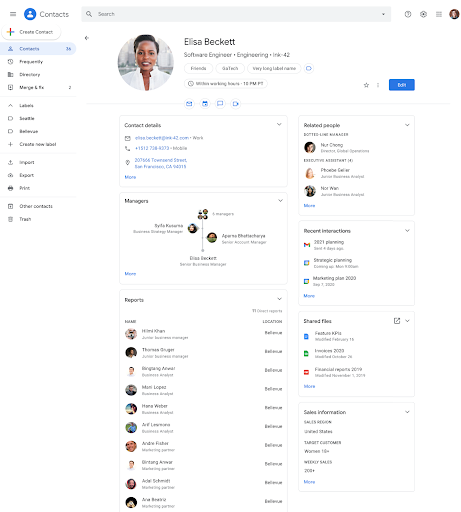
Google Contacts will include additional information about people in your organization:
- Local time: The the local time for a user’s time zone will be displayed
- Working hours: You’ll see a crescent moon indicator and purple banner if it’s outside the working hours a user has set in Google Calendar
- Non-manager relationships: You can view relationships such as an administrative business partner or a dotted line manager
- Shared files: You’ll see a list of any Drive files a user has shared with you Custom attributes: any custom attributes your organization has added, such as Team, Skills, or other information specific to your organization
Getting started
Admins:
- To share non-manager relationships in Google Contacts, populate the “Relationships” section of the User resource using the Admin SDK.
- Custom Attributes can be configured in the “Users” section in the Admin console and the Directory API.
- Local Time and Outside Working Hours is automatically shown when Calendar availability is enabled and working hours are set.
- Shared Drive files will automatically be displayed; no additional action is required.
End users: To open the Contacts Sidebar, click “Open detailed view” while hovering over a user’s information card, or select the Contacts icon in the side panel. Visit the Help Center to learn more about using Google products side by side.
Rollout pace
- Rapid Release and Scheduled Release domains: Extended rollout (potentially longer than 15 days for feature visibility) starting on October 18, 2021.
- Note: Each card (custom fields, shared files, non-manager relationships, and local time) will be rolled out separately.
Availability
- Available to all Google Workspace customers, as well as G Suite Basic and Business customers