
outubro 10, 2023
Book a conference room directly from a Google Meet hardware device


What’s changing
To maximize the use of physical room resources and make it easier to find meeting rooms, you can now book an available conference room directly from a Meet hardware device. If the device calendar shows a specific room is available, you’ll be able to book the room for either the next 30 or 60 minutes. If you need to, you can cancel an in-room booking from the device as well.
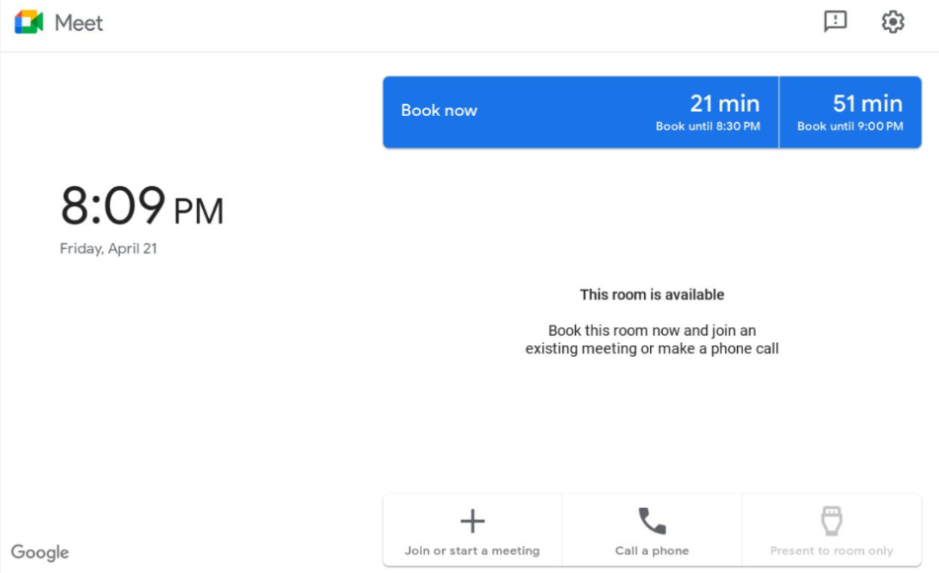
This feature will launch with the default set to OFF — admins will have several options to configure this feature across their fleet:
- You can turn this feature on across all rooms by going to Directory > Buildings and resources > Global room settings and toggling Book rooms from Google Meet hardware.
- You can turn off this feature for specific rooms by going to Directory > Buildings and resources > Resource management > Resources > [Room Name] > Room settings and toggle Exempt from in-room booking.
- You can also bulk update the individual room toggle for up to 200 rooms from the resource management page.
Getting started
- Admins: This feature will be OFF by default and can be enabled by the admin. Visit the Help Center to learn more about in-room bookings with Google Meet hardware.
- End users: If your admin has turned on this feature in your organization, you should see the ‘Book now’ option appear automatically in available conference rooms unless the room in question has been opted out.
Rollout pace
- Rapid Release and Scheduled release domains: Gradual rollout (up to 15 days for feature visibility) starting on October 10, 2023
Availability
- Available to all Google Workspace customers using Meet hardware devices