This official feed from the Google Workspace team provides essential information about new features and improvements for Google Workspace customers.


What’s changing

We're making it easier than ever to analyze massive datasets by more seamlessly connecting Google Sheets and BigQuery. Now, users will see a new option to import .csv files containing datasets of any size directly to BigQuery while opening large .csv files from Drive or via the Data > Data Connectors menu flow in Sheets. From there, users can analyze the entire dataset using familiar Sheets features such as charts, pivot tables, and formulas via Connected Sheets

Previously, preparing a large dataset for analysis in Connected Sheets was often a multi-step process that could have involved relying on separate data pipelines, processing tools or multiple upload steps, all before the user could return to Sheets to start their analysis. This new connectivity expedites the analysis workflow by allowing users to directly ingest large datasets and begin analysis seamlessly, all within a single interface. This update will help users move from raw data to insights much faster.

Part of the upload dialog when users choose to import a file to BigQuery via the Google Sheets interface


Part of the upload dialog when users choose to import a file to BigQuery via the Google Sheets interface


Users with appropriate permissions will also see a new option to import with Connected Sheets when a file is too large for native upload to Sheets


Users with appropriate permissions will also see a new option to import with Connected Sheets when a file is too large for native upload to Sheets

Getting started

Rollout pace

Availability

  • Available to all Google Workspace customers, Workspace Individual Subscribers, and users with personal Google accounts

Resources


What’s changing 

Google Drive Inventory reporting now supports scheduling a daily export of your Drive data assets to BigQuery, in addition to the existing weekly cadence. Compared to APIs, exporting inventory reports to BigQuery empowers administrators to understand their data more deeply, providing insights into how their data is classified, accessed, and used. Understanding these metrics can help admins to identify security risks, ensure compliance with regulatory requirements, and more. 


Getting started 


Rollout pace 


Availability 

Available for Google Workspace: 
  • Enterprise Standard and Enterprise Plus
  • Frontline Plus  
  • Education Standard and Education Plus 
  • Enterprise Essentials Plus 
  • Cloud Identity Premium 

Resources 

What’s changing 

We recently announced that Gemini Audit logs could be accessed through the Reporting API (Admin SDK), the security investigation tool and the audit investigation tool.

Admins can export Gemini Audit logs to BigQuery Export for further analysis of user activity when interacting with Gemini across Workspace apps.


Getting started 

  • Admins: Visit the Help Center to learn more about reporting logs and BigQuery.
  • End users: There is no end user impact or action required.

Rollout pace 

Availability 

Exporting logs to BigQuery is available for Google Workspace:
  • Frontline Standard and Plus
  • Enterprise Standard and Plus
  • Education Standard and Plus
  • Enterprise Essentials Plus

Resources 

New updates

Unless otherwise indicated, the features below are available to all Google Workspace customers, and are fully launched or in the process of rolling out. Rollouts should take no more than 15 business days to complete if launching to both Rapid and Scheduled Release at the same time. If not, each stage of rollout should take no more than 15 business days to complete.


Easily connect to BigQuery data using Saved Queries in Connected Sheets 
We’re launching direct access to the BigQuery saved queries feature directly from Connected Sheets. Users can now quickly and easily create a new Connected Sheet by selecting a previously saved query under any project they have access to. | Rolling out now to Rapid Release and Scheduled Release domains. | Available to all Google Workspace customers, Workspace Individual Subscribers, and users with personal Google accounts. | Learn more about analyzing & refreshing BigQuery data in Google Sheets using Connected Sheets, getting started with BigQuery data in Google Sheets and writing & editing a query.

Scan documents easier using Google Drive on Android devices 
To improve upon the scanning experience in the Google Drive app on Android devices, we’re increasing the size and updating the style of the scan buttons. To scan something, open the Drive app on your Android device > scan a document > edit scan (if desired) > upload to Drive. | Rollout to Rapid Release domains is complete; Rolling out now to Scheduled Release domains, with expected completion by June 30, 2025. | Available to Google Workspace customers, Google Workspace Individual subscribers, and users with personal Google accounts. | Visit the Help Center to learn more about scanning documents with Google Drive.

Scan documents easier using Google Drive on Android devices

Chat apps can now create spaces with their own identity using the Google Chat API
Last year, we introduced a feature through the Google Workspace Developer Preview Program that enables Chat apps to create spaces and memberships - using application identity - via the Google Chat API. This update further enhances Chat apps for real-time collaboration and allows for even more sophisticated and autonomous Chat apps by eliminating the need to create spaces and memberships on behalf of a user. This week, we’re excited to announce that this is now generally available for Google Workspace developers. | Rolling out now to Rapid Release and Scheduled Release domains. | Available to all Google Workspace customers. | Visit the Developer blog to see an example and learn more about what this means for developers. You can also visit our developer documentation to explore how to authenticate and authorize Chat apps, and learn how to create spaces and add space members using application identity.
Chat apps can now create spaces with their own identity using the Google Chat API
Export Gemini responses to a Google Doc or Sheet from Gemini in the side panel of Google Drive
Users can collaborate with Gemini in Google Drive to perform various tasks, such as extracting data, drafting proposals, creating study guides and more. We’re excited to build upon this by giving users the ability to convert Gemini’s response directly into a Sheet or a Doc. After asking Gemini a question, click the ‘Export to Doc’ or ‘Export to Sheet’ button, and you’ll have an artifact that you can continue working on or share with others. | Rolling out now to Rapid Release and Scheduled Release domains. | Available to Business Standard and Plus; Enterprise Standard and Plus; Google One AI Premium; Customers with the Gemini Education or Gemini Education Premium add-on, and anyone who previously purchased a Gemini Business or Gemini Enterprise add-on. | Visit the Help Center to learn more about collaborating with Gemini in Google Drive.
Export Gemini responses to a Google Doc or Sheet from the Gemini side panel in Google Drive

Create even more interactive YouTube assignments in Google Classroom
In 2024, we added AI-suggested questions that educators can easily attach to the video based on its content to save educators time. Today, we’re excited to announce that we’re expanding the collection of YouTube videos that have AI-suggested questions available. As a result, educators can create even more interactive YouTube assignments in Classroom more quickly and efficiently, with the help of Gemini. Before assigning the interactive video activity, educators will be able to edit the suggested questions ahead of attaching the YouTube video to the assignment. | Rollout to Rapid Release and Scheduled Release domains is complete. | Available for Google Workspace Education Plus and the Teaching and Learning add-on. | Visit the Help Center to learn more about interactive questions for YouTube videos in Google Classroom.

Your users can now express interest in upgrading their Google Workspace subscription 
We’re introducing a simple way for Workspace end users to request an upgraded edition of Google Workspace from their admins. To send this request, Workspace end users will see a path to request an upgraded Workspace edition including additional Gemini features when they interact with Gemini, such as with the Gemini icon displayed across Workspace apps. This interaction will provide an end user a path to complete a request form for an upgraded Workspace edition. Super admins will receive this request by email, and from there they can choose to upgrade their Workspace subscription directly in the Admin console. | Admins can disable these requests at any time in the Admin console by going to Account > Account Settings > Gemini for Google Workspace, and deselecting the ‘User-requested upgrades’ setting — use this article in our Help Center for more information. | Please note this is only available for customers in the US and India with fewer than 300 licenses. | Rolling out now to Rapid Release and Scheduled Release domains. | Learn more about Gemini for Workspace, including our recent Gemini for Workspace announcements.

Previous announcements

The announcements below were published on the Workspace Updates blog earlier this week. Please refer to the original blog posts for complete details.

Use Gemini in Drive to interact with folders in 20+ additional languages
Last year, we added folder support to Gemini in the side panel of Google Drive. This week, we’re excited to announce this experience is now available in 20+ languages. | Learn more about language availability for Gemini in Drive

Use Gemini in Google Sheets to quickly add dropdowns, pivot tables, filters, and more 
Analyzing and manipulating data in spreadsheets can be complex and time-consuming, even for experienced users. This week, we're introducing powerful new editing options within Gemini in Sheets that are designed to help everyone accomplish more, faster. | Learn more about Gemini in Sheets

Google Workspace apps for Gmail, Google Drive, Google Docs, Calendar, Keep, and Tasks are now generally available for the Gemini app 
Earlier this year, we launched Google Workspace apps (formerly known as "extensions") in Gemini in open beta. When enabled, Gemini can reference and incorporate data from these apps to generate even more informed and relevant responses, bringing Gemini’s capabilities more seamlessly into your daily workflows, helping enhance productivity. Workspace apps are available for: Calendar, Docs, Drive, Gmail, Keep, Tasks. | Learn more about Workspace apps in the Gemini app

Extract and categorize data in AppSheet with the power of Gemini 
At Google Cloud Next 2025, we introduced Gemini in AppSheet solutions for AppSheet Enterprise Plus users. Now you can automatically extract key information from uploaded photos, parse through complex PDFs, or even categorize, route and prioritize incoming requests based on their content – all seamlessly within your existing AppSheet apps. The new AI Task (Preview) feature, powered by Gemini, makes this a reality. | Learn more about Gemini in AppSheet. 

Upcoming Changes to Microsoft Exchange Migrations 
Beginning May 31, 2025, the legacy Data Migration Service will no longer support migrating email, calendar, and contact data from Microsoft Exchange on-premises servers (e.g., Exchange 2010, 2013, or 2016). Admins will not be able to start new migrations after May 31, 2025 – migrations that are in progress will continue until completion. | Learn more about changes to Microsoft Exchange Migrations.

Completed rollouts

The features below completed their rollouts to Rapid Release domains, Scheduled Release domains, or both. Please refer to the original blog posts for additional details.

Rapid Release Domains: 
Scheduled Release Domains: 
Rapid and Scheduled Release Domains: 
For a recap of announcements in the past six months, check out What’s new in Google Workspace (recent releases).

What’s changing

Google Workspace audit logs enable admins to have visibility into activity on their data, such as file shares and downloads, when it occurred, and who within the organization performed the action. The Google Drive audit events include activity on content your users create in Google Docs, Sheets, Slides, as well as the files that your users upload to Drive, such as PDFs and Microsoft Word files. 

Today, we’re excited to announce that for admins who analyze these logs in BigQuery, these events are now enriched with Drive labels metadata. Admins leverage Drive labels to apply descriptive metadata, such as file sensitivity, to Drive items. With the enrichment of label metadata on log events, admins can now focus their analysis on activity occurring on their most important files by filtering on label conditions. 


Getting started 


Rollout pace 

  • This feature is available now. 

Availability 

  • Available to Enterprise Essentials Plus, Enterprise Standard and Enterprise Plus, Education Standard and Education Plus 

Resources 

3 New updates

Unless otherwise indicated, the features below are available to all Google Workspace customers, and are fully launched or in the process of rolling out. Rollouts should take no more than 15 business days to complete if launching to both Rapid and Scheduled Release at the same time. If not, each stage of rollout should take no more than 15 business days to complete.


New ways to work with filters in Connected Sheets for Looker and Connected Sheets for BigQuery 
  • With Looker: Connected Sheets for Looker users will now be able to see whether Looker-defined filters, always_filters and conditionally_filters, are applied in their Google Sheets. | Rolling out to Rapid Release domains and Scheduled Release domains now. | Available to all Google Workspace customers, Google Workspace Individual subscribers, and users with personal Google accounts. | Learn more about always_filter and conditionally_filter in Looker. 
  • With BigQuery: Connected Sheets for BigQuery users can now right-click any value in the Connected Sheets preview and filter rows in the preview on that specific value. As a result, a new query will be sent to BigQuery to re-fetch the preview. This new option provides an additional way to easily explore data in the Connected Sheets preview for BigQuery. | This is now available to all Google Workspace customers, Google Workspace Individual subscribers, and users with personal Google accounts. | Learn more about sorting & filtering BigQuery data in Google Sheets.

Latest improvement for page setup in Google Docs 
We’re introducing a new menu item within the Format option that enables you to easily switch between pageless and pages mode in Google Docs. | Rollout to Rapid Release domains is complete; launch to Scheduled Release domains planned for February 5, 2024. | Available to all Google Workspace customers, Google Workspace Individual subscribers, and users with personal Google accounts. | Learn more about changing a document’s page setup. 
Latest improvement for page setup in Google Docs


Developers can now choose which calendar events to be notified about 
Developers using the Calendar API can now subscribe to specific changes in users’ calendars — this includes event types such as working location, out-of-office, or focus time. This update reduces the amount of notifications down to those that are most relevant to the developer. | Use our Developer Documentation for more information about subscribing to alerts for specific calendar event changes. | Rolling out now to Rapid Release domains and Scheduled Release domains. | The Calendar API is available to all Google Workspace customers, however Calendar features may vary across Google Workspace editions.


Previous announcements

The announcements below were published on the Workspace Updates blog earlier this week. Please refer to the original blog posts for complete details.


For Google Meet Hardware, ‘Auto-Update Expiration (AUE)’ will now be referred to as 'end of Meet support' 
We’re making changes to the terminology that refers to when a Meet hardware device is no longer supported. | This update impacts all Google Workspace customers with Meet hardware devices. | Learn more about 'end of Meet support'.

Local data storage exports your organization's Workspace data into the geographic location of your choice, launching in beta 
We’re introducing Google Workspace’s new feature, local data storage. This feature allows admins to export their organization’s Workspace data into the geographic location or locations of their choice. | Available to Google Workspace Enterprise Plus customers with Assured Controls add-on only. | Learn more about the local data storage exports beta.

Improving the Google Calendar appointment scheduling experience with new features 
We’re improving upon the current appointment scheduling experience with four new features. | Co-hosts, secondary calendars and delegate access features are available to Google Workspace Business Standard, Business Plus, Enterprise Standard, Enterprise Plus, Education Fundamentals, Education Standard, Education Plus, the Teaching and Learning Upgrade, and Nonprofits only. Check Calendars for availability feature is available to Google Workspace Business Standard, Business Plus, Enterprise Standard, Enterprise Plus, Education Fundamentals, Education Standard, Education Plus, the Teaching and Learning Upgrade, Nonprofits, Google Workspace Individual subscribers, and users with personal Google accounts only. | Learn more about the appointment scheduling features. 

Shareable class templates and classwork in Google Classroom are now generally available 
Last year, we announced a Google Classroom beta that simplifies lesson planning with shareable class templates and classwork. We’re excited to announce that this is now globally available for Google Workspace for Education Plus customers in English, Spanish, Portuguese and Japanese. | Available to Education Plus only. | Learn more about shareable class materials. 

Pin chat messages in Google Meet 
You can now pin messages to the top of the meeting chat. Pinned messages will appear for all users, even if they join the meeting after the message was initially sent. | Learn more about messaging pinning.


Completed rollouts

The features below completed their rollouts to Rapid Release domains, Scheduled Release domains, or both. Please refer to the original blog posts for additional details.

Rapid Release Domains: 

Scheduled Release Domains: 
Rapid and Scheduled Release Domains: 

For a recap of announcements in the past six months, check out What’s new in Google Workspace (recent releases).  

4 New updates

Unless otherwise indicated, the features below are available to all Google Workspace customers, and are fully launched or in the process of rolling out. Rollouts should take no more than 15 business days to complete if launching to both Rapid and Scheduled Release at the same time. If not, each stage of rollout should take no more than 15 business days to complete.


Version history limits for Apps Script projects 
For all new scripts, you’ll be able to create and save up to 200 versions of your script. If needed, you can permanently delete a script version from the project history page. | This is available now to all Google Workspace customers. | Learn more using our developer documentation on working with Apps Script versions


Share a link to a specific time in a Google Drive video 
We’re adding new functionality to the Drive sharing button that lets you share timestamped links to specific parts of a video. On web, simply navigate to drive.google.com > find and open a video file > play the video (you can pause the playback before performing the following steps) > select the dropdown on the “Share” button in the top-right corner > select “Copy link to this time” > send the link. | Rolling out now to Rapid Release and Scheduled Release domains. | Available to all Google Workspace customers and users with personal Google Accounts. | Learn more about copying a specific time in the video
Share a link to a specific time in a Google Drive video

Introducing dropdown options on the sharing button in Google Docs, Sheets, Slides and Drawings
We’re adding a new feature that ensures a seamless sharing experience across Workspace. In Google Docs, Sheets, Slides and Drawings, you will now see a dropdown on the Share button that surfaces quick actions, such as pending access requests and the “Copy link” option. | Rolling out now to Rapid Release and Scheduled Release domains. | Available to all Google Workspace customers and users with personal Google Accounts. 
dropdown options on the sharing button

Using functions in Connected Sheets for BigQuery 
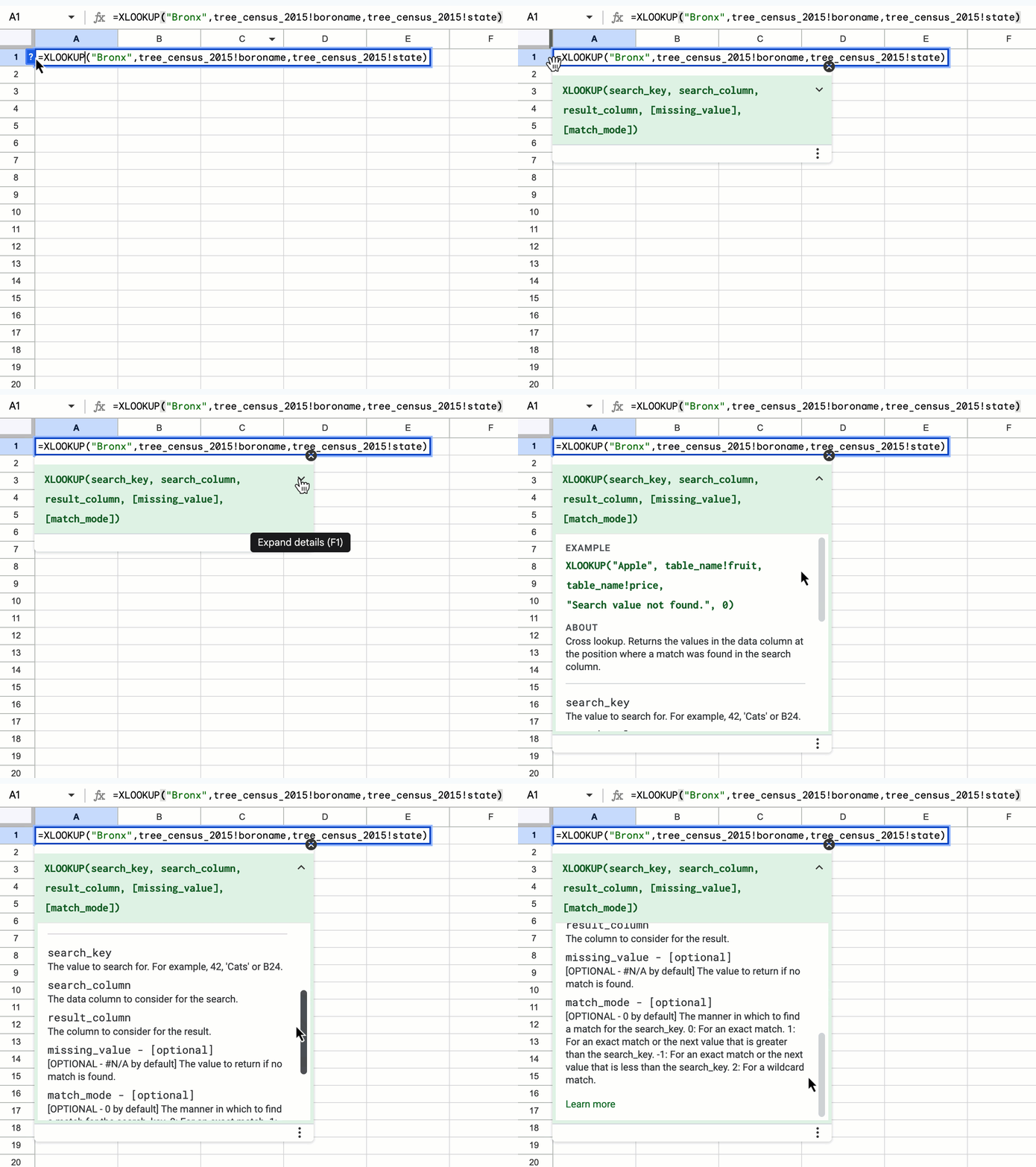
Today, Connected Sheets for BigQuery supports 23 Sheets functions, such as AVERAGE and XLOOKUP. However, all of these functions behave somewhat differently than their native counterparts. Thus, to help Connected Sheets users write better functions, we now display context-aware Help Center content in Sheets. The ‘formula help’ shows descriptions for Connected Sheets functions when writing a formula that would query BigQuery, and otherwise shows descriptions of native Sheets functions. | This is available now to all Google Workspace customers and users with personal Google Accounts. | Learn more about the XLOOKUP function.
Using functions in Connected Sheets for BigQuery


Previous announcements

The announcements below were published on the Workspace Updates blog earlier this week. Please refer to the original blog posts for complete details.


Updates to metrics in Google Drive Apps Reports and Reports API 
We’re making some updates to the Google Drive metrics in the Admin Console Apps reports and the Reports API. As a result of these improvements, admins who analyze metrics will have more reporting clarity and can better understand activity trends within their domain. | Learn more about metrics in Drive Apps Reports and Reports API. 

Easily share Google Drive files to Google Calendar meeting attendees 
We’re introducing the option to share any file with all meeting participants on a Google Calendar invite via the sharing dialog within a file. | Learn more about sharing Drive files to Calendar. 

Google Meet is now available on Logitech Android appliances 
Google Meet is now supported on Logitech’s Rally Bar and Rally Bar Mini Android-based appliances for collaboration rooms and spaces of just about any size. After initial setup, admins can easily enroll, manage, and monitor these devices using the Google admin console. Google Meet on Logitech Android-based devices is supported on CollabOS v1.11 as a video conferencing provider | Learn more about Meet on Logitech Android appliances. 

Google Meet hardware devices from Poly now support interoperability with Cisco Webex and Zoom 
We’re expanding the existing interoperability between Google Meet, Cisco Webex, and Zoom to include Android-based Meet hardware devices from Poly. Specifically, these devices include: Poly Studio X30, X50, X52, and X70. | Learn more about support interoperability with Cisco Webex and Zoom.

Extending Trusted Types to Gmail
We’re excited to announce the expansion of Trusted Types to Gmail. This will provide a defense against DOM XSS and further enhances our advanced data protection controls to keep users and data safe across more of the apps they use everyday. | Learn more about Trusted Types.


Completed rollouts

The features below completed their rollouts to Rapid Release domains, Scheduled Release domains, or both. Please refer to the original blog posts for additional details.

Rapid Release Domains: 

Scheduled Release Domains: 

Rapid and Scheduled Release Domains: 

For a recap of announcements in the past six months, check out What’s new in Google Workspace (recent releases). 

What’s changing 

In August 2022, we announced the movement of the existing Gmail logs in BigQuery to Google Workspace logs and reports in BigQuery, creating a single space to access all of your Google Workspace audit events. 


To further improve this experience, you’ll see all Gmail log events from the Security Investigation Tool (SIT) in your Google Workspace logs and reports in BigQuery. This includes device types and post-delivery actions (for example open, delete, clicked links, and attachment downloads). This change will give admins a more complete picture of Gmail activity happening in their domain, and bring consistency across reporting tools. 


Use the table below to familiarize yourself with the newly added columns — complete details can be found in our Help Center.


List of newly added columns

Description

event_info.mail_event_type

The event type corresponds to the Event attribute in Gmail log events in Security Investigation Tool.

event_info.client_context.client_type

The type of client or device where the action occurred, including: WEB, IOS, ANDROID, IMAP, POP3, and API.

event_info.client_context.session_context.delegate_user_email

Email address of the delegated user who performed the action on the account owner's behalf.

message_info.attachment.file_name

File attachment name.

message_info.post_delivery_info

Information about the post-delivery event.

message_info.post_delivery_info.action_type

Post-delivery action type.


message_info.post_delivery_info.interaction

Information about the user's interaction with message links, Drive items, or attachments.

message_info.post_delivery_info.interaction.link_url

The URL associated with the interaction, which is set only for link click interactions.

message_info.post_delivery_info.interaction.drive_id

The unique ID of the Google Drive item associated with the interaction. This ID is used to access the item in Drive.

message_info.post_delivery_info.interaction.attachment

The target attachments of the interaction, which are set only for attachment interactions.

message_info.post_delivery_info.interaction.attachment.file_extension_type

File extension (not MIME part type), not including the period.

message_info.post_delivery_info.interaction.attachment.malware_family

Malware type, if malware is detected during message handling.

message_info.post_delivery_info.interaction.attachment.file_name

Attachment file name.

message_info.post_delivery_info.interaction.attachment.sha256

SHA256 hash of the attachment.


Getting started


Rollout pace


Availability

  • Available to Google Workspace Enterprise Essentials, Enterprise Standard, Enterprise Plus, Education Plus, Education Standard 
  • Not available to Google Workspace Essentials, Business Starter, Business Standard, Business Plus, Frontline, and Nonprofits, as well as legacy G Suite Basic and Business customers

Resources


What’s changing 

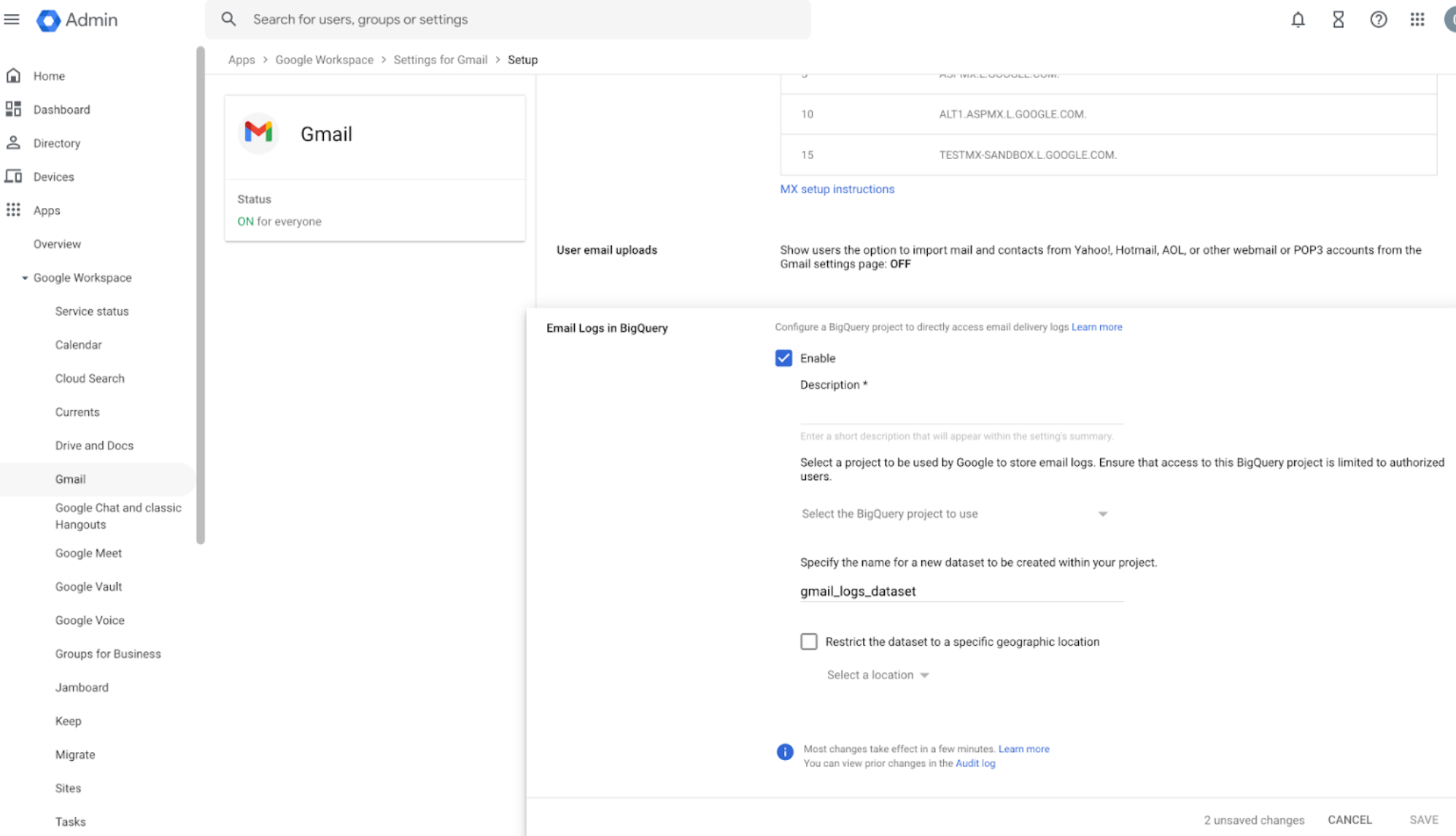
In the coming months, we will move the location of the existing Gmail logs in BigQuery to Google Workspace logs and reports in BigQuery. This change will only impact existing Google Workspace customers, who have BigQuery Export enabled. New customers will be guided through setting up a Workspace BigQuery project for Gmail logs. 


While this change is happening, for a brief period of time, Gmail data will be exported to both the Gmail logs and the Workspace logs — existing Google Workspace customers who are impacted will receive an email notification with more information in the coming weeks. 

Gmail logs in BigQuery 


 Migrating to Unified Workspace logs in BigQuery


Who’s impacted 

Admins


Why it’s important 

This change will create a single space to access all of your Google Workspace audit events and eliminate the need to switch between various sources of truth. 


Once this merger is completed, you will not be able to use Gmail logs in BigQuery in the Admin console. Visit the Help Center for more information, including detailed step-by-step instructions on handling this change. 


Additional details

Temporary dual export period and BigQuery storage requirements 
Once Gmail logs are set to be exported to Workspace Logs, this data will temporarily exported to two destinations: 
  • Your previous, Gmail-only BigQuery project 
  • Your new or existing Workspace BigQuery project, which stores data for all Google Workspace applications 

This will also impact your BigQuery quotas limits and how often they have to refresh, as well as the cost associated with exporting logs to BigQuery. To avoid impact on your quotas and duplicative data, we strongly recommend turning off Gmail log exports to your Gmail-only BigQuery projects


Getting started 


Rollout pace 


Availability 

  • Available to Google Workspace Enterprise Essentials, Enterprise Standard, Enterprise Plus, Education Plus, Education Standard 
  • Not available to Google Workspace Essentials, Business Starter, Business Standard, Business Plus, Frontline, and Nonprofits, as well as legacy G Suite Basic and Business customers 

Resources