This official feed from the Google Workspace team provides essential information about new features and improvements for Google Workspace customers.


For enterprise organizations, migrating files along with their permissions to a new platform can feel daunting and risk interrupting daily business operations. To help simplify this transition, we are excited to announce general availability of Google Workspace data import (advanced mode) to support large-scale file migrations from Microsoft OneDrive. Just like the other features of the data import, this is available at no additional cost.

This update allows IT teams to execute large migrations efficiently, as you can import multiple concurrent batches at a time. Data import automatically adjusts import speeds to match your Microsoft licensing tier, maximizing throughput without exceeding source quotas.

Data import provides:

  • Ease of use: A turnkey, scalable cloud-native service that can be accessed and used directly from the admin console. 
  • Quicker speeds and accuracy: Finish importing data sooner with faster migration speeds from parallelization and improved algorithms.
  • No additional cost to use: No additional infrastructure costs during migration or licensing costs for third-party data migration tools.


Additionally, customers will be able to use the migration planning utility for file migrations that will help improve their change management and data migration forecasting. The migration planning utility is available to provide source data corpus details and migration timeline estimates. This offers customers no-friction discovery and data-driven planning when undertaking large scale enterprise migrations from Microsoft 365 to Google Workspace.


Getting started

Rollout pace

Availability

  • Business: Business Starter, Standard, and Plus
  • Enterprise: Enterprise Standard and Plus
  • Education: Education Fundamentals, Standard, and Plus
  • Other Editions: Frontline Starter, Standard, and Plus; Essentials Starter, Enterprise Essentials, and Enterprise Essentials Plus; Nonprofit

Resources

For enterprise organizations, migrating communication history and collaboration channels to a new platform can feel daunting and risk interrupting daily business operations. To make this transition smoother, we are excited to announce that migrating chat data from Microsoft Teams to Google Workspace for large scale workloads is now generally available in data import. Just like the other features of the Data Import tool, this is available at  zero tool cost.

This enhancement builds on our existing data import capabilities, allowing admins to easily copy channel messages, group chats, and direct conversations from Teams to Workspace at no additional tool or infrastructure costs.

Data import for Teams offers:

  • Ease of use: A turnkey, scalable cloud-native solution that can be accessed and used directly from the admin console.
  • Quicker speeds and accuracy: Finish importing data sooner with faster migration speeds from parallelization and improved algorithms.
  • No additional cost to use: No additional infrastructure costs during migration or licensing costs for third-party data migration tools.
  • High fidelity: Both Teams channels as well as private chat messages (i.e. 1:1 and group messages) are imported.


Additionally, the migration planning utility now supports Teams to help customers improve their change management and data migration forecasting. The migration planning utility is available to provide migration timeline estimates and organize user data into speed-optimized batches. This offers customers simplified discovery and data-driven planning when undertaking large scale enterprise migrations from Microsoft 365 to Google Workspace.


Getting started

Rollout pace

Availability

  • Business: Business Starter, Standard, and Plus
  • Enterprise: Enterprise Standard and Plus
  • Education: Education Fundamentals, Standard, and Plus
  • Other Editions: Frontline Starter, Standard, and Plus; Essentials Starter, Enterprise Essentials, and Enterprise Essentials Plus; Nonprofit

Resources

New updates

Unless otherwise indicated, the features below are fully launched or in the process of rolling out (rollouts should take no more than 15 business days to complete), launching to both Rapid and Scheduled Release at the same time (if not, each stage of rollout should take no more than 15 business days to complete), and available to all Google Workspace and G Suite customers.


AppSheet Support is now available through the Workspace Admin console
Available to all  AppSheet customers who have admin user access through Workspace Support. AppSheet Core is available as an add-on paid subscription to all Google Workspace editions. | Available to all  AppSheet customers who have admin user access through Workspace Support. AppSheet Core is available as an add-on paid subscription to all Google Workspace editions. | Learn more here. 


Updated emoji experience in Google Chat on web
Last year we updated the emoji experience on mobile.Now we have brought the ability to express yourself more authentically in Chat on Web. We’re making the following updates to the emoji experience: 
  • The Emoji set is updated to the latest version (Emoji 13.1), reflecting the latest emoji set and diversity and inclusion options.
  • Gender-neutral options for gender-modifiable emojis have been added.
  • Emoji skin tone and gender preferences are saved per individual emoji. 

Previous announcements

The announcements below were published on the Workspace Updates blog earlier this week. Please refer to the original blog posts for complete details.


Classic Hangouts will be upgraded to Google Chat beginning March 22, 2022
Beginning March 22, 2022, we’ll turn on the “Chat preferred” setting for any customers who haven’t already done so, making Google Chat the default chat application. This means that when users visit classic Hangouts in Gmail on the web or the classic Hangouts mobile apps, they’ll be directed to Chat. Hangouts.google.com will continue to work. It is not possible to opt out of this change. | Learn more. 


Google Workspace Migrate is now generally available
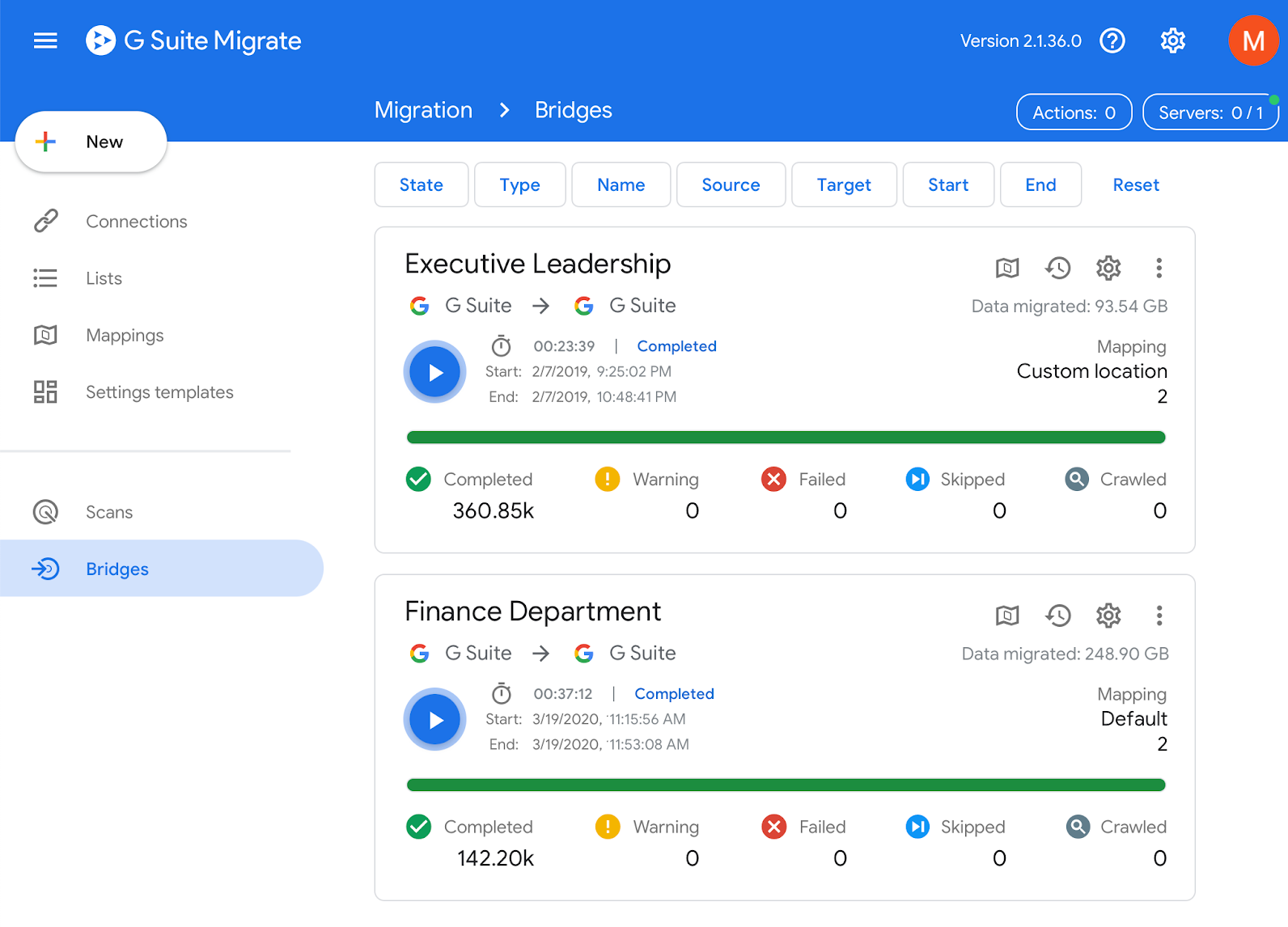
Google Workspace Migrate, previously announced in beta in 2019, is now generally available for select Google Workspace Editions. This first-party, on-premise product helps admins assess and plan migration projects, and confidently migrate their users and large amounts of critical content directly into Google Workspace. | Available to Google Workspace Business Standard, Business Plus, Enterprise Standard, Enterprise Plus, Education Standard, Education Plus, and legacy G Suite Business customers only. | Learn more.


For a recap of announcements in the past six months, check out What’s new in Google Workspace (recent releases).

What’s changing 

Google Workspace Migrate, previously announced in beta in 2019, is now generally available for select Google Workspace Editions. This first-party, on-premise product helps admins assess and plan migration projects, and confidently migrate their users and large amounts of critical content directly into Google Workspace.

Who’s impacted

Admins


Why you’d use it

Google Workspace Migrate is especially beneficial for Google Workspace customers with a large number of seats, as it allows them to securely migrate large amounts of their organization’s data and setup on-premises infrastructure. Specifically, it provides assistance with:

  • Assessment: Quickly scan source environments to help accurately plan for key project milestones and watch points 
  • Migration: Efficiently migrate valuable data from a variety of sources (see below) 
  • Track: Easily identify project progress and health with detailed aggregate and granular logging functionality 

Additionally, Google Workspace Migrate supports Microsoft Exchange, Microsoft SharePoint, Microsoft OneDrive, file shares, Box migrations, legacy G Suite Business and Google Workspace environments, enabling you to: 

  • Selectively migrate Gmail, Calendar, Drive, and more data between Google Workspace environments. 
  • Choose to migrate all users from one environment to another. 
  • Selectively migrate specific user data (organizational units, users, or subsets of data) between Google Workspace environments.


Additional details 

To prevent disruption to end-user productivity, Google Workspace Migrate maintains a high level of fidelity for migrated content from supported sources: Exchange, SharePoint, OneDrive, and file shares. The following versions will be supported:

  • Google Workspace
  • Exchange: Exchange 2010, 2013, 2016, and Microsoft 365 
  • Sharepoint: SharePoint 2010, 2013, 2016, SharePoint Online, and OneDrive for Business 
  • File shares: A Windows-accessible file share (for example, SMB or NFS)
  • Box

Getting started


Rollout pace


Availability

  • Available to Google Workspace Business Standard, Business Plus, Enterprise Standard, Enterprise Plus, Education Standard, Education Plus, and legacy G Suite Business customers
  • Not available to Google Workspace Essentials, Business Starter, Enterprise Essentials, Education Fundamentals, the Teaching and Learning Upgrade, Frontline, and Nonprofits, as well as legacy G Suite Basic customers

Resources


Quick launch summary 

G Suite Migrate, currently available in beta, helps admins assess, plan, and migrate large amounts of content directly into G Suite. It already supports Microsoft Exchange, Microsoft SharePoint, Microsoft OneDrive, file shares, and Box migrations. With this launch, you can now also migrate between G Suite environments. Specifically, you can: 
  • Selectively migrate Gmail, Calendar, Drive, and more data between G Suite environments. 
  • Choose to migrate all users from one environment to another. 
  • Selectively migrate specific user data (organizational units, users, or subsets of data) between G Suite environments. 

Getting started 

Rollout pace 

Availability 

  • Available to G Suite Business, G Suite Enterprise, G Suite Enterprise for Education, and G Suite Essentials customers 
  • Not available to G Suite Basic, G Suite for Education, and G Suite for Nonprofits customers 

Resources 

What’s changing

We’re adding support for migrating Microsoft Exchange In-Place Archives to the G Suite Migrate beta. Admins can use this new functionality to migrate the content of their user’s Exchange In-Place Archives to G Suite. Additionally, admins can:

  • Make migrated archive mail only visible in Google Vault (not Gmail).
  • Make attachments of archived mail uploaded to Google Drive only visible in Google Vault. If you turn on this setting, large email attachments will be visible in Vault (not Drive).
  • Choose how to apply labels to archive folders in Gmail.

Who’s impacted

Admins only

Why it’s important

Previously, it wasn’t possible to migrate archived email from Exchange to Gmail. This feature makes it easy for admins to migrate both active and archived email to G Suite.

How to get started

Helpful links

Availability

Rollout details
G Suite editions
  • Available to G Suite Business, G Suite Enterprise, G Suite Enterprise for Education, and Drive for Enterprise
  • Not available to G Suite Basic, G Suite for Education, and G Suite for Nonprofits

On/off by default?

Stay up to date with G Suite launches

Quick launch summary 

Earlier this year, we announced G Suite Migrate. Launching in beta, this first-party product helps admins assess and plan migration projects, making the migration of enterprise data and content to G Suite seamless.

Now, G Suite admins who require migration from Box, as well as other previously supported Microsoft services like Exchange or Office 365 can utilize G Suite Migrate. We hope that adding support for migrations from Box will help ease the transition for G Suite users. G Suite admins can learn more and sign up for the G Suite Migrate beta here.

G Suite also offers interoperability functionality between Box and G Suite, learn more here.

Helpful links 

Availability 

  • G Suite editions G Suite Business, G Suite Enterprise, G Suite Enterprise for Education, and Drive Enterprise customers are eligible to register for the G Suite Migrate beta program. 
  • Not available to G Suite Basic, G Suite for Education, and G Suite for Nonprofits. 

Stay up to date with G Suite launches

What’s Changing 

We’re launching G Suite Migrate in beta. This new first-party product will help admins assess and plan migration projects, and confidently migrate large amounts of valuable content directly into G Suite. G Suite Migrate is built on the technology from Google Cloud’s AppBridge acquisition in 2017.

Who’s impacted 

Admins only

Why you’d use it 

With G Suite Migrate, you’ll be able to securely migrate large amounts of your organization's data, making the transition to G Suite even easier. Specifically, G Suite Migrate will provide assistance with:
  • Assessment - Quickly scan source environments to help accurately plan for key project milestones and watch points 
  • Migration - Quickly migrate valuable data from a variety of sources (see below) 
  • Tracking - Quickly identify project progress and health with detailed aggregate and granular logging functionality 

How to get started 


Additional details 

To prevent disruption to end-user productivity, G Suite Migrate maintains a high level of fidelity for migrated content from supported sources: Exchange, SharePoint, OneDrive, and File Shares. The following versions will be supported as part of this beta:

  • Exchange: Exchange 2010, 2013, 2016, and Office 365. 
  • Sharepoint: SharePoint 2010, 2013, 2016, SharePoint Online, and OneDrive for Business. 
  • File Shares: Windows File Servers, NAS, SAN, Network Shares, and NFS repositories. 

Availability 


  • G Suite editions G Suite Business, G Suite Enterprise, G Suite Enterprise for Education, and Drive Enterprise customers are eligible to register for the G Suite Migrate beta program. 
  • Not available to G Suite Basic, G Suite for Education, and G Suite for Nonprofits.


Stay up to date with G Suite launches

On December 31, 2018, we will discontinue support for Windows XP and Server 2003 in the following Windows-based G Suite data migration and sync tools:
The Windows XP and Server 2003 platforms are no longer supported by Microsoft. If already installed, the G Suite tools will continue to function on these platforms, but will not be actively tested and maintained, and will not receive security updates. If you are still using one of these unsupported platforms, we encourage you to move to a newer version of Windows.

Launch Details
Release track
Launching to both Rapid Release and Scheduled Release on December 31, 2018


Launch release calendar
Launch detail categories
Get these product update alerts by email
Subscribe to the RSS feed of these updates