This official feed from the Google Workspace team provides essential information about new features and improvements for Google Workspace customers.


New updates 

Unless otherwise indicated, the features below are fully launched or in the process of rolling out (rollouts should take no more than 15 business days to complete), launching to both Rapid and Scheduled Release at the same time (if not, each stage of rollout should take no more than 15 business days to complete), and available to all Google Workspace and G Suite customers. 


Updating Gmail "Compose" button for Chat in Gmail users on the web 
Earlier this year, we updated the "Compose" button to a smaller, icon-only button for all users of Chat in Gmail on the web. We've heard from you that the original, larger version of the button is more intuitive and will be going back to that option starting November 3, 2021. | Available to all Google Workspace customers and users with personal Google accounts.


New navigation menus in Google Sites
Site editors can now organize page and external links under new navigation menus. Simply select "New Menu" and add or move pages to allow more flexibility in structuring navigation within your sites. | Available to all Google Workspace customers and users with personal Google accounts.


Previous announcements


The announcements below were published on the Workspace Updates blog earlier this week. Please refer to the original blog posts for complete details.


Enhanced menus in Google Sheets improves findability of key features
We’re updating the menus in Google Sheets to make it easier to locate the most commonly-used features. | Learn more.


Manage and share private iOS apps through Google Endpoint Management
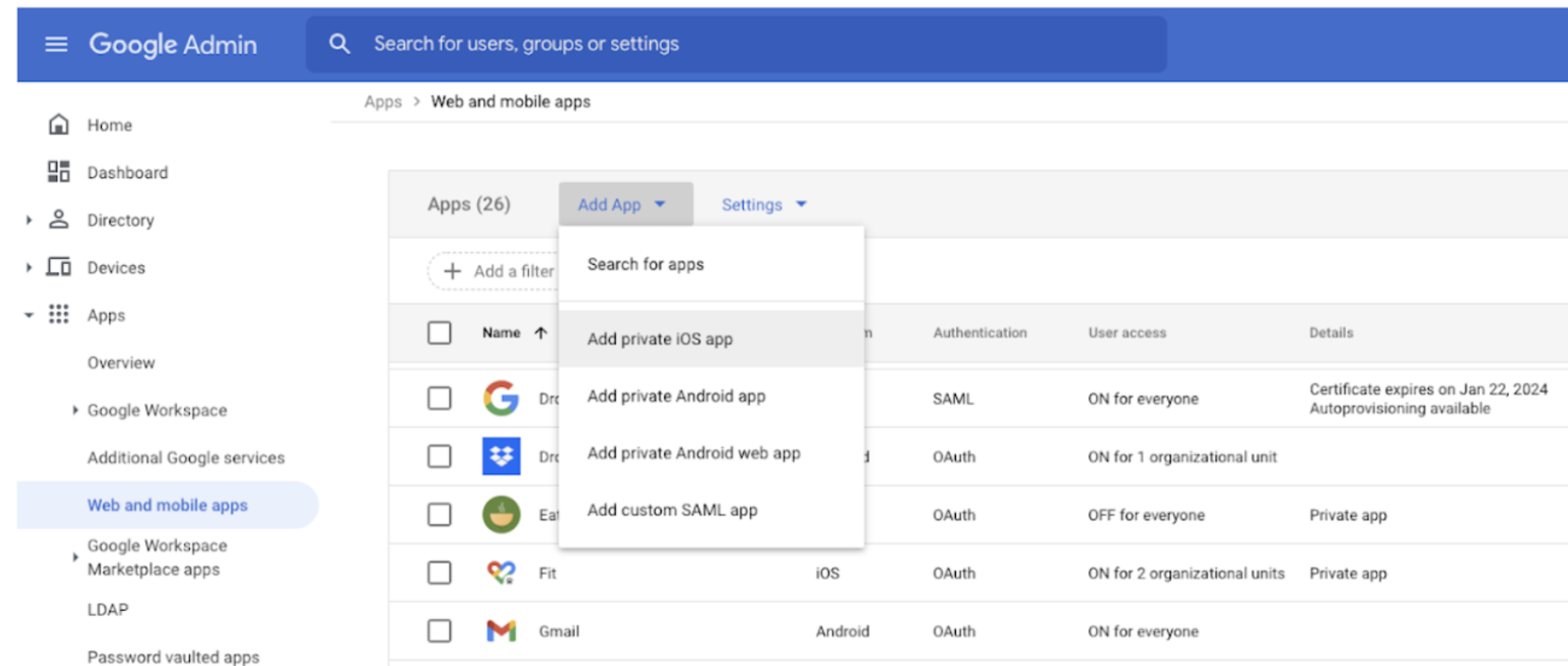
Admins can now upload, manage, and distribute private iOS applications to advanced managed devices. | Available to Google Workspace Enterprise Standard, Enterprise Plus, Education Standard, Education Plus, and Cloud Identity Premium customers. | Learn more.


VirusTotal integration with the security investigation tool provides deeper insight into Gmail events
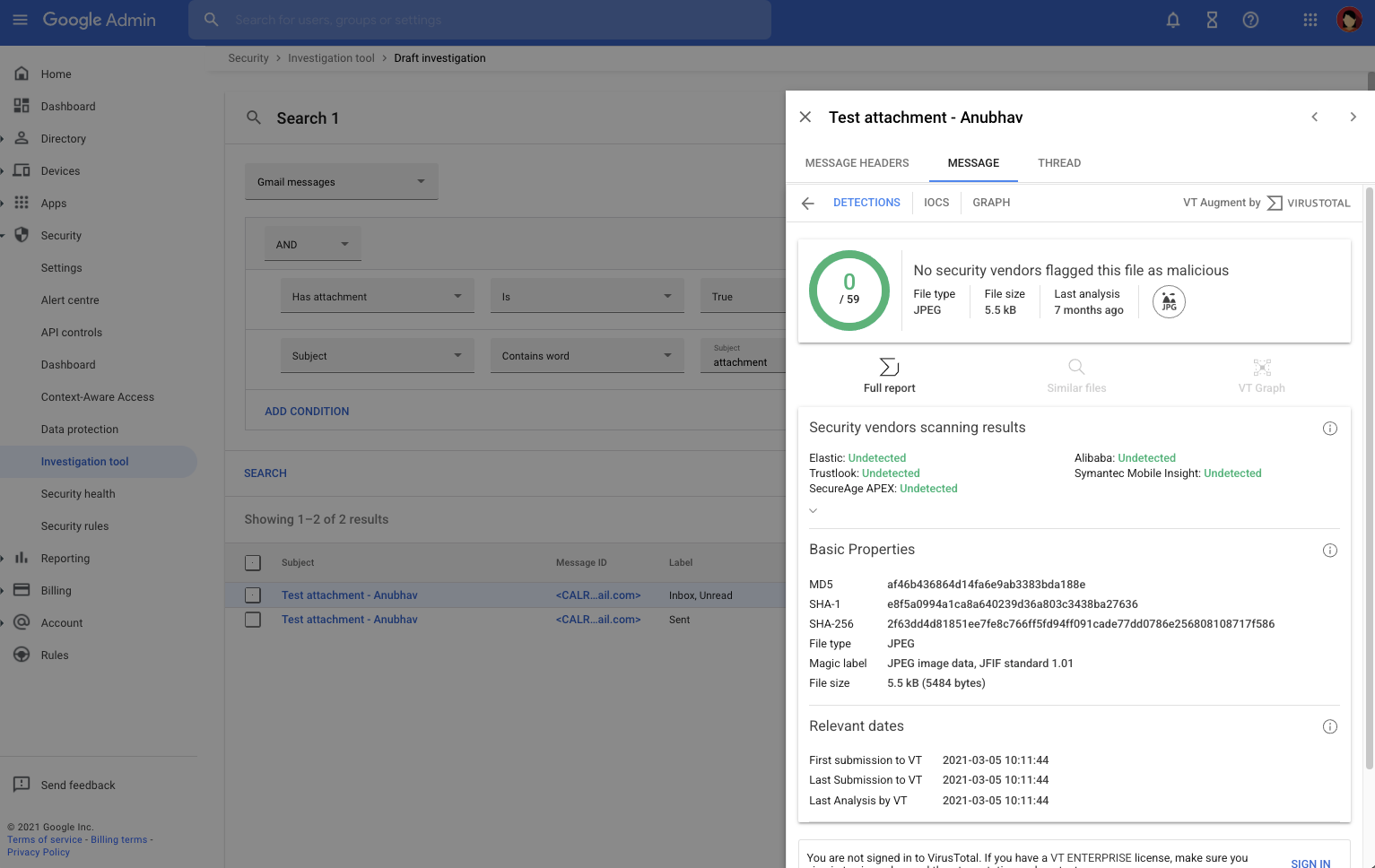
Admins can use the Security  Investigation tool to view VirusTotal reports to gain richer information regarding Gmail event logs and use that information to make more informed decisions on protecting their users and data. | Available to Google Workspace Enterprise Plus, Education Standard, and Education Plus customers. | Learn more.


Improved and updated security menu in the Admin Console
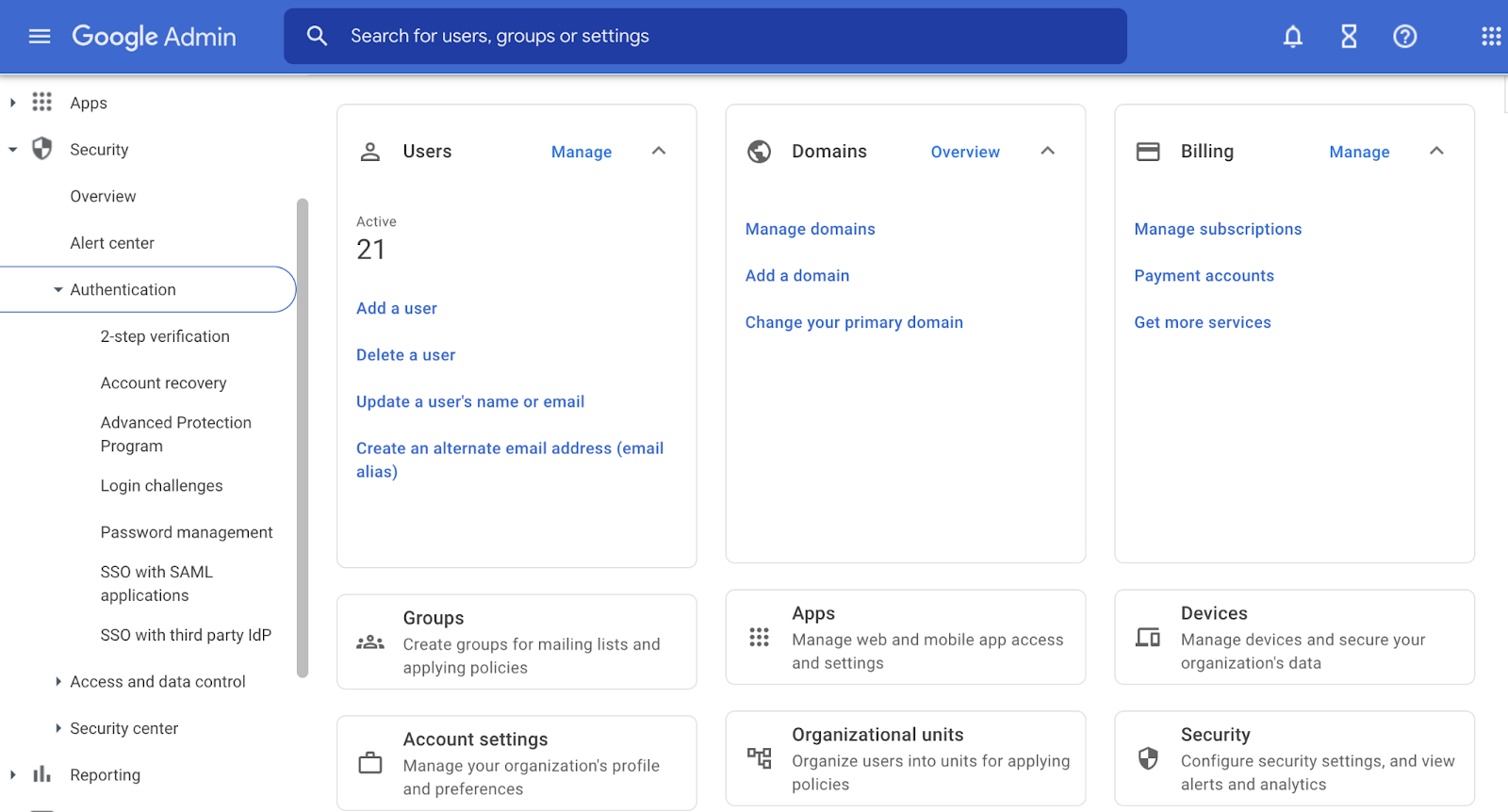
We have updated the “Security” category within the left-hand navigation of the Admin console by adding navigation access to security features previously only accessible from the security settings page, introducing subcategories, and more. | Learn more.


For a recap of announcements in the past six months, check out What’s new in Google Workspace (recent releases).
Quick launch summary 

We have updated the “Security” category within the left-hand navigation of the Admin console by: 
  • Adding navigation access to security features previously only accessible from the Security settings page. 
  • Adding Authentication, Access & data controls, and Security center subcategories making it easier to find the features available. 
  • Updating the name of the Security Settings page to Overview. 
We hope these improvements will make it easier for admins to discover, access, and manage our suite of security tools.

The updated Security navigation within the Admin console


Additional details

Instead of the previous single list, security features are now categorized by Authentication, Access & data controls, and Security center.  Availability of some subcategories and features will depend on your specific Google Workspace edition:


Authentication provides account and password management capabilities including:
  • 2-step verification
  • Account recovery
  • Advanced Protection Program
  • Login challenges
  • Password management
  • SSO with SAML applications
  • SSO with third party IdP

Access and data controls provide granular capabilities to manage your data through devices, browsers and applications including:

  • API controls
  • Client-side encryption
  • Context-Aware Access
  • Data protection
  • Google Session control
  • Google Cloud session control
  • Less secure apps

Security center provides advanced security information and analytics including:


What’s changing

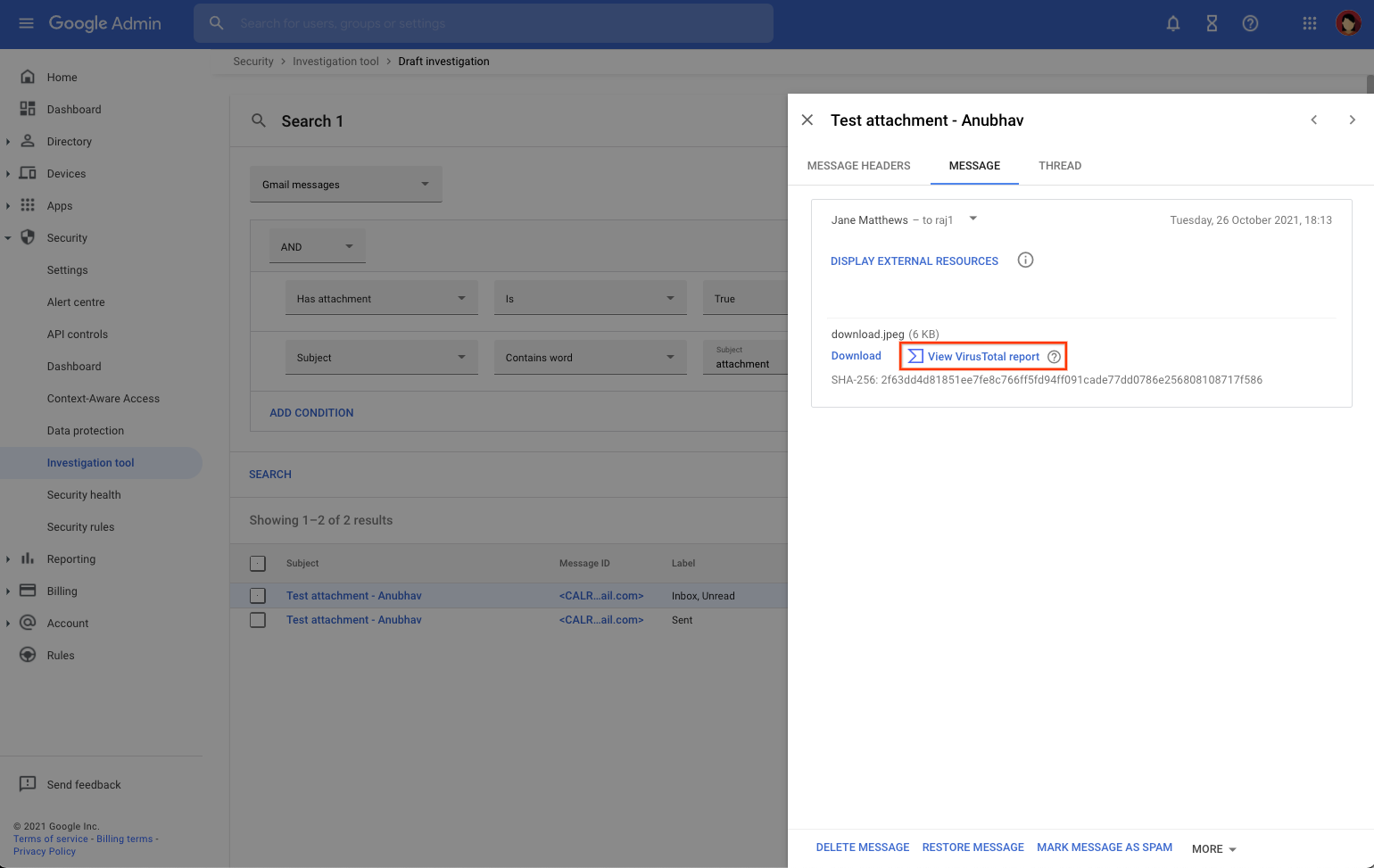
Earlier this year, we announced an integration between VirusTotal and the Alert Center, giving admins the ability to look into security alerts at a deeper level. Beginning today, admins can also use the Security  Investigation tool to view VirusTotal reports to gain richer information regarding Gmail event logs and use that information to make more informed decisions on protecting their users and data.


Within the security investigation tool, you select “View VirusTotal report” for a given investigation result.

The report will surface more details about potential security threats.


The Standard version of VirusTotal reports includes the following:

  • File identification: Identifiers and characteristics allowing you to reference the threat and share it with other analysts (file hashes, file type, size, etc).
  • Threat reputation: Maliciousness assessments coming from 70+ security vendors.
  • Threat time spread: Key dates that enable you to understand when a given threat was first observed in-the-wild and how long it’s been active.

The Enhanced version of VirusTotal reports includes additional features such as:
  • Multi-angular detection: Additional threat analysis coming from crowdsourced rule matches and community scoring (for example: YARA, Sigma, and IDS rules).
  • Allowlist information: Useful details to power false positive discarding (National Software Reference Library, Software Distributors, Microsoft Clean Metadata Feed, etc.). 
  • Related indicators of compromise (IOCs): Examples of IOCs include a network infrastructure distributing a malware file, servers acting as a command-and-control for a given threat, first-stage delivery vectors for a file being studied, etc.
  • Interactive threat graph: Graphical format that maps out entire threat campaigns by visualizing the relationships between IOCs.
  • Security-relevant metadata: Includes software publisher information, identification of malicious macros in documents, Android application permissions, etc.
  • In-the-wild details: Geographical and time-spread details for threats, common attacker deception techniques, and more, through VirusTotal submission metadata.
  • Suspicious attribute pivoting: Clickable details in VirusTotal reports, allowing you to explore the global VirusTotal dataset for other threats that share the same properties.

Who’s impacted

Admins


Why it matters

Integrating VirusTotal with existing notifications and warnings surfaced through the security investigation tool provides Admins with richer information regarding potential threats. 

By giving our admins greater context over these threats, they can confidently take swift action to protect their users and data. For example, Admins can use VirusTotal to further investigate inconsistencies with users’ accounts to determine whether their device is infected with a virus. Using the VirusTotal integration tool to determine whether any shared attachments are malicious and whether the attachment has been seen elsewhere across their organization.


Additional details

VirusTotal provides an investigation layer on top of alerts but isn’t being used directly for detection or alerting. 

Data (file attachment hashes) is only shared to VirusTotal after your admin selects to view the VirusTotal report. No data is otherwise shared.

VirusTotal data is shared with the broader security community. This enables security vendors to collaborate with each other, share important details, and take action to fight security threats.

The VirusTotal report has two versions: Standard and Enhanced. The Standard version is displayed for admins who have the Security Center > VirusTotal > View report privilege, and who have one of the required Google Workspace editions. The Enhanced version is automatically displayed for paid VirusTotal subscribers who have an active virustotal.com login session with their VT Enterprise user account. Visit the Help Center for more information.


Getting started

Rollout pace


Availability

  • Available to Google Workspace Enterprise Plus, Education Standard, and Education Plus customers
  • Not available to Google Workspace Essentials, Business Starter, Business Standard, Business Plus, Enterprise Essentials, Enterprise Standard, Education Fundamentals, Frontline, and Nonprofits, as well as G Suite Basic and Business customers

Resources


What’s changing 

Admins can now upload, manage, and distribute private iOS applications to advanced managed devices.


In the Admin console, under Apps > web and mobile apps > Add app, you’ll now see the “Add Private iOS app” option, which will guide admins through uploading the app, populating information about the app, and configuring the OUs and groups they want the app to be distributed to. 

In the Admin console, navigate to Apps > Web and Mobile apps and then select "Add App".


Once added, you can update, delete, and manage user access to the app.


Who’s impacted 

Admins 


Why you’d use it

Internally developed, private apps can be useful and relied on by users for a variety of reasons, such as increasing productivity or sharing company specific information, such as cafe menus or campus maps. By giving admins the ability to add and provision custom iOS applications through the Admin console, they can securely distribute their own in-house apps. They can also keep private apps updated easily, because when they upload a new version of the app it’s automatically updated on users’ devices.


Getting started

Rollout pace

Availability

  • Available to Google Workspace Enterprise Standard, Enterprise Plus, Education Standard, Education Plus, and Cloud Identity Premium customers.
  • Not available to Google Workspace Essentials, Business Starter, Business Standard, Business Plus, Enterprise Essentials, Education Fundamentals, Frontline, and Nonprofits, as well as G Suite Basic and Business customers

Resources


What’s changing 

We’re updating the menus in Google Sheets to make it easier to locate the most commonly-used features.

In this update: 

  • The menu bar and right-click menus have been shortened to better fit your screen to prevent menus from being hidden off screen
  • Some features were reorganized and added to more intuitive locations (for example, you can now freeze a row or column from the right-click menu) 
  • Some descriptions of items in the menu are shorter, enabling faster recognition 
  • Icons have been added to help you locate features more easily 
  • Changes are across all menus, including File, Edit, View, Insert, Format, Date, Tools, Extensions, Help, and Accessibility. 

Example of updated menu in Google Sheets


Example of updated menu in Google Sheets

Example of updated menus in Google Sheets

Who’s impacted 

End users 

Why it’s important 

The new design improves findability of key features, making it quicker and easier to use Sheets, especially on devices with smaller screens. 

Additional details 

Some of your favorite menu items may have moved a little, but all existing functionality is still available. We hope that their new home will be more intuitive and make it easier and faster to navigate the product.

Getting started 

  • Admins: There is no admin control for this feature. 
  • End users: This feature will be ON by default and cannot be disabled. Use the menus as you would regularly and enjoy the new look and feel. Visit the Help Center to learn more about using Google Sheets

Rollout pace 

Availability 

  • Available to all Google Workspace customers, as well as G Suite Basic and Business customers. Also available to users with personal Google Accounts 

Resources