
This official feed from the Google Workspace team provides essential information about new features and improvements for Google Workspace customers.


What’s changing

In 2018, we launched the Content manager role, making it easier to manage files in shared drives. Currently, content managers have the ability to edit, reorganize, and delete shared drive content, but they cannot share folders in shared drives. 

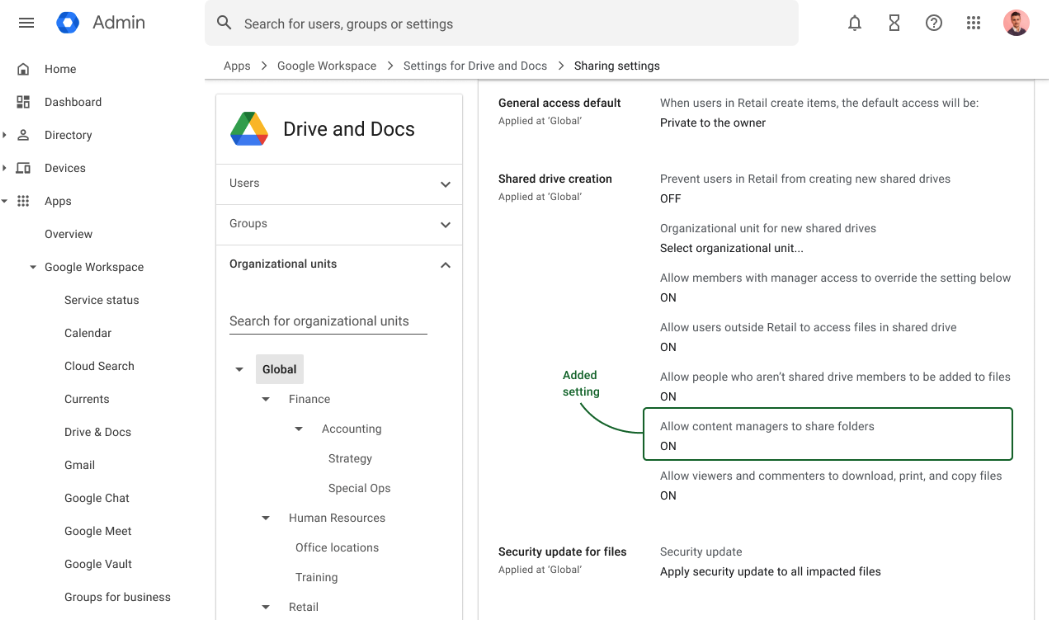
Starting today, admins will see a new shared drive setting that can be enabled or disabled to give content managers the ability to share folders in shared drives. 

In February 2023, all content managers will have the ability to share folders by default. If you’d like this feature to remain off for end users, disable the setting now. 


Who’s impacted 

Admins and end users 


Why it matters 

Enabling content managers to share folders is a highly requested feature that will help organizations better manage access to their data. 


Additional details 

We will provide an update in February 2023 with the exact date that all content managers will have the ability to share folders by default. 


Getting started 

  • Admins: 
    • This setting is currently ON by default. To disable the setting for content managers to share folders, go to the "Sharing settings" in the Drive and Docs section of the Admin Console > scroll to the "Shared drive creation" section > change the "Allow content managers to share folders" setting to OFF. 
      • Note: If enabled, Content managers will be able to share folders starting in February 2023. 
    • Visit the Help Center to learn more about managing shared drives as an admin. 
  • End users: If enabled by your admin, content managers can share folders starting February 2023. Visit the Help Center to learn more about shared drives

Rollout pace 

Admin controls: 
End user setting: 

Availability 

  • Available to Google Workspace Essentials, Business Standard, Business Plus, Enterprise Essentials, Enterprise Standard, Enterprise Plus, Education Fundamentals, Education Plus, Education Standard, the Teaching and Learning Upgrade, and Nonprofits, as well as legacy G Suite Business customers 
  • Not available to Google Workspace Business Starter, Frontline, and legacy G Suite Basic customers 
  • Not available to users with personal Google Accounts 
Resources 

What’s changing 

In 2020, we released several data exfiltration protections for iOS devices. Today, we’re announcing the next set of enhancements for data exfiltration protections for iOS. We’re expanding these security controls to give admins more ways to protect sensitive company data on iOS devices. 


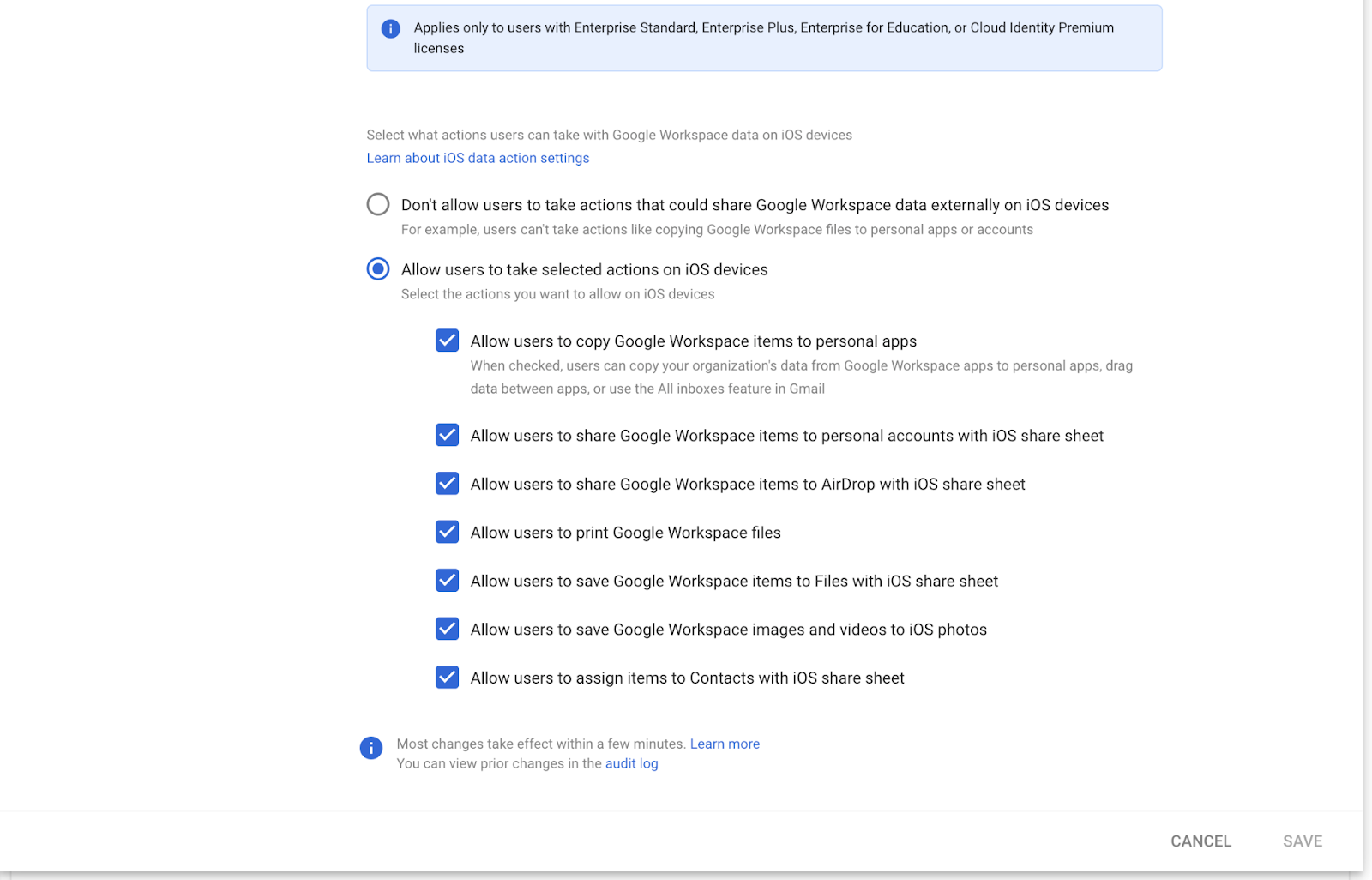
Admins can now turn the following actions on or off for Google Workspace data: 
  • Copying Google Workspace files and data to personal apps 
  • Sharing Google Workspace data to personal accounts via AirDrop and the iOS share sheet 
  • Air Printing Google Workspace files 
  • Saving Google Workspace items to files with the iOS share sheet 
  • Saving Google Workspace images/videos to iOS photos 
  • Assigning items from Google Workspace to Contacts with the iOS share sheet. 


Who’s impacted 

Admins and end users 


Why it’s important 

This is the next step in ensuring we continue to enhance data protections for Google Workspace data and how that information is stored, shared, and used across the iOS devices within your organization. Similar protections are already available on Android devices through Work Profiles


Getting started 

  • Admins: These settings can also apply to any OU level throughout the organization, to scale your policy settings to any iOS mobile device within your organization. These settings can be configured in the Admin console under Devices > Mobile and endpoints > iOS settings > Data Sharing. Visit the Help Center to learn more about data protection on iOS devices


  • End users: There is no end-user setting for this feature. Restricted actions are not shown except for “Save to files”, in which case a dialog pops up notifying the user that this action is restricted. 

Rollout pace


Availability 

  • Available to Google Workspace Enterprise Standard, Enterprise Plus, Enterprise for Education, and Cloud Identity Premium customers. 

Resources 

New updates 

There are no new updates to share this week. Please see below for a recap of published announcements. 


Previous announcements


The announcements below were published on the Workspace Updates blog earlier this week. Please refer to the original blog posts for complete details.


Improved meeting quality when joining on virtual machines 
If you use a Virtual Desktop Interface (VDI) such as Citrix or VMWare to join Google Meet calls, you’ll notice an increase in video and audio quality. Meet will now detect whether you’re joining from a VDI and automatically adjust for the best performance. | Learn more


Use the Cloud Search Query API to set Suggest Filters to enhance Cloud Search results 
It’s now easier to configure and use Cloud Search search filters and facets with multiple enhancements to our existing functionalities. With this launch, you can use the Cloud Search Query API to configure new additional capabilities. | Available to Google Cloud Search Customers only. | Learn more.


For a recap of announcements in the past six months, check out What’s new in Google Workspace (recent releases).

What’s changing

If you use a Virtual Desktop Interface (VDI) such as Citrix or VMWare to join Google Meet calls, you’ll notice an increase in video and audio quality. Meet will now detect whether you’re joining from a VDI and automatically adjust for the best performance. This optimization will also help cut down on the demand put on your VDIs, such as CPU, GPU, and memory usage, helping improve meeting quality and overall performance. 


Getting started 

  • Admins: Ensure Google Meet can detect that it’s running inside a virtual machine (VM) by enabling the Enterprise Hardware Platform API policy in Chrome. Visit the API page and the Help Center to learn more about how to set Chrome policies for users or browsers and use VDIs with Google Meet
  • End users: There is no end user action required — Google Meet will automatically optimize your experience when using a VDI. 


Rollout pace 


Availability 

  • Available to all Google Workspace customers, as well as legacy G Suite Basic and Business customers 


Resources 

New updates 

Unless otherwise indicated, the features below are fully launched or in the process of rolling out (rollouts should take no more than 15 business days to complete), launching to both Rapid and Scheduled Release at the same time (if not, each stage of rollout should take no more than 15 business days to complete), and available to all Google Workspace and G Suite customers. 


Resizing Pivot Tables in Google Sheets
We’re excited to announce a requested feature that allows you to resize the pivot table editor side panel when creating or editing a pivot table. This functionality is especially useful when the names of columns or fields are too long and you want to see the text in its entirety. | Learn more.

Improved search results based on recent search activity in Gmail
In July, we announced better search and suggestion options in Gmail. Now, when using Gmail on the web, this also includes better search results based on your recent search activity in Gmail. This enhancement to Gmail search makes results more relevant and contextual. | Learn more


Share Google Docs, Sheets, and Slides files in Google Meet chat 
Earlier this year, we announced the ability to join or present to a Google Meet call from Google Docs, Sheets, or Slides. Now, if you are presenting or joining a meeting from a file, you can easily share that file with meeting attendees through in-meeting chat. With this update you’re able to grant access to a document, spreadsheet, or presentation to all or select meeting attendees, allowing everyone in the meeting to collaborate while having a conversation. | Learn more

Previous announcements


There are no previous announcements to share this week. For a recap of announcements in the past six months, check out What’s new in Google Workspace (recent releases).