This official feed from the Google Workspace team provides essential information about new features and improvements for Google Workspace customers.


What’s changing 

You can now leverage Miro, a third party online whiteboarding app, for ideating and problem solving as a group in Google Meet. With this integration in Google Meet, you can seamlessly collaborate on a Miro board together during a call with powerful tools and templates, such as brainstorming with digital sticky notes and planning agile workflows, for more aligned and innovative teamwork. Visit the Cloud Blog for more information on the Google Meet and Miro integration.
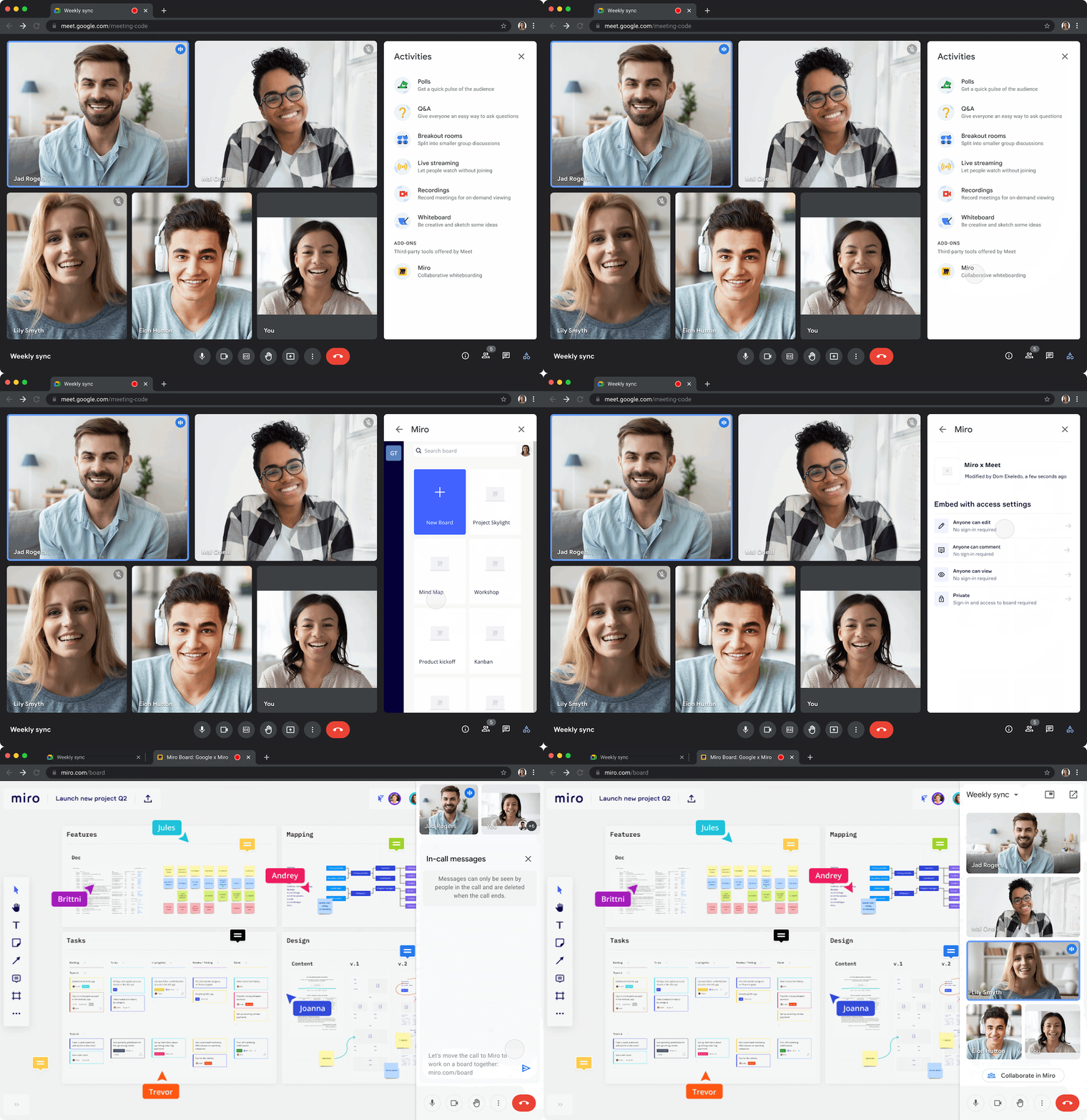


This integration is available when using Google Meet on Chrome or Microsoft Edge at this time. 


Who’s impacted 

Admins and end users 


Why you’d use it 

You now have Miro’s vast offering of drawing tools, templates, comments, and other helpful features directly accessible from Google Meet. This integration will make it easier to foster collaboration and participation from all meeting participants, regardless of location, in real-time or asynchronously. 

Getting started 


Rollout pace 


Availability 

  • Available to all Google Workspace customers, as well as legacy G Suite Basic and Business customers 
  • Available to users with personal Google Accounts 
  • Not available to users with a Google Family Link Account or users under the age of 18. 

Resources 

Quick summary 

The appointment scheduling feature allows people to share their availability via a booking page, which can be used by external stakeholders, clients, and partners to schedule a meeting. 


Starting today, we’re making it easier to share appointment schedules on web and mobile through a new Share button. This update allows appointment hosts to copy a short link to all appointment schedules or a specific booking page, and add HTML to embed a booking page on their website. 

web sharing

Getting started

Castro consulting


Example of an embedded booking page on an external website

Rollout pace 


Availability 

  • Available to Google Workspace Individual, Business Standard, Business Plus, Enterprise Standard, Enterprise Plus, Education Fundamentals, Education Standard, Education Plus, the Teaching and Learning Upgrade, and Nonprofits customers 
  • Not available to Google Workspace Essentials, Business Starter, Frontline, as well as legacy G Suite Basic and Business customers 
  • Not available to users with personal Google Accounts 

Resources 

Roadmap 


What’s changing

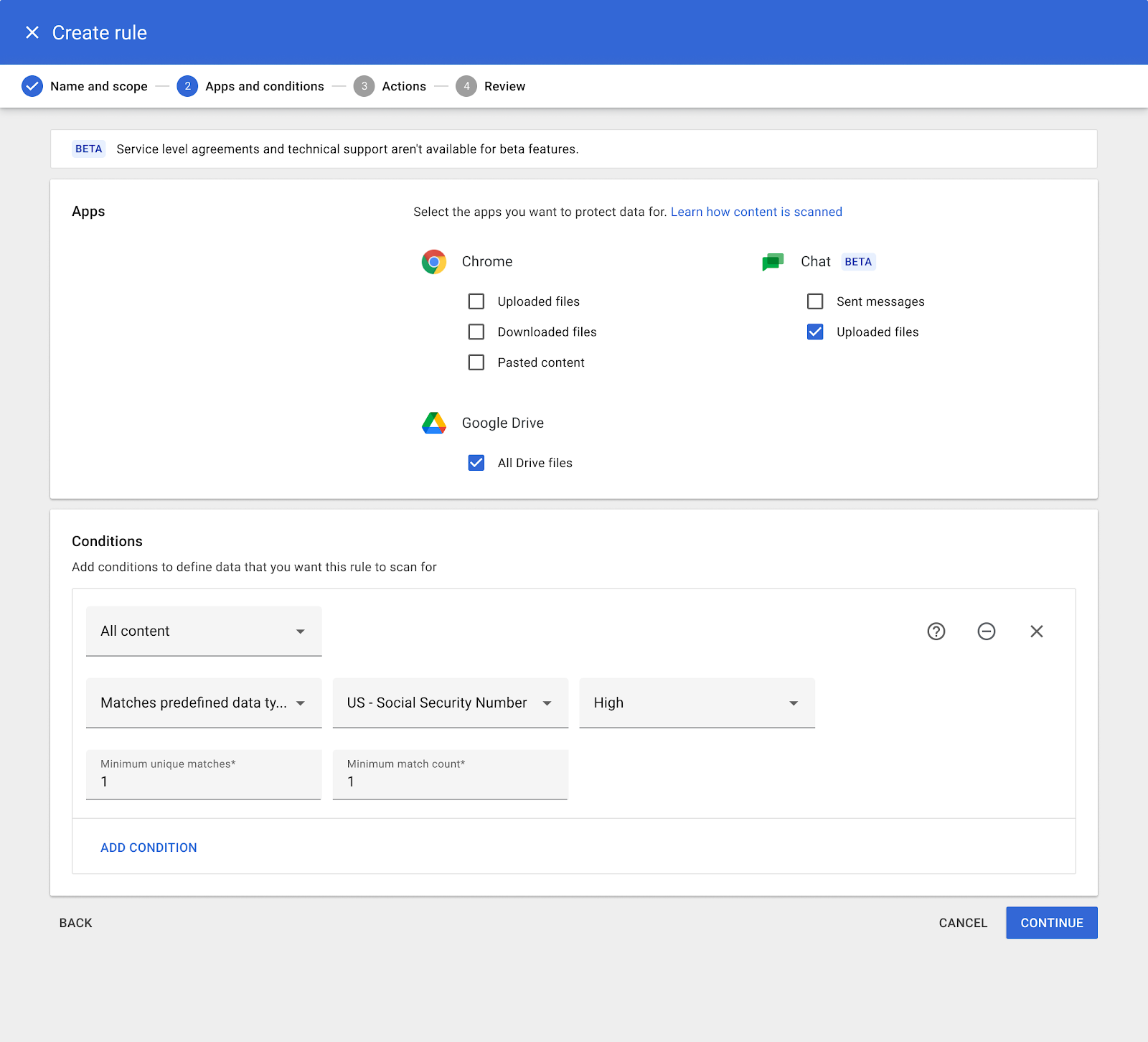
For select Google Workspace editions, admins can establish data loss prevention (DLP) rules for Google Chat that can help protect sensitive data from getting to unauthorized users. This feature is now available as an open beta, which means admins can use it without enrolling in a specific beta program.


Data loss prevention rules for Chat in the Admin console


End user experience on web

End user experience on mobile


Who’s impacted

Admins and end users


Why it’s important

Data leaks, whether accidental or malicious, are a top concern for our customers. Data protection rules for Chat help admins and security experts build a stronger framework around sensitive data to prevent personal  or proprietary information from ending up in the wrong hands.


Admins can selectively apply data protection rules to: 
  • Messages in groups, spaces, and/or direct messages
  • Messages between internal and/or external participants
  • Message text and/or attachments


Once DLP rules are applied, messages and files in relevant conversations will automatically be scanned for sensitive information. Users will be notified about potential data loss, preventing it from leaving the organization accidentally or on purpose. Admins can configure the action to be taken in response to sensitive data being detected, such as: block from sending, warn before sending, and log for audit in the future.


Admins can configure these options to best fit the needs of their organization. If admins opt to log these events, they can be accessed in the Security Investigation Tool. This allows admins to do a comprehensive investigation and identify the reason for each incident and make adjustments to data protection policies as necessary.


Getting started

  • Admins: 
    • This feature will be OFF by default and can be enabled at the domain, OU, or group level. You can create DLP rules in the Admin console under Security > Data Protection.
      • Note: You can modify existing DLP rules for Drive and Chrome to also apply to Chat.
    • Visit the Help Center to learn more about turning data loss prevention in Chat on for your organization.

Rollout pace


Availability

  • Available to Google Workspace Enterprise Standard, Enterprise Plus, Education Fundamentals, Education Standard, Education Plus, and the Teaching & Learning upgrade customers.
  • DLP rules for Drive are also available for Cloud Identity Premium users who are licensed for Workspace editions with Drive audit log. Visit the Help Center for more information.
  • Not available to Google Workspace Essentials, Business Starter, Business Standard, Business Plus, Enterprise Essentials, Frontline, and Nonprofits, as well as legacy G Suite Basic and Business customers


Resources


Quick summary 

For select Google Workspace editions, admin can now trigger an on demand sync between Apple DEP and Google Mobile Device Management (MDM) servers for company owned devices. Additionally, they will also be able to see when this sync was last triggered. 


While this sync takes place automatically once every several hours, admins can now request this sync on demand for time sensitive needs. For example, admins can use this option to start a sync immediately for sensitive inventory changes on Apple devices. 

The “Sync DEP Devices” option in the Admin console under Devices > Mobile and endpoints > iOS Settings > Apple certificates.


Getting started 


Rollout pace 

Availability 

  • Available to Google Workspace Enterprise Standard, Enterprise Plus, and Cloud Identity Premium customers 
  • Not available to Google Workspace Essentials, Business Starter, Business Standard, Business Plus, Enterprise Essentials, Education Fundamentals,Frontline, and Nonprofits, Cloud Identity Free, or G Suite Basic and Business customers 

Resources 

New updates

Unless otherwise indicated, the features below are fully launched or in the process of rolling out (rollouts should take no more than 15 business days to complete), launching to both Rapid and Scheduled Release at the same time (if not, each stage of rollout should take no more than 15 business days to complete), and available to all Google Workspace and G Suite customers. 


Rollout for visual updates in Gmail has resumed 
In October 2021, we announced several improvements for the To, Cc, and Bcc fields in Gmail. Shortly thereafter, we paused rollout to work on performance improvements. Beginning today, these features will resume rolling out slowly — we anticipate to be complete by the end of September 2022. | Learn more


Previous announcements 

The announcements below were published on the Workspace Updates blog earlier this week. Please refer to the original blog posts for complete details.

Space Managers can change access to new and existing spaces in Google Chat 
Space Managers can change access to new and existing spaces by making them either ‘Restricted’ or ‘Discoverable’ for a select group of people in their organization as the conversation evolves. | Learn more


For a recap of announcements in the past six months, check out What’s new in Google Workspace (recent releases).