This official feed from the Google Workspace team provides essential information about new features and improvements for Google Workspace customers.


What’s changing 

In September 2023, we announced the next phase of digital whiteboarding for Google Workspace. At that time, we announced that new whiteboarding tools would soon be integrated with Series One Board 65 and Desk 27 devices. By the end of the month, Lucidspark by Lucid Software can be launched directly from these devices. With this integration, users will be able to share and participate in a Lucidspark whiteboard session in a Meet call, either initiated from the Series One Board 65 and Desk 27 or a remote participant on the call.


Who’s impacted

Admins and end users


Why you’d use it 

Integrating third-party collaboration tools is a key component of the new digital whiteboarding experience in Google Workspace. Specifically, we’ve heard from our customers that whiteboarding tools like Lucidspark by Lucid Software help their teams work better together with features like infinite canvas, templates, and diagramming. Today, Lucidspark can already be launched inside a Meet call from your laptop. Now, you also have the option to use Lucidspark on the Board 65 and Desk 27 devices within a Meet call.


Later this year we’ll introduce support for launching FigJam and Miro directly from Board 65 and Desk 27 devices. We’ll provide an update here on the Workspace Updates blog with more information at that time. For more information on the future of digital whiteboarding in Workspace, please refer to our initial announcement.


Getting started


Rollout pace


Availability

  • Available to all Google Workspace customers with Google Meet Board 65 and Desk 27 devices


4 New updates

Unless otherwise indicated, the features below are available to all Google Workspace customers, and are fully launched or in the process of rolling out. Rollouts should take no more than 15 business days to complete if launching to both Rapid and Scheduled Release at the same time. If not, each stage of rollout should take no more than 15 business days to complete.


Version history limits for Apps Script projects 
For all new scripts, you’ll be able to create and save up to 200 versions of your script. If needed, you can permanently delete a script version from the project history page. | This is available now to all Google Workspace customers. | Learn more using our developer documentation on working with Apps Script versions


Share a link to a specific time in a Google Drive video 
We’re adding new functionality to the Drive sharing button that lets you share timestamped links to specific parts of a video. On web, simply navigate to drive.google.com > find and open a video file > play the video (you can pause the playback before performing the following steps) > select the dropdown on the “Share” button in the top-right corner > select “Copy link to this time” > send the link. | Rolling out now to Rapid Release and Scheduled Release domains. | Available to all Google Workspace customers and users with personal Google Accounts. | Learn more about copying a specific time in the video
Share a link to a specific time in a Google Drive video

Introducing dropdown options on the sharing button in Google Docs, Sheets, Slides and Drawings
We’re adding a new feature that ensures a seamless sharing experience across Workspace. In Google Docs, Sheets, Slides and Drawings, you will now see a dropdown on the Share button that surfaces quick actions, such as pending access requests and the “Copy link” option. | Rolling out now to Rapid Release and Scheduled Release domains. | Available to all Google Workspace customers and users with personal Google Accounts. 
dropdown options on the sharing button

Using functions in Connected Sheets for BigQuery 
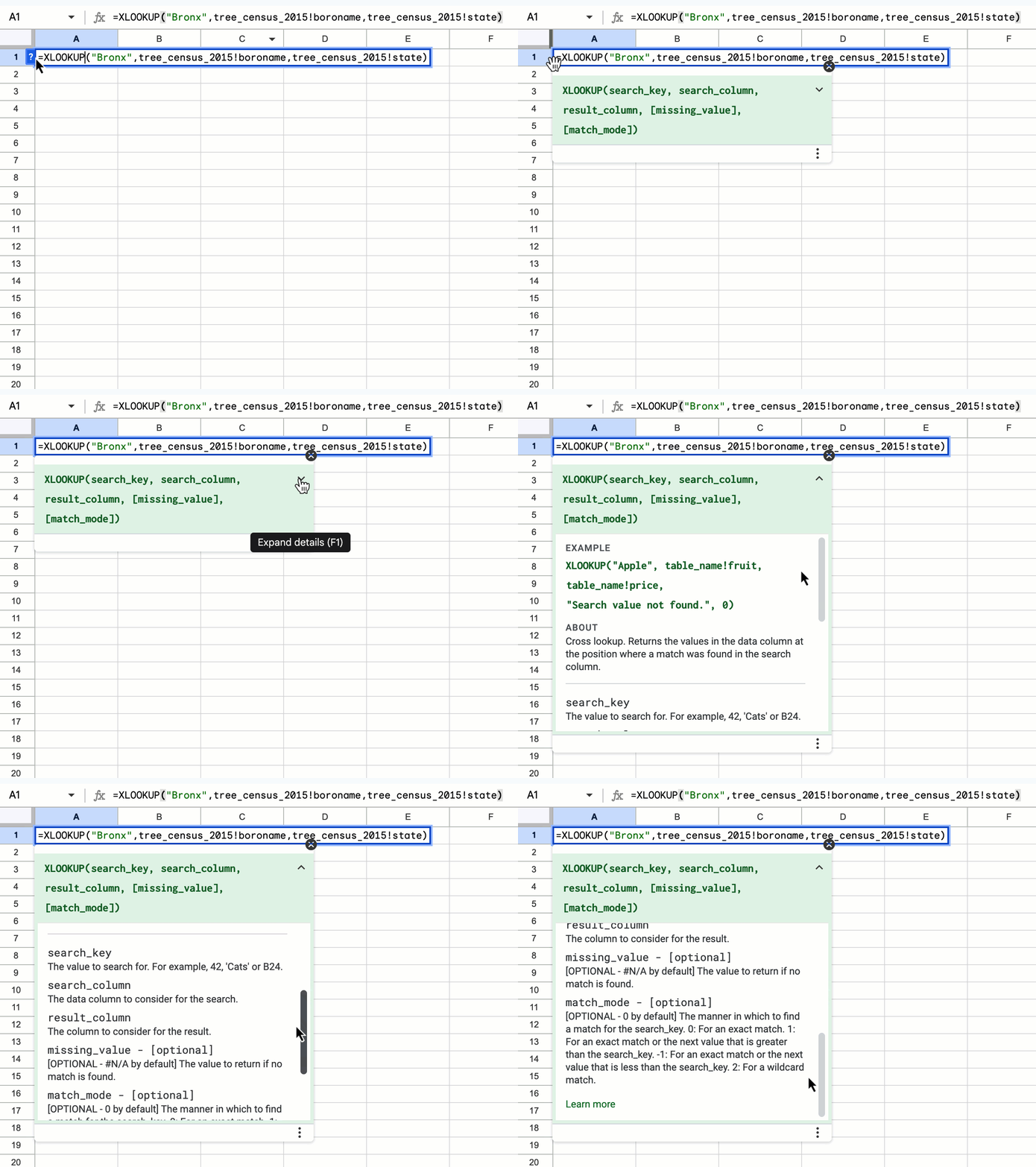
Today, Connected Sheets for BigQuery supports 23 Sheets functions, such as AVERAGE and XLOOKUP. However, all of these functions behave somewhat differently than their native counterparts. Thus, to help Connected Sheets users write better functions, we now display context-aware Help Center content in Sheets. The ‘formula help’ shows descriptions for Connected Sheets functions when writing a formula that would query BigQuery, and otherwise shows descriptions of native Sheets functions. | This is available now to all Google Workspace customers and users with personal Google Accounts. | Learn more about the XLOOKUP function.
Using functions in Connected Sheets for BigQuery


Previous announcements

The announcements below were published on the Workspace Updates blog earlier this week. Please refer to the original blog posts for complete details.


Updates to metrics in Google Drive Apps Reports and Reports API 
We’re making some updates to the Google Drive metrics in the Admin Console Apps reports and the Reports API. As a result of these improvements, admins who analyze metrics will have more reporting clarity and can better understand activity trends within their domain. | Learn more about metrics in Drive Apps Reports and Reports API. 

Easily share Google Drive files to Google Calendar meeting attendees 
We’re introducing the option to share any file with all meeting participants on a Google Calendar invite via the sharing dialog within a file. | Learn more about sharing Drive files to Calendar. 

Google Meet is now available on Logitech Android appliances 
Google Meet is now supported on Logitech’s Rally Bar and Rally Bar Mini Android-based appliances for collaboration rooms and spaces of just about any size. After initial setup, admins can easily enroll, manage, and monitor these devices using the Google admin console. Google Meet on Logitech Android-based devices is supported on CollabOS v1.11 as a video conferencing provider | Learn more about Meet on Logitech Android appliances. 

Google Meet hardware devices from Poly now support interoperability with Cisco Webex and Zoom 
We’re expanding the existing interoperability between Google Meet, Cisco Webex, and Zoom to include Android-based Meet hardware devices from Poly. Specifically, these devices include: Poly Studio X30, X50, X52, and X70. | Learn more about support interoperability with Cisco Webex and Zoom.

Extending Trusted Types to Gmail
We’re excited to announce the expansion of Trusted Types to Gmail. This will provide a defense against DOM XSS and further enhances our advanced data protection controls to keep users and data safe across more of the apps they use everyday. | Learn more about Trusted Types.


Completed rollouts

The features below completed their rollouts to Rapid Release domains, Scheduled Release domains, or both. Please refer to the original blog posts for additional details.

Rapid Release Domains: 

Scheduled Release Domains: 

Rapid and Scheduled Release Domains: 

For a recap of announcements in the past six months, check out What’s new in Google Workspace (recent releases). 

What’s changing

Last year, we improved the client-side security of Google Docs, Sheets, Slides, Forms, Sites, Drawings, Drive, and Calendar with Trusted Types. This browser-based runtime feature limits the uses of Document Object Model (DOM) APIs that are used by the apps listed above or third-party extensions. Trusted Types also reduce the possibility of Document Object Model Cross Site Scripting (DOM XSS), which continues to be one of the most critical threats to web security. 

DOM XSS occurs when a cyber attacker injects malicious code into a web page, which can then be executed by the victim's browser. This can allow the cyber attacker to steal cookies, hijack sessions, and even take control of the victim's computer. 

To defend against this, we’re excited to announce the expansion of Trusted Types to Gmail. This will provide a defense against DOM XSS and further enhances our advanced data protection controls to keep users and data safe across more of the apps they use everyday. 


Who’s impacted 

Developers (relying on any Chrome extensions that modify DOM APIs.) 


Additional details 

This new enforcement mode will require third-party extensions to use typed objects instead of strings when assigning values to DOM APIs. Once Trusted Types are fully enforced, the Trusted Types directive will be present in the Content Security Policy (CSP) header: 

Content-Security-Policy: require-trusted-types-for 'script';report-uri https://mail.google.com/mail/cspreport 


Getting started 

  • Admins: There is no admin control for this feature. 
  • Developers: 
    • To make code Trusted Types compliant, signal to the browser that data being used within the context of these DOM APIs is trustworthy by creating a Trusted Type special object. 
    • There are several ways to be Trusted Types compliant, such as removing the offending code, using a library (such as safevalues or DOMPurify), or creating a Trusted Types policy. To ensure a seamless experience for users, we recommend employing these techniques before Trusted Types enforcement is rolled out. Failure to make code Trusted Types compliant may cause feature breakages for third-party extensions as their DOM manipulations will be blocked by the browser. 
  • End users: There is no end user setting for this feature. 

Rollout pace 


Availability 

  • Available to all Google Workspace customers and users with personal Google Accounts 

Resources 

What’s changing 

We’re expanding the existing interoperability between Google Meet, Cisco Webex, and Zoom to include Android-based Meet hardware devices from Poly. Specifically, these devices include: Poly Studio X30, X50, X52, and X70. 


Note that Webex and Zoom interoperability supports core video conferencing features. Some advanced features, such as polls, wired present, and dual-screen support may not be available when using Poly Meet hardware to join Webex or Zoom meetings.

Getting started


Admins: 
End users: 
  • When enabled by your admin, you can join a Webex or Zoom meeting from a Poly Android-based Google Meet hardware device by: 
    • Joining an ad-hoc call by tapping "Join or start a meeting" on your touch controller and selecting Webex or Zoom from the dropdown options. 
    • Joining a scheduled call by adding a room to an event with Webex or Zoom meeting details.  
      • Note: Calendar events that originate outside of Google Calendar must be duplicated and populated with room details manually.
  • Visit the Help Center to learn more about Google Meet interoperability.

Rollout pace


Availability

  • Available to all Google Workspace customers with Google Meet hardware subscriptions

Resources


What’s changing 

Google Meet is now supported on Logitech’s Rally Bar and Rally Bar Mini Android-based appliances for collaboration rooms and spaces of just about any size. After initial setup, admins can easily enroll, manage, and monitor these devices using the Google admin console. Google Meet on Logitech Android-based devices is supported on CollabOS v1.11 as a video conferencing provider. The following Logitech Android devices now support Google Meet: 
  • Logitech Rally Bar 
  • Logitech Rally Bar Mini
  • Tap IP


Additional details

As part of this launch, we are also providing admins with a new capability to protect their room devices using a passcode. This ensures that only authorized users are able to access and change the room’s device settings. This feature is only available for Logitech Rally Bar and Rally Bar Mini in appliance mode, where Rally Bar’s built-in computer supports Google Meet without the need for an additional computer or a user’s laptop. Visit the Help Center to learn more about setting up Logitech devices as Meet Hardware and enrolling your devices.

Getting started

  • Admins: 
    • Logitech Rally Bar and Rally Bar Mini appliances will need to be updated to CollabOS 1.11 in order to select Google Meet as the conferencing partner application. 
    • Once the device is updated to CollabOS 1.11 and the conferencing partner is set to Google Meet, follow the on-device prompts to enroll the device onto the Google Meet hardware admin console. Visit the Help Center to learn more about setting up Logitech devices as Meet Hardware.
    • Google Meet on Logitech Android appliances require Google Meet hardware licenses, please reach out to a Google Meet hardware reseller. 

  • End users: No action required. Once a Logitech Rally Bar and Rally Bar Mini have been successfully enrolled, you can join Google Meet meetings normally.

Rollout pace

  • This update is available as part of Logitech’s CollabOS 1.11 release. For more information, please reach out to your Logitech account team or reseller.

Availability

  • Available on Logitech Rally Bar and Rally Bar Mini customers. Support for additional Logitech devices will be added over time. 
  • Available to all Google Workspace customers.


Resources