
This official feed from the Google Workspace team provides essential information about new features and improvements for Google Workspace customers.


We recently completed the cross-platform rollout of a feature allowing Google Apps customers to share links to Hangouts video calls so that external meeting guests may request to join if not explicitly invited. 

Previously, video calls shared with the link required someone in the Apps domain of the Hangout video call to accept those requesting access on the web. With today’s launch, we’ve enabled this accept or reject functionality in the latest version of the Hangouts iOS app.

To accept or reject a request to join a video call on your mobile device, tap the ‘Accept’ or ‘Decline’ button in the pop-up screen that appears when a guest is requesting to join.
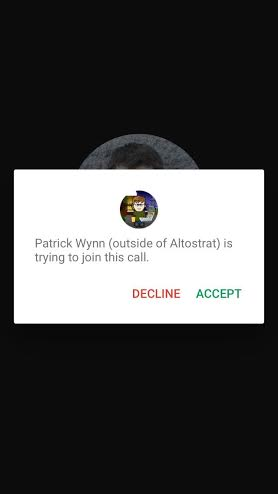
This functionality is coming soon to the Hangouts Android app.

Release track:
Rapid release and Scheduled release

For more information:
Help Center
Get the latest Hangouts app in the App Store

Note: all launches are applicable to all Google Apps editions unless otherwise noted

Launch release calendar
Get these product update alerts by email
Subscribe to the RSS feed of these updates
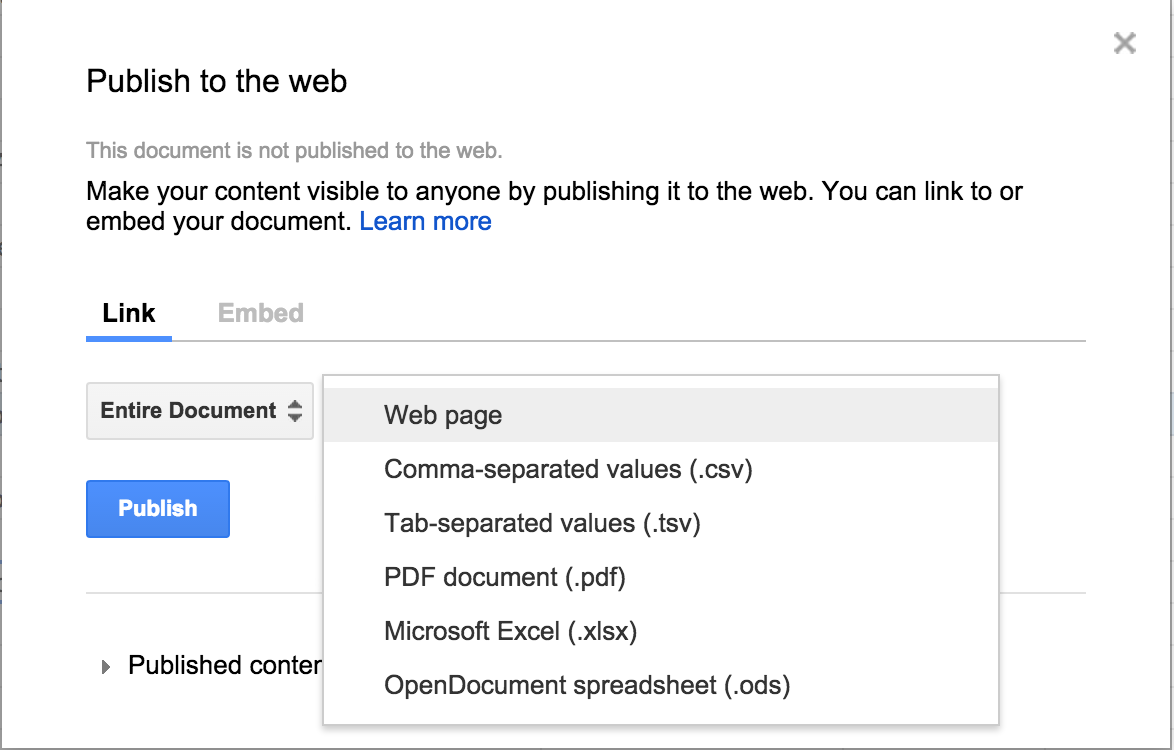

In Google Sheets on the web, if a person wants to make a spreadsheet available for a large audience to see, they can publish the file as a web page. Once that file is published, the person receives a URL that can be sent to whomever they choose or embedded into a website. Today’s launch allows people to publish spreadsheets in five additional formats—as comma-separated values (.csv), tab-separated values (.tsv), a PDF document (.pdf), a Microsoft Excel® spreadsheet (.xlsx), or an OpenDocument spreadsheet (.ods). The URL generated, when opened in a browser, will automatically download the spreadsheet in the chosen format (spreadsheets in these additional formats cannot be embedded).
More Publishing Formats.png
Try out this new feature in Google Sheets on the web today.

Release track:
Rapid release and Scheduled release

More information:

Help Center

Note: all launches are applicable to all Google Apps editions unless otherwise noted

Launch release calendar
Get these product update alerts by email
Subscribe to the RSS feed of these updates

Last year, Google worked with the FIDO Alliance standards organization to launch the Security Key — an actual physical key used to simplify 2-Step Verification with Google Accounts. The key adds a layer of protection as it sends an encrypted signature rather than a code, ensuring that login information cannot be phished.


Recently, we announced that we’ve been working on new controls for Google Apps admins to easily deploy, monitor and manage Security Keys for their domains via the Admin console, with no additional software to install. Today, we’re excited to announce that these controls are ready and available in the Admin console for Google Apps Unlimited and Google Apps for Education customers. We also have worked on a new special offer for Google Apps customers that allows them to purchase Security Keys at a 50% discounted rate from Yubico, Security Key manufacturer.

Once Security Keys have been activated by individuals within a domain, Google Apps admins will now be able to do the following with today’s release:
  • See where and when people last used their keys with usage tracking and reports (Admin console > Reports > Audit > Admin)
  • Easily revoke access to lost Security Keys and provide backup codes so people can still sign-in and get work done (Admin console > Users > Open details for person in question > Security Keys)

We are using Security Keys at Google because it makes our lives easier and increases security. With these new controls, Google Apps admins can offer the same benefits to people in their domain.  


Check out the links below for more information.

Note: the new admin controls are available for Google Apps Unlimited and Google Apps for Education customers only. Customers using other Google Apps editions can use Security Keys, but people in their domain must revoke their own keys using My Account.

Release track:
Rapid release and Scheduled release

More information:
Special purchase offer for Google Apps customers
Help Center: Setting up 2-Step Verification
Help Center: Using Security Key for 2-Step Verification
Help Center: Reports
Help Center: Security settings and access control


Note: all launches are applicable to all Google Apps editions unless otherwise noted

Launch release calendar
Get these product update alerts by email
Subscribe to the RSS feed of these updates

To help analyze and monitor the use of Google Drive content in their organizations, Drive for Work and Google Apps for Education admins are able to access audit logs in the ‘Audit’ section of the Admin console Reports area and via the Reports API. The current Drive audit logs include events such as create, view, and delete, among others. With today’s launch, we’re adding download event support to the Drive audit logs.

Download events will cover file downloads for Google and non-Google file formats. Admins will be able to filter on download events and combine that with other filtering criteria like document name, user name and timestamp. Admins will also be able to set download alerts on certain files based on filenames, owners, etc.

Check out the Help Center for more information and notes on download event support. We’ll be adding additional sources such as Sync Client downloads and exports of documents through the Google Docs editors in the future. 

Release track:
Rapid release and Scheduled release

For more information:
Help Center


Note: all launches are applicable to all Google Apps editions unless otherwise noted

Launch release calendar
Get these product update alerts by email
Subscribe to the RSS feed of these updates

A new version of the Google Drive app for Android is coming to Google Play over the next week. New features include:

  • Ability to download multiple files in the background at the same time
  • Ability to use the "Send File" feature on more than one file at a time

drive-multiselect.png

  • New and improved sharing UI when adding people to a file and reviewing who has access

drive-android-add-people-access.png

  • View file thumbnails in the details pane for folders
  • Ability to report abuse cases in Settings

Release track:
Rapid release and Scheduled release (gradual rollout)

For more information:
Help Center
Download the latest Google Drive app on Google Play


Note: all launches are applicable to all Google Apps editions unless otherwise noted

Launch release calendar
Get these product update alerts by email
Subscribe to the RSS feed of these updates