
This official feed from the Google Workspace team provides essential information about new features and improvements for Google Workspace customers.


Back in November 2014, we announced that older spreadsheets (those created prior to Dec 2013, including any subsequent copies) would start being gradually migrated to the new version of Google Sheets for Google Apps domains on the Rapid release track, with Scheduled domains to follow.

While the migration started for consumer spreadsheets, we decided to delay the migration for the Rapid release track to ensure a more smooth process. Starting next week, we will formally start the migration for Rapid release domains, with Scheduled release domains to follow 2-3 weeks later (note: we have decided against displaying the migration notification in the Sheets interface for Google Apps customers to prevent unnecessary confusion).  

The migrations will take several months to complete, but you'll be able to take advantage of the new features and capabilities in the new Sheets as older spreadsheets are migrated. Simpler spreadsheets will be upgraded first, while those that use Apps Script and more complex features will be migrated weeks to months later to ensure a seamless transition.

Release track:
Migration for Rapid release starting next week, with Scheduled release to start 2-3 weeks later (gradual rollout)

For more information:
Help Center

Note: all launches are applicable to all Google Apps editions unless otherwise noted

whatsnew.googleapps.com
Get these product update alerts by email
Subscribe to the RSS feed of these updates
In September 2014, we announced that Google Apps Vault would be added to all Google Apps for Education accounts at no charge. 

As of yesterday, all new Google Apps for Education customers will receive Vault as part of their Google Apps for Education suite. Existing Google Apps for Education customers who do not already have Vault enabled will now see it added to their account (note: these customers will first have to set up retention policies for archiving to begin). Existing Google Apps for Education customers who already have Vault enabled will not see any changes.

Release track:
Rapid release and Scheduled release

For more information:
Help Center

Note: all launches are applicable to all Google Apps editions unless otherwise noted

whatsnew.googleapps.com
Get these product update alerts by email
Subscribe to the RSS feed of these updates

At Google I/O last June, we introduced material design, a single underlying design system that allows for a beautiful unified experience across platforms and device sizes. You’ve seen these design principles applied to many of Google’s products recently, and today we’re announcing that the Admin console is next in line.

The Admin console has been redesigned to better meet the needs of Google Apps admins, putting your most important controls front and center and making the most common tasks easier than ever to complete. 

To help you get acquainted with the new design, we’ve prepared a design change guide [pdf], featuring screenshots of the new navigational elements and guidance on how to change settings, manage and add users, apply filters and access other frequently used features in the new UI. We also pulled together before and after screenshots for context on how things will be changing. We suggest spending some time reviewing these guides to ensure you can hit the ground running with the new design.

Release track:
Launching to both Rapid release and Scheduled release domains gradually, starting this week

For more information:


Note: all launches are applicable to all Google Apps editions unless otherwise noted

whatsnew.googleapps.com
Get these product update alerts by email
Subscribe to the RSS feed of these updates

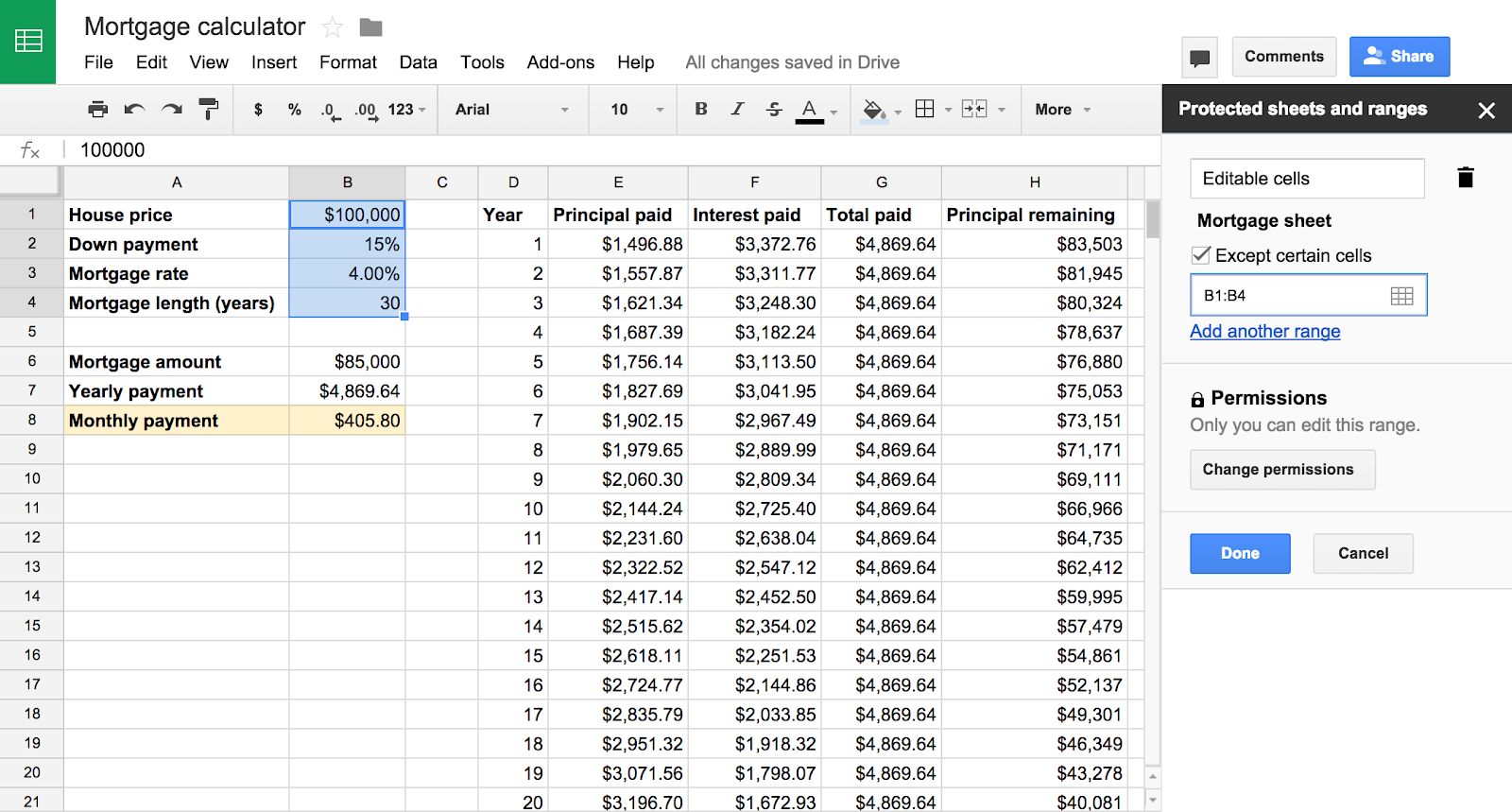
We’re launching several improvements to the protected sheets and ranges functionality in Google Sheets, providing faster and more granular control when locking down sections of content in spreadsheets.

Key changes include:
  • Ability to lock down all content in a sheet except a particular cell or range
  • Faster set up with the ability to re-use the same permissions you previously chose on a different set of cells
  • Ability to quickly lock down a sheet or range to only a single person, a small number of people or a domain
protected-1.png
Release track:
Rapid release, with Scheduled release coming in two weeks

For more information:
Help Center

Note: all launches are applicable to all Google Apps editions unless otherwise noted

whatsnew.googleapps.com
Get these product update alerts by email
Subscribe to the RSS feed of these updates

New versions of the Google Docs, Sheets and Slides apps are now available on Google Play and the App Store. New features include real-time spell-checking in documents (new for iOS only)inserting links (Android only) and hiding rows/columns in spreadsheets, and grouping shapes in presentations. We’ve also added support for Touch ID on iOS, so you can unlock Docs, Sheets and Slides with your unique fingerprint.

Release track:
Rapid release and Scheduled release

For more information:
(New) Google Docs blog post
Download the latest Docs, Sheets, and Slides apps on Google Play and the App Store

Note: all launches are applicable to all Google Apps editions unless otherwise noted

whatsnew.googleapps.com
Get these product update alerts by email
Subscribe to the RSS feed of these updates