This official feed from the Google Workspace team provides essential information about new features and improvements for Google Workspace customers.


Quick summary

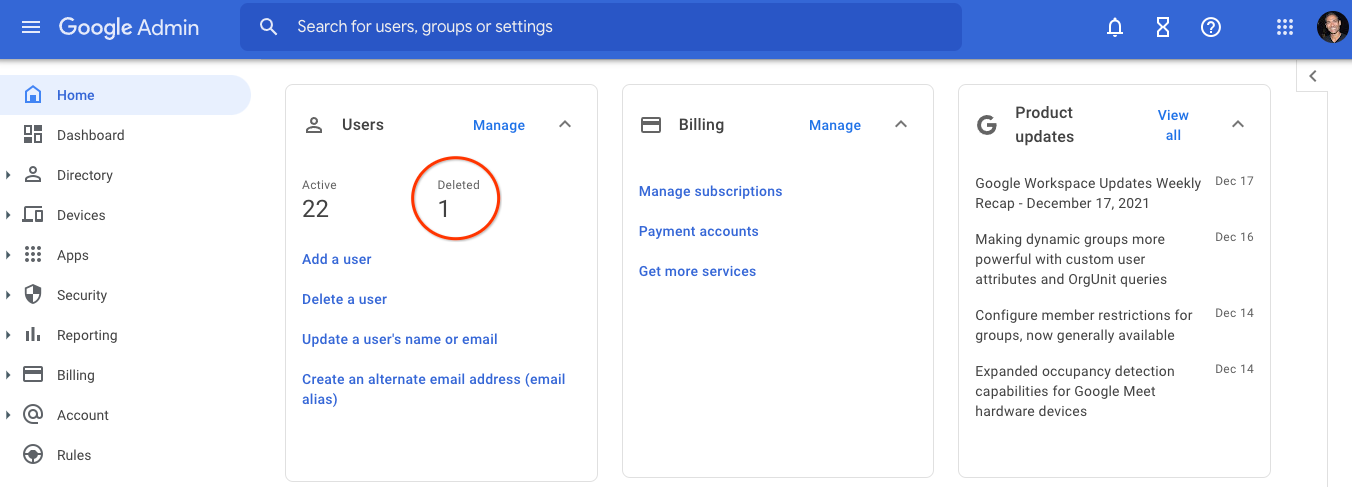
For customers with less than 100 active users, you’ll now be able to see when you have recently deleted users in your organization on the “Users” card in the Admin console. If you click on the number shown, you can view a list of the recently deleted users and how many days are left until their data is permanently deleted. 

Previously, Admins would have to filter for recently deleted users on the User List page to review any users available for being restored — this update makes this important information more readily available for customers that primarily use the Admin console for user management. 


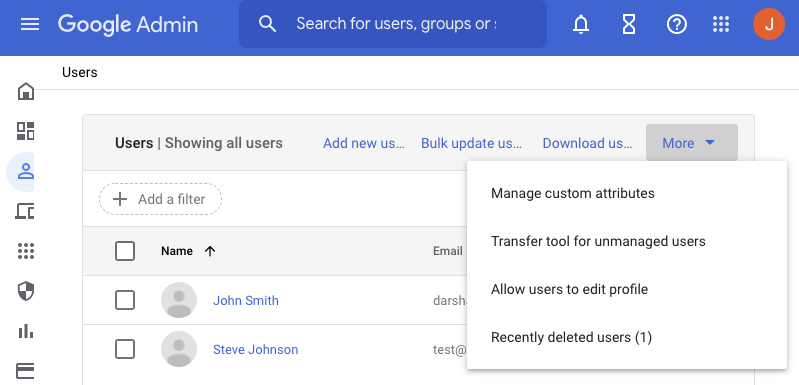
Additionally, for all customers, admins can now select “Recently deleted users” from the “More” menu on the User List page to quickly check whether there are any recently deleted users.


We hope these updates make it easier for Admins to stay informed about their recently deleted users and take action if needed such as restoring users to retain their accounts or transfer data to another account.


Getting started


Rollout pace


Availability

  • Available to all Google Workspace customers, as well as G Suite Basic and Business customers

Resources


Quick Summary 

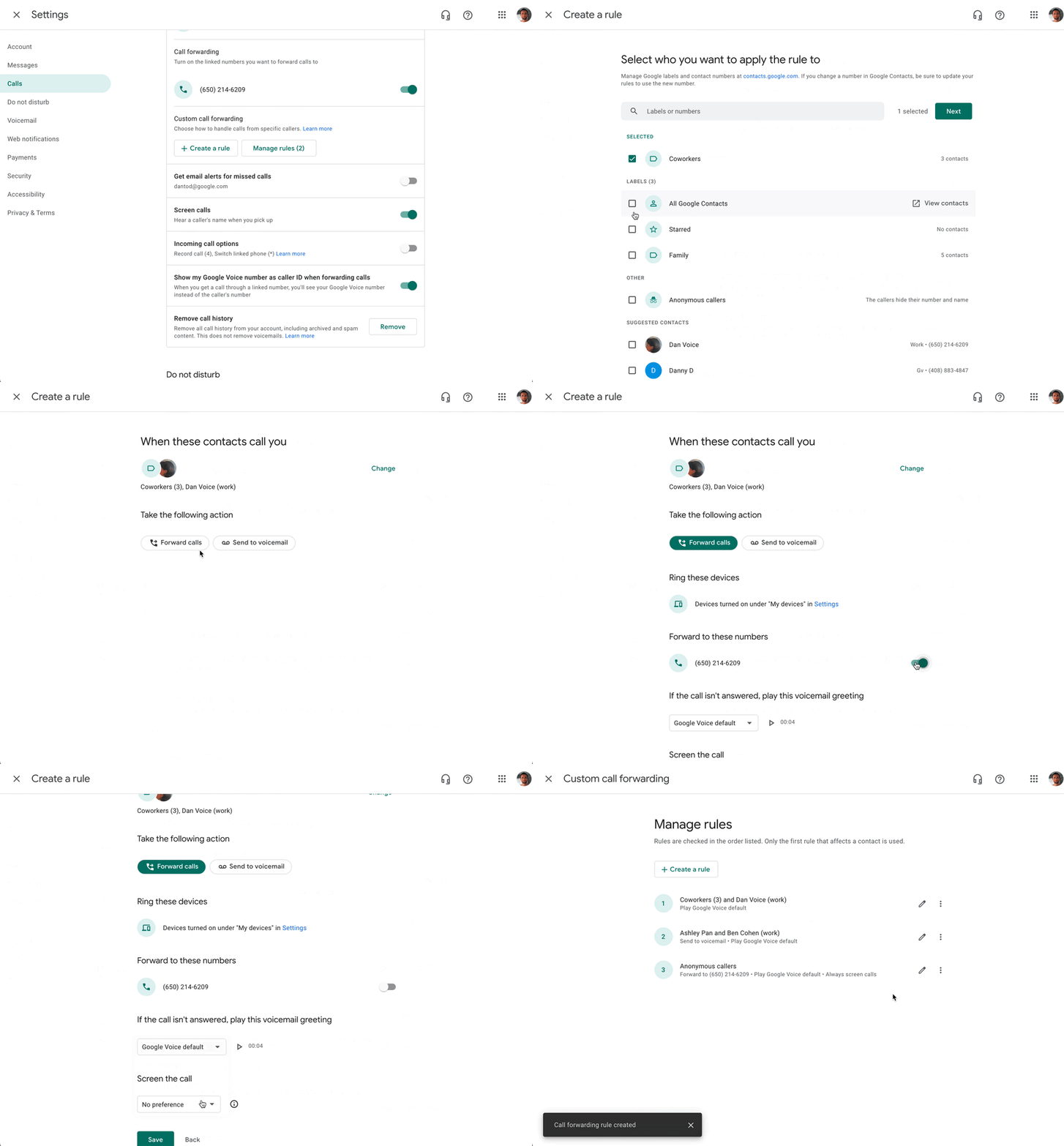
Within the Google Voice settings, you can easily create rules for how incoming calls should be handled. These options allow you to route incoming calls in ways that are most efficient to your workflows and productivity, including granular settings for specific contacts. 


Specifically, you can now: 
  • Forward calls from specific contacts to your linked phone numbers or directly to voicemail, 
  • Opt to screen calls from specific contacts, 
  • Set custom voicemail greetings for specific contacts, 
  • Apply rules for all your contacts or specific groups within your contacts 


Getting started 


Rollout pace 

Availability 

  • Available to all Google Voice users.

Resources 

New updates

Unless otherwise indicated, the features below are fully launched or in the process of rolling out (rollouts should take no more than 15 business days to complete), launching to both Rapid and Scheduled Release at the same time (if not, each stage of rollout should take no more than 15 business days to complete), and available to all Google Workspace and G Suite customers.


The filmstrip in Google Slides is now collapsable

In Google Slides, editors can now collapse or expand the filmstrip as needed. Collapsing the filmstrip expands the current slide view for more focused editing. You can expand the filmstrip when you need to view, navigate to, and edit the other slides in your presentation. 


Previous announcements

The announcements below were published on the Workspace Updates blog earlier this week. Please refer to the original blog posts for complete details.

Prevent unwanted invitations from being added to your calendar
We've improved the "Automatically add invitations" setting to help prevent unwanted invitations from being added to your calendar. You can choose to either: always have invitations automatically added or only have them automatically added if you have RSVP’d in the email event invitation. | Learn more here.


Easily see which account you’re currently using in Google Calendar on mobile
We’ve added account profile pictures in the top corner of Google Calendar on mobile so you can confidently tell which account you’re currently using and easily toggle between accounts. | Learn more.


Automatically move breakout room participants back to the original meeting
Google Meet costs and co-hosts can now automatically move break out room participants back to the main meeting room. Additionally, we’ve added better visual indicators for breakout room participants to indicate this movement. | Available to Google Workspace Essentials, Business Standard, Business Plus, Enterprise Essentials, Enterprise Standard, Enterprise Plus, Nonprofits and Education Plus as well as G Suite Business customers. | Learn more.


Use your Google Meet hardware-connected displays as digital signage
Admins have several new options to control how screen savers are displayed on their Google Meet hardware devices. | Learn more.


Expanded occupancy detection capabilities for Google Meet hardware devices
We’ve significantly expanded our occupancy detection capabilities on Google Meet hardware devices beyond Series One devices. Additionally, we have made improvements to the Room insights dashboard in the Admin console. | Learn more.


Configure member restrictions for groups, now generally available
In October 2021, we announced an open beta for group level controls that allow admins and end users who are group owners to restrict group memberships based on internal or external members and member type. This feature is now generally available. | Learn more.


Making dynamic groups more powerful with custom user attributes and OrgUnit queries
We’re further expanding the functionality of dynamic groups: dynamic groups can now be defined by querying custom user attributes and can also be defined based on users’ membership in Organizational Units (OUs). | Available to Google Workspace Enterprise Standard, Enterprise Plus, and Education Plus customers. | Learn more.


For a recap of announcements in the past six months, check out What’s new in Google Workspace (recent releases).

What’s changing 

Google Groups are a convenient way for Workspaces users to collaborate and a powerful tool for admins to apply consistent security and access policies to sets of users or devices. Dynamic groups further enhance this functionality by allowing group membership to be automatically updated based on parameters such as location, department, or job title. 

Today we are further extending the functionality of dynamic groups in two important ways: 
  • First, dynamic groups can now be defined by querying custom user attributes. This functionality is available as an open beta (no sign up required). 
  • Second, dynamic groups can also be defined based on users’ membership in Organizational Units (OUs). This feature is now generally available. 

Who’s impacted 

Admins only 


Why you’d use it 

Dynamic groups can be used for email distribution lists, access control, group based policy, and more. Compared to regular Google Groups they have the added benefit that memberships are automatically kept up-to-date. Automating membership management increases security, reduces errors, and alleviates user frustration while minimizing the burden on admins. 

These new features expand the utility of dynamic groups for organizations that take advantage of custom user attributes and organizational units. They can further tailor dynamic groups to meet the specific needs of their organization. For example these organizations could now: 
  • Create a dynamic group for all users of a subsidiary (an organizational unit) based in a particular city or state. 
  • Create a dynamic group with all users with a custom attribute of a “job_skill” or “speciality”. 

Getting started 

  • Admins: To take advantage of this new dynamic group functionality, you will need to have already defined custom user fields or organizational units
    • Once this is in place you can test membership queries and then create / update dynamic groups to take advantage of them. 
      • To query a customer attribute “EmployeeNumber” (based on this sample schema): user.custom_schemas.employmentData.EmployeeNumber == '123456789' 
      • To query all direct members of an organizational unit: user.org_unit_id==orgUnitId('03ph8a2z1enx4lx') 
      • To query all direct and indirect members of an organizational unit: user.org_units.exists(org_unit, org_unit.org_unit_id==orgUnitId('03ph8a2z1khexns')) 
  • End users: Not available to end users. 

Rollout pace 

  • Custom user attribute queries are available now for all users in open beta (no sign up required) 
  • Organizational unit based dynamic group queries are now generally available for all users. 

Availability 

  • Available to Google Workspace Enterprise Standard, Enterprise Plus, and Education Plus customers 
  • Not available to Google Workspace Essentials, Business Starter, Business Standard, Business Plus, Enterprise Essentials, Education Fundamentals, Frontline, and Nonprofits, as well as G Suite Basic and Business customers 

Resources 

Quick launch summary

In October 2021, we announced an open beta for group level controls that allow admins and end users who are group owners to restrict group memberships based on internal or external members and member type (service account, user, group). This feature is now generally available.

Member restrictions allow admins and end users who are group owners to limit group inclusion in several important ways:

  • Restrict group membership to only Internal or external members of an organization
  • Restrict by Member type - e.g. service accounts, users, and other groups.

The Cloud Identity Groups Memberships API can be used to check the state of memberships, which makes finding violating memberships easier

See the original announcement for more information.


Getting started


Rollout pace


Availability

  • Available to Google Workspace Enterprise Standard, Enterprise Plus, Education Plus, and Cloud Identity Premium customers
  • Not available to Google Workspace Essentials, Business Starter, Business Standard, Business Plus, Enterprise Essentials, Education Fundamentals, Frontline, and Nonprofits, as well as G Suite Basic and Business customers


Resources