This official feed from the Google Workspace team provides essential information about new features and improvements for Google Workspace customers.


What’s changing

We’re introducing a beta that gives Google Forms creators more granular control over who can respond to their forms via sharing settings. 

Previously, forms creators had two sharing options: restrict responses to users within their domain (and trusted domains) or make forms public (i.e. anyone with the URL can respond). With this new option, form creators can limit response access to specific users, groups, or target audiences—similar to how file owners can restrict the sharing of Google Docs, Sheets, Slides or Sites in Drive. 
New beta to add granular control options for who can respond to Google Forms


Who’s impacted 

Admins, end users and developers 


Why you’d use it 

This feature is useful in any scenario where you’d like to control who can respond to a form. For example, teachers can use this to ensure a quiz is only accessible to select students who receive the link. Similarly, business leaders can better collect feedback from specific organizational units and prevent the form from collecting email addresses or from being forwarded. 


Getting started 

  • Admins: For a limited time, you can sign your organization up for the beta using this form. Upon signing up, users within the Google group signed up for the beta should see the new feature within 2-3 weeks. 
  • End users: All new forms created by users who are allowlisted will be enabled into this feature. Form creators must publish their form to enable responders to view the form or submit a response. Form creators can see who has access to the form and share response access to specific users, groups, or target audiences. Visit the Help Center to learn more about creating a form in Google Forms
    • Users with personal Google Accounts or Workspace Individual subscribers can sign up using this form. 

Availability 

  • Available to all Google Workspace customers and users with personal Google Accounts 
    • Note: The target audiences feature mentioned above is only available for the Google Drive and Docs and Google Chat services. Supported editions for this feature on Drive, Docs & Chat include: Business Plus, Enterprise Standard, Enterprise Plus, Education Standard, Education Plus, Enterprise Essentials and Enterprise Essentials Plus. Supported editions for this feature on Drive & Docs only include: Business Standard, Nonprofits and G Suite Business. 

Resources 

What’s changing

Admins can now set client-side encryption (CSE) to be on by default for:

  • Newly created Gmail messages, Google Calendar events. 
  • Newly created Google Docs, Sheets, and Slides files.
  • Newly uploaded Google Drive files.

Admins can set client-side encryption as default on for users in Organizational Units (OUs) that regularly handle sensitive data requiring additional encryption. This allows organizations the flexibility to meet their compliance and regulatory requirements and reduce the burden on change management programs. Users are prompted to create a CSE object natively in each app meaning their emails, events and files are encrypted by default with customer-managed keys and are private from Google. For organizations with strict regulatory or sovereignty needs, this can help them close compliance gaps by defaulting users to the preferred mode for handling sensitive data.  

Drive:


Gmail:

This is available on the web initially, with support coming for mobile apps in the future. 

Who’s impacted

Admins and end users


Why it matters

This feature is important for Google Workspace admins as it improves users compliance behavior without sacrificing productivity and increases control for admins implementing data control policies. It also includes improved audit logs, providing more detail for admins compiling regulatory compliance reports.

Workspace already uses the latest cryptographic standards to encrypt data by default, at rest and in transit between our facilities. Client-side encryption goes beyond this, giving organizations authoritative control and privacy as the sole owner of private encryption keys and the identity provider of the encryption keys. It gives organizations higher confidence that any third party, including Google and foreign governments, cannot access their confidential data. Users can continue to collaborate across their preferred apps in Workspace while IT and compliance teams can ensure that sensitive data stays compliant with regulations. 


Getting started

Rollout pace


Availability

  • Google Workspace Assured Controls is available as an add-on to Google Workspace Enterprise Plus customers only. For more information, contact your Google account representative.

Resources


What’s changing 

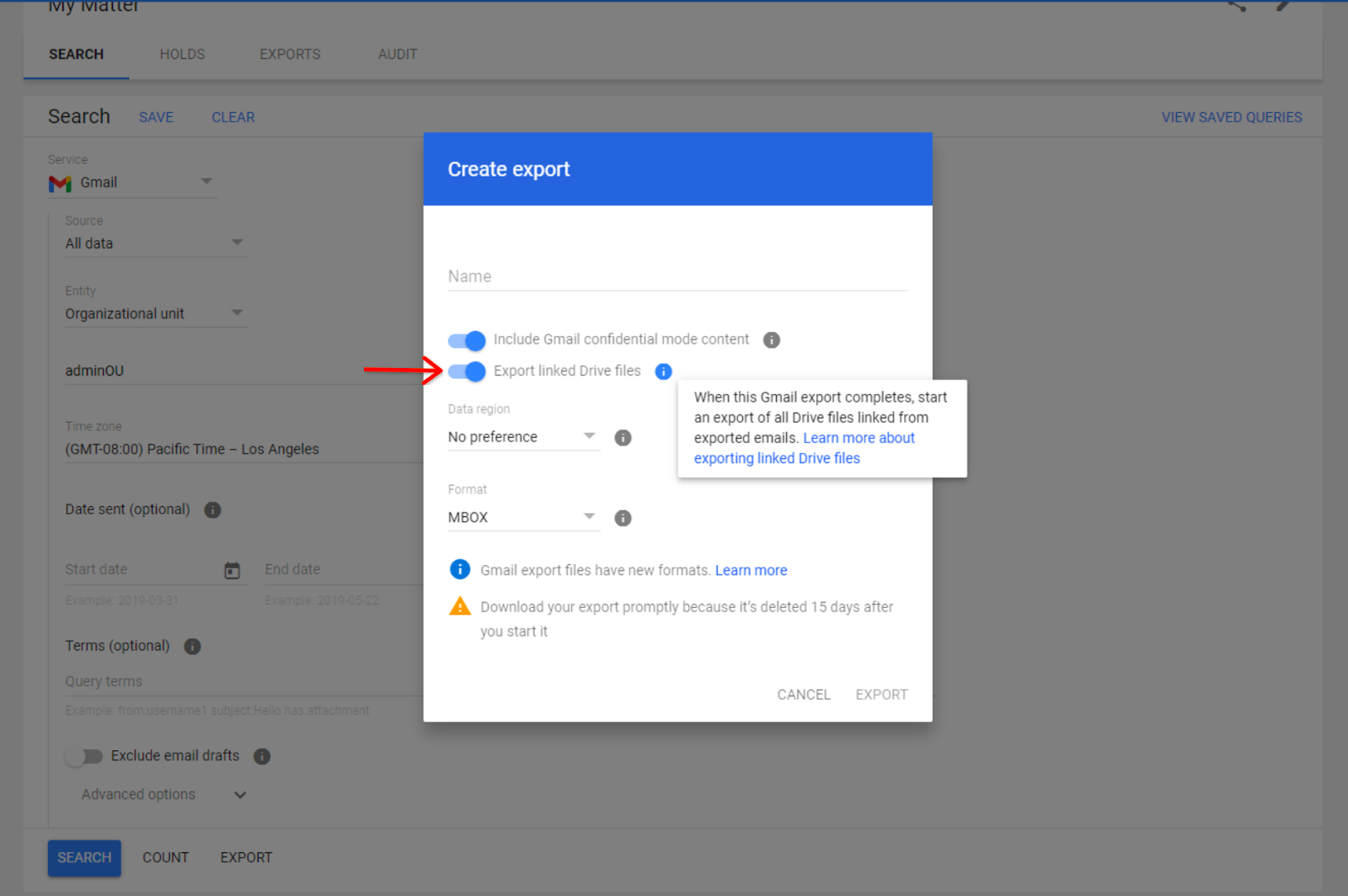
Starting December 8, 2023, admins can export Drive files hyperlinked in Gmail messages directly in Google Vault. When admins select “export linked Drive files”, Vault will look for Drive hyperlinks in the body of the emails being exported from Gmail. If Drive hyperlinks are found, a separate export of Drive files will also be created.


Toggle “Export linked Drive files” on or off


In the “Exports” tab, Drive exports will be grouped with their corresponding Gmail export — you can select the arrow icon to open the collapsible menu.


Admins will be able to find their exported hyperlinked Drive content nested under the corresponding Gmail export in the “Export” tab. Vault admins can find the association between the Gmail export and Drive link export in the export file names and metadata


Who’s impacted 

Admins 


Why it matters 

Vault is critical for retaining, holding, searching, and exporting users’ Google Workspace data. This update reduces the need for admins to manually find and extract Drive files hyperlinked in Gmail messages. 

Getting started 


Rollout pace 

Vault user interface updates 
API updates 

Availability 

  • Available to Google Workspace Business Plus, Enterprise Essentials, Enterprise Essentials Plus, Enterprise Standard, Enterprise Plus, Education Standard, Education Plus customers or customers with the Vault add-on license

Resources 

What’s changing

Building upon the recently announced improved search results in Google Chat, we’re also upgrading the search results page to help you find the right message, file, or space in Chat. 

Specifically, Chat will now highlight matching keywords in search results and show clear demarcation between results for easier browsing. The highlighted keywords could be an exact match to your search query or terms that are related to your search query. 
Introducing a redesigned search results page in Google Chat


Who’s impacted 

End users 


Why it matters 

This update improves content discoverability by making it easier for you to browse and locate search results quickly in Chat. 


Additional details 

Search results are based on the exact query, as well as any additional queries that might have been triggered (secondary query, synonyms, spell corrections, etc). 


Getting started 


Rollout pace 

  • This feature is available now for all users on web and mobile


Availability 

  • Available to all Google Workspace customers and users with personal Google Accounts 

Resources 

What’s changing

For years, users have written content and replied to comments faster and more easily using Smart Compose in Google Docs, Slides, Sheets and Drawings. Today, we’re excited to announce a new feature that extends the power of Smart Compose to help you solve simple math equations. 

Upon typing a math equation that ends with “=” into your document, presentation, spreadsheet comments, or drawing, solutions will appear as grey text suggestions. This new seamless mathematical experience will increase productivity and accuracy when solving math equations across Workspace. 
Solve math equations easily with Smart Compose


Getting started 

  • Admins: There is no admin control for this feature. 
  • End users: This feature will be ON by default and can be disabled by opening a file, clicking Tools > Preferences > deselect “Show Smart Compose suggestions”. Visit the Help Center to learn more about using Smart Compose and Smart Reply. 

Rollout pace 

Availability 

  • Available to Google Workspace Business Starter, Business Standard, Business Plus, Essentials Starter, Enterprise Essentials, Enterprise Essentials Plus, Enterprise Standard, Enterprise Plus, Education Fundamentals, Education Standard, Education Plus, the Teaching and Learning Upgrade, and Nonprofits 

Resources