
This official feed from the Google Workspace team provides essential information about new features and improvements for Google Workspace customers.


New updates 

There are no new updates to share this week. Please see below for a recap of published announcements.

Previous announcements 

The announcements below were published on the Workspace Updates blog earlier this week. Please refer to the original blog posts for complete details.

Edit details in line with Google Tasks on the web
You can now add additional information to your personal tasks without opening the “Details” dialog box. | Learn more. 

Admins will now be alerted when there is an issue with their Google Voice auto attendants or ring groups
Admins will now receive an alert in the Admin console’s Alert Center when an issue is detected with their auto attendant or ring group configuration along with instructions on how to quickly resolve the issue. | Learn more.

Google Vault now supports Google Sites
Google Vault now supports new Google Sites. You can use Google Vault to set retention policies for Google Sites, perform searches of Google Sites data, and export Google Sites content. | Learn more. 

Apply context-aware access policies to mobile and desktop applications
Admins can now assign existing or new context-aware access levels to Google desktop and mobile applications. | Learn more. 

Email threads with recipients outside your organization will be labeled “External”
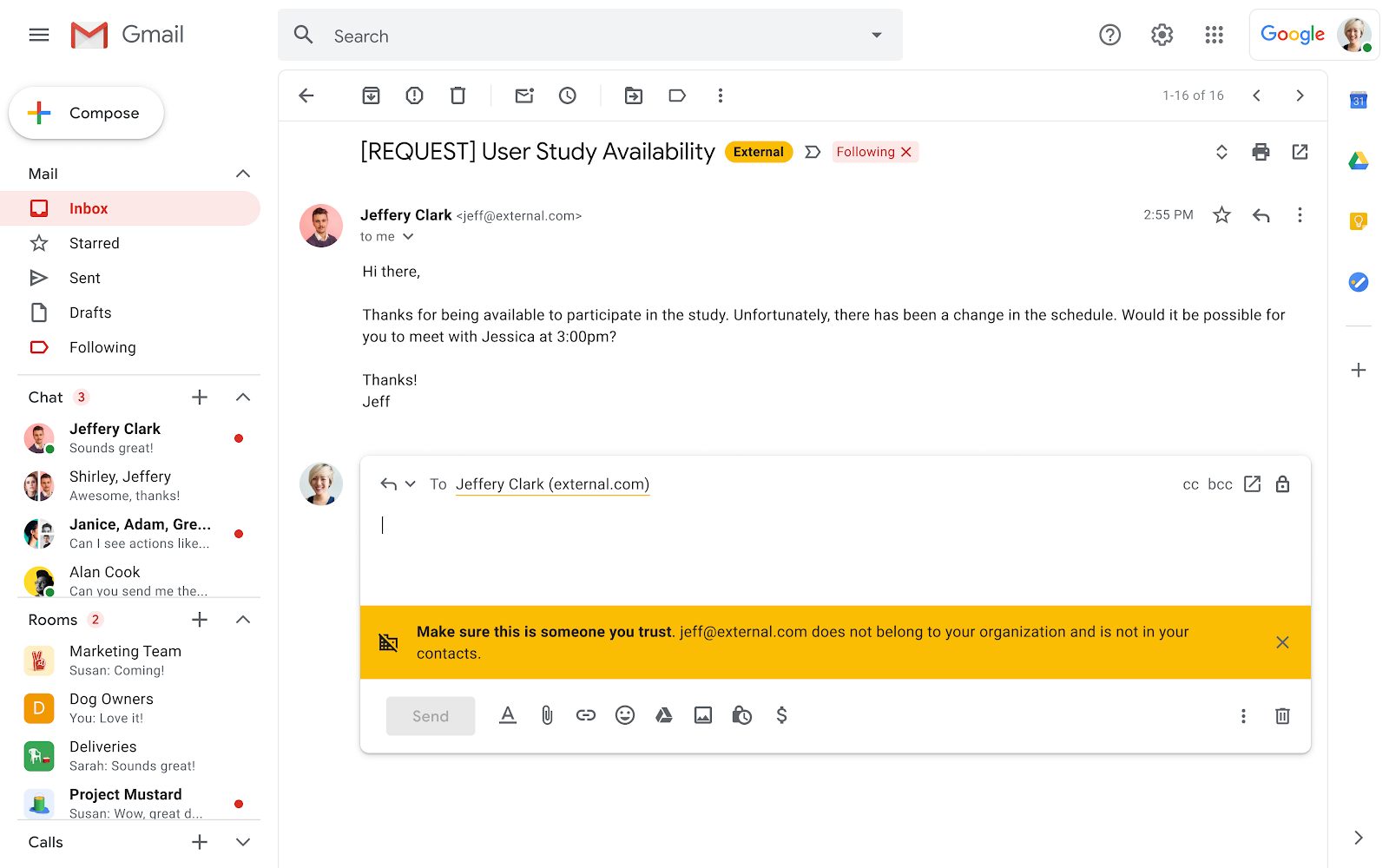
We’re adding a new “External” label to email threads that include recipients outside your organization. This adds to the existing external recipient warning banner and can be turned on and off by admins. | Learn more

For a recap of announcements in the past six months, check out What’s new in Google Workspace (recent releases).

What’s changing 

We’re adding a new “External” label to email threads that include recipients outside your organization. This adds to the existing external recipient warning banner, which is displayed when responding to emails sent from outside of your organization. 


The “External” label will be visible on Gmail on the web and Android devices. We will provide an update when this feature becomes available on iOS. 


The external label and warning banner appears when interacting with individuals outside the domain.


Who’s impacted 

Admins and end users 


Why it’s important 

The “External” label and the reply warning banner and label are helpful reminders for users to treat external messages with caution. This can help avoid unintentionally sharing confidential information with recipients outside of their organization. 


Additional details 

Secondary and alias domains are exempted from being labeled as “External”. 


Getting started 

  • Admins: Visit the Help Center to learn more about turning external recipient warnings on or off in Gmail. Note: This setting controls both the “External” label and warning banner. 

  • End users: No action required. When enabled by your admin, you'll see "External" label and warning banner when interacting with or replying to email threads with recipients outside your organization or contacts.


Rollout pace 


Availability 

  • Available to all Google Workspace customers, as well as G Suite Basic and Business customers 


Resources 

What’s changing 

Admins can now assign existing or new context-aware access levels to Google desktop and mobile applications. 

Applying context-aware access levels to mobile and desktop applications


Who’s impacted 

Admins and end users 


Why it’s important 

With context-aware access, you can set up different access levels based on a user’s identity and the context of the request (location, device security status, IP address). Expanding these policies to other Google Workspace entry points—such as the Google Drive for desktop app or using Gmail on a mobile browser—gives admins greater control over how, when, and where users can access Workspace resources. 


Getting started 


Rollout pace 

Availability 

  • Available to Google Workspace Enterprise Standard, Enterprise Plus, Education Plus, and Cloud Identity Premium customers
  • Not available to Google Workspace Essentials, Business Starter, Business Standard, Business Plus, Enterprise Essentials, Education Fundamentals, Frontline, and Nonprofits, as well as G Suite Basic and Business customers

Resources 

What’s changing

Google Vault now supports new Google Sites. You can use Google Vault to set retention policies for Google Sites, perform searches of Google Sites data, and export Google Sites content. If you already use Vault to hold Google Drive files, sites files will now be covered by those holds. You can set Sites-specific retention rules if you want to manage sites retention.

Who’s impacted

Admins

Why it matters

This provides you with expanded control over your organization’s data, and can help you meet regulatory or legal obligations for your Google Sites data.

If you have Drive retention rules set to purge data after a retention period, sites will be purged according to those rules.

Getting started

  • End users: There is no end user setting for this feature.

Rollout pace

Rapid Release and Scheduled Release domains: Gradual rollout (up to 15 days for feature visibility) starting on April 27.

Availability

  • Available to Business Plus, Enterprise Essentials, Enterprise Standard, Enterprise Plus, Education Fundamentals, Education Plus, and Nonprofits.
  • Not available to Google Workspace Essentials, Business Starter and Business Standard customers, and G Suite Basic customers.

Resources

Quick launch summary 

Admins will now receive an alert in the Admin console’s Alert Center when an issue is detected with their auto attendant or ring group configuration along with instructions on how to quickly resolve the issue. These issues include: 
  • No valid members in a ring group, 
  • No valid auto attendants or ring groups to forward the call to, 
  • No voicemail recipients. 


Getting started 

Rollout pace 


Availability 

  • Available to all Google Workspace and G Suite customers with Google Voice standard and premier licenses 

Resources