This official feed from the Google Workspace team provides essential information about new features and improvements for Google Workspace customers.


Quick summary 

When someone mentions you in a comment in a Google Workspace document, we send you an email notification with the comment and the commenter's name. With this update, we are adding the commenter's email address to the email notification. 


We hope that by providing this additional information, this will help you feel more confident that you’re receiving a legitimate notification rather than a spam or phishing attempt by a bad actor. 


Getting started 


Rollout pace 


Availability 

  • Available to all Google Workspace customers, as well as legacy G Suite Basic and Business customers
  • Also available to users with personal Google accounts 

Resources 

Quick summary 

Admins will now be able to see events that include both their organization and another external organization or user (Copy, Move, ACL Change, etc.) in their Drive audit logs. 

For example, if you have an external guest user on some of your organization’s documents and the guest makes a copy of the document in their organization, that Copy event will now show in your audit logs. This can help you see new audit log events related to potential exfiltration that you could not see before.

Getting started 

  • Admins: This feature will be ON by default. No action is required, relevant events will appear in the logs automatically. Use our Help Center to learn more about Drive audit logs. 
  • End users: No end user impact. 

Rollout pace 

Availability 

Resources 

Quick summary 

You can now embed linked response charts from Google Forms into a Google Doc, Google Slides presentation, or a Google Drawing. When new form responses are received, anyone with the proper permissions can refresh an embedded chart by simply clicking the "Update" button. This eliminates the need to re-copy the chart from the form. 

This feature is useful for sharing real-time responses to polls or surveys and for incorporating Forms responses data into presentations or reports. 


Embedding a form chart


Getting started 

  • Admins: There is no admin control for this feature. 
  • End users: There is no end user setting for this feature. Visit the Help Center to learn more about viewing and managing form responses

Rollout pace 

Availability 

  • Available to all Google Workspace customers, as well as legacy G Suite Basic and Business customers Available to users with personal Google Accounts 

 Resources 

What’s changing 

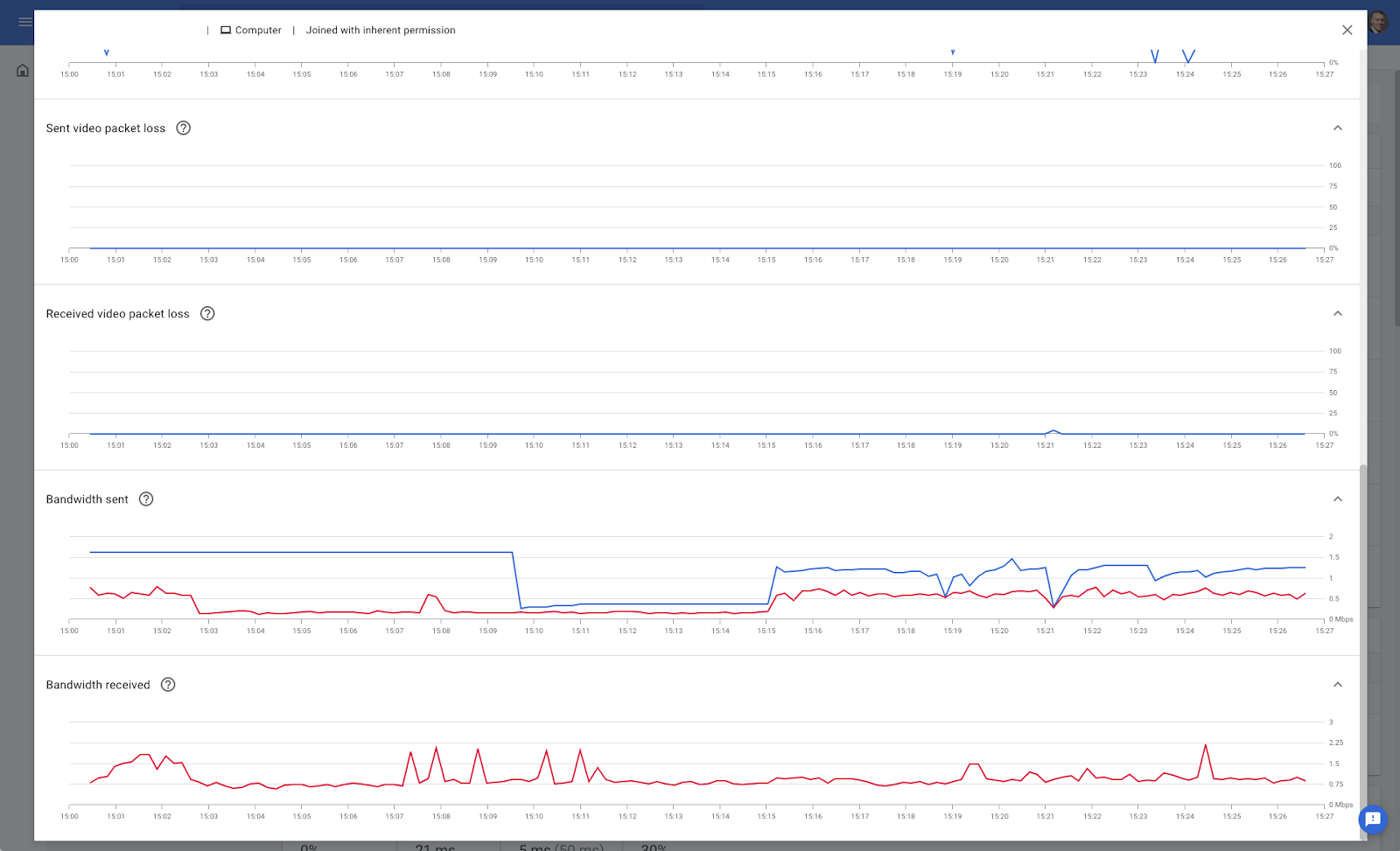
Admins can now use the Meet quality tool to view inbound and outbound bandwidth information—both used and available—for their users. Surfacing this information helps admins visualize participants bandwidth compared to the quality of a call, making it easier for them to determine where a bandwidth bottleneck could be causing low quality. 


Admins can use the graphs to view sent and received bandwidth, used bandwidth, and the bandwidth availability over time.


Hovering over a data point surfaces numerical readouts and exact timestamps. 


Who’s impacted


Admins


Why it’s important

Knowing which bitrates are available or being used for specific endpoints is critical data when performing troubleshooting or working to improve call quality in your domain. Previously, this data was only available as an average across entire calls, which can make it difficult to narrow down problems during specific points in time. 


We hope by surfacing this detailed information, Admins can easily troubleshoot or improve call quality for their users.


Getting started


  • Admins: This feature will be available by default. From the Admin console, navigate to Apps > Google Workspace > Google Meet > Meet quality tool. Alternatively, you can search for a meeting code, organizer, or participant from the search bar to access the Meet quality tool. Visit the Help Center to learn more about tracking meeting quality and statistics.
  • End users: There is no end user impact.


Rollout pace

  • This feature is currently available

Availability

  • Available to all Google Workspace customers, as well as legacy G Suite Basic and Business customers

Resources


Roadmap


What’s changing 


We're introducing several improvements for Spaces in Google Chat to help you better organize people, topics, and projects. 

These improvements include: 

  • Manager role so certain users have greater control over the management of a space. 
  • Space descriptions so users can set context for their spaces. 
  • Space guidelines to ensure safe and effective communication environments. 


Who’s impacted 

End users 

Why it’s important 

The Manager role provides tools to promote healthy conversations and control the availability of the space within an organization. Space creators will be managers by default and can assign other members in the space this role as well. 


Space managers will have a badge next to their name on the member list

 Space managers will have a badge next to their name on the member list


Managers can also add a description for spaces. This field can be used to describe the purpose of the space, such as ’a place to discuss all things asteroids,’ which is helpful context for members of the space.

You can add a space description when creating a space or by selecting “View space details” for an existing space on both web and mobile. Space descriptions can be viewed when a user is in the “Browse Spaces” view or by selecting “View space details.”


Adding a space decription


Adding a space description


Additionally, Managers can describe space guidelines that establish rules and expectations for members to create a safer community experience. 


Space guidelines

Space guidelines


We hope this feature makes it easier to share the purpose and guidelines for a particular space, making it easier for your collaborators to navigate quickly to the appropriate space. 


Getting started 


Rollout pace 

Space Roles: 

Mobile: 

  • Rapid and Scheduled Release domains: Extended rollout (potentially longer than 15 days for feature visibility) starting on February 28, 2022, with anticipated completion by March 14, 2022 

Web: 

Space Descriptions and Guidelines: 

  • We anticipate rollout for the descriptions and guidelines features to begin later this month. We’ll share an update on the Workspace Updates Blog when rollout begins. 


Availability 

  • Available to all Google Workspace customers, as well as legacy G Suite Basic and Business customers 
  • Available to users with personal Google Accounts 

Resources 

Roadmap 

This feature was listed as an upcoming release.