
This official feed from the Google Workspace team provides essential information about new features and improvements for Google Workspace customers.


A new Hangouts Chrome app was launched today with an updated UI. The app is available for Windows and Chrome OS platforms and brings the best of Hangouts to your desktop.

Improvements include:

  • Streamlined design that keeps your chats accessible without getting in the way of everything else. Your contact list and all your chats are condensed into one easy to toggle window.
  • Works outside of your browser so your chats are always available, not tucked away inside a window. You’ll get all your messages as long as you have the app running, and your chats will sync across Hangouts on all your devices.
  • Includes all the video and voice features you’re used to in Hangouts. We recently announced you can make phone calls to any number in the world (via Hangouts dialer) and now you can do this right from your desktop.

Release track:
Rapid release and Scheduled release

For more information:
Download the Hangouts Chrome app

Note: all launches are applicable to all Google Apps editions unless otherwise noted

whatsnew.googleapps.com
Get these product update alerts by email
Subscribe to the RSS feed of these updates
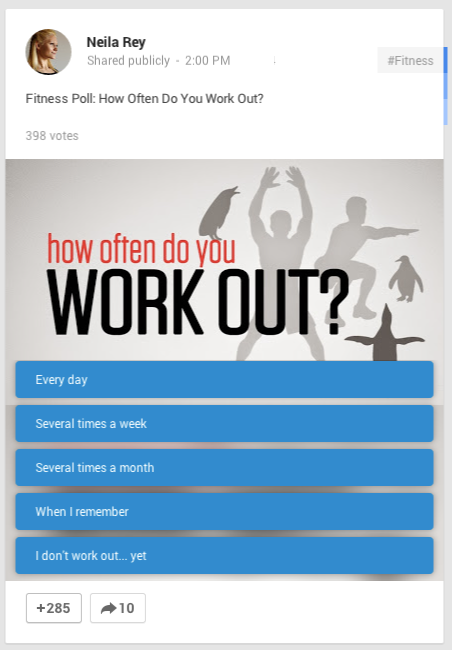
Today we announced Google+ Polls, a new feature that allows people using Google+ to create interactive polls and share them with their friends and followers. Images can be added to the polls from one’s device or Google+ photos, making them interesting and engaging. Followers can then vote on the polls and results are visible to them after they vote.
polls-partners-3.004.png
Polls will become available over the next few days on Android and the web, and are coming soon to iOS. Look for the new poll icon when creating a post to create a poll.
Release track:
Rapid release and Scheduled release For more information:
Help Center

Note: all launches are applicable to all Google Apps editions unless otherwise noted

whatsnew.googleapps.com
Get these product update alerts by email
Subscribe to the RSS feed of these updates

We have added spell check functionality to the new Google Sheets. This is a new and improved version of spell check compared to what existed in the old Sheets.

In this version, spelling is checked against the web (similar to Docs and Slides) so that the dictionary is always up-to-date. Also like in Docs and Slides, people can add words to their own dictionary so that the spell checker won't mark names or abbreviations as misspellings in the future.

You can access the functionality by selecting Tools -> Spelling. Incorrect words are featured in a window on the upper right corner of the screen, along with suggested spellings. Suggestions can be accepted or ignored.

Release track:
Rapid release and Scheduled release

For more information:
Help Center

Note: all launches are applicable to all Google Apps editions unless otherwise noted

whatsnew.googleapps.com
Get these product update alerts by email
Subscribe to the RSS feed of these updates

People working with images in Google Slides on the web will now have the ability to adjust their color, transparency, brightness, and contrast.

To use this feature, select an image in Google Slides and click the Image options button in the toolbar (you can also right click on the image, or use the Format menu, and select Image options). Under "Recolor," you can change the color of your image to match your presentation. Under "Adjustments," you can change the following:
  • Transparency: How much of the slide shows through behind the image
  • Brightness: How bright the image appears on the slide
  • Contrast: How much the image stands out from its background

Release track:
Rapid release, with Scheduled release coming in two weeks

For more information:
Help Center

Note: all launches are applicable to all Google Apps editions unless otherwise noted

whatsnew.googleapps.com
Get these product update alerts by email
Subscribe to the RSS feed of these updates

This launch allows Google Apps customers to share links to Hangouts video calls so that external guests may request to join if not explicitly invited. This will also help your guests avoid errors when joining with alternate Google accounts.

Features of the launch include:

  1. People in the same domain as the Hangout can make the video call externally accessible with the link.

  1. Video calls that are shared with the link require someone in the Hangout Apps domain to accept those requesting access.

Primary use-case: A person using Hangouts for Work invites another contact to a Hangout via calendar, but the contact connects through their browser, already logged in with their personal account.

Release track:
Rapid release and Scheduled release

For more information:
G+ Post


Note: all launches are applicable to all Google Apps editions unless otherwise noted

whatsnew.googleapps.com
Get these product update alerts by email
Subscribe to the RSS feed of these updates