This official feed from the Google Workspace team provides essential information about new features and improvements for Google Workspace customers.


Quick launch summary

We’re making some updates to the home page in the Admin console. You may notice: 
  • A new card-based interface which includes more information and links to provide quick access to common tasks. 
  • Expandable (or collapsible) cards for Users, Billing, and Domains, with quick links to common items in those areas. 
  • Reordered items to make it easier to find the most used sections and complete common tasks. 
We hope this design will make it quicker to navigate around the Admin console, easier to find items you need to manage, and simpler to understand how Google Workspace is deployed within your organization. 

The new admin console home page 

The old Admin console home page 

Getting started 

  • Admins: You’ll see the new interface when you log into the Admin console. Visit the Help Center to learn more about using the Admin console
  • End users: No end user impact. 

Rollout pace 

Availability 

  • Available to all Google Workspace customers, as well as G Suite Basic and Business customers 

Resources 

Quick launch summary

Now you can add these four new citation source types in Google Docs:
  • Film
  • TV Series
  • TV Episode
  • Miscellaneous
This will make writing academic papers easier, since you won’t have to copy citations from other tools. The four new citation source types come in addition to the types you already have available, including books, websites, journal articles, and newspaper articles.


Adding a film as a citation source

Getting started


Rollout pace


Availability

  • Available to all Google Workspace customers, as well as G Suite Basic and Business customers.

Resources

What’s changing

We previously announced Google Workspace Frontline, our newest offering built specifically for frontline employees. Today, we’re excited to announce that Google Workspace Frontline is available for purchase through Sales and resellers, to give frontline workers secure access, on any supported device, to the information they need to be at their best.


Who’s impacted

Admins and end users 

Why you’d use it

Google Workspace Frontline can help open up communication and collaboration channels between frontline workers and corporate teams in a way that’s safe and secure, even from their own personal devices. It’s a custom solution that includes communication and collaboration apps like Gmail, Chat, Meet, Docs, Drive, and more, as well as business-grade support and security features like advanced endpoint management that help keep a company’s data secure.

Additional details

With Google Workspace Frontline, your employees will have access to:
  • Gmail
  • Google Calendar
  • Google Chat
  • Google Meet
  • Google Docs
  • Google Sheets
  • Google Slides
  • Google Sites

In addition, you’ll get 2GB Drive storage per user and the ability to view content in shared drives. This offer also includes business-grade support and security features like advanced endpoint management, which enables admins to require strong mobile passcodes, set up work profiles for Android devices, manage apps forAndroid and iOS devices, and wipe devices remotely if needed.

Getting started

  • Admins: To learn more about Google Workspace Frontline, visit the Help Center or contact our Sales team.
  • End users: Users will automatically get access to the features in Google Workspace Frontline after signing up.

Rollout pace

  • This edition is available now.

Availability

  • Google Workspace Frontline is available for both new and all existing customers.

Resources

What’s changing 

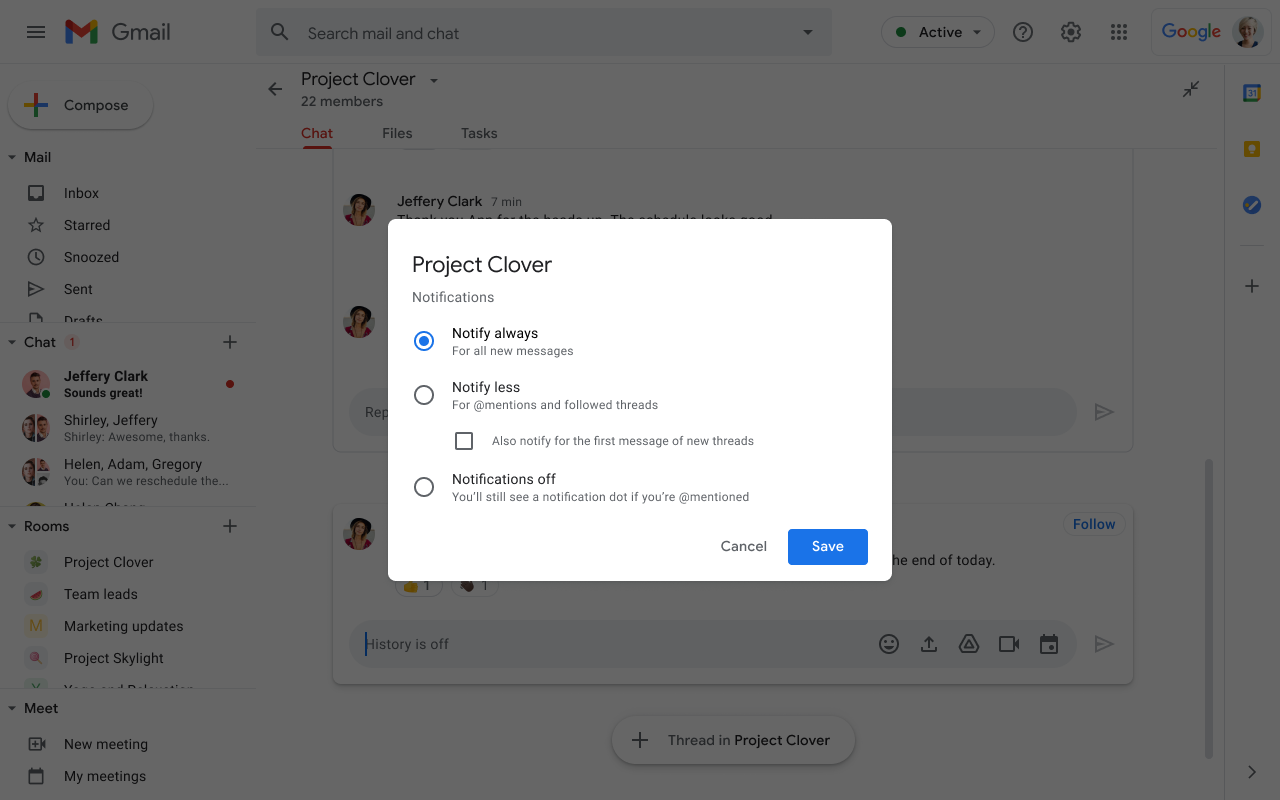
We’ve added more options for notification settings in Google Chat and Chat in Gmail. The new options affect push notifications on desktop and mobile, as well as notification badges on both the Chat and Gmail apps. You can set your notification preferences to:
  • Notify always: You’ll receive a notification for every message and new messages will be badged.
  • Notify less: You’ll receive notifications and badges for direct mentions, @all mentions, and followed threads. Additionally, there is an option to be notified about new threads in threaded rooms.
  • Notifications off: You will receive no notifications, but you’ll see a badge if you’re directly mentioned.

For existing Rooms, the notification setting may default to a state where you receive more notifications. To review and update your notification settings, simply select the three-dot overflow menu in each room.

Who’s impacted 

End users 

Why you’d use it 

These additional notification settings give you more control over the amount of notifications you’ll receive based on your level of engagement or involvement in specific conversations. We hope that by giving the ability you adjust your notifications as needed, you can stay on top of need-to-know conversations without being overwhelmed by notifications.

Getting started 

  • Admins: There is no admin control for this feature. We recommend that you familiarize yourself with the changes outlined in these Help Center articles and let your users know about the changes they can expect: 
  • End users: 
    • Visit the Help Center to learn more about turning notifications on or off in Gmail and Chat.
    • Make sure your Gmail and Google Chat apps are updated to the latest versions of the respective apps.

Rollout pace

Availability 

  • Available to all Google Workspace customers, as well as G Suite Basic and Business customers


Resources 


What’s changing

Starting March 24, we’re making some changes to the interface of Google Chat on the web (i.e. chat.google.com) and the Progressive Web Application (PWA).

Old and new Google Chat on the web


Who’s impacted

End users

Why you’d use it

The new interface is similar to that of Chat in Gmail, giving users a consistent and predictable Chat experience no matter where they are. We’ve also added some new integrations to help your users be more productive. See Additional details below for more information.

Additional details

In addition to the visual interface updates, you’ll also see the following changes on Chat on the web:
  • In Chat rooms, you can now access shared files and tasks via tabs at the top of the room
  • We’ve added the quick access side panel on the right side, like in Gmail, to provide access to apps like Calendar, Keep, Tasks, and Maps
  • Search for existing conversations or for people to start new conversations is now under the “+” on the left-side navigation.
  • You can use the search bar at the top to look for content across all rooms and direct messages (DMs). To search for content within each room or direct message, click on the search button at the top right corner of the room/DM first and then proceed to search for content in the search bar.
  • The “Chat” and “Rooms” sections on the left-side navigation bar are static, allowing you to scroll more easily within each section. You can readjust the height of each of the sections based on your preference.
  • Feature to toggle between full screen view and pop-up view for both rooms and DMs, allowing easier multi tasking between conversations.
  • Integration with Google Meet so you can join or start a call directly from Chat
  • Pinned chats and rooms are now at the top of the Chat and Rooms sections instead of in a separate Pinned section. Users can unpin any unused pinned conversations to reduce clutter in these sections.
  • chat.google.com will now redirect to mail.google.com/chat. However, users can continue to use chat.google.com to access Chat.

Note that these changes will only impact domains with the Gmail service turned on. We’ll launch these changes to domains with Gmail turned off in the coming months.

Getting started

  • Admins: There is no admin control for these changes.
  • End users: These changes will take place automatically at chat.google.com and in the Chat PWA.

Rollout pace

Availability

  • Available to all Google Workspace customers, as well as G Suite Basic and Business customers