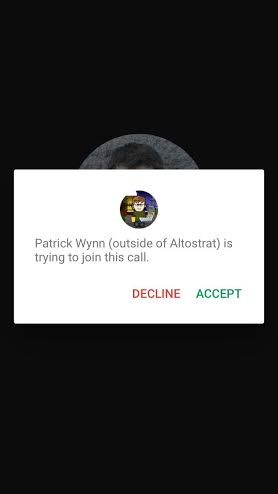
We recently completed the cross-platform rollout of a feature allowing Google Apps customers to share links to Hangouts video calls so that external meeting guests may request to join if not explicitly invited. Previously, video calls shared with the link required someone in the Apps domain of the Hangout video call to accept those requesting access on the web. With today’s launch, we’ve enabled this accept or reject functionality in the latest version of the Hangouts iOS app. To accept or reject a request to join a video call on your mobile device, tap the ‘Accept’ or ‘Decline’ button in the pop-up screen that appears when a guest is requesting to join.
This functionality is coming soon to the Hangouts Android app. Release track: Rapid release and Scheduled release For more information: Help Center Get the latest Hangouts app in the App Store Note: all launches are applicable to all Google Apps editions unless otherwise noted
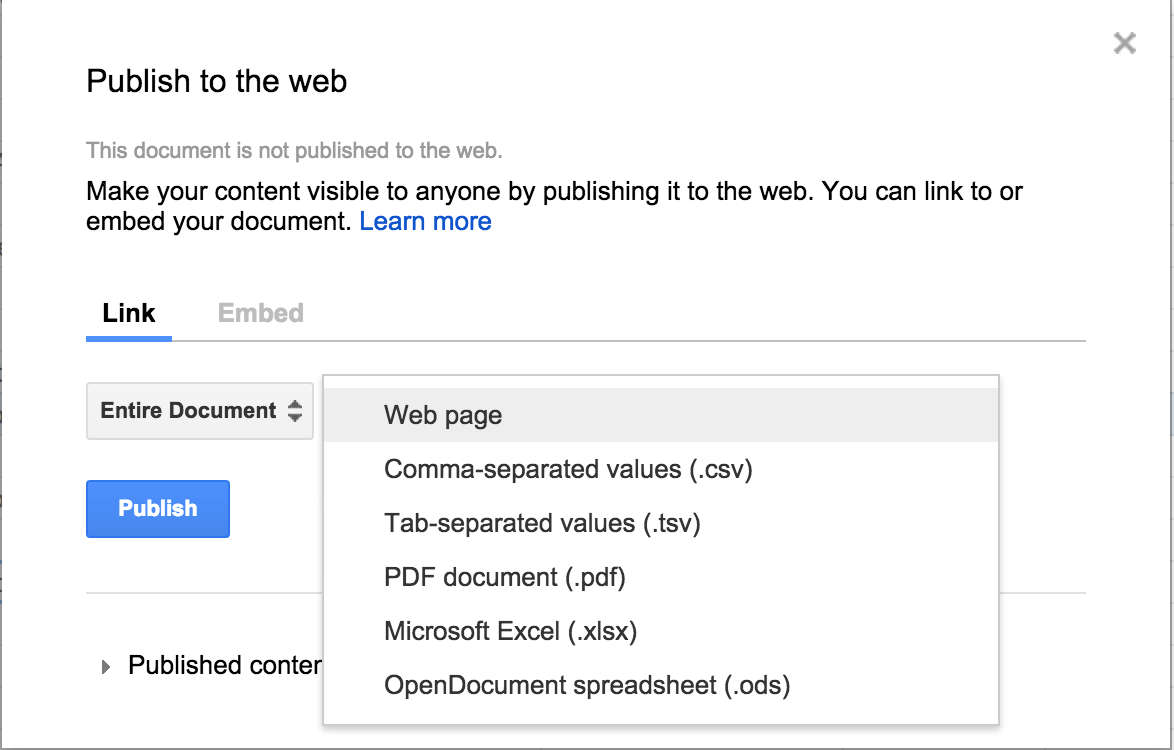
In Google Sheets on the web, if a person wants to make a spreadsheet available for a large audience to see, they can publish the file as a web page. Once that file is published, the person receives a URL that can be sent to whomever they choose or embedded into a website. Today’s launch allows people to publish spreadsheets in five additional formats—as comma-separated values (.csv), tab-separated values (.tsv), a PDF document (.pdf), a Microsoft Excel® spreadsheet (.xlsx), or an OpenDocument spreadsheet (.ods). The URL generated, when opened in a browser, will automatically download the spreadsheet in the chosen format (spreadsheets in these additional formats cannot be embedded).
Try out this new feature in Google Sheets on the web today.
Release track: Rapid release and Scheduled release
Last year, Google worked with the FIDO Alliance standards organization to launch the Security Key — an actual physical key used to simplify 2-Step Verification with Google Accounts. The key adds a layer of protection as it sends an encrypted signature rather than a code, ensuring that login information cannot be phished.
Recently, we announced that we’ve been working on new controls for Google Apps admins to easily deploy, monitor and manage Security Keys for their domains via the Admin console, with no additional software to install. Today, we’re excited to announce that these controls are ready and available in the Admin console for Google Apps Unlimited and Google Apps for Education customers. We also have worked on a new special offer for Google Apps customers that allows them to purchase Security Keys at a 50% discounted rate from Yubico, Security Key manufacturer. Once Security Keys have been activated by individuals within a domain, Google Apps admins will now be able to do the following with today’s release:
See where and when people last used their keys with usage tracking and reports (Admin console > Reports > Audit > Admin)
Easily revoke access to lost Security Keys and provide backup codes so people can still sign-in and get work done (Admin console > Users > Open details for person in question > Security Keys)
We are using Security Keys at Google because it makes our lives easier and increases security. With these new controls, Google Apps admins can offer the same benefits to people in their domain.
To help analyze and monitor the use of Google Drive content in their organizations, Drive for Work and Google Apps for Education admins are able to access audit logs in the ‘Audit’ section of the Admin console Reports area and via the Reports API. The current Drive audit logs include events such as create, view, and delete, among others. With today’s launch, we’re adding download event support to the Drive audit logs. Download events will cover file downloads for Google and non-Google file formats. Admins will be able to filter on download events and combine that with other filtering criteria like document name, user name and timestamp. Admins will also be able to set download alerts on certain files based on filenames, owners, etc. Check out the Help Center for more information and notes on download event support. We’ll be adding additional sources such as Sync Client downloads and exports of documents through the Google Docs editors in the future. Release track: Rapid release and Scheduled release For more information: Help Center Note: all launches are applicable to all Google Apps editions unless otherwise noted
In the Google Cloud Community, discuss the latest features with Googlers and other Google Workspace admins like you. Learn tips and tricks that will make your work and life easier. Be the first to know what's happening with Google Workspace.
On the “What’s new in Google Workspace?” Help Center page, learn about new products and features launching in Google Workspace, including smaller changes that haven’t been announced on the Google Workspace Updates blog.
Discover how a diverse range of organizations, from small businesses and nimble startups to globally recognized Fortune 500 corporations, leverage the collaborative power of Google Workspace. Explore examples of how teams of are streamlining workflows and driving productivity by utilizing Google-Workspace.


 This functionality is coming soon to the Hangouts Android app.