
This official feed from the Google Workspace team provides essential information about new features and improvements for Google Workspace customers.


If you’ve recently rebranded your business or purchased a new domain name, today’s launch makes it possible to rename your primary domain directly from the Admin console.* Simply follow the instructions outlined in the Help Center to swap your existing primary domain name with any verified secondary domain name. If you purchased your Google Apps licenses from a Reseller, please notify them before making any changes to your domain name.


*Please note that this feature is not available for Reseller accounts, domains purchased through a Google partner, accounts with Chrome or Mobile Device Management licenses, or customers in trial. You also cannot change Standard edition domains.

Launch Details
Release track:
Launching to both Rapid release and Scheduled release

Rollout pace:
Full rollout (1–3 days for feature visibility)

Impact:
Admins only

Action:
Admin action suggested/FYI

More Information
Help Center: Before you change your primary domain
Help Center: Change your primary domain from the Admin console

Note: all launches are applicable to all Google Apps editions unless otherwise noted

Launch release calendar
Launch detail categories
Get these product update alerts by email
Subscribe to the RSS feed of these updates

From keeping remote workers in the loop to sharing information across teams, businesses are using Google+ to collaborate and communicate more effectively. As announced last week, today the new version of Google+ will become the default option on web for Google Apps users of Google+. The new experience makes it easier to focus on the features our Apps customers tell us they find the most useful, including a new home page to quickly browse through content, Communities that make it easy to collaborate around ideas and Collections that enable organizations to follow and discuss topics of interest.

If desired, users will still be able to use the classic Google+ interface by clicking on the "Back to classic Google+" link in the bottom left-hand corner. In the coming weeks, with the launch of Google+ as a core Google Apps service, Google Apps customers will no longer have the ability to revert back to the classic Google+ interface.

Launch Details 
Release track:
New version of Google+ launching as the default experience to both Rapid release and Scheduled release today. In the coming weeks, the ability to revert back to the classic Google+ interface will no longer be available with the launch of Google+ as a core Google Apps service. Monitor the Google Apps release calendar for a specific launch date to be added soon. 

Rollout pace:
Gradual rollout (potentially longer than 3 days for feature visibility)

Impact:
All end-users for domains with Google+ enabled

Action: 
Change management suggested/FYI

More Information
Learning Center


Note: all launches are applicable to all Google Apps editions unless otherwise noted

Launch release calendar
Launch detail categories
Get these product update alerts by email
Subscribe to the RSS feed of these updates
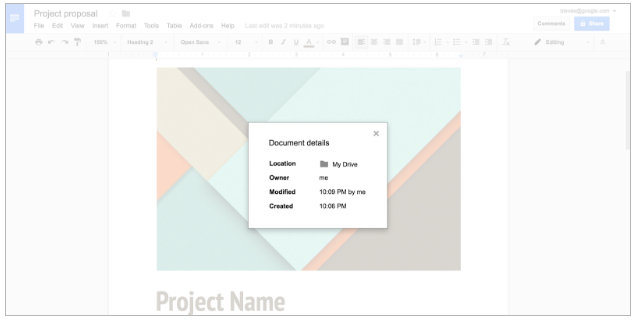
Today, you can view the details of any file or folder stored in Google Drive, including the file or folder owner’s name, the last time it was opened or modified, its location, and more. With this launch, you’ll gain that same capability in Google Docs, Sheets, and Slides on the web.

To see details of a Google document, spreadsheet, or presentation, simply select Document details from the File menu.


Launch Details
Release track:
Launching to both Rapid release and Scheduled release

Rollout pace:
Full rollout (1–3 days for feature visibility)

Impact:
All end users

Action:
Change management suggested/FYI

Note: all launches are applicable to all Google Apps editions unless otherwise noted

Launch release calendar
Launch detail categories
Get these product update alerts by email
Subscribe to the RSS feed of these updates

Google offers its Google Apps customers useful and simple-to-use video chat features to make communication better. Whether communicating changes to remote teams, presenting demos to stakeholders, or just getting things done quicker in real time, screen sharing is an effective way to present content to your audience. That’s why we’re excited to roll out a new integration between Google Chrome and Google Hangouts that makes screen sharing from your Chrome browser to a Google Hangout easier than ever before.

With this launch, signed-in Chrome users on Chrome 52 or higher will be able to use the “Cast…” menu item from Chrome to share the contents of a browser tab or their entire desktop into a Hangout. Hangouts that are scheduled on the user’s Google Calendar are shown automatically, but they can also be joined manually using the “Search” text box. 
Google Cast does not need to be installed on the user’s machine, as this is now natively available in Chrome 52 or higher. We hope this makes the feature easier to roll out to users, allowing screen sharing to be just 1-2 clicks away.


Launch Details
Release track:
Launching to both Rapid release and Scheduled release

Rollout pace:
Full rollout (1-3 days for feature visibility)

Impact:
All end users on Chrome 52

Action:
Change management suggested/FYI

More Information
Help Center

Note: all launches are applicable to all Google Apps editions unless otherwise noted

Launch release calendar
Launch detail categories
Get these product update alerts by email
Subscribe to the RSS feed of these updates

Last month in Google Hangouts, we announced that better group chat controls were now available on Android, iOS, and the web in order to make it a simpler and more consistent experience joining group chats with your team. In following this move towards consistency, on August 31, 2016, a new version of the Google Hangouts Chrome extension will be made available to new users. As we continue to iterate and add in features that help users communicate in group chats, the new experience brings together multiple chat windows into one and makes it easier to see more chat content.
Existing users of the Chrome extension will be able to opt into the new experience on August 31, 2016, which has functional parity with the current experience. Users will have the option to remain on the current experience until October 17, 2016, at which point all users will be automatically updated to the new experience.

In order to make this a smooth transition, we’re updating the Google Hangouts Help Center articles with the latest changes, nested in the Hangouts Chrome desktop app section.

Action Suggested
  • If you have people using the existing Google Hangouts Chrome extension in your organization, share the Help Center articles above to prepare them for this change.
  • If you use Chrome Management (available to all Google Apps customers) to centrally manage installation of the extension, please see our Help Center article for more information.

As a reminder, the new Google Hangouts Chrome extension will become the default experience on October 17, 2016.

Launch Details
Release track:
Launching to both Rapid release and Scheduled release on August 31, 2016 as the default for new users, and opt-in for existing users. The new extension will become the default for all users on October 17, 2016.

Rollout pace:
Gradual rollout (potentially longer than 3 days for feature visibility)

Impact:
All Hangouts Chrome extension end users

Action:
Change management suggested/FYI

More Information
Chrome Web Store
Help Center: Hangouts Chrome desktop app
Administrators only: Set Chrome policies for users