
This official feed from the Google Workspace team provides essential information about new features and improvements for Google Workspace customers.


This launch adds the ability to merge the cells of a table in Google Docs. Merged table cells can span more than one row and/or column. 

To merge table cells, highlight the cells to be merged in your table and select Merge cells from the Table menu (or right click and select Merge cells).

Merged table cells in Word documents can now be imported as well.

Release track:
Rapid release, with Scheduled release coming in two weeks

For more information:
Drive G+ post
Help Center

Note: all launches are applicable to all Google Apps editions unless otherwise noted

whatsnew.googleapps.com
Get these product update alerts by email
Subscribe to the RSS feed of these updates

Check out this month's "What's New in Google Apps" newsletter [pdf] for a roundup of all Apps launches from November 2014.

Newsletter Archive & Translated Versions (coming soon for November issue)


Note: all launches are applicable to all Google Apps editions unless otherwise noted

whatsnew.googleapps.com
Get these product update alerts by email
Subscribe to the RSS feed of these updates

Posted by Eran Feigenbaum, Director of Security Google for Work 

(Cross-posted on the Google for Work Blog)

As an IT manager, we realize you spend a lot of time managing devices, applications and security settings for everyone at your organization. To make your job a bit easier, today we’re announcing new security tools to help Google Apps users take more control of their security online.

A new Devices and Activity dashboard gives your users additional insight over the devices accessing their Google account. The page shows a comprehensive view of all devices that have been active on an account in the last 28 days, or are currently signed in. And in case any suspicious activity is noticed, there’s a setting to immediately take steps to secure an account and change a password.


We are also launching the security wizard for Google for Work accounts. The security wizard guides users through steps they can take to turn on or adjust security features, like providing contact info for account recovery (if the domain security policy allows it), or reviewing recent account activity and account permissions. Plus, it only takes minutes for users to update their settings. This tool prioritizes all administrator settings for security features that end users are permitted to turn on. Access the wizard at g.co/accountcheckup.


Security in the cloud is a shared responsibility and keeping your company information secure is at the core of what we do everyday. By making users more aware of their security settings and the activity on their devices, we can work together to stay a step ahead of any bad guys.

Note: all launches are applicable to all Google Apps editions unless otherwise noted

whatsnew.googleapps.com
Get these product update alerts by email
Subscribe to the RSS feed of these updates

Last month, we launched the ability for Google Apps customers to share links to Hangouts video calls so that external guests may request to join if not explicitly invited. This helps guests avoid errors when joining with alternate Google accounts.

We’re now giving admins greater control over this feature with an option in the Admin console to start all video calls in a state where external participants may request access to join. This feature is especially useful for customers who do not rely on Google Calendar to schedule meetings or those using the Microsoft Outlook Hangouts plugin.

To adjust the setting, click on Google Apps -> Talk/Hangouts -> General Settings:


Release track:
Rapid release and Scheduled release

For more information:
Help Center

Note: all launches are applicable to all Google Apps editions unless otherwise noted

whatsnew.googleapps.com
Get these product update alerts by email
Subscribe to the RSS feed of these updates
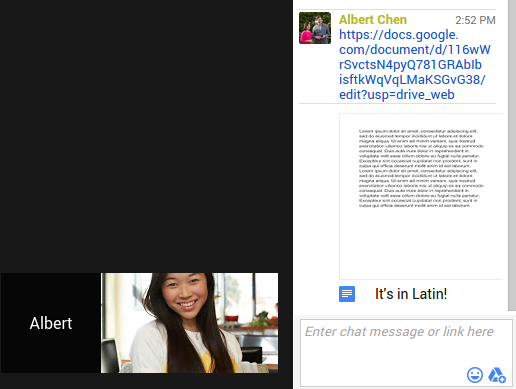
To make it easier to collaborate during Hangouts video calls, we’ve enabled the sharing of links to any Drive file directly from the chat window. Shared links will show a preview of the file right in the chat message, even when other participants don’t have their chat window open. Clicking on the link will open the file in a different browser tab so you can conveniently work on it in full view.

To share a link from Drive during a Hangouts video call, click on the Chat icon and then click the Google Drive picker icon from within the chat window.

Chat window.png

Note: this feature will replace the Google Drive Hangouts app, which will no longer be available as of December 15th, 2014.

Release track:
Rapid release and Scheduled release

For more information:
Google for Work G+ Post
Help Center

Note: all launches are applicable to all Google Apps editions unless otherwise noted

whatsnew.googleapps.com
Get these product update alerts by email
Subscribe to the RSS feed of these updates