Today we’re launching a native Classroom mobile app for both Android and iOS to help teachers and students be more collaborative in the classroom and save even more paper and time:
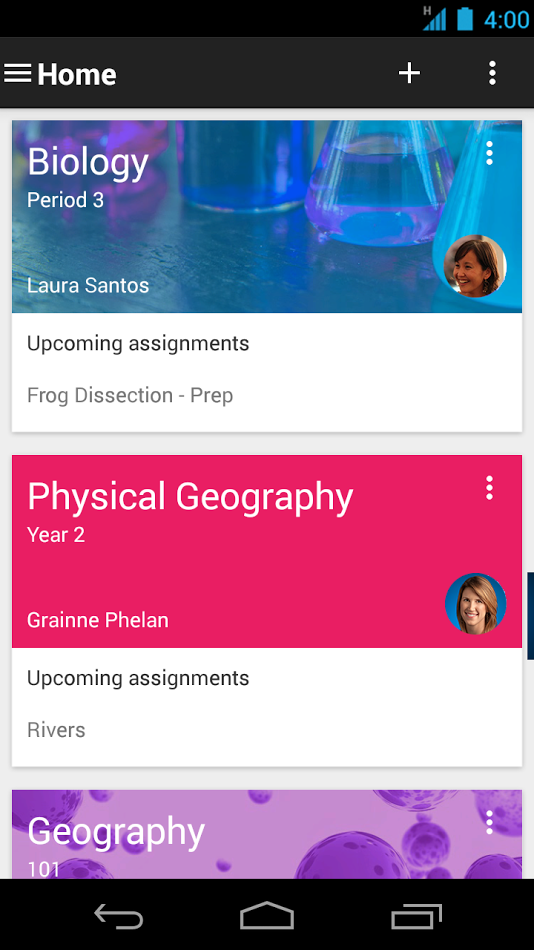 New with the mobile app, students and teachers can:
We’re also launching two new desktop features to help teachers stay organized as they head into the second half of the year:
Release track:
Rapid release and Scheduled release
For more information:
Google for Work blog post
Classroom apps: Android | iOS
Help Center: Mobile app | Archive classes | Teacher assignment page
Note: all launches are applicable to all Google Apps editions unless otherwise noted
whatsnew.googleapps.com
Get these product update alerts by email
Subscribe to the RSS feed of these updates
- Snap a photo: Right from the assignment page in the mobile app, students can snap a photo and attach it to their assignment.
- Share from other apps: Students can also easily attach images, PDFs and web pages from other apps to their assignments.
- Offline caching: Class streams and assignment information are automatically cached every time you open the app with an Internet connection, so that you can see them when you don’t have a connection.
We’re also launching two new desktop features to help teachers stay organized as they head into the second half of the year:
- Teacher Assignments Page: On Classroom for desktop, we’re launching a teacher assignments page, where teachers will be able to get quick access to any assignment, see how many students are done and mark assignments as reviewed.
- Archive Classes: We also know that classes don’t go on forever —that’s why today we’re launching the ability to archive classes. Archiving a class will remove it from the home page and make it read-only — teachers and class members can still view valuable information in archived classes, but can’t make any changes or turn in assignments.
Release track:
Rapid release and Scheduled release
For more information:
Google for Work blog post
Classroom apps: Android | iOS
Help Center: Mobile app | Archive classes | Teacher assignment page
Note: all launches are applicable to all Google Apps editions unless otherwise noted
whatsnew.googleapps.com
Get these product update alerts by email
Subscribe to the RSS feed of these updates