
This official feed from the Google Workspace team provides essential information about new features and improvements for Google Workspace customers.


This week, we’re introducing iOS Account Wipe (i.e. Selective Wipe), which allows Google Apps admins to safely delete an employee’s corporate account and data from their iPhone or iPad without impacting that employee’s personal space (e.g. their personal photos). The existing Remote Wipe functionality, which allows admins to wipe an employee’s entire device, will remain unchanged.


In addition, as part of an ongoing effort to make Android even more valuable to our customers, this week we are launching enhanced functionality for Android Mobile Application Management (MAM), a core capability that we introduced with our initial support of Android for Work. These new features can help admins get their employees up and running on Android for Work faster (with auto-install into an employee’s Work Profile) and stay productive (by preventing employees from uninstalling certain apps)—while at the same time keeping data protected (with widget control).
The Google Apps Device Policy app for Android is concurrently updated to display additional information about the device when the employee is using a Work Profile (e.g. the unknown sources status, developer options status, and domain names of other accounts added to the Work Profile).

Release track:
Rapid release and Scheduled release (gradual rollout)

More information:

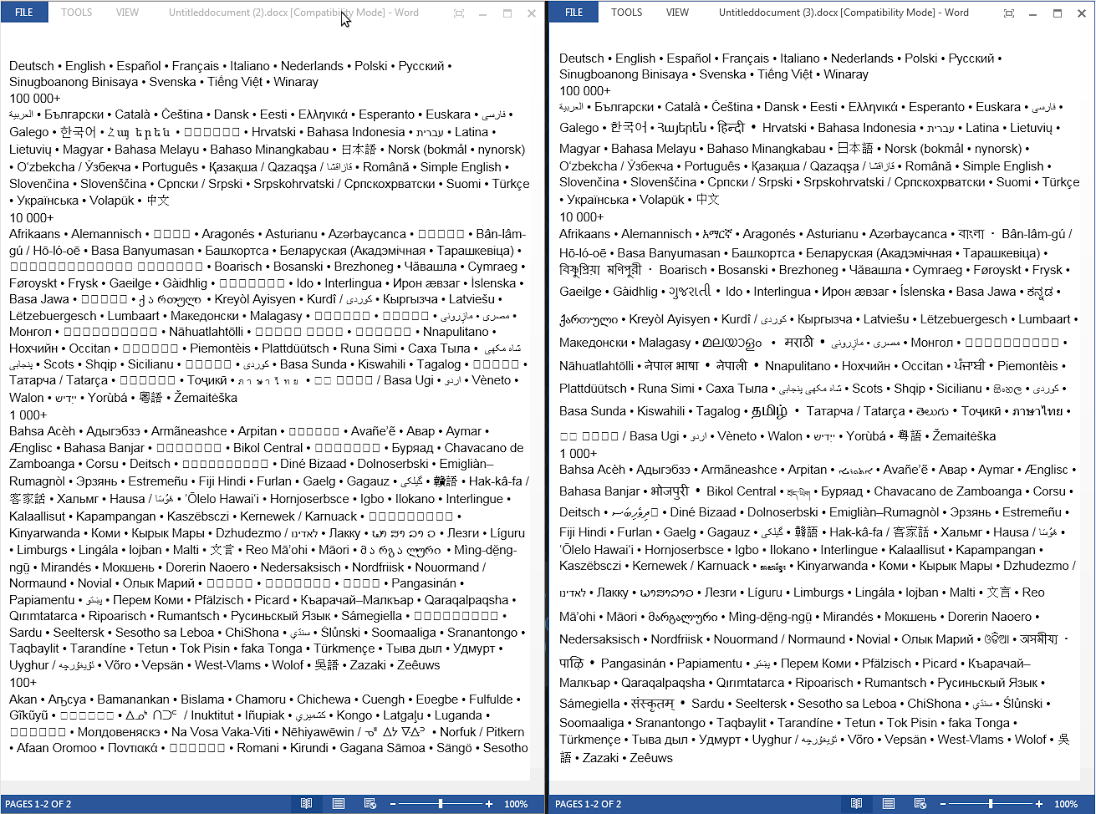
Many modern companies have employees, customers, and business partners across the globe, working in a multitude of languages. Many of those languages, including Hindi and Mandarin, are written in non-Latin scripts. Previously, when a document was created in Google Docs and included non-Latin text, it could not be exported to Microsoft Word properly—the non-Latin content would show up illegible. With today’s launch, documents written in the following non-Latin scripts will remain readable when exported from Google Docs on desktop to Microsoft Word:
  • Armenian
  • Bengali
  • Devanagari
  • Ethiopic
  • Gujarati
  • Gurmukhi
  • Kannada
  • Khmer
  • Malayalam
  • Oriya
  • Sinhala
  • Syriac
  • Tamil
  • Telugu
  • Thaana
  • Tibetan
The 16 scripts above serve as the writing systems for more than 25 languages, so working with your international counterparts will now be easier and more efficient. 
Font Deduction.png
In addition to these new scripts, we will now support several new unicode blocks, including Arrows, Bopomofo, various Hangul jamos and other CJK symbols and radicals, mathematical operators, and more.

Release track:
Rapid release and Scheduled release

Note: all launches are applicable to all Google Apps editions unless otherwise noted

Launch release calendar
Get these product update alerts by email
Subscribe to the RSS feed of these updates
A new version of the Google Drive app for iOS is now available in the App Store. New features include:

  • New material design

  • Faster syncing with Google Drive web
  • Improvements to image viewing and scrolling (people no longer need to tap “Load more”)
  • Swipe gesture to go back

Release track:
Rapid release and Scheduled release

For more information:
Help Center
Download the latest Google Drive app in the App Store

Note: all launches are applicable to all Google Apps editions unless otherwise noted

Launch release calendar
Get these product update alerts by email
Subscribe to the RSS feed of these updates

whats_new_doc_header_may2015LL.gif
Check out the latest "What's New in Google Apps" newsletter [pdf] for a roundup of all Apps launches from May 2015.

Newsletter Archive & Translated Versions (coming soon for May issue)


Note: all launches are applicable to all Google Apps editions unless otherwise noted

Launch release calendar
Get these product update alerts by email
Subscribe to the RSS feed of these updates

We recognize that people today are constantly connected, making control over their digital privacy and security even more important. We want to help them better use tools and settings to safeguard their data, protect their privacy, and decide what information is used to make Google services work better for them. With this in mind, we recently launched a single hub where people can manage their Google account data. My Account, which replaces the previous Google Account settings page, features sections dedicated to managing one’s sign-in and security settings, personal info and privacy settings, and account preferences. Below are just some of the things a person can do with My Account:
  • Take the Privacy Checkup and Security Checkup, two simple, step-by-step guides for reviewing and editing one’s personal privacy and security settings.
  • Manage the information that can be used from Search, Maps, YouTube, and other products to enhance one’s experience on Google.
  • Control which apps and sites are connected to one’s account.

In addition, starting on June 15th, Google for Work account owners will receive an email when we’re unable to determine if they’ve previously used a particular browser or device with their account. This could happen when someone signs in to a Google for Work account for the first time on a new computer, phone, or browser, when someone uses their browser’s incognito or private browsing mode or clears their cookies, or when someone besides that account owner accesses their account. Individuals will also be able to view a list of recently used devices and recent new sign-ins on their Sign-in & security page and, if something looks suspicious, take action quickly. Check out My Account at myaccount.google.com.

Along with My Account, we’ve rolled out a new site at privacy.google.com, where we answer common questions about privacy and security on Google (e.g. “What data does Google collect?” and “What does Google do with the data it collects?”). We also explain how encryption and spam filtering help keep individuals’ data safe and how personal information helps customize an individual’s experience on Google. Explore the new site at privacy.google.com.

Release track:
New My Account pages and Privacy and Security Checkups available now for both Rapid release and Scheduled release; Sign-in Alerts coming June 15th for both Rapid release and Scheduled release (gradual rollout)

Note: all launches are applicable to all Google Apps editions unless otherwise noted

Launch release calendar
Get these product update alerts by email
Subscribe to the RSS feed of these updates