This official feed from the Google Workspace team provides essential information about new features and improvements for Google Workspace customers.


We announced a developer preview of the Classroom API in June, and more than a thousand developers and schools have opted in to use it. Today, we’re ending the developer preview, so all developers can develop with the API. The end of the preview also means that all Google Apps for Education users can authorize third-party applications to access their Classroom data, unless their admin decides to restrict that access in the Admin console. Admins can also restrict API access at the organization-unit level.

In addition, the Classroom API is now supported in Apps Script, which lets anyone write custom scripts or publish add-ons for Google Docs, Sheets, and Forms. Check out the Quick Start to learn more. 

For more information on the Classroom API, check out our Help Center and developer documentation, or watch this video for a high-level overview of the API and share button.

Launch Details
Release track: 

Launching to both Rapid release and Scheduled release

Rollout pace:

Full rollout (1–3 days for feature visibility)

Impact:

All end users (Admins only for data access settings)

Action:

Admin action suggested/FYI
Change management suggested/FYI

More Information
Google for Education Blog Post
Classroom API Developer Documentation
Help Center: Classroom API overview
Help Center: Set Classroom data access


Note: all launches are applicable to all Google Apps editions unless otherwise noted

Launch release calendar
Launch detail categories
Get these product update alerts by email
Subscribe to the RSS feed of these updates
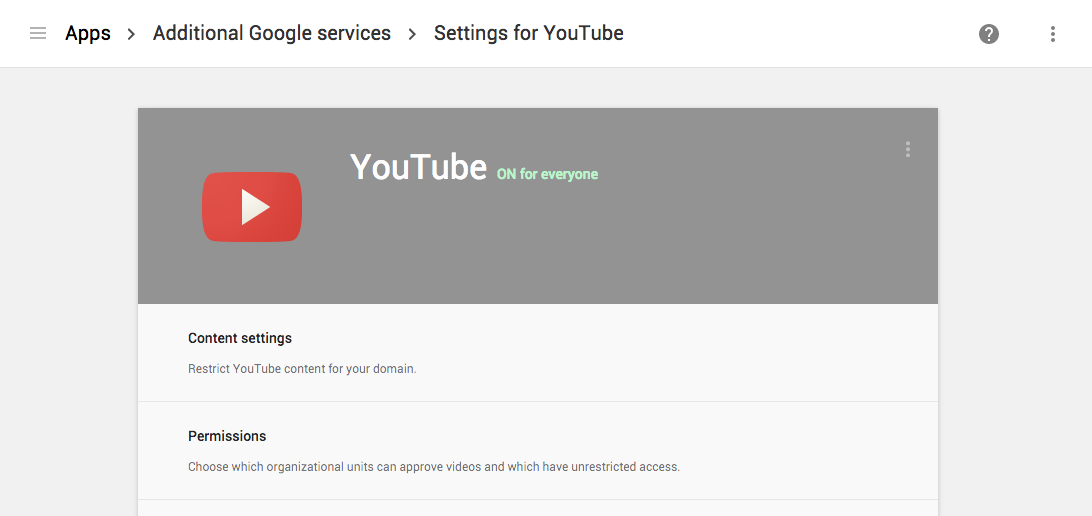
Today we’re introducing YouTube settings, available to Google Apps admins as an Additional Service, that will allow admins to restrict YouTube content on managed networks. 

This feature is integrated directly into the Google Apps Admin console under YouTube settings [Apps > Additional Google services > YouTube]. In addition to restricting video content, admins will be able to delegate “approvers” to whitelist additional content for signed-in users on the domain. 

Check out the Help Center for more information on these new settings.

Launch Details 
Release track:  
Launching to both Rapid release and Scheduled release

Rollout pace: 
Full rollout (1-3 days for feature visibility)

Impact: 
Admins only

Action:
Admin action suggested/FYI

More Information
Help Center


Note: all launches are applicable to all Google Apps editions unless otherwise noted

Launch release calendar
Launch detail categories
Get these product update alerts by email
Subscribe to the RSS feed of these updates

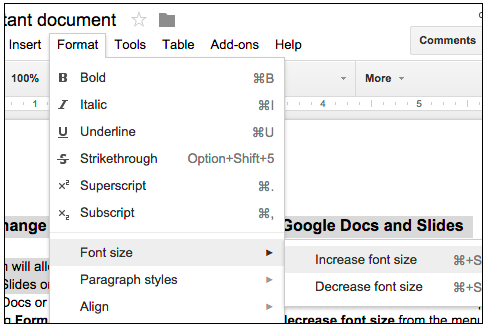
This launch will allow users to more easily increase or decrease the relative font size of text in Google Docs and Slides. Starting today, if a user highlights a range of text or any number of textboxes in Google Docs or Slides, he or she can increase or decrease that selection’s font size in 1-pt increments by choosing Format > Font size > Increase font size or decrease font size from the menu bar. If the selected text contains multiple font sizes, each will be increased or decreased accordingly. Check out the Help Center articles below for the associated keyboard shortcuts.

Launch Details
Release track:
Launching to both Rapid release and Scheduled release


Rollout pace:
Full rollout (1–3 days for feature visibility)

Impact:
All end users

Action:
Change management suggested/FYI

We’re making charts in Google Sheets easier to use and analyze. This launch introduces the option to include hidden and/or filtered data in Sheets charts. Going forward, if you create a chart in Sheets on the web and then filter or hide any of the source data, a small message will appear indicating that the data has been removed from your chart and giving you the option to include it. While this option will only appear on the web, any settings will be respected on mobile as well.

If you opt to include that hidden or filtered data and then later want to exclude it from the same sheet, you can simply expand the chart menu in the upper right corner of the chart and select Advanced edit. That will open the Chart Editor, where you can choose Chart types and uncheck the box next to Include hidden / filtered data. The next time you hide or filter source data in that same sheet, you’ll see the message again.

Not only will this give you greater control over the spreadsheets you create within Google Sheets, it will prevent Microsoft Excel spreadsheets that contain hidden data and that are imported into Sheets from being inaccurately displayed.

Launch Details

Release track:
Launching to both Rapid release and Scheduled release**

**Update to original post (August 12, 2015): We originally communicated that this feature was launching to both Rapid release and Scheduled release domains on Monday, August 3rd. While it launched successfully to Rapid release domains on that date, it did not go live for Scheduled. The feature will now launch to Scheduled release domains on Monday, August 17th.

Rollout pace:
Full rollout (1–3 days for feature visibility)

Impact:
All end users

Action:
Change management suggested/FYI

More Information
Help Center

whatsnew-header-july2015.png


Check out the latest "What's New in Google Apps" newsletter [pdf] for a roundup of all Apps launches from July 2015.

Newsletter Archive & Translated Versions (coming soon for July issue)


Note: all launches are applicable to all Google Apps editions unless otherwise noted

Launch release calendar
Launch detail categories
Get these product update alerts by email
Subscribe to the RSS feed of these updates