
This official feed from the Google Workspace team provides essential information about new features and improvements for Google Workspace customers.


Last July, we launched the Google Drive plug-in for Microsoft® Office. This plug-in made it super easy for people using Office for Windows to open their Word, Excel and PowerPoint documents stored in Drive and then save any changes back to Drive once they were done. Today we are extending the capabilities of this plug-in to include Outlook support.

From within Outlook for Windows, you can now:

  • Insert files using Drive: You can now simultaneously upload any local file to Google Drive and email the link out to the collaborators using Outlook. This is especially useful if your organization uses Google Apps Sync for Microsoft® Outlook or has a setup that uses Outlook with another mail provider.
Send a Drive file from Outlook
Save local files to Drive seamlessly
  • Update sharing permissions: While composing a message in Outlook, you can now insert an existing Drive document link (or the actual Drive file) and customize the access permissions before sending the email. The plug-in is smart enough to know when to show you the document’s permissions and if you need to share the document with your recipients.
Fix Drive file access right from Outlook

  • Save incoming attachments to Drive: For an incoming email attachment, Outlook users will now see a new Save to Drive option, which allows you to save attachments directly to Google Drive. This can save valuable time uploading downloaded attachment files from local storage back into Google Drive. 
Sync your incoming attachments to Drive

Limitations
The Drive plug-in for Microsoft Office supports the Microsoft Windows versions of Outlook (2007, 2010, 2013 and 2016 versions), and Office 365 if you've downloaded and installed Microsoft Outlook on your computer as part of an Office 365 subscription.


Launch Details
Release track:
Launching to both Rapid release and Scheduled release

Rollout pace:
Gradual rollout (potentially longer than 3 days for feature visibility)

Impact:
All end users

Action:
Change management suggested/FYI

Learn more
Help Center

Note: all launches are applicable to all Google Apps editions unless otherwise noted

Launch release calendar
Launch detail categories
Get these product update alerts by email
Subscribe to the RSS feed of these updates
Last week we announced changes to the link sharing behavior on Google Drive on the web. Based on feedback from Google Apps customers following the announcement, we’ve decided to change the default behavior for this new feature. Turning on link sharing will now require two clicks: one on the “Get shareable link” icon and then another on the toggle switch itself.

This revised behavior will rollout to Rapid release domains today and Scheduled release domains in two weeks. Monitor the Google Apps release calendar for the specific launch date.

Note: all launches are applicable to all Google Apps editions unless otherwise noted

Launch release calendar
Launch detail categories
Get these product update alerts by email
Subscribe to the RSS feed of these updates

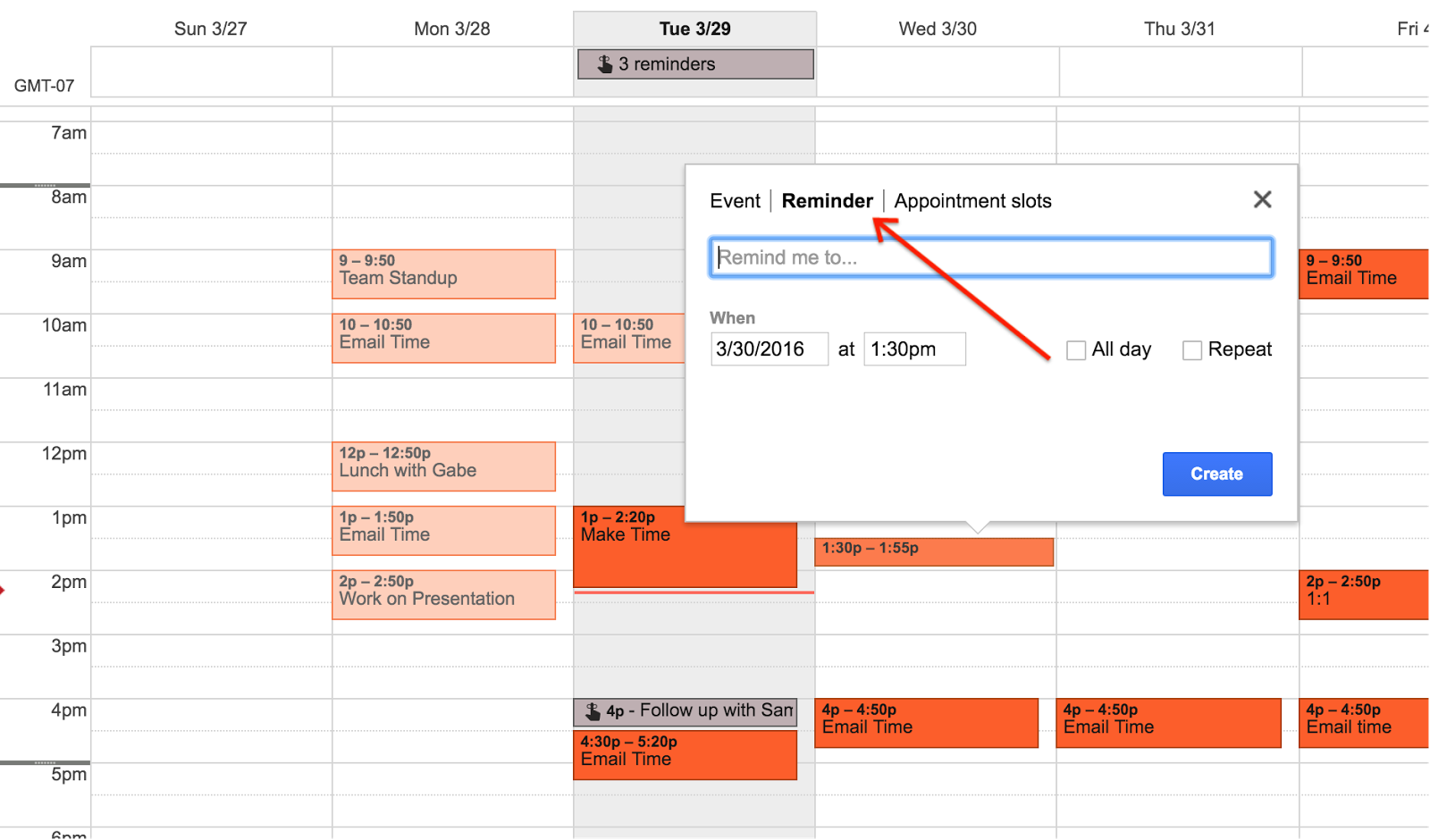
Last year, we launched Reminders in the Google Calendar app for iOS and Android. We’re now happy to announce that Reminders are coming to Google Calendar on the web.

Key features:

  • Set a reminder for a specific time and date and get notified when it’s time. To create a reminder, tap on a time in the calendar grid, then select “Reminder.”


  • Reminders carry forward to the next day, until you mark them done. To mark a reminder as done, simply click on the reminder, and click ‘Mark as done’.
  • Reminders created in the Google app, Keep, and Inbox will also show in Google Calendar.
  • Reminders on the web will sync to your Google Calendar Android and iOS apps.


Please note:

  • Reminders are private to calendar owners and are not viewable, even if your calendar is shared with others.
  • Google Tasks users will not be prompted to use the Reminders feature. It can be enabled from the drop down menu on the Tasks calendar.


Check out the Help Center for more information.

Launch Details
Release track:
Launching to Rapid release, with Scheduled release coming in 4 weeks

Rollout pace:
Full rollout (1-3 days for feature visibility)

Impact:
All end users

Action:
Admin action suggested/FYI

More Information
Help Center


Note: all launches are applicable to all Google Apps editions unless otherwise noted

Launch release calendar
Launch detail categories
Get these product update alerts by email
Subscribe to the RSS feed of these updates

With the recent release of Chrome OS 49 stable, the Chrome for Work team is excited to announce the following updates:

Chromebase for meetings available March 31, 2016 
We've expanded into small spaces adding a brand new form factor, the Acer Chromebase for meetings. Purpose-built for desktop, telephone room and huddle spaces, this all-in-one touchscreen requires no messy wires or bulky accessories and is packed with the same capability as our current offering.

For a limited time, eligible customers can try two devices free for 30 days with no obligation by signing up here.

What’s in a name? 
You may have noticed above we’re now referring to our product as “Chrome devices for meetings.” That’s because the launch of the new Chromebase expands our “for meetings” offering to a new form factor; the Chromebase. So now that we have Chromebases and Chromeboxes for meetings, we’ll refer to them collectively as, “Chrome devices for meetings.”

25 Person Hangouts
We increased the maximum number of participants to 25 from 15 for Google Apps customers. See the Google Apps Update Blog for more details.

Custom wallpaper
Chrome devices for meetings featured photos from Google+ on its home screen. Now you may upload up to 10 of your own photos which will be selectively displayed on CfM homescreens. See the Help Center for guidelines.

Forward feedback to domain admin
While we allow users to submit real time feedback to Google from their devices, there was no way for the domain administrator to see that information. So we have launched an option in the Admin console for domain administrators to have user feedback go not only to Google Feedback servers, but also to a specified set of recipients.

Run remote diagnostics on Chrome devices for meetings
To provide domain administrators with even more tools to view the health of their Chrome devices for meetings, we have also added the ability to remotely run and view device diagnostics directly from the Admin console. These remote diagnostics enable testing devices for connection quality, video bandwidth, resolution, audio capture, and the functioning of protocols such as UDP, TCP, and IPV6. See the Help Center for more information.

Launch Details 
Release track:
All features launched to both Rapid release and Scheduled release

Action:
Admin action suggested/FYI


Note: all launches are applicable to all Google Apps editions unless otherwise noted

Launch release calendar
Launch detail categories
Get these product update alerts by email
Subscribe to the RSS feed of these updates

Check out the latest "What's New in Google Apps" newsletter [pdf] for a roundup of all Apps launches from March 2016.

Newsletter Archive & Translated Versions (coming soon for March issue)


Note: all launches are applicable to all Google Apps editions unless otherwise noted

Launch release calendar
Launch detail categories
Get these product update alerts by email
Subscribe to the RSS feed of these updates