
This official feed from the Google Workspace team provides essential information about new features and improvements for Google Workspace customers.


Meet allows G Suite users to connect across any device, at any time. Users with iOS devices whose accounts aren’t Meet-enabled are still able to join meetings that they’re invited to, but aren’t able to create them. To ensure that these users understand why they are missing that functionality, we will start showing them the following message the first time they open the Meet app on their iOS device:


“Your account only lets you use Meet to join other people's meetings. To create your own meetings, use a G Suite account that's enabled for Meet."

This message is already shown to users on the web. It will primarily reach non-G Suite users’ accounts, but admins may receive requests from their users who do not have Meet enabled for their domain and/or organizational unit.

Launch Details
Release track:
Launching to both Rapid Release and Scheduled Release

Editions:
Available to all G Suite editions

Rollout pace:
Gradual rollout (up to 15 days for feature visibility)

Impact:
All end users

Action:
Change management suggested/FYI

More Information
Help Center: Managing Hangouts Meet

Launch release calendar
Launch detail categories
Get these product update alerts by email
Subscribe to the RSS feed of these updates

The new Google Sites provides a simple and elegant way to create websites. To help your site stand out, you can now customize your favicon—the icon which appears in a browser tab or bookmark list—to match your site. This can help your viewers more easily recognize your site, and help you reinforce your branding.


Use our Help Center to find out how to add a custom favicon in the new Google Sites.

Launch Details 
Release track:
Launching to Rapid Release, with Scheduled Release coming in 2 weeks.

Editions: 
Available to all G Suite editions

Rollout pace: 
Gradual rollout (up to 15 days for feature visibility)

Impact: 
All end users

Action: 
Change management suggested/FYI

More Information 
Help Center: Add or edit text & images


Launch release calendar
Launch detail categories
Get these product update alerts by email
Subscribe to the RSS feed of these updates

With Single-Sign-On (SSO), users can access all of their enterprise cloud applications—including the Admin console for admins—after signing in just once. Google supports the two most popular enterprise SSO standards, OpenID Connect and SAML, and there are many applications with pre-integrated SSO support in our third-party apps catalog already. We’re now adding SAML integration for 25 additional applications:
  • Adobe Sign (formerly EchoSign)
  • AppDynamics
  • Apteligent
  • Artifactory Cloud
  • Autotask Workplace
  • Betterworks
  • Bugcrowd
  • Cisco Umbrella (formerly OpenDNS)
  • CloudHealth
  • Digicert
  • Egencia
  • Engagedly
  • Envoy
  • Freshservice
  • inContact
  • Kapost
  • LearnCore
  • Lifesize
  • Namely
  • PeopleHR
  • Reflektive
  • RightScale
  • Robin
  • Skyhigh
  • Uservoice
You can find our full list of pre-integrated applications, as well as instructions for installing them, in the Help Center.

Note that apart from the pre-integrated SAML applications, G Suite also supports installing “Custom SAML Applications,” which means that admins can install any third-party application that supports SAML. The advantage of a pre-integrated app is that the installation is much easier. You can learn more about installing Custom SAML Applications in this Help Center article.

Launch Details
Release track
Launching to both Rapid Release and Scheduled Release

Editions:
Available to all G Suite editions

Rollout pace:
Gradual rollout (up to 15 days for feature visibility)

Impact:
Admins only

Action:
Admin action suggested/FYI

More Information
Help Center: Using SAML to set up federated SSO


Launch release calendar
Launch detail categories
Get these product update alerts by email
Subscribe to the RSS feed of these updates

Last year, we introduced a new resource for admins: What’s new in G Suite? Don’t forget to visit the page regularly for a list of the most recent launches across G Suite.

Feedback? Let us know.

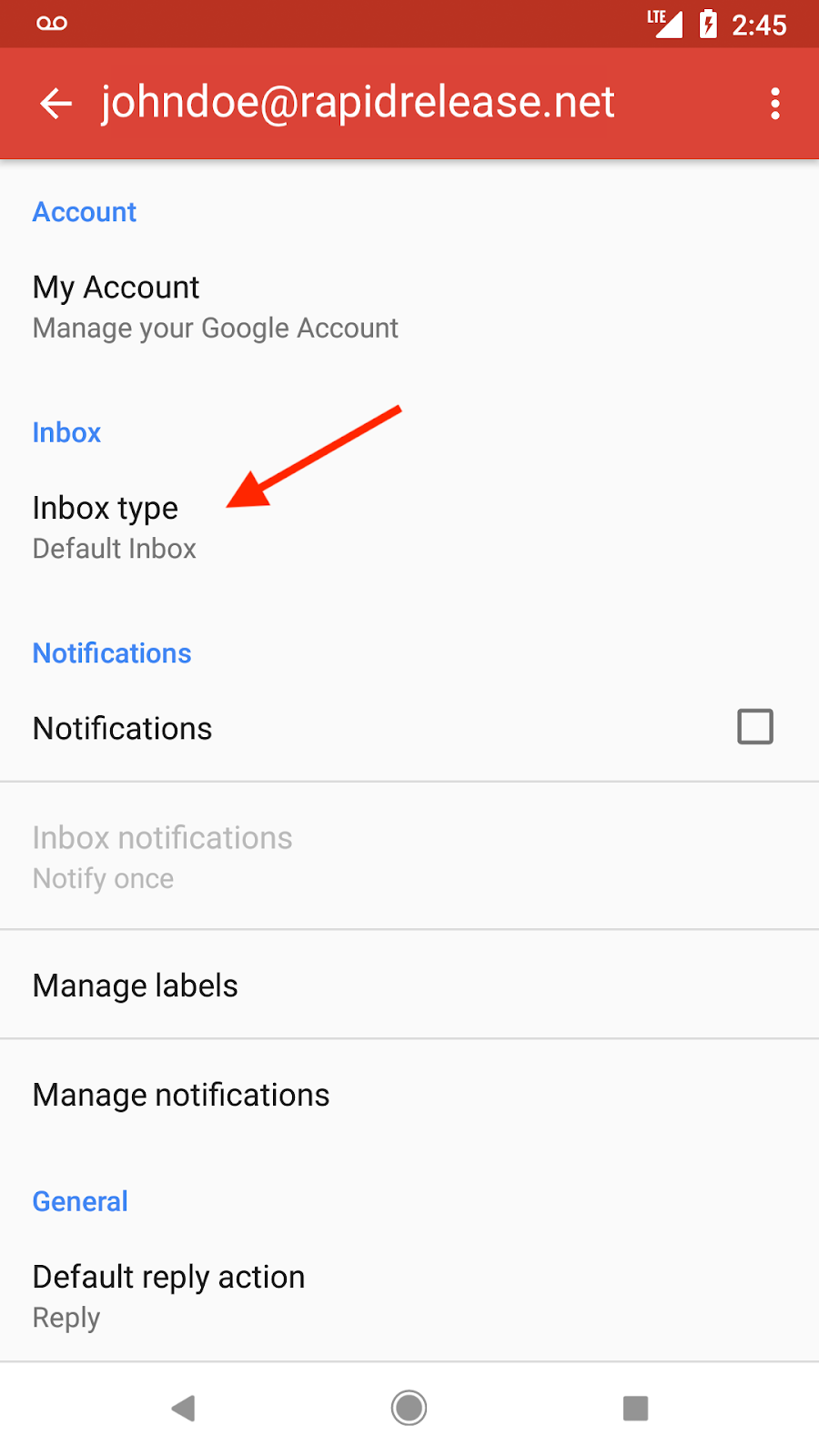
We can all use a little help organizing our email. Gmail makes it easy, offering web and iOS users various options for sorting their inboxes, including unread first, important first, starred first, and priority inbox. Because many of you rely on your phones for email, we’re now bringing these same options to the Gmail app for Android.

Going forward, if you’ve selected a specific inbox type for your Gmail account on the web, you’ll see that same email configuration in your Android app. For instance, if you’ve chosen to see unread emails at the top of your inbox and everything else below, you’ll see your emails sorted the same way in Gmail for Android.

You’ll also be able to change your inbox type directly from the Gmail app on your Android phone (under Settings > Inbox type). This inbox type will then be reflected across web and iOS as well.


We hope this helps you stay on top of your email—no matter where (and on what device) you read it.

Launch Details
Release track:
Launching to both Rapid Release and Scheduled Release

Editions:
Available to all G Suite editions

Rollout pace:
Extended rollout (potentially longer than 15 days for feature visibility)

Impact:
All end users

Action:
Change management suggested/FYI

More Information
Help Center: Change your Gmail inbox layout


Launch release calendar
Launch detail categories
Get these product update alerts by email
Subscribe to the RSS feed of these updates