
This official feed from the Google Workspace team provides essential information about new features and improvements for Google Workspace customers.


What’s changing

Earlier this year, we announced that Gmail would be enforcing the MTA-STS security standard in beta. We’re now adding a diagnostics page for all admins to validate their MTA-STS configurations.

Who’s impacted

Admins only

Why you’d use it

On this page you can validate your MTA-STS and TLS reporting configuration. If any of your domains are not configured correctly, you’ll see what the suggested configuration is, making it easier to configure new MTA-STS settings.

How to get started


  • Admins: In the Admin console, navigate to Apps > G Suite > Settings for Gmail > Advanced settings. Here, you’ll be able to validate your MTA-STS configuration.
  • End users: No action needed.

Helpful links


Availability

Rollout details


G Suite editions

  • Available to all G Suite editions

On/off by default?

  • This feature will be ON by default.

Stay up to date with G Suite launches
Quick launch summary 

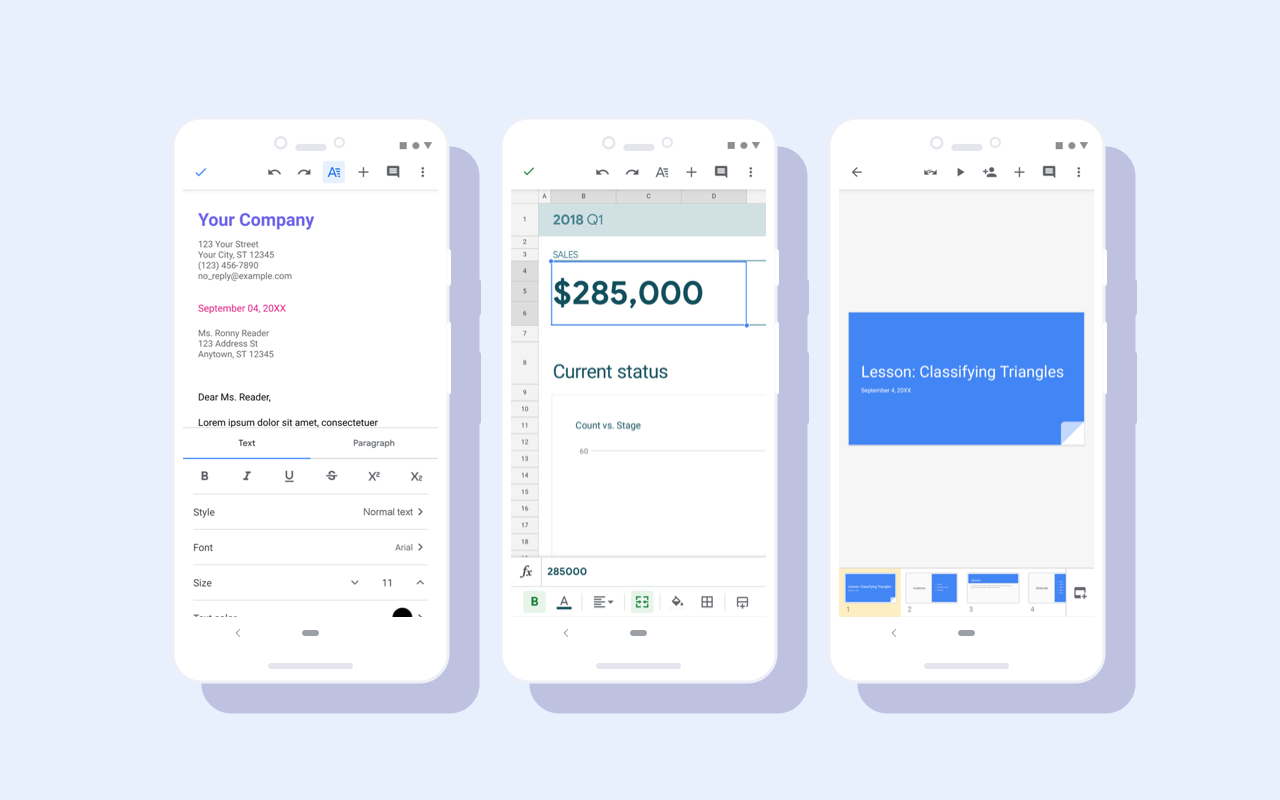
Google Docs, Sheets, and Slides now have a new look and feel on Android devices. While there are no functionality changes, users will notice visual improvements, including a restyled document list, highly-legible typefaces, consistent controls, and updated iconography.

This redesign is already reflected in the latest versions of the Google Docs and Slides Android Apps. It will begin rolling out to Sheets on Android today.

Screenshots of Google Docs, Slides, and Sheets with the Material redesign.


This Material redesign is part of a larger effort to bring consistency to the look and feel of our G Suite apps, with ease-of-use in mind. See here for more information on the Google Drive Material redesign on iOS and Android and here for the Docs, Sheets, and Slides redesign on the web

Availability 

Rollout details 
G Suite editions 
  • Available to all G Suite editions 

On/off by default? 
  • This feature will be ON by default.

Stay up to date with G Suite launches

Quick launch summary 

The Google Device Policy app won’t support mobile devices running iOS version 9.0 or lower after the end of 2019. If your organization has advanced mobile device management (MDM) enabled, users must upgrade to iOS version 10.0 or higher to access new MDM features or to download the Device Policy app for the first time.

We will remove support for iOS 9.0 in the first release of the Device Policy app in 2020. Therefore please ensure your users upgrade their devices before the end of the year to avoid any disruption to their work.

Use our Help Center to find more information on minimum device requirements for Google mobile management.


Stay up to date with G Suite launches

Quick launch summary 

Google Voice will now support Dark theme on Android. Dark theme is a popular feature, as it creates a better viewing experience in low-light conditions and preserves battery life.

Dark theme for Google Voice

If you already have dark theme enabled on your Android phone (under Settings > Display > Screen settings), Voice will automatically respect this setting. On Pixel, when Battery Saver is enabled, Voice will default to dark theme automatically.

To change the theme specifically for the Google Voice app, go to Menu > Settings > Display Options > Theme and select “Dark.”

Availability 

Rollout details 
  • Gradual rollout (up to 15 days for feature visibility) starting on October 1, 2019 for all users 

G Suite editions 
  • Available to all G Suite editions 

On/off by default? 
  • Dark theme in the Google Voice app is off by default, unless you have it enabled in your Android device's display settings, in which case the app will also respect that setting.

Stay up to date with G Suite launches


Check out the latest "What's New in G Suite" launch recap (pdf) for a roundup of all G Suite launches from September 2019.

Archive and translated versions (coming soon for September issue)

Stay up to date with G Suite launches