
This official feed from the Google Workspace team provides essential information about new features and improvements for Google Workspace customers.


Quick summary 

We’re introducing a streamlined, persistent navigation experience in the Admin console. The new left-hand navigation column allows you to quickly browse through and navigate to key pages without losing context or your place in the Admin console. You’ll also notice updated icons for each category, bringing the Admin console design inline with other Google products.


You can easily collapse the navigation bar by selecting the menu icon at the top left when you need more space on the page to complete tasks.

We hope the updated navigation experience, along with other recent upgrades, makes it faster for admins to navigate within the Admin console, allowing them to manage their users, domains, and policies with ease.

Getting started

  • Admins: This feature will be available by default. 
  • End users: There is no end user impact.

Rollout pace


Availability

  • Available to all Google Workspace customers, as well as G Suite Basic and Business customers
Resources


Quick launch summary 

We’re making visitor sharing available to Google Workspace Business Starter and Frontline customers, with a limit of five visitor shares per month, per user. 

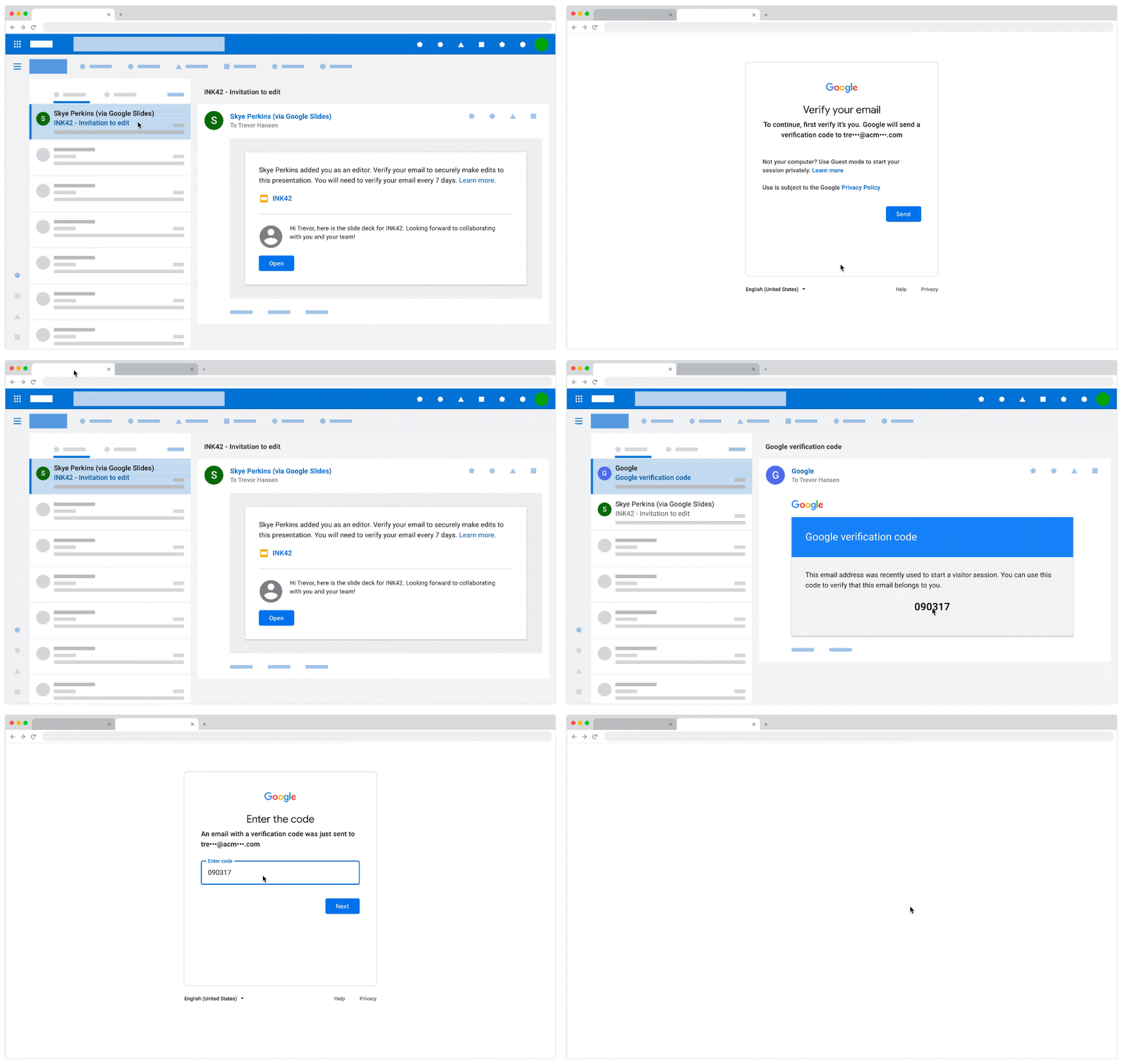
With visitor sharing, you can share items with non-Google accounts, enabling them to view, comment on, or edit content in Google Drive, Docs, Sheets, Slides, and Sites using a secure pincode. 


Getting started 

  • Admins: 
    • Sharing outside of your organization to users with non-Google accounts will be ON by default if you currently allow users in your organization to send sharing invitations to people outside your organization who are not using a Google account. 
    • Sharing outside of your organization to users with non-Google accounts will be OFF by default if you currently do not allow sharing outside your organization. Use our Help Center to learn more about sharing to non-Google accounts
    • Visitor sharing will be controlled by new settings at Admin console > Apps > G Suite > Drive and Docs > Sharing Settings (pictured below). 


Rollout pace 


Availability 

  • Available to Google Workspace Essentials, Business Starter, Business Standard, Business Plus, Enterprise Essentials, Enterprise Standard, Enterprise Plus, Education Fundamentals, Education Plus, Frontline, and Nonprofits, as well as G Suite Business customers 
  • Not available to G Suite Basic, Cloud Identity customers, or users with personal accounts 

Resources 

Quick launch summary

Google Chat bots can be a great way to help users streamline workflows, accomplish tasks, and get information and notifications in real time, without switching contexts away from Chat. We’re adding two new Chat bot features that make it easier to find and use Chat bots:
  • Slash Commands for Google Chat bots: Slash commands enable users to simply type “/” in the message line to reveal a list of functions offered by available bots. This makes it much easier to discover and use Chat bot functions that are available to you.
  • Dialogs for Google Chat bots: Dialogs allow developers to build user interfaces to create visual interfaces to gather inputs from users in a structured format. By guiding users to enter information in the right format, developers can be more confident of getting the specific data in the right formats to make their bots as useful as possible.


Slash commands make it easier to discover Chat bot functions


Dialogs help users input structured information to make Chat bots more useful


Getting started


Rollout pace

  • Available now for all users.

Availability


  • Available to all Google Workspace customers, as well as G Suite Basic and Business customers

Resources

What’s changing 

In July 2020, we announced a pilot for Brand Indicators for Message Identification (BIMI) in Gmail. Starting today, Gmail announces general availability of BIMI support across Gmail. 

BIMI aims to increase the adoption of strong authentication in the email ecosystem for those who have implemented Domain-based Message Authentication, Reporting, and Conformance (DMARC). For senders that have adopted DMARC and have validated their imagery, Gmail will display the validated logos in the avatar slots, increasing confidence in the source of emails for recipients. 


Before and after BIMI: Validated logos display on authenticated emails.


See below for more information, as well as the Cloud Blog for more information on BIMI for Gmail. 


Who’s impacted 

Admins 


Why it matters 

BIMI promotes another layer of security to Gmail by requiring strong authentication and verification of logos before they’re displayed in the Gmail avatar slot. Strong authentication increases confidence in the source of emails and provides recipients with a more immersive experience. Further, this helps email security systems filter spoofed, phishing emails from legitimate messages. 


Getting started 

  • Admins: 
    • To learn more about BIMI and see the latest news, visit the working group’s website
    • To take advantage of BIMI for your outgoing emails to Gmail and other platforms, ensure that your organization has adopted DMARC, and that you have validated your logo with a VMC, issued by a Certification Authority such as Entrust or DigiCert. 
    • Visit the Help Center to learn more about setting up BIMI
  • End users: No action required. 

Availability

  • Available to all Google Workspace customers, as well as G Suite Basic and Business customers 

Resources 

What’s changing 

Earlier this year, we announced that we were working towards unifying our two existing Google Drive sync clients – Backup and Sync and Drive File Stream – into a single sync client called Drive for desktop. By doing this, we’re creating a powerful and unified sync client with the best and most used features from both Backup and Sync and Drive File Stream. 

We also mentioned in this announcement that Google Workspace customers with Backup and Sync users would need to transition these users to Drive for desktop. Now, we want to provide a more detailed timeline for this transition: 

  • Starting July 19, 2021: Backup and Sync will support a guided flow to help users transition onto Drive for desktop. 
  • Starting August 18, 2021: Any users still on Backup and Sync will start to receive in-product notifications prompting them to transition to Drive for desktop. 
  • Starting October 1, 2021: Any users still on Backup and Sync after that point will no longer be able to sign in to Backup and Sync. To continue syncing with Drive and/or Google Photos, users will need to transition to Drive for desktop. 


Users can easily see which files and folders are synced using Drive for desktop 

Who’s impacted 

Admins and end users 


Why it’s important 

Drive for desktop is a unified sync client that provides a consistent experience for anyone who uses Drive, whether for business, education or personal purposes. It enables you to quickly sync and access content directly from Mac or PC, which can save you time by helping you access files and folders in a familiar location. Drive for desktop also automatically syncs local files to the cloud in the background, which minimizes the time you need to spend waiting for files to sync while also freeing up your disk space and saving network bandwidth 


Getting started 

Rollout pace 

  • Rapid Release and Scheduled Release domains
    • Starting July 19, 2021: Backup and Sync will support a guided flow to help users transition onto Drive for desktop. 
    • Starting August 18, 2021: Any users still on Backup and Sync will start to receive in-product notifications prompting them to transition to Drive for desktop. 
    • Starting October 1, 2021: Any users still on Backup and Sync after that point will no longer be able to sign in to Backup and Sync. To continue syncing with Drive and/or Google Photos, users will need to transition to Drive for desktop. 

Applicability 

  • Applicable to Backup & Sync users at all Google Workspace customers, as well as G Suite Basic and Business customers. This is also applicable to users with personal Google Accounts, and these users can learn more in this Keyword blog post

Resources