This official feed from the Google Workspace team provides essential information about new features and improvements for Google Workspace customers.


New updates 

Unless otherwise indicated, the features below are fully launched or in the process of rolling out (rollouts should take no more than 15 business days to complete), launching to both Rapid and Scheduled Release at the same time (if not, each stage of rollout should take no more than 15 business days to complete), and available to all Google Workspace and G Suite customers.


Updated emoji experience in Google Chat on iOS
It’s now easier to express yourself more authentically in Chat on iOS. We’re making the following updates to the emoji experience: The Emoji set is updated to the latest version (Emoji 13.1), reflecting the latest emoji set and diversity and inclusion options; Gender-neutral options for gender-modifiable emojis have been added; Emoji skin tone and gender preferences are saved per individual emoji. | Available to all Google Workspace and G Suite customers, as well as users with personal Google accounts.


Previous announcements

The announcements below were published on the Workspace Updates blog earlier this week. Please refer to the original blog posts for complete details.


More easily add citations in Google Docs with new search and automated entry function
When adding citations in Google Docs, you can now search for books and online sources, then automatically populate some attributes for those sources.  | Learn more.


Refine search results in Google Drive with search chips, launching in beta
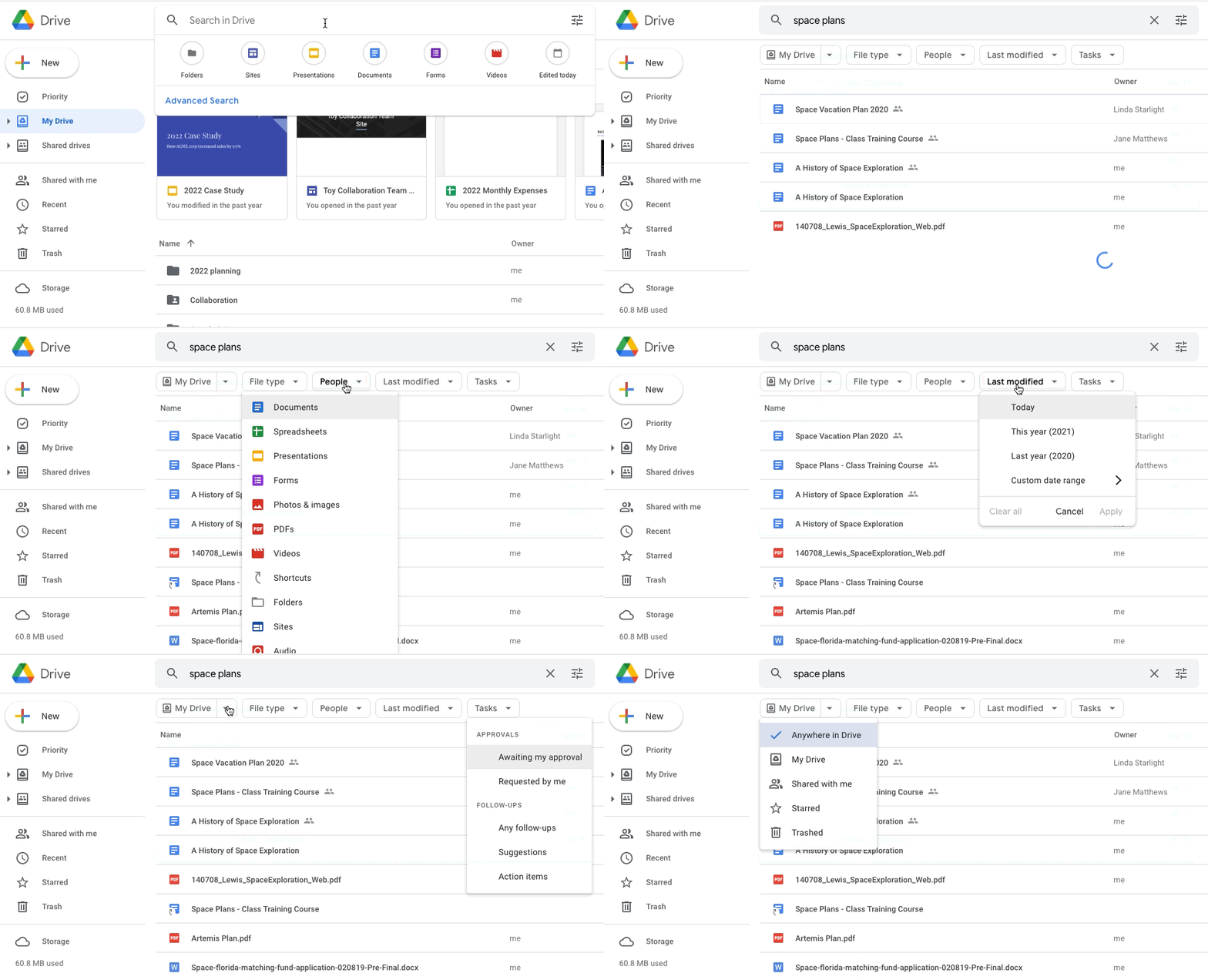
We’re launching a new beta for Google Drive that will help users refine their search and locate files faster using search chips. This beta will be available for all Google Workspace editions—eligible customers can use this form to express interest in the beta. | Learn more.


Enable advanced context-aware access to Google Workspace in the Admin console
You can now configure context-aware access (CAA) custom access levels using advanced attributes directly from the Google Workspace Admin console. You can use more advanced signals such as time/date restrictions, credential strength, Chrome browser attributes or verified ChromeOS as well as third-party signals via BeyondCorp Alliance partners. | Available to Google Workspace Enterprise Standard, Enterprise Plus, Education Standard, and Education Plus. Also available to Cloud Identity Premium customers. | Learn more.


Google Workspace Client-side encryption beta expanded to include Google Meet and Google Drive for desktop
We’re now expanding the client-side encryption beta to include desktop data for Google Meet and Google Drive. Additionally, key access service APIs are now publicly available for anyone to use. Lastly, we are adding two new Key access service partners (Fortanix, Stormshield) for customers looking for a dedicated partner that integrates with the key access service APIs. | Learn more.


For a recap of announcements in the past six months, check out What’s new in Google Workspace (recent releases).

What’s changing 

Earlier this year, we announced the beta for Google Workspace Client-side encryption, specifically for Google Drive, Docs, Sheets, and Slides, with support for all file types in Drive including Office files, PDFs, and more. 

We’re now expanding the beta to include desktop data for Google Meet and Google Drive. Additionally, key access service APIs are now publicly available for anyone to use. 

Encryption notice in Meet

Encryption notice in Meet

Lastly, we are adding two new Key access service partners (Fortanix, Stormshield) for customers looking for a dedicated partner that integrates with the key access service APIs. Previously, we had announced key service partnerships with Flowcrypt, FutureX, Thales and Virtru

The beta is available to Google Workspace Enterprise Plus and Google Workspace Education Plus customers—eligible customers can now apply for the beta here. Important note: Customers who are already participating in the beta will have to reapply for access to the Google Meet and functionality, but you will be able to reuse your key service configuration. 

Who’s impacted 

Admins and developers 

Why it’s important 

Google Workspace already uses the latest cryptographic standards to encrypt all data at rest and in transit between our facilities. With Client-side encryption, we’re taking this a step further by giving customers direct control of encryption keys and the identity provider used to access those keys. This can help you strengthen the confidentiality of your data while helping to address a broad range of data sovereignty and compliance needs. 

When using Client-side encryption, customer data is indecipherable to Google. Customers can create a fundamentally stronger privacy posture to comply with regulations like ITAR and CJIS or simply to better protect the privacy of their confidential data 

Read our announcement post to learn more about this beta and our plans for Client-side encryption across Google Workspace. 

Additional details 

If you are looking to choose a key service access partner, Flowcrypt, Fortanix, Futurex, Stormshield, Thales, and Virtru have built tools in accordance with Google’s specifications and provide both key management and access control capabilities. Your partner of choice holds the key to decode encrypted Google Workspace files, and Google cannot access or decipher these files without this key. 

If you prefer to build or integrate your own in-house key services, we have published the key access service API specifications that can be used with Client-side encryption. 

Getting started 

Availability 

  • Available to Enterprise Plus and Education Plus customers 
  • Not available to Google Workspace Essentials, Business Starter, Business Standard, Business Plus, Enterprise Essentials, Enterprise Standard, Education Fundamentals, Frontline, and Nonprofits, as well as G Suite Basic and Business customers. 

Resources 

What’s changing 

You can now configure context-aware access (CAA) custom access levels using advanced attributes directly from the Google Workspace Admin console. You can use more advanced signals such as time/date restrictions, credential strength, Chrome browser attributes or verified ChromeOS as well as third-party signals via BeyondCorp Alliance partners

Who’s impacted 

Admins 

Why you’d use it 

By making more attributes available, and by enabling set up and management of advanced access levels in the Admin console, it will be easier to help ensure your Google Workspace configuration is more secure.

Getting started 

Admin console screen to create an access level

Admin console screen to create an access level

Rollout pace 

Availability 

  • Available to Google Workspace Enterprise Standard, Enterprise Plus, Education Standard, and Education Plus. Also available to Cloud Identity Premium customers. 
  • Not available to Google Workspace Essentials, Business Starter, Business Standard, Business Plus, Enterprise Essentials, Education Fundamentals, Frontline, and Nonprofits, as well as G Suite Basic and Business, and Cloud Identity Free customers. 

Resources 

Update

[December 9, 2021]: This beta is now closed and will no longer be accepting new applicants. We will provide an update on the Workspace Updates Blog when this feature becomes generally available.

What’s changing

We’re launching a new beta for Google Drive that will help users refine their search and locate files faster using search chips. This is similar to functionality available in Gmail today. 


See below for more information.


Who’s impacted

Admins and end users


Why you’d use it 

When searching in Drive, users often use a few key words to try and locate the file they’re looking for, such as “marketing plan” or “sales report,” which may return results that are too broad. 


Now, after a query is entered, users can use search chips to surface more relevant results based on:

  • File type, such as a Google Doc, PDF, or image
  • People
  • Location, such as a shared drive or specific folder
  • When the document was last modified
  • File titles only
  • Shared drive labels
  • Tasks
We hope search chips in Drive make it easier to find relevant files faster, eliminating the need to perform multiple searches or sort through irrelevant results.


Getting started

  • Admins: This beta is now closed and will no longer be accepting new applicants. 

  • End users: If accepted into the beta, search chips will be available by default to users in the Google group(s) provided at sign-up. Simply enter a search query and select one or multiple chips to further drill down results.

Availability

  • Available to all Google Workspace customers, as well as G Suite Basic and Business customers

What’s changing 

When adding citations in Google Docs, you can now search for books and online sources, then automatically populate some attributes for those sources. 


Citation Search navigation

Citation search navigation

Who’s impacted 

End users 

Why you’d use it 

Citations are an important aspect of many types of documents. This new search and automatic addition function makes it quicker and easier to add citations. By automating part of the source creation process, and ensuring correct formatting, we hope to save you time and reduce manual errors while managing citations. 

Getting started 

  • Admins: There is no admin control for this feature. 
  • End users: This feature will be available automatically. In every document, users can find the feature using the Tools > Citations menu item. Visit the Help Center to learn more about adding citations to your document. 

Rollout pace 

Availability 

  • Available to all Google Workspace customers, as well as G Suite Basic and Business customers 
  • Available to users with personal Google Accounts 

Resources