This official feed from the Google Workspace team provides essential information about new features and improvements for Google Workspace customers.


Quick launch summary

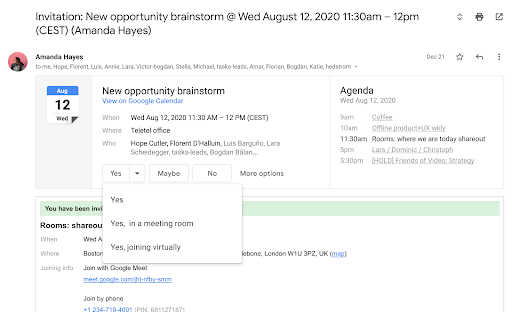
In July of this year, we introduced new RSVP options for Calendar invitations to make Google Calendar more flexible in the hybrid workplace. We’re now adding this same functionality to RSVPs in Gmail.

Dropdown menu showing new RSVP methods in Gmail
New RSVP options in Gmail


With these RSVP options, you can indicate how you plan to join a meeting—in the meeting room, or virtually. Then, both the organizer and guests will be able to see how attendees are planning to attend the meeting in the event detail. This will help meeting attendees know what to expect when joining a meeting, and prepare accordingly.

Note that if you select the new RSVP options, the join method details (e.g. “joining virtually”) are not shared with contacts on other platforms, such as Microsoft Outlook.

Getting started


Rollout pace


Availability

  • Available to all Google Workspace customers, as well as G Suite Basic and Business customers

Resources

Quick launch summary

In new Google Sites, we’re adding the ability for editors to copy a single page or subset of pages into a new site. Previously, it was only possible to make a copy of an entire site. This feature gives site editors more control, allowing users to reuse part of a site or easily break up a large site into smaller sites. 

We hope this feature, in addition to other recent site editing capabilities such as restoring a specific page from a site, make it easier for site editors to collaborate on large sites.

Getting started

To copy specific pages in Google Sites, select Make a copy > Pages > Selected Pages from the three-dot overflow menu.


Rollout pace


Availability


What’s changing

Google for Education transformation reports are available for K-12 Google Workspace for Education customers worldwide, at no additional cost. The next reporting window is open as of November 2, 2021 and will close December 10, 2021. 

Additionally, we’ve introduced several improvements for transformation reports:

  • Immediate access: Starting today, super admins for any Google Workspace for Education domain can login to view their transformation report. We've removed the waiting period between logging in to request a report and receiving a report. 
  • Realtime updates: You can now adjust the product data windows and the number of teachers and students you expect to be using Google products. This will allow you to view real time updates for your report regarding what’s most useful to you. any time between November 2, 2021 and December 10, 2021.  (The report will be locked for editing after December 10)
  • Ease of use: Reports are now available immediately upon login without having to request one in advance. Additionally, reports can now be customized with updates in real time any time Nov 2- Dec 10. 

See below for more information on generating your transformation report.


Who’s impacted

Admins


Why you’d use it

The transformation report is a free tool designed to help quantify your organization’s Google for Education implementation across our products and programs. Semester-based reports track usage trends over time and make it easy to understand how your organization is using Google Workspace for Education, Chromebooks, and progressing through Certification programs. 


Based on usage information and survey responses, you’ll receive tailored recommendations and resources from Google for Education to help you drive more impact across your organization. 


See here for more information about Google for Education transformation reports, as well as a list of frequently asked questions.


Getting started

Super Admins: Super admins may log in to g.co/edutransformationreport to access a custom transformation report:


  • Log in to view your report 
    • Note: All Google for Education customers will have a report available without having to proactively request one in advance.


  • Take and share the transformation survey [optional]
    • Survey participation is optional, but we encourage you and your leadership team to complete the survey at least once a year to reflect on your digital transformation and receive customized feedback.  
    • See our FAQs for recommendations on who to share the survey with and this email template when sharing with your leadership team.

End users: No action required.


Rollout pace

  • Transformation reports are available now for all users. 


Availability

  • Available to K-12 Google Workspace for Education Fundamentals, Education Standard, Education Plus, and the Teaching and Learning Upgrade customers
  • Not available to Google Workspace Essentials, Business Starter, Business Standard, Business Plus, Enterprise Essentials, Enterprise Standard, Enterprise Plus, Frontline, and Nonprofits, as well as G Suite Basic and Business customers


Resources 


Quick launch summary 

Earlier this year, we enabled users to block another user in Google Drive. If blocked, the user will not be able to share any Drive items with you, and items owned by the user will not be able to be shared with you or be shown when you’re browsing Google Drive. 


Now, we’re enhancing this feature by also preventing notifications when there’s an @-mention between you and a blocked user in comments or action items on Google Docs, Sheets, or Slides. This block will apply to both email and in-app notifications. This will make the feature more predictable and comprehensive. 


Getting started 

Rollout pace 

Availability 

  • Available to all Google Workspace customers, as well as G Suite Basic and Business customers. 

Resources 


What's changing

Previously we launched a new beta that allows you to request and review formal approvals on Google Docs, Sheets, and Slides, and now we are rolling out that ability to more users. Once requested, approvers can approve, reject, add comments, or edit the document in response. All of this can be done without leaving the secure environment of Google Workspace. 


Requesting an approval on a Google Doc

Requesting an approval on a Google Doc


Who’s impacted 

Admins and end users 

Why you’d use it 

Securing document approvals can be difficult when collaborating with multiple stakeholders and competing priorities. This feature makes it easy to secure those approvals and see who has approved them.

This feature also ensures that when edits are made to a document, all reviewers are notified and the latest version of the document is re-approved. It also ensures that once all reviewers have provided their approval, the file locks and cannot be edited, securing the integrity of your document. 

We hope this feature streamlines the workflow needed to secure approvals on contracts, legal documents, and other situations where formal approval is required. 

Additional details 

Once a document is sent for approval, reviewers get email, browser or Google Chat notifications, based on where they have selected in Google Drive’s web settings to receive notifications. They will then receive a link they can follow directly to the document. 

If you set a due date, your reviewers will receive email reminders that their approval is needed or past due. You’ll also be able to prevent any user from editing the item’s content or leaving comments and suggestions by choosing to lock the document. 

Note: Documents by default will remain unlocked until they are fully approved. 

If you request approval from multiple people, the document is considered approved once all reviewers approve the file. If an edit is made during the approval process, all reviewers will need to re-approve the latest version of the file and will receive email notifications in those instances. The document approval request is rejected for all reviewers if a single reviewer rejects the file. 

Once all reviewers approve the document, the file will be locked. Locked files can't be edited until they're unlocked or approved. Unlocking the file cancels the current approval request. 

Getting started 


Enabling the approvals feature in the Admin console

Enabling the approvals feature in the Admin console

Rollout pace 

Admin setting 

Note: While the Admin console setting will be visible and configurable, your setting will not be enforced until November 15, 2021 

End user feature 

Availability 

  • Available to Google Workspace Essentials, Business Standard, Business Plus, Enterprise Essentials, Enterprise Standard, Enterprise Plus, Education Plus, and Nonprofits, as well as G Suite Business, G Suite Enterprise, Drive Enterprise, G Suite for Education, G Suite Enterprise for Education, and G Suite for Nonprofits 
  • Not available to Google Workspace Business Starter, Education Fundamentals, Education Standard, Frontline, and G Suite Basic customers 
  • Not available to users with personal Google Accounts 

Resources 

Roadmap