This official feed from the Google Workspace team provides essential information about new features and improvements for Google Workspace customers.


[Update - January 15, 2025]: We recently announced that Google AI features will be added directly to our Google Workspace Business and Enterprise plans. As part of this announcement, customers with Business Standard, Business Plus, Enterprise Standard, and Enterprise Plus editions can continue to use translated captions through their existing subscriptions.
[Update - September 7, 2023]: Translated captions in Google Meet will be available exclusively to Duet AI for Google Workspace Enterprise add-on users at a future date. We will provide a minimum of 6 months notice to existing Google Workspace customers before this change takes place.


What’s changing 

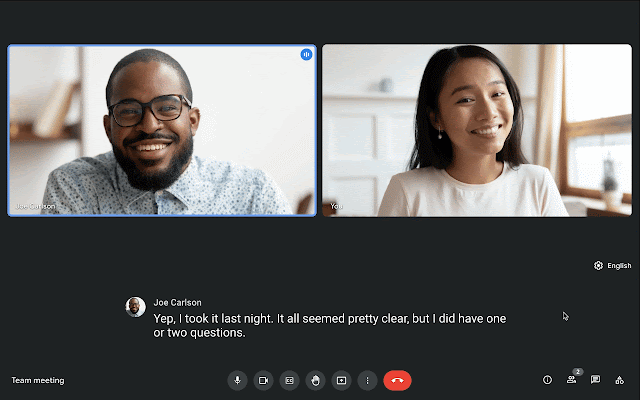
In 2021, we announced a beta for live translated captions in Google Meet. We’re now making live translated captions generally available for select Google Workspace editions. 

Meeting participants can translate English meetings to: 
  • French 
  • German 
  • Portuguese 
  • Spanish 

Translated captions are available on Google Meet on web and mobile devices. 

Who’s impacted 

End users 


Why it’s important 

Translated captions help make Google Meet video calls more inclusive and collaborative by removing language proficiency barriers. When meeting participants consume content in their preferred language, this helps equalize information sharing, learning, and collaboration and ensures your meetings are as effective as possible for everyone.

This feature can be particularly helpful for all-hands meetings or training meetings with globally distributed teams. Additionally, translated captions can be impactful in education settings, allowing educators to connect and interact with students, parents, and community stakeholders with diverse backgrounds.


Additional details 


Beta availability 
The live translated captions beta will remain open for the next several months. Therefore, if you are participating in the beta with a Google Workspace edition not listed as “Available to” above, your experience will remain the same. 


Availability for meeting participants 
Meeting participants will be able to use live translated captions if the meeting is organized by a user in beta or an eligible Google Workspace edition. 


Getting started 

  • Admins: There is no admin control for this feature. 
  • End users: This feature will be available by default and can be enabled in Google Meet on the web by going to Settings > Captions > Translated captions or on mobile by going to Settings > Captions > Live Captions > Translation Language. Visit the Help Center to learn more about translated captions in Google Meet

Rollout pace 


Availability 

  • Available for meetings organized by Google Workspace Business Standard, Business Plus, Enterprise Starter, Enterprise Standard, Enterprise Plus, Education Plus, and the Teaching and Learning Upgrade
  • Not available to meetings organized by Google Workspace Essentials, Business Starter, Enterprise Essentials, Google Workspace for Education Fundamentals, Google Workspace for Education Standard, Frontline, and Nonprofits, as well as legacy G Suite Basic and Business customers 
  • Not available to Google Workspace Individual customers or users with personal Google Accounts 
Resources 

What’s changing 

We’ve made several improvements to the issue detection engine which notifies admins about peripheral and connectivity issues in their Google Meet hardware fleet. These improvements will make alerts more reliable and cut down on noise and false signals.

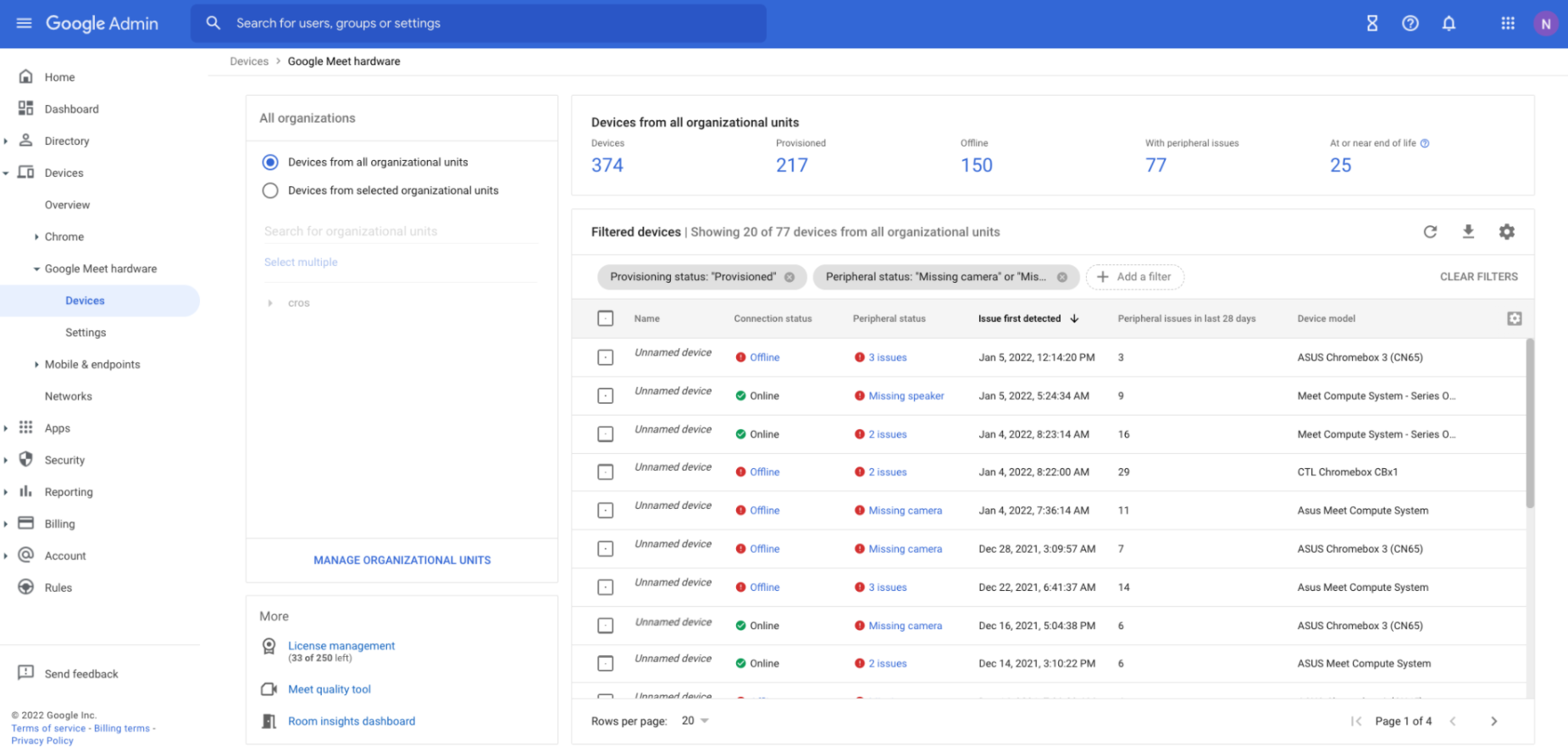
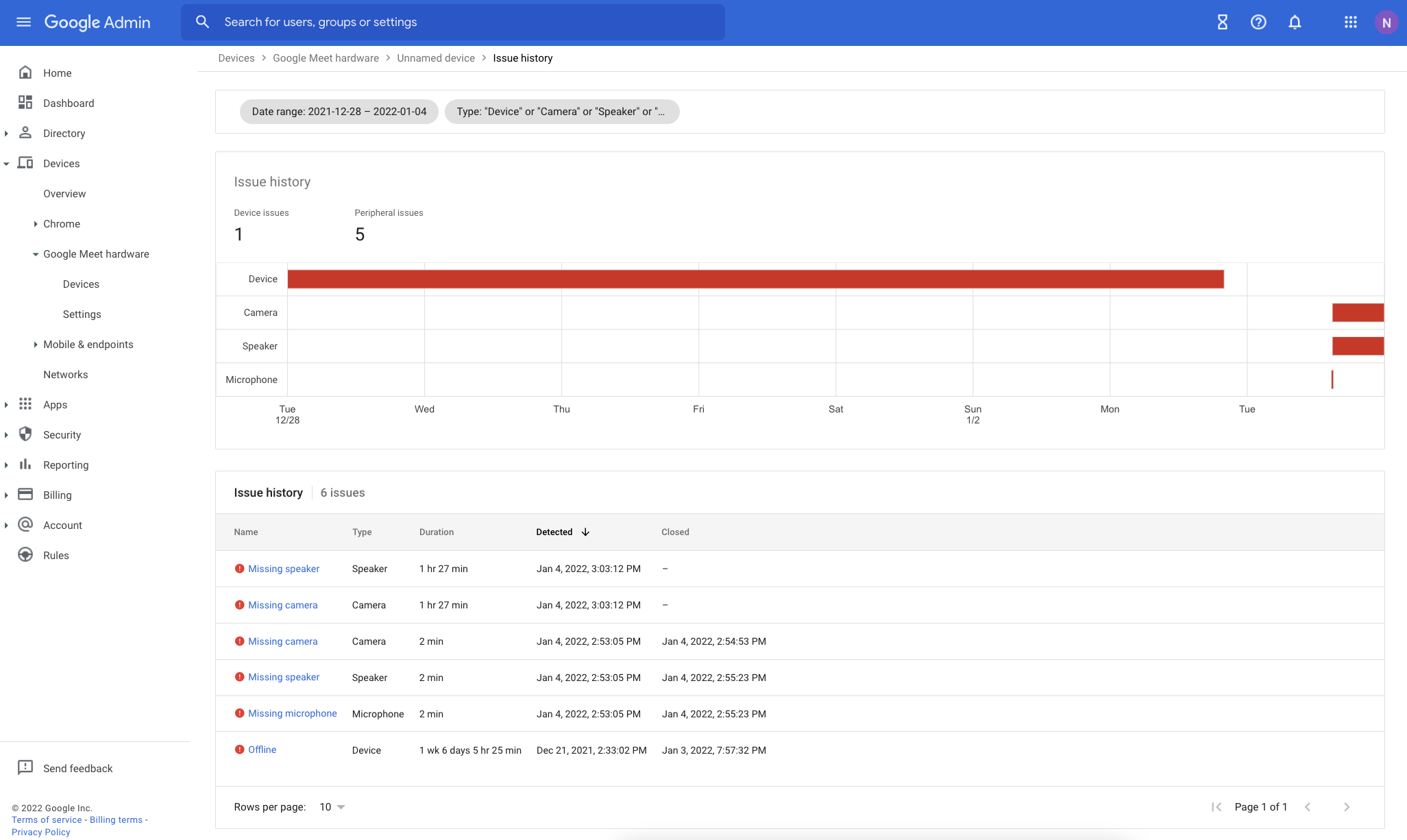
Furthermore, we’ve made a number of significant visual changes to the Google Meet hardware section of the Admin console in order to display more detailed information regarding device issues.  We expect these new features will allow admins to better troubleshoot issues in their fleets.  They include:

  • Issue history page
  • Device list quick-filters
  • Issue detail sidebar
  • New aggregated issue count columns

See below for more information.


Who’s impacted

Admins


Why it’s important

We hope that by improving the accuracy and information associated with alerts and providing additional troubleshooting tools, Admins can resolve Google Meet hardware issues faster across their fleet.


Additional details


New issue history page
To provide admins with more information and context about a device’s health over time, we’ve added a new Issue History page in the Admin console. Here, admins can see a visual timeline and table of issues for specific devices, which can be filtered further by a specific date or issue type.


Improvements to the Google Meet hardware Devices section of the Admin console
We’ve added new quick-filters at the top of the Device list page to help quickly filter your devices down to the most common views, such as offline devices, those approaching end-of-life, and more.


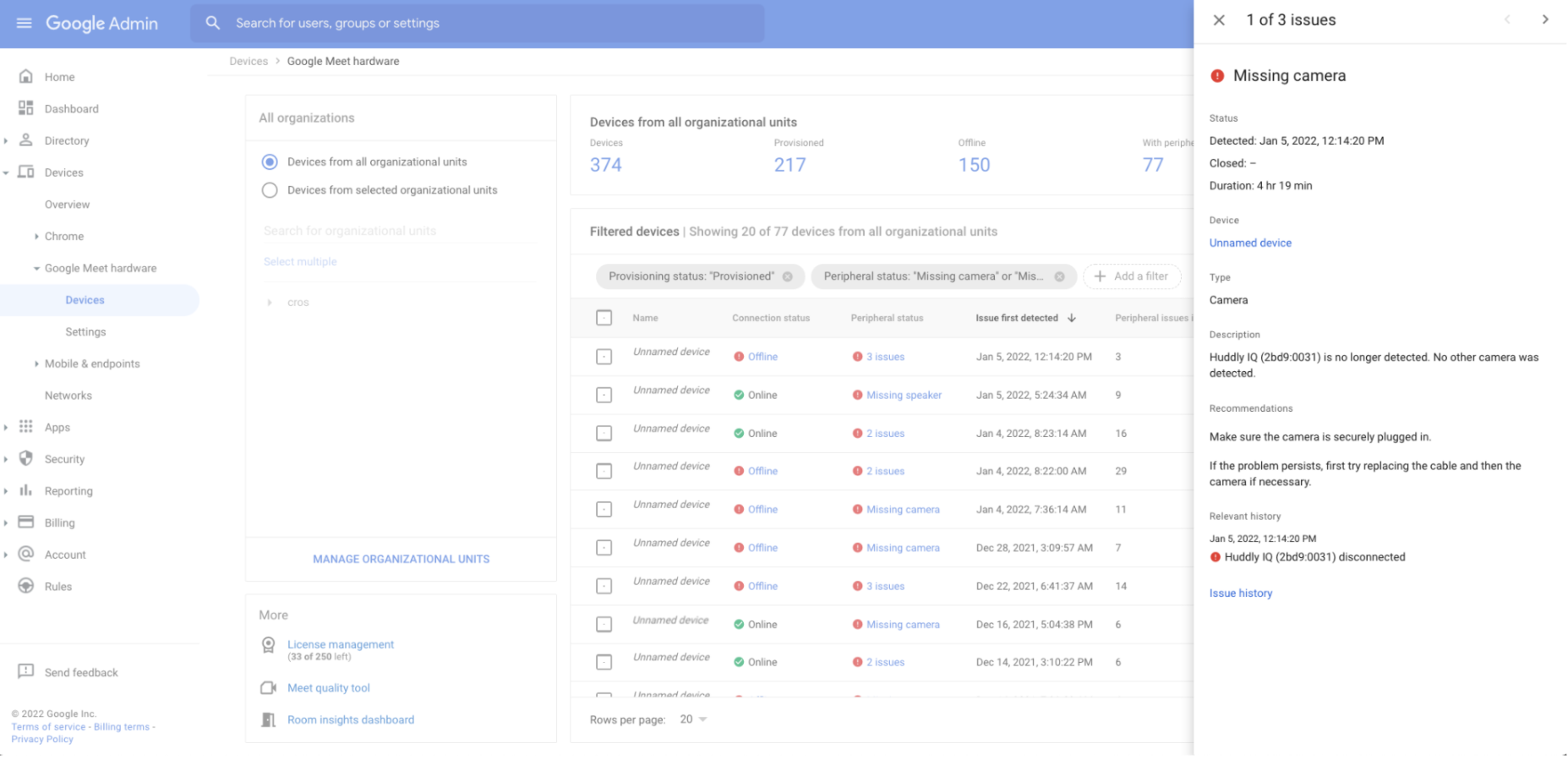
You can also surface richer information about device issues in the sidebar by clicking an issue from the Device list or Device detail page. This information includes:

  • Description
  • Type
  • Detection time
  • Closed time
  • Duration
  • Related events
  • Troubleshooting recommendations


Additionally, we’ve added two new columns to the Device list page: Device issues in last 28 days and Peripheral issues in last 28 days, which can help you isolate persistently problematic devices in your fleet. To add these columns to your current view, you can select the appropriate quick-filter or manually use the column management widget.


Getting started

  • Admins: These updates will be automatically available. Visit the Help Center to learn more about turning on connectivity and peripherals alerts.
    • Note: As these updates roll out, there may be instances in which future resolution alerts for issues open longer than 30 days contain a different Alert ID than the ID originally included in the initial alert. We anticipate these occurrences to be rare, but Admins who have built custom task-tracking integrations based on these alerts should be aware of this in case they contain logic that relies upon the Alert ID. Newly created alerts going forward will not be affected.
  • End users: There is no end user impact or action required.

Rollout pace


Availability

  • Available to all Google Workspace customers, as well as legacy G Suite Basic and Business customers with Google Meet hardware devices

Resources


What’s changing

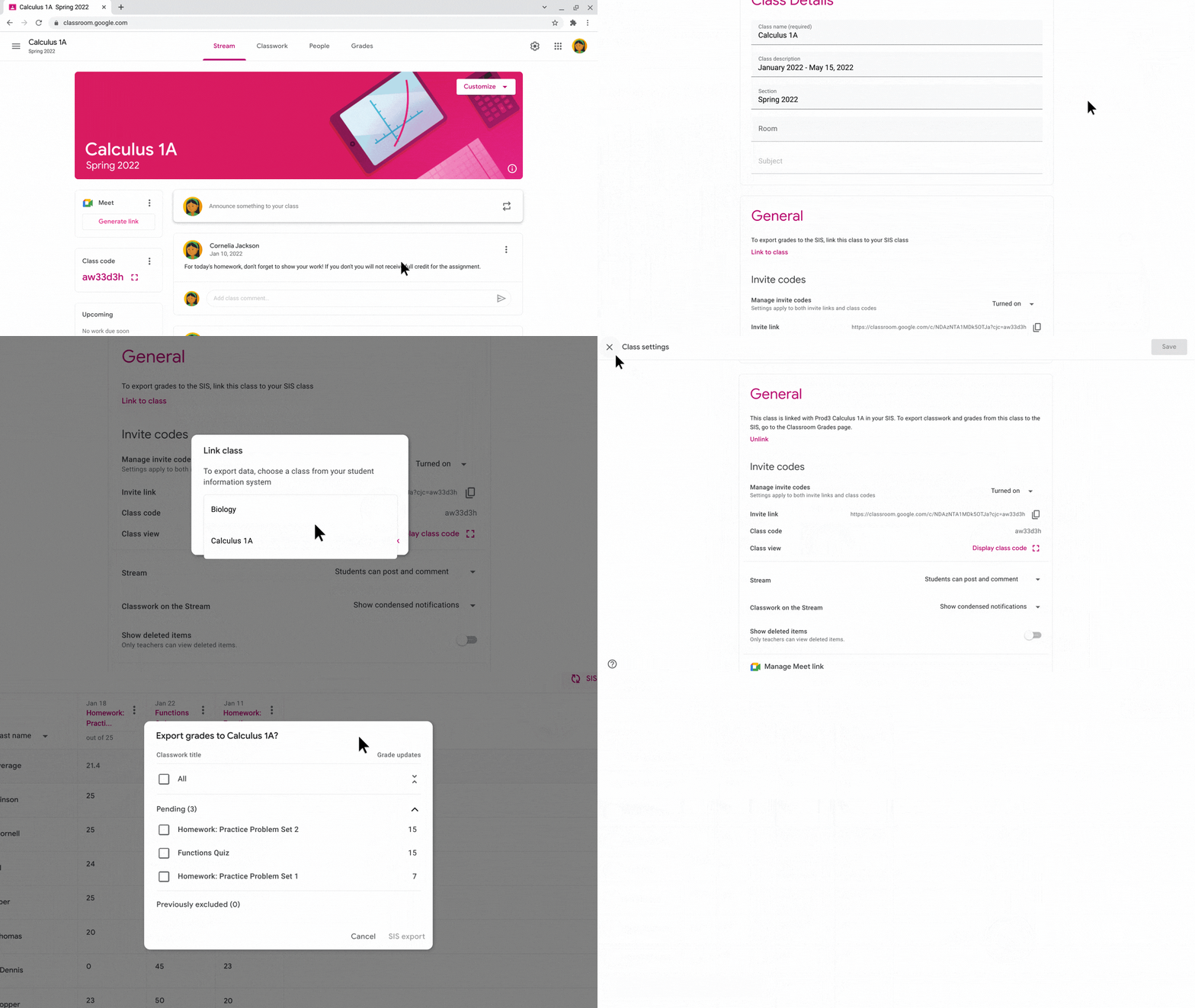
Google Classroom teachers can now export their grades to Follett Aspen, a third-party Student Information System (SIS). Grade export is a one-way information push that allows:

  • Admins to establish a connection between their district SIS and Google Classroom, and configure export settings that apply to Google Classroom teachers.
  • Teachers to manually link new or existing Google Classroom classes to their SIS, and push returned assignments and grades from Google Classroom.

This is only available to users in the United States and Canada. Additionally, there is no additional cost associated with this functionality.


Who’s impacted

Admins and teacher end users


Why it matters

This feature expands the interoperability between Google Classroom and Follett Aspen SIS in the United States and Canada. Grade export saves teachers time and duplicative work by keeping their SIS in sync with fewer manual steps.


Getting started


Rollout pace


Availability

  • Available as a core service to Google Workspace Education Fundamentals, Education Standard, the Teaching and Learning Upgrade, and Education Plus. 
  • Not available to Google Workspace Essentials, Business Starter, Business Standard, Business Plus, Enterprise Essentials, Enterprise Standard, Enterprise Plus, Frontline, and Nonprofits, as well as legacy G Suite Basic and Business customers


Resources


Roadmap


New updates 

Unless otherwise indicated, the features below are fully launched or in the process of rolling out (rollouts should take no more than 15 business days to complete), launching to both Rapid and Scheduled Release at the same time (if not, each stage of rollout should take no more than 15 business days to complete), and available to all Google Workspace and G Suite customers. 


Update 
[2024]: We have completely rolled back this feature on web and there are no plans to relaunch this feature at this time. We will provide an update if and when one becomes available.
[February 2, 2022]: We have temporarily paused the rollout for this feature. We apologize for the delay and we will share an update once rollout resumes.

PPTX file limit increase in Google Slides 
You can now import PPTX files up to 300MB into Google Slides using Office Editing mode — previously, 100MB was the maximum. Once imported, you can save back your edits to the underlying PPTX file. | Available to all Google Workspace customers and users with personal Google accounts. | Learn more.


Previous announcements 


The announcements below were published on the Workspace Updates blog earlier this week. Please refer to the original blog posts for complete details. 


Use a new enterprise certificate condition to set context-aware access rules for company-managed devices 
When configuring context-aware access rules, you can now use a new signal to determine whether a device is company-owned. | Available to Google Workspace Enterprise Standard, Enterprise Plus, Education Standard, Education Plus, and Cloud Identity Premium customers. | Learn more. 


For a recap of announcements in the past six months, check out What’s new in Google Workspace (recent releases).

Quick launch summary 

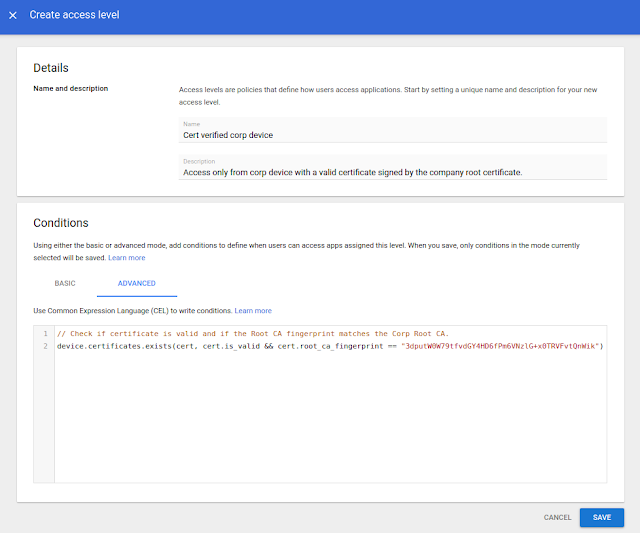
When configuring context-aware access rules, you can now use a new signal to determine whether a device is company-owned. By using new enterprise certificates as an alternative context-aware signal to determine if a device is a company-managed asset, you can set more specific context-aware policies that are appropriate based on the trustworthiness of the device. 
admin console screen to configure context-aware access rules
The Admin console screen to configure context-aware access rules using enterprise certificate condition


Getting started 

Rollout pace 

  • This feature is now available for all eligible users. 

Availability 

  • Available to Google Workspace Enterprise Standard, Enterprise Plus, Education Standard, Education Plus, and Cloud Identity Premium customers 
  • Not available to Google Workspace Essentials, Business Starter, Business Standard, Business Plus, Enterprise Essentials, Education Fundamentals, Frontline, and Nonprofits, as well as legacy G Suite Basic and Business, and Cloud Identity Free customers 

Resources