This official feed from the Google Workspace team provides essential information about new features and improvements for Google Workspace customers.


New updates 

Unless otherwise indicated, the features below are fully launched or in the process of rolling out (rollouts should take no more than 15 business days to complete), launching to both Rapid and Scheduled Release at the same time (if not, each stage of rollout should take no more than 15 business days to complete), and available to all Google Workspace and legacy G Suite customers. 


Japanese grammar suggestions for Google Docs 
You'll now see grammar suggestions as you type in Japanese in Docs. Grammar suggestions can help you write faster and more accurately. | Learn more.


Previous announcements 

The announcements below were published on the Workspace Updates blog earlier this week. Please refer to the original blog posts for complete details. 


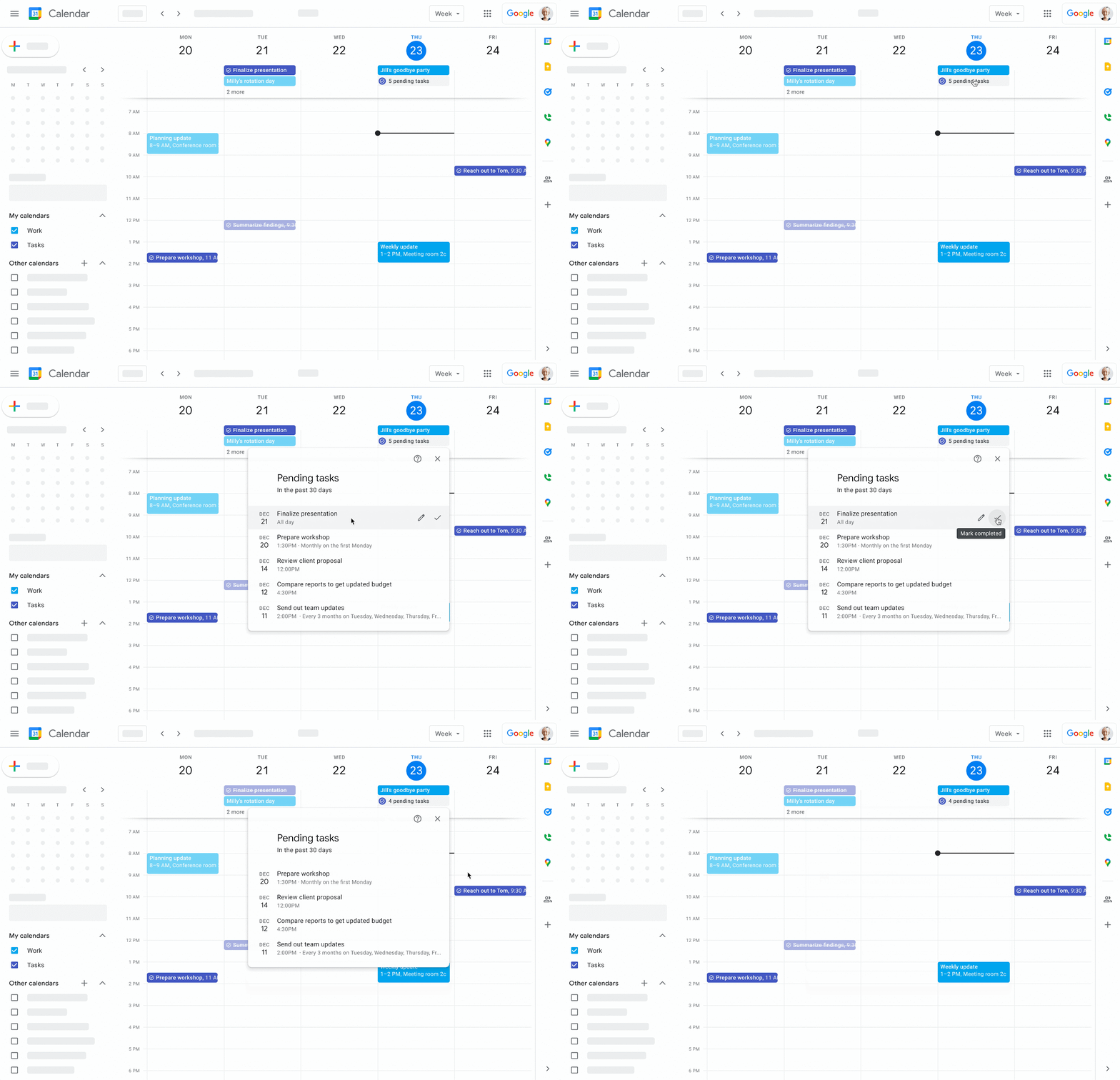
Manage overdue tasks in Google Calendar You can now easily see and manage your overdue tasks in Google Calendar. 
If you have uncompleted tasks that were due in the past 30 days, you will have an all day entry that will tell you how many tasks are pending from that timeframe. | Learn more. 


Participate in Google Meet polls and Q&As on Chromebase for meetings 
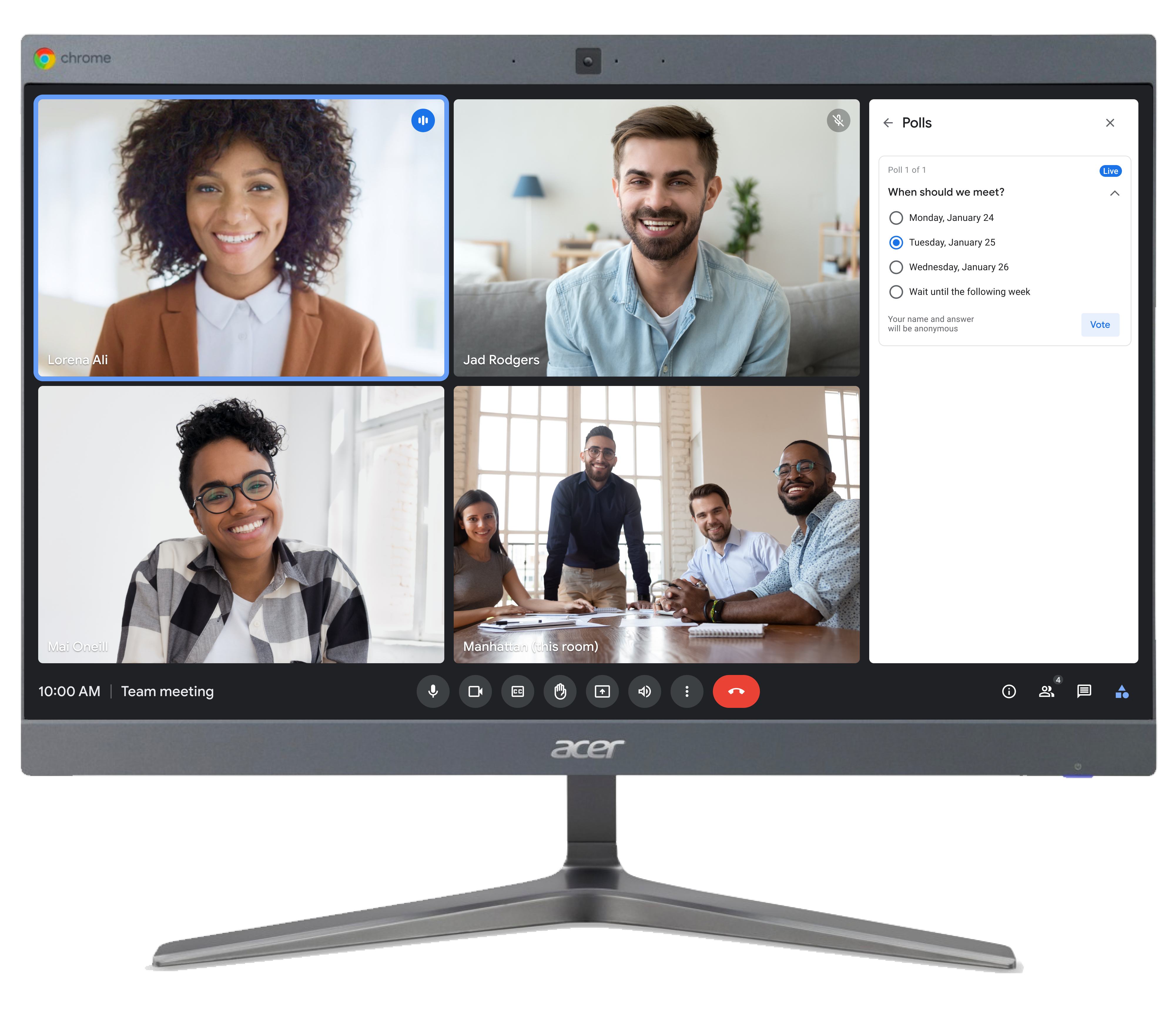
You can now participate in Google Meet polls and Q&As when joining from a Chromebase for meetings all-in-one touchscreen device. | Learn more.


The future of Currents and the next generation of collaboration in Spaces 
With Spaces now available, starting in 2023 we are planning to wind down Google Currents and bring remaining content and communities over to the new Spaces experience. | Learn more here and here


Google Voice calls between many European numbers are now included in Google Voice licenses
Beginning February 8, 2022, calls from European Google Voice numbers to mobile and landline numbers in many European countries will be included with the cost of the Google Voice license. | Learn more. 


For a recap of announcements in the past six months, check out What’s new in Google Workspace (recent releases).

Quick summary

Beginning February 8, 2022, calls from European Google Voice numbers to mobile and landline numbers in many European countries will be included with the cost of the Google Voice license. 

Previously, these calls were subject to domestic and international rates. This change will reduce the cost of staying connected with your colleagues, partners, and customers distributed in Europe.


Getting started


Rollout pace

  • This feature is available now for all users with European phone numbers.


Availability

  • Available to all Google Voice Starter, Standard, and Premier customers


Resources


What’s happening 

Last year, we introduced Spaces, a dedicated place for organizing people, topics, and projects in Google Workspace. Since launching Spaces, many customers have told us that they appreciate the tight integration with Google Workspace products, including Gmail, Calendar, Drive, and Meet, and the seamless collaboration experience. 


With Spaces now available, starting in 2023 we are planning to wind down Google Currents and bring remaining content and communities over to the new Spaces experience. Before we do this, we’ll deliver new capabilities in Spaces to help you communicate and collaborate more effectively. These include support for larger communities and leadership communication, investments in advanced search, tools for content moderation, and more. We’re also investing in search and discoverability, platform capabilities for app development, and enterprise-grade security and compliance, including data protection, data loss prevention (DLP) and Vault support. 


If your organization is using Currents, we’ll share a timeline for opting in to data migration and other milestones in the coming months, as well as guidance to assist with the transition. Spaces are available to all Google Workspace customers today.


Who’s impacted

Admins and end users


Why it matters

The accelerating transition to hybrid work has significantly changed the way people collaborate, and Google Workspace customers are using Chat and Spaces to communicate about projects, share organizational updates, and build community. 


Upgrading Google Currents to Spaces removes a separate, siloed destination for users, and provides organizations with a modern, enterprise-grade experience that reflects how the world is working today. Spaces provide a central place for teams to engage in topic-based discussions, share knowledge and ideas, move projects forward, and build communities and team culture. 


Additional details

In preparation for the migration from Currents to Spaces, we’ll start turning down features with very little usage. Please see the Help Center for more details.


Getting started

  • Admins: If your organization is using Currents, we’ll share more details, including a migration guide, in an email to the primary admin at your domain in the coming months. Please stay tuned. 
  • End users: Read more on how to get started with Spaces.

Availability

  • Spaces are available to all Google Workspace customers and users with personal Google Accounts.

Resources


What’s changing 

You can now participate in Google Meet polls and Q&As when joining from a Chromebase for meetings all-in-one touchscreen device.


Who’s impacted

End users


Why you’d use it

This update can foster more inclusive hybrid meetings by giving participants in conference rooms and classrooms a way to engage in these key activities from Chromebase for meetings devices.


Additional details

Q&A
When using a Chromebase device:
  • Meeting participants can view, sort, and upvote questions.
  • Note: meeting organizers can start Q&As from Meet on web, Android, and iOs devices only.

View and upvote questions on Chromebase for meetings


Polls
When using a Chromebase device:
  • Meeting participants can vote on any poll during the meeting. Note that the vote will be attributed to your Chromebase device.
  • Note: meeting organizers can create a poll from Meet on web, Android, and iOS devices only. 

Participate in meeting polls by voting on Chromebase for meetings


Visit the Help Center to learn more about conducting polls and asking participants questions in Meet, and the supported Google Workspace editions.


Getting started

  • Admins: There is no admin control for this feature.
  • End users: Visit the Help Center to learn more about using polls and Q&As in Google Meet.


Rollout pace


Availability


Resources


Quick summary 

You can now easily see and manage your overdue tasks in Google Calendar. If you have uncompleted tasks that were due in the past 30 days, you will have an all day entry that will tell you how many tasks are pending from that timeframe. Clicking on that entry brings up the list of these pending tasks and you can directly edit or mark them as complete from this list. 

See pending tasks as an all day entry in Calendar


By giving you a comprehensive list of uncompleted past tasks, right in Calendar, we hope that this helps you better keep track of your Tasks. The feature will be available on the web and on mobile. 


Getting started 

  • Admins: There is no admin control for this feature. 
  • End users: This feature will be ON by default for anyone that uses tasks in Calendar and can be turned OFF by hiding tasks in Google Calendar. Visit the Help Center to learn more about creating & viewing tasks in Calendar

Rollout pace 

Web: 

Android: 

iOS: 

Availability 

  • Available to all Google Workspace customers, as well as legacy G Suite Basic and Business customers 

Resources