
This official feed from the Google Workspace team provides essential information about new features and improvements for Google Workspace customers.


What’s changing

 
We're now ready to move into the final phase of the migration from Classic Hangouts to Google Chat for Google Workspace customers. 

Beginning March 22, 2022, we’ll turn on the “Chat preferred” setting for any customers who haven’t already done so, making Google Chat the default chat application. This means that when users visit classic Hangouts in Gmail on the web or the classic Hangouts mobile apps, they’ll be directed to Chat. Hangouts.google.com will continue to work. It is not possible to opt out of this change. If you’d like to export your classic Hangouts and Chat data, learn about exporting your organization’s data

NOTE: This phase does not affect the personal use of Hangouts with a Google Account


See below for more information and timing. 


Who’s impacted 

Admins and end users 

Why it matters 

Starting March 22, 2022, classic Hangouts users with the following domain settings will be migrated to Google Chat:

Admin console setting

Automatic upgrade timeline

Chat and classic Hangouts

Access groups with both Google Chat and classic Hangouts turned on

Over the course of three weeks starting March 22, 2022

Classic Hangouts only

Access groups with only classic Hangouts enabled

Over the course of five weeks starting April 4, 2022


After domains are upgraded to “Chat preferred,” all classic Hangouts applications, except hangouts.google.com, will be disabled. Additionally, the “Chat and classic Hangouts” and “Classic Hangouts only” settings will be removed from the Admin console. 

Additional details 

  • Vault users: Messages sent in classic Hangouts will continue to be retained and held according to policies set for Chat, and searchable and exportable with Gmail search in Vault. Messages sent in Chat are subject to retention rules and holds you set for Chat, and searchable and exportable with Chat search in Vault.
  • Conversation history: Except for a few special cases, all the conversation history from Hangouts will be available in Google Chat. However, starting mid-March 2022, any newly created spaces in Google Chat within your domain will not appear in classic Hangouts. This means that messages sent in these spaces will only appear in Google Chat for your affected users. You can learn more about Chat and classic Hangouts interoperability


Getting started 

  • Admins: 
    •  If you currently have the “Classic Hangouts only” or “Chat and classic Hangouts” Admin console setting enabled for your entire domain or specific access groups, you’ll be automatically upgraded to the “Chat preferred” setting, per the dates listed above. You can upgrade all of your users to “Chat preferred” prior to those dates if you choose. 
    • If you don’t have the “Classic Hangouts only” or “Chat and classic Hangouts” setting selected, you don’t need to do anything. 
  • End user: There is no end user setting for this feature. Visit the Help Center to learn more about the switch from classic Hangouts to Google Chat

Availability 

  • Available to all Google Workspace customers, as well as legacy G Suite Basic and Business customers

Resources 

What’s changing 

We're introducing document previews for Cloud Search, allowing users to preview search results before opening the file. With this capability, you can be more confident about the link you are clicking on by getting a sneak peek into the document and avoid clicking on non-relevant results. 


Who’s impacted 

Admins and end users 


Why it’s important 

Document previews give users a snapshot of documents in the search results page without having to open the link. This feature is particularly useful when trying to distinguish between documents with similar titles — now, users can feel more confident they’re opening the most relevant results. 


Previews are available for most of the popular document formats such as Google Docs, Sheets, Slides, PDF, Microsoft Word documents and more. Note that users can only preview documents that they have access to. 


Getting started 

  • Admins: This feature will be OFF by default and can be enabled at the search application, or data source level. To learn more about document previews, including preconditions and limitations, refer to our developer documentation for thumbnails
  • End users: There is no end user action required.

Rollout pace 

  • This feature is available now.

Availability 

  • Available to Google Cloud Search Customers 

Resources 

What’s changing 

We’ve improved the search experience in Google Chat, making it easier and more intuitive for you to surface and navigate to relevant conversations and spaces. 

Some improvements you’ll notice are: 

  • People suggestions based on your chat activity when you click into the search bar. 
  • Intelligent suggestions for people, spaces and group messages when you begin typing in the search bar.

Search suggestions in Google chat on Web

This update will be available only on Google Chat on the web (chat.google.com). 

Who’s impacted 

End users 

Why it’s important 

Suggestions as you type help reduce time spent on finding the right people and spaces you want to engage with. Additionally, this update brings the search experience inline with Google Chat on mobile and other Google Workspace apps such as Gmail or Google Drive. 

Getting started 

  • Admins: There is no admin control for this feature. 
  • End users: Visit the Help Center to learn more about searching for messages or a space in Google Chat.

Rollout pace 

This feature is currently available 

Availability 

  • Available to all Google Workspace customers, as well as legacy G Suite Basic and Business customers 
  • Available to users with personal Google Accounts 

Resources 

What’s changing 

In 2021, we launched smart canvas to drive the next era of collaboration in Google Workspace. We’re now announcing new smart canvas features that will create a more flexible, interactive, and intelligent experience, enhancing the content and connections that fuel collaboration across Google Workspace. 

You can now: 

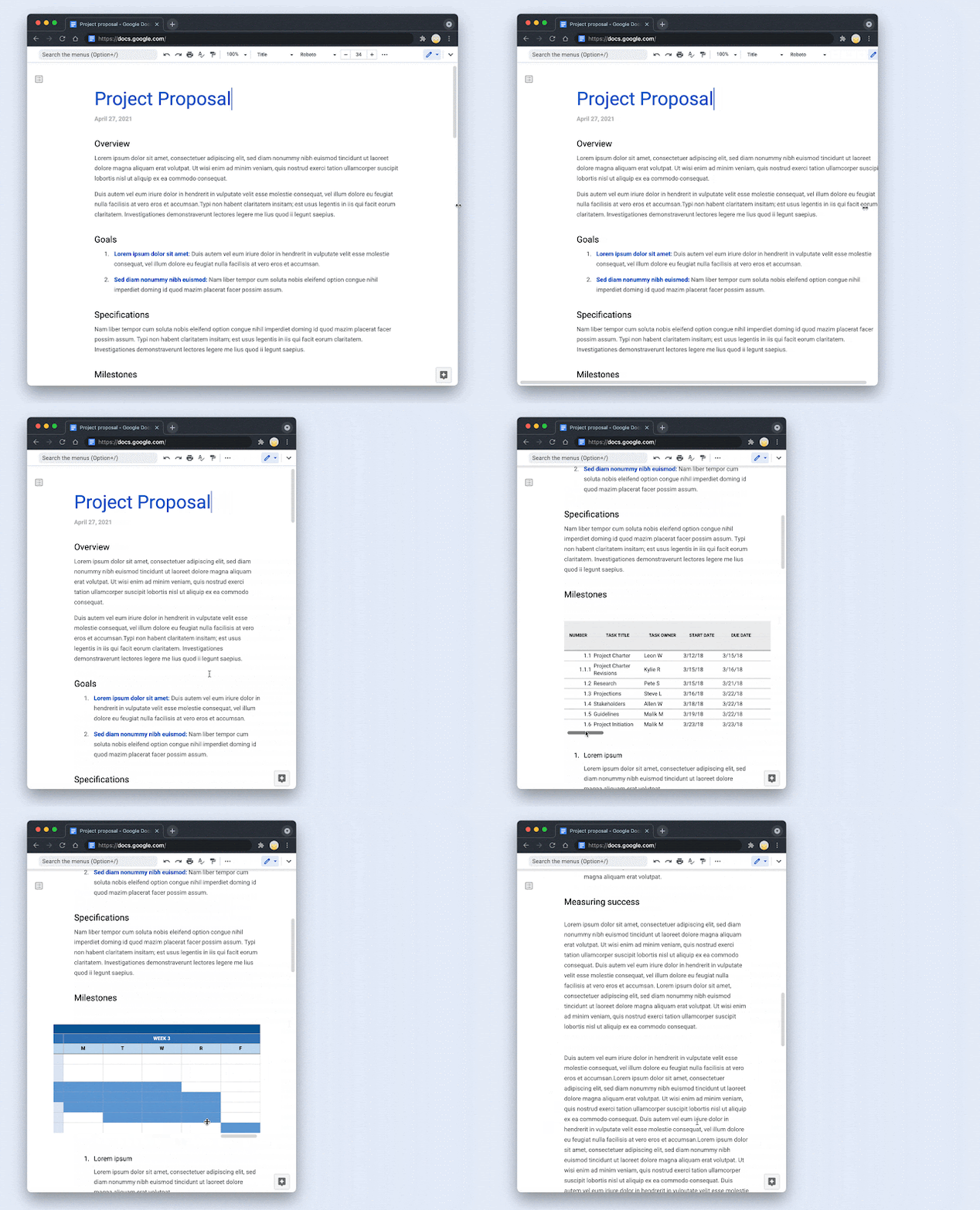
  • Add a summary to your document, giving readers a high level overview of its content. 
    • Note: For some Google Workspace editions, you’ll see automatically generated summary suggestions in certain cases. See below for availability. 
  • Create pageless documents in Docs, making it easier to collaborate on documents with wide tables, large images, and more. 

You can read more about these features on the Google Cloud Blog

Who’s impacted 

End users 

Why it’s important 

Summaries in Docs provide a brief overview of the main points in a document, so you can quickly parse the information that matters and prioritize where to focus. You can also edit the summaries, or create your own. 

Reviewing a Summary in a Google Doc


Pageless format in Docs gives teams more space to collaborate, helping to create an uninterrupted flow of information for both writers and viewers, as well as adding more horizontal space for content like tables and images. 


Formatting a Google Doc to be Pageless

Formatting a Google Doc to be Pageless


Getting started 

  • Admins: There is no admin control for these features. 
  • End users: These features will be available by default. Visit the Help Center to learn more about document summaries and pageless formatting


Rollout pace 


Availability 

Pageless formatting and summaries 
  • Available to all Google Workspace customers, as well as legacy G Suite Basic and Business customers 
Summary suggestions
  • Available to Google Workspace Essentials, Business Starter, Business Standard, Business Plus, Enterprise Essentials, Enterprise Standard, Enterprise Plus, Education Plus, and Frontline
  • Not available to Google Workspace, Education Fundamentals. and Nonprofits. 

Resources 

What’s changing 

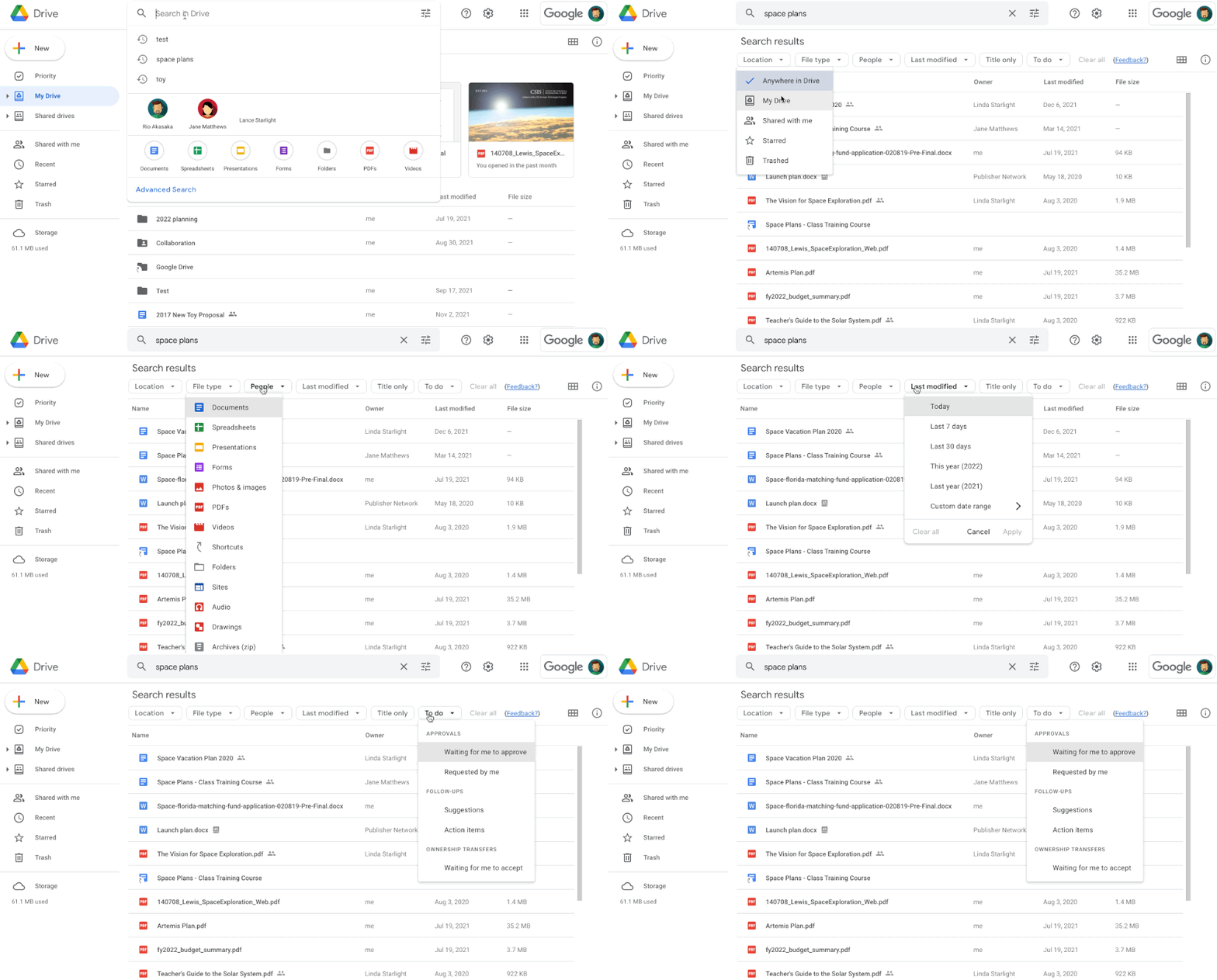
In November 2021, we announced a beta for search chips in Google Drive, which makes it easier for users to find relevant files faster and eliminates the need to perform multiple searches or sort through irrelevant results. Search chips are now generally available for all users. 


Who’s impacted 

End users 


Why you’d use it 

When searching in Drive, users often use a few key words to try and locate the file they’re looking for, such as “marketing plan” or “sales report,” which may return results that are too broad. 


Now, after a query is entered, users can use search chips to surface more relevant results based on: 
  • File type, such as a Google Doc, PDF, or image 
  • People 
  • Location, such as a shared drive or specific folder 
  • When the document was last modified File titles only 
  • Shared labels 
  • Tasks 


Additionally, you’ll also notice various other improvements: 
  • You'll see spelling suggestions along with search chips 
  • You can clear search chips on their own, or together with the query 
  • Additional date options for the “Last modified” chip 


We hope search chips make it easier to narrow down your search results and find your important files faster. 


Getting started 

  • Admins: No action required. 
  • End users: This feature will be automatically available. Simply enter a search query and select one or multiple chips to further drill down results. Visit the Help Center to learn more about finding files in Google Drive

Rollout pace 


Availability 

  • Available to all Google Workspace customers, as well as legacy G Suite Basic and Business customers 

Resources