This official feed from the Google Workspace team provides essential information about new features and improvements for Google Workspace customers.


What’s changing 

We’re bringing our software-based noise cancellation capability to the following Google Meet hardware devices: 
Use this YouTube video to learn more about noise cancellation in Google Meet. 


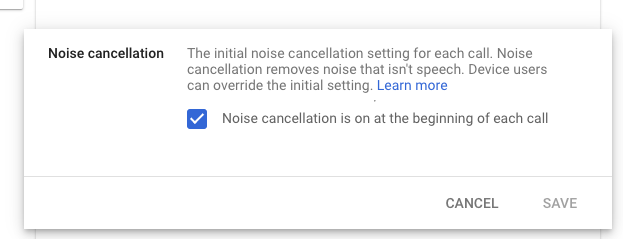
Additionally, we’ve added a new admin control which allows you to specify whether noise cancellation is on or off at the beginning of each call. See below for more information and availability. 


Who’s impacted 

Admins and end users 


Why it’s important 

To help limit distractions in your video call, Google Meet devices can remove background noises such as typing, closing a door, or the sounds of a nearby construction site. Noise cancellation helps make calls more productive by reducing distractions that can divert attention away from the content of the meeting. 


Additional details 

  • Noise cancellation is not available for Series One Meet Compute Systems. Series One Meet Compute Systems will only use "True Voice" for noise cancellation, which requires a Series One Smart Audio Bar or Series One Mic Pod. 
  • The admin setting for managing noise cancellation will not change the behavior for SeriesOne devices at the time of this launch. This will be implemented in the coming weeks — we will provide an update on the Workspace Updates Blog at that time. 

Getting started 


Admin console per-device setting for controlling noise cancellation for each call


On-device setting for controlling noise cancellation while on a call


Rollout pace 


Availability 

  • Available to Google Workspace Business Starter, Business Standard, Business Plus, Enterprise Essentials, Enterprise Standard, Enterprise Plus, Education Fundamentals, Education Teaching & Learning, Education Standard and Education Plus customers, as well as legacy G Suite Business and Basic customers 
  • Not available to Google Workspace Essentials and Nonprofits customers 

Resources 

Update

[April 29, 2022]: 

  • Rollout for Rapid release domains will be complete on Wednesday, May 5, 2022.
  • Rollout for Scheduled release domains will begin on Wednesday, May 11, 2022 and is expected to be complete by Tuesday, May 24, 2022.


What’s changing

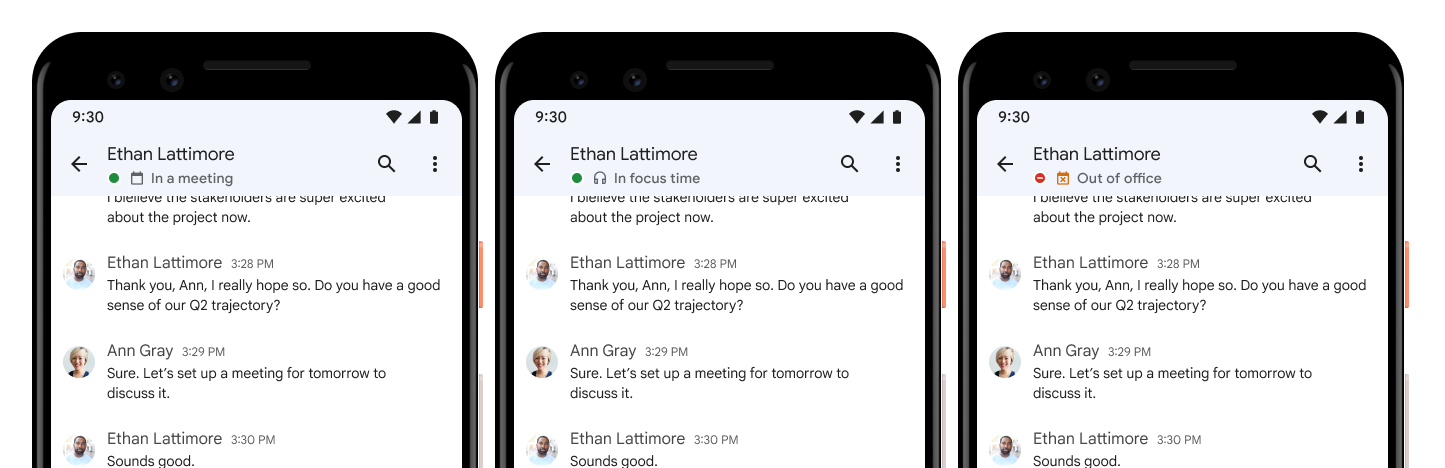
In addition to seeing when someone is out of office, you can now see additional Google Calendar statuses like “In a meeting” or “In focus time” in Google Chat. 


Additional Calendar statuses on web


Additional Calendar statuses on mobile

Who’s impacted

Admins and end users


Why you’d use it

We hope by surfacing these additional statuses, this will make it easier for your colleagues to identify appropriate times to message you.


Additional details

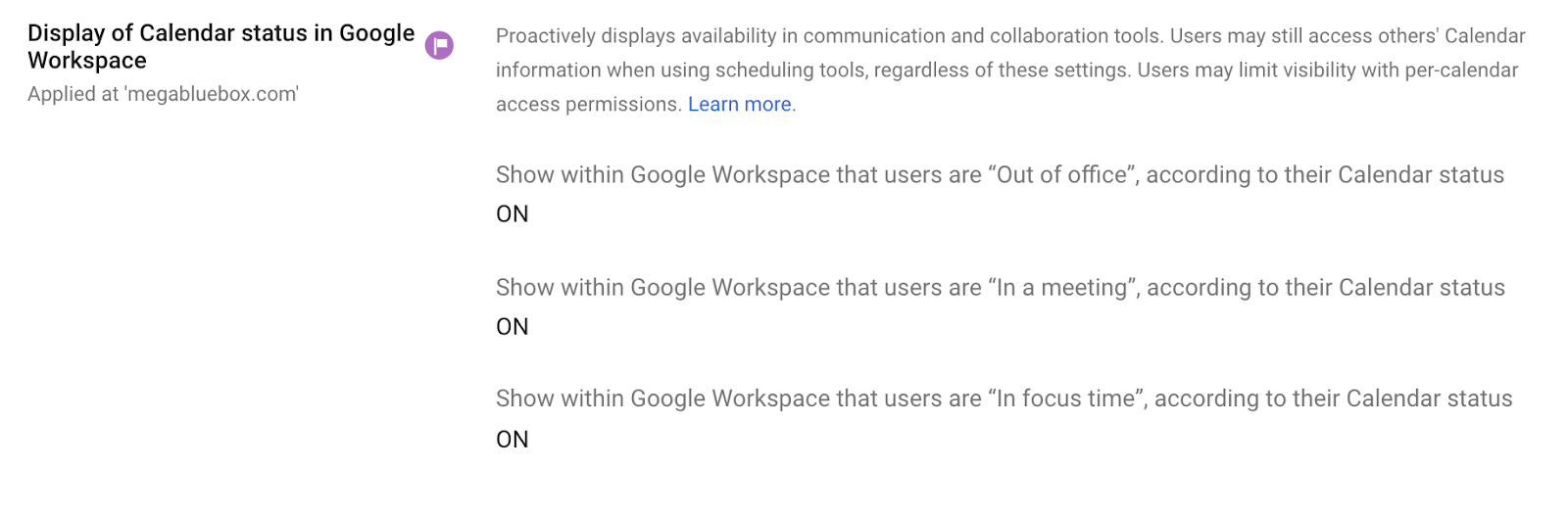
Additionally, the Admin control for Calendar availability will be updated to include configuration options for displaying “In a meeting” or “In focus time” blocks.


See below for more information on availability. 


Getting started


Rollout pace

End user availability 

Android & iOS:


Web:

Admin setting
  • This feature is available now.

Availability

  • Available to all Google Workspace customers, as well as legacy G Suite Basic and Business customers
  • Not available to Google Workspace Individual users or users with personal Google accounts

Resources


Quick Summary 

We’ve increased the cell limit in Google Sheets from up to five million cells to up to ten million cells. This limit applies to new, existing, and imported files. 


Over the course of the last four years, we’ve been steadily increasing the cell limit in Google Sheets: from 2 million to 5 million in 2019 and now to 10 million. We hope this and future increases give users the ability to work with their data on a much greater scale in Google Sheets. 


Getting started 

  • Admins: There is no admin control for this feature. 
  • End users: Visit the Help Center to learn more about the current file limits in Google Sheets. 

Rollout pace 

  • This feature is available now for all users. 

Availability 

  • Available to all Google Workspace customers, as well as legacy G Suite Basic and Business customers 

Resources 

Quick summary 

Admins can now configure Chromebase for Meetings in their fleet to automatically turn off the display when not in use. We’ve heard from our customers that reducing power consumption is increasingly important — we hope this helps customers achieve their sustainability goals or comply with local energy efficiency requirements. 


Getting started 

  • Admins: This feature will respect the current power saving setting for Chromebase for Meetings devices, and can be changed at the organizational unit level. Visit the Help Center to learn more about managing power-saving settings. 
  • End users: No action required — to wake a device, simply tap on the screen. 

Rollout pace 


Availability 

  • Available to all Google Workspace customers, as well as legacy G Suite Basic and Business customers with Google Meet hardware devices 

Resources 

What’s changing 

You can now use People Search in Google Cloud Search to find people within your organization with a simple search query. 

You can search for a person based on any profile attribute such as name, email, location or roles. You can also search for a person based on custom fields or a combination of attributes (for example, “John Product Manager”). 

People profiles that match the user's query are displayed at the top of cloudsearch.google.com search results. Clicking on a user’s profile opens their contact card where you can see more profile details including recent interactions. 


See people results in Cloud Search


See people results in Cloud Search


See more people results in People Tab

See more people results in People Tab


Detailed profile view


This functionally is also available using the Cloud Search Query API. 

Who’s impacted 

Admins, end users, and developers 

Why you’d use it 

People Search makes it easier to collaborate with teams across the organization by reducing the effort required in finding the right person. With this feature, members of your organization can quickly find out information about other employees, such as corporate contacts, role, team, department, desk location, reporting structure, cost center, past interactions and more. 

Getting started 

Rollout pace 

This feature is currently available 

Availability 

  • Available to Google Workspace Business Plus, Enterprise Standard, Enterprise Plus, and Education Plus customers
  • Available to all Google Cloud Search customers 
  • Not available to Google Workspace Essentials, Business Starter, Business Standard, Enterprise Essentials, Education Fundamentals, Frontline, and Nonprofits, as well as legacy G Suite Basic and Business customers

Resources 

Roadmap