This official feed from the Google Workspace team provides essential information about new features and improvements for Google Workspace customers.


Quick summary 

In the Alert Center, Admins will see new, additional one-click recommended actions for certain events: 

  • Device wipeout: for “device compromised” and “suspicious device activity” alerts. If the admin feels blocking the device is not sufficient to protect the data at risk, they can can remotely wipe out the data of the device.

  • Quarantine email: for alerts such as malware detected post delivery, user phishing reported, suspicious message reported, and more. Once in quarantine, admins can take additional actions such as delivering the message to the intended recipient or denying message delivery.

Recommended actions help Admins quickly triage, take action, and remedy various incidents without leaving the Alert Center. To learn more about recommended actions, use this article in our Help Center and see this post on the Google Workspace Updates blog


Getting started 


Rollout pace 


Availability 

  • Available to Google Workspace Enterprise Plus, Education Standard, and Education Plus customers 
  • Not available to Google Workspace Essentials, Business Starter, Business Standard, Business Plus, Enterprise Essentials, Enterprise Standard, Education Fundamentals, Frontline, and Nonprofits, as well as G Suite Basic and Business customers 
Resources 

Quick summary 

You can now apply contextual access rules to the Admin console. This enables you to control access to the Admin console based on user and device context. For example, you can enable restrictions based on IP, minimum device operating system version, and more. This can improve your security posture and reduce the risk of incorrect access to your Admin console. 


Getting started 


Rollout pace 


Availability 

  • Available to Google Workspace Enterprise Standard, Enterprise Plus, Education Standard, Education Plus, and Cloud Identity Premium customers. 
  • Not available to Google Workspace Essentials, Business Starter, Business Standard, Business Plus, Enterprise Essentials, Education Fundamentals, Frontline, and Nonprofits, as well as G Suite Basic and Business customers. 


Resources 

What’s changing 

Previously, users in organizational units (OUs) or groups with active Drive Data Loss Prevention (DLP) policies couldn’t respond to external forms with File Upload questions. 


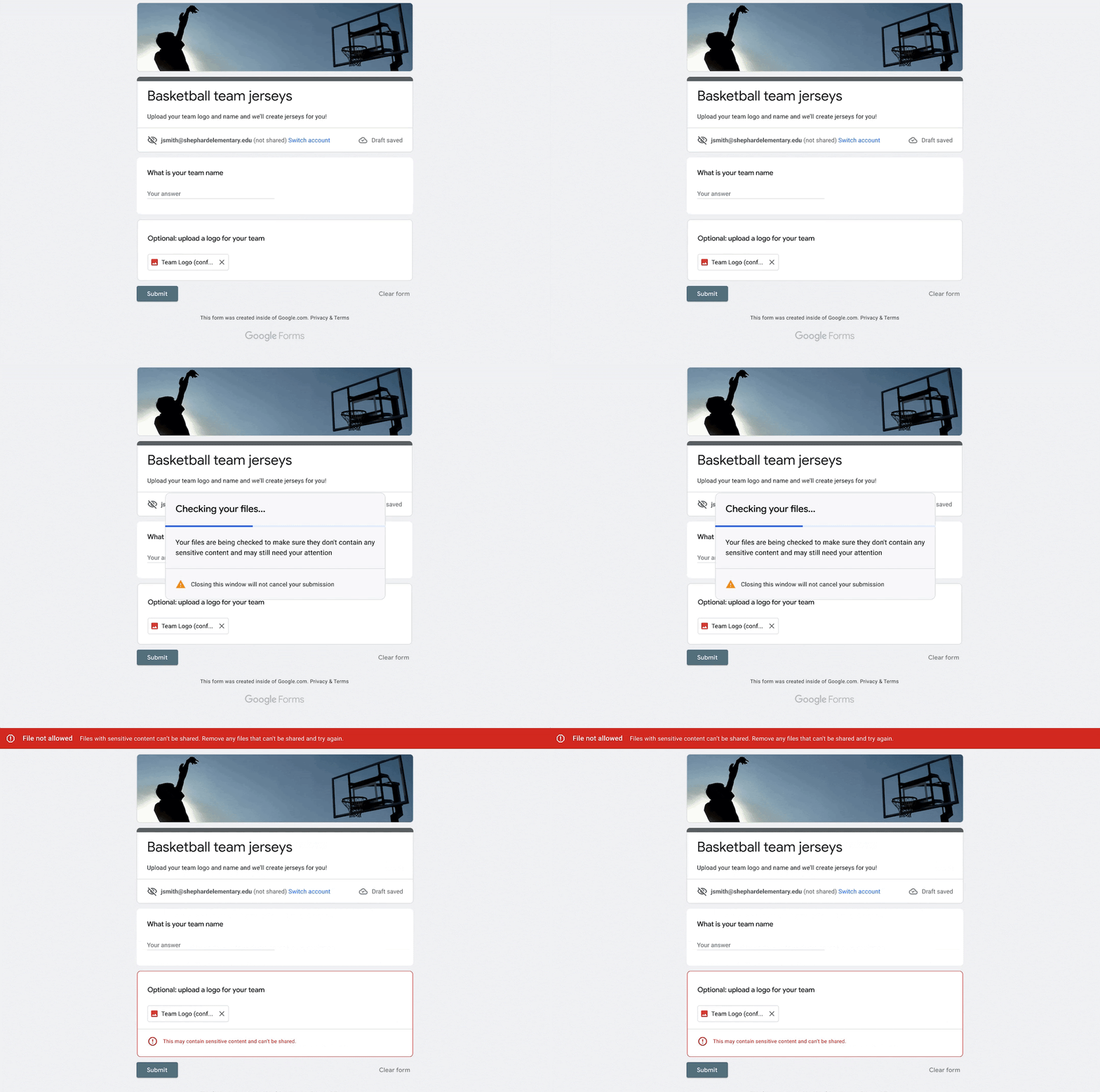
Now, we’re launching a new beta that will allow users to respond to external forms that contain File Upload questions, while also helping to prevent the leak of sensitive and confidential information. This beta will apply your domain’s existing Drive DLP policies to files that your users submit to Google Forms, without creating new rules or updating any existing ones. 


Admins of eligible customers can express interest in the beta using this form


Who’s impacted 

Admins and end users 


Why it’s important 

With this launch, end users will be unblocked from responding to Google Forms with File Upload questions across domains. At the same time, DLP gives admins control over what their users can share, and prevents unintended exposure of sensitive information such as credit card numbers or personal identifiable information. 


Getting started 

  • Admins: 
    • Use this form to express interest in the beta. 
    • Once accepted into the beta, Drive DLP rules defined for your domain will be applied to files submitted to File Upload questions in Google Forms. 
    • If you are not using DLP for Drive, you can create DLP rules at the domain, OU, or group level in the Admin console under Security > Data protection. You can apply block, warn or audit actions, consistent with DLP for Drive. Visit the Help Center to learn more about turning data loss prevention in Google Forms on for your organization
  • End users: 
    • End users can respond to forms as usual, but can now respond to forms outside their domain, including forms that have File Upload questions. 
    • If a form violates Drive DLP rules for their domain, end users may see warnings or be blocked from submitting. 


Availability 

  • Available to Google Workspace Enterprise Standard, Enterprise Plus, Education Fundamentals, Education Standard and Education Plus customers 
  • Not available to Google Workspace Essentials, Business Starter, Business Standard, Business Plus, Enterprise Essentials, Frontline, and Nonprofits, as well as G Suite Basic and Business customers 


Resources 

What’s changing 

We’re introducing two improvements for Google Meet: 
  • Prompts to exit meetings when you’re the only user in a meeting. 
  • A centralized location for host management controls. 

See below for more information. 


Who’s impacted 

End users 


Why you’d use it 

Leave empty call reminders 
Now, when you’re the only person in a meeting for ten minutes, you’ll receive a prompt asking whether you want to stay or leave the meeting. If you don’t respond after two minutes, you will automatically leave the meeting. 


We hope that this feature will help prevent situations where your audio or video is unintentionally shared. 


This feature will be available for Google Meet on desktop and iOS devices (this will launch on Android soon) — see below for availability. 


Host Management controls update 
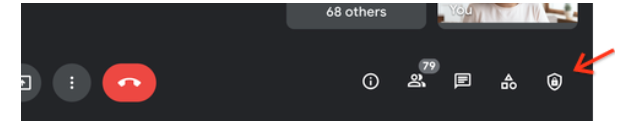
Currently, host and co-host controls can be found in multiple locations in Meet. For a more user intuitive experience, we’ve consolidated all host and co-host features in a single, central location under the “Host controls” menu. We hope this change makes it easier to manage your meeting settings by reducing the need to switch between various menus. 

This update is specifically for Google Meet on desktop. 


Getting started 

  • Admins: There is no admin action required. 
  • End users: Leave empty call reminders: This feature will be ON by default and can be turned off by the user. Visit the Help Center to learn more. 


  • Host management controls can now be found under the “Host Controls” button located in the bottom bar. 


Rollout pace 

  • Rapid Release domains: Gradual rollout (up to 15 days for feature visibility) starting on April 11, 2022 
  • Scheduled Release domains: Extended rollout (potentially longer than 15 days for feature visibility) starting on April 18, 2022 

Availability 

Meeting exit reminders
  • Available to all Google Workspace customers, as well as legacy G Suite Basic and Business customers Also available to users with personal Google accounts 

Host Management menu updates 
  • The Host management menu updates are available for all users. 

Quick summary 

Giving and receiving feedback is a key collaborative workflow in Google Docs. The new emoji reactions feature provides a less formal alternative to comments to express your opinions about document content.

We are making the following experiences available in Docs 

  • Emoji set is updated to the latest version (Emoji 14.0), reflecting the latest emoji set with options to accurately reflect your identity 
  • Gender-neutral options for gender-modifiable emojis 
  • Emoji skin tone and gender preferences are saved per individual emoji 


Getting Started

  • Admins:There is no Admin control for this feature
  • End users: This feature will be ON by default and can not be disabled by the user. To access reactions in Docs, hover over any message or an existing anchor and click on the “Add reaction” icon. Additionally, emoji preferences are shared with Google Chat, so any preferences set in one app will be reflected in the other. Both apps can be used to update emoji preferences via the picker. Visit the Help Center to learn more about using emoji reactions in Google Docs

Rollout pace 

Availability 

  • Available to all Google Workspace customers, as well as legacy G Suite Basic and Business customers, and users with personal Google Accounts.

Resources 

Roadmap