
This official feed from the Google Workspace team provides essential information about new features and improvements for Google Workspace customers.


Quick Summary 

Last year, we launched formula suggestions in Sheets, which recommend formulas for specific cells based on the data you are analyzing. Now, you can write formulas faster and with higher confidence with formula corrections. These intelligent, context-aware corrections help you improve and troubleshoot many different kinds of formulas. Some examples include: 

  • VLOOKUP errors 
  • Missing cells in range input 
  • Locking ranges when applying formulas across cells 

Whenever you insert a formula that Sheets detects may be improved, a suggestion box will appear with details on a new version that can replace the current formula, including the ability to accept or reject it.


For example, the above correction helps users when writing VLOOKUP functions, which only return values to the right of the matched cell. The correction suggests a combination of INDEX and MATCH functions to reverse the column order in the formula. 

Getting started 

  • Admins: There is no admin control for these features. 
  • End users: This feature will be available by default and can be disabled by going to Tools > Enable formula corrections or from the three-dot menu of the suggestion dialog box. Visit the Help Center to learn more about using formulas and functions in Google Sheets. 

Rollout pace 

Availability 

  • Available to all Google Workspace customers, as well as legacy G Suite Basic and Business customers, and users with personal Google Accounts. 
Resources 

Quick launch summary 

Google Meet now supports SRTP in TLS on mobile, which increases overall compatibility and helps ensure higher quality video meetings with Google Meet. 


In addition, Meet is introducing support for UDP port 3478 to deliver media (Note that existing ports 19302–19309 deliver media as well). 


Getting started 

  • Admins: If you already use Meet today, configure your network to support Meet on port 3478. Note: If the port is blocked, Meet will fallback to port 19302​–19309. If you use DPI technology on port 443, add the corresponding user SNIs to the allowlist: 
    • Google Workspace admins: Meet traffic over TLS and port 3478 will use the same fixed IP range dedicated for Google Meet in Google Workspace domains. 
    • Non-Google Workspace admins: Meet traffic over TLS and port 3478 will use the fixed IP range dedicated for non-Google Workspace users. 
  • End users: No end-user impact. 

Rollout pace 

Meet traffic over TLS 
  • This feature is available now. 

Meet traffic over port 3478: 

Availability 

  • Available to all Google Workspace customers, as well as legacy G Suite Basic and Business customers 

Resources 

What’s changing 

We’re introducing a new AppSheet and Apps Script connector which allows you to extend custom, no-code apps to integrate and automate workflows across Google Workspace. 


The Apps Script Connector will be available for users in the AppSheet Core plan and above, which is available to users of the Google Workspace Enterprise edition. Users in the AppSheet Starter plan can test the feature. Learn more from AppSheet documentation. 


Who’s impacted 

Admins, end users, and developers 


Why it matters 

AppSheet is Google’s platform for building no-code custom apps and workflows to automate business processes. AppSheet works well with mixed data sources, even if customer data is stored across Sheets, CloudSQL, or on-premise databases. 


Apps Script is Google’s hosted JavaScript platform that makes it easy to build solutions that integrate, automate, and extend Google Workspace. Apps Script is integrated with Google Workspace APIs and includes native integrations to Google services such as YouTube, Google Analytics, and BigQuery. 


You can use the AppSheet Apps Script connector to extend custom no-code apps to integrate and automate workflows across Google Workspace. This is useful in a variety of scenarios, such as use cases in the retail, manufacturing or public sector. For example, you could use the connector with your AppSheet app to: 
  • Receive employee travel requests via the web, and when a request is made, it can look up the requestor’s manager and send a chat or email notification for approval. 
  • Allow workers to capture photos from their mobile device for on-site inspections, and upload images and media to Google Drive and adjust Drive sharing settings to ensure auditors have access. 
  • Manage shift schedules and appointments through a simple web interface, and when a time slot is booked, create an event on Google Calendar with the requestor invited. 


Getting started 


Rollout pace 


Availability 

  • The Apps Script Connector will be available for users in the AppSheet Core plan and above (available to Google Workspace Enterprise, see AppSheet pricing). Users in the Starter plan can test the feature. 

Resources 

What’s changing 

In December 2020, we announced a redesign of the Integrated Development Environment (IDE) for Google Apps Script. The modern and simplified development experience makes it quicker and easier to build solutions that make Google Workspace apps more useful for your organization. 


We’re now adding several new features to the IDE to help achieve functional parity with the legacy IDE experience. These features are: 
  • Script Properties 
  • Add-on Testing 
  • Time Zone Setting 
  • Rhino Debugging 


See below for more information. 


Who’s impacted 

Admins and developers 


Why it’s important 

Apps Script is a rapid application development platform that makes it fast and easy to create custom business solutions that integrate with Google Workspace and that increase the power of apps including Calendar, Docs, Drive, Gmail, Sheets, and Slides. For more information, see the original announcement on the Workspace Updates Blog


This launch ensures Apps Script users can utilize the legacy features in the new environment: 
  • Script Properties: Allows you to store simple data in key-value pairs scoped to one script. Script properties are typically used to store developer configuration data. The new IDE has now integrated the interface to edit, delete and create up to 50 new script properties. 
  • Add-on Testing: Allows add-on developers to test their add-ons before publishing them broadly.
  • Time Zone Setting: Allows you to update the time zone of the script and its executions. 
  • Rhino Debugging: Adds the ability to debug Rhino subroutines on V8 debugger, without migrating to V8. If the code is not V8 compatible, users will get a warning message. 

We hope these additional features empower you to create solutions and integrations for Google Workspace applications faster and easier. 


Getting started 


Rollout pace 


Availability 

  • Available to Google Workspace Essentials, Business Starter, Business Standard, Business Plus, Enterprise Essentials, Enterprise Standard, and Enterprise Plus, as well as G Suite Basic, Business, Education, Enterprise for Education, and Nonprofits customers 

Resources 

What’s changing 

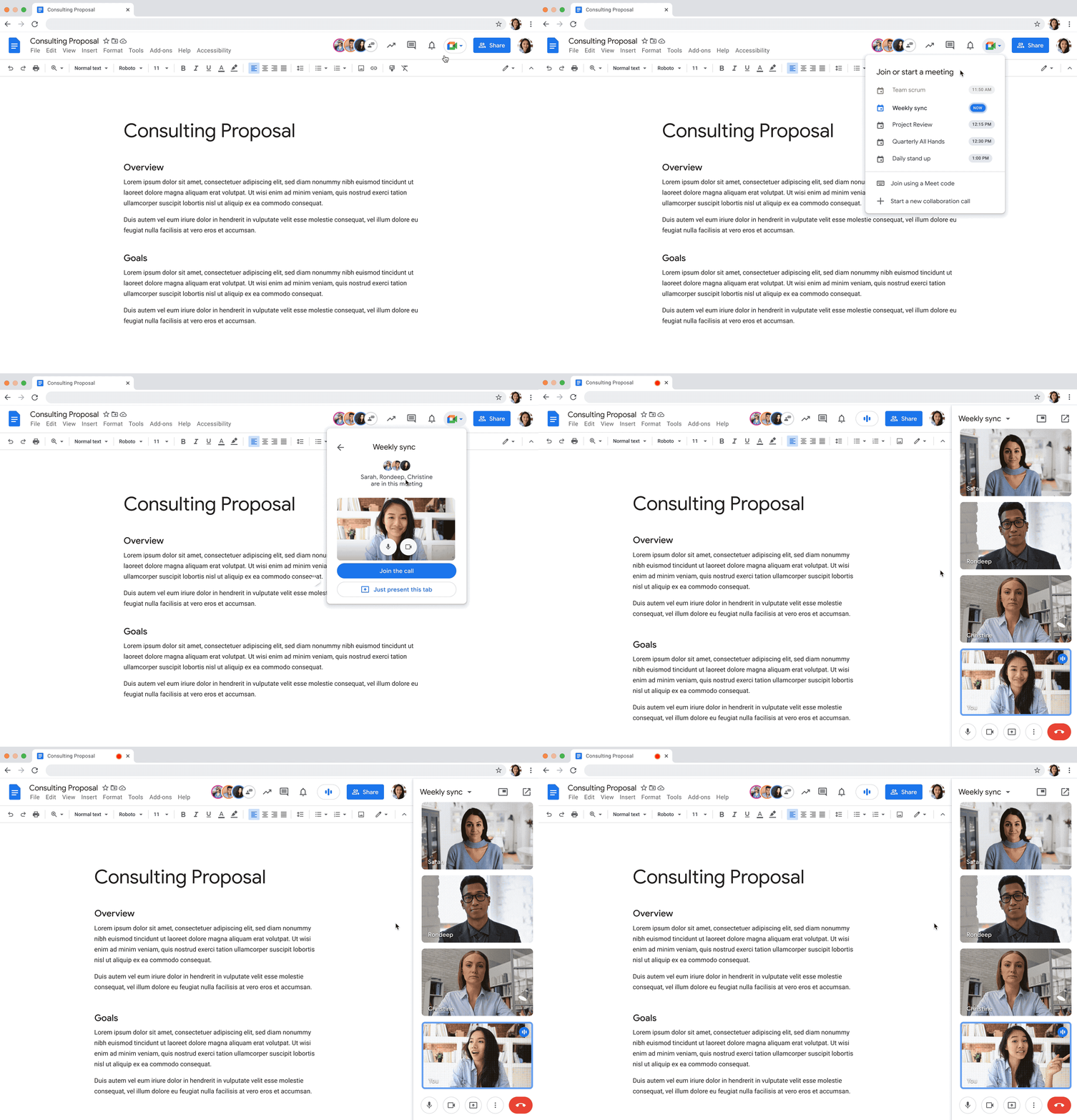
You can now join a Google Meet call from Google Docs, Sheets, and Slides. In addition to the present to Meet option, you can select “Join the call” to quickly join and present a document, spreadsheet, or presentation to all attendees, allowing everyone in the meeting to collaborate while having a conversation.


Who’s impacted 

Admins and end users 


Why it’s important 

To help teams do their best work in the hybrid work world, as many of us begin a return to office, we continue to make enhancements to Google Meet to help ensure that video meetings are inclusive and collaborative no matter the location or device preference. 

We hope this feature makes it easier for everyone in the meeting to collaborate in real-time while having a conversation—all from the same tab. 


Getting started 


Rollout pace 

  • Rapid Release domains: Extended rollout (potentially longer than 15 days for feature visibility starting on April 12, 2022 
  • Scheduled Release domains: Gradual rollout (up to 15 days for feature visibility) starting on May 2, 2022 

Availability 

  • Available to all Google Workspace customers, as well as legacy G Suite Basic and Business customers 

Resources 


Roadmap