This official feed from the Google Workspace team provides essential information about new features and improvements for Google Workspace customers.


New updates

Unless otherwise indicated, the features below are fully launched or in the process of rolling out (rollouts should take no more than 15 business days to complete), launching to both Rapid and Scheduled Release at the same time (if not, each stage of rollout should take no more than 15 business days to complete), and available to all legacy Google Workspace and G Suite customers.


Space descriptions and guidelines in Google Chat rolling out now
Earlier this year, we announced the ability for space managers to add descriptions and guidelines for their spaces. This feature is now available on mobile and will be gradually rolling out for web. | Learn more here and here.


Previous announcements

The announcements below were published on the Workspace Updates blog earlier this week. Please refer to the original blog posts for complete details.


Use new table templates and dropdown chips in Google Docs to create highly collaborative documents
We’re introducing two new enhancements for our flexible, smart canvas for collaboration: dropdown chips and table templates in Google Docs. | Learn more. 


Share your video feed when using Companion mode in Google Meet
When using Companion mode in Google Meet, you can now turn your camera on and share your video feed with all other participants. | Learn more.


Set recurring task end options directly in Google Tasks
You can set the end option for a recurring task (never, on a certain date, or after X occurrences) directly in Google Tasks. | Learn more.


Space managers can now delete messages in Google Chat
This feature will allow Space managers to easily moderate their spaces and remove any content that is irrelevant or inappropriate in the space. | Learn more.


For a recap of announcements in the past six months, check out What’s new in Google Workspace (recent releases).

Quick summary 

In Google Chat, Space managers can now delete messages from other users in unthreaded spaces. This feature will allow Space managers to easily moderate their spaces and remove any content that is irrelevant or inappropriate in the space. 


Getting started 

  • Admins: There is no admin control for this feature. Visit the Help Center to learn more about optimizing Chat spaces for your organization
  • End users: Hover over a message and select the “Delete the message” option. 

Rollout pace 


Availability 

  • Available to Google Workspace Business Standard, Business Plus, Enterprise Essentials, Enterprise Standard, Enterprise Plus, Education Fundamentals, Education Plus, Education Standard, and the Teaching and Learning Upgrade 
  • Not available to Google Workspace Essentials, Business Starter, Frontline, and Nonprofits, as well as legacy G Suite Basic and Business customers 

Resources 

Quick summary 

Currently, you can set the end option for a recurring task (never, on a certain date, or after X occurrences) by opening the task in Google Calendar. With this launch, you can also set this option directly in Google Tasks. This gives you more control over how and until when your tasks repeat. 


Getting started 

  • Admins: There is no admin control for this feature. 
  • End users: These options will be available when creating or editing a task in Tasks. Visit the Help Center to learn more about setting up repeating tasks.

Rollout pace 


Availability 

  • Available to all Google Workspace customers, as well as legacy G Suite Basic and Business customers Available to users with personal Google Accounts 

Resources 

Quick summary 

When using Companion mode in Google Meet, you can now turn your camera on and share your video feed with all other participants. For in-room participants attending a hybrid meeting, this feature helps improve collaboration and representation equity by giving everyone the ability to share their own video with other on-call participants.


Getting started

  • Admins: There is no admin control for this feature.
  • End users: 
    • This feature will be available by default. You can join a meeting on the web using Companion mode from the green room before your meeting. To share your video feed, select “Turn on camera” from the Meet toolbar.
    • Use this Help Center article and video guide to learn more about using Companion mode in Google Meet.

Rollout pace

What’s changing 

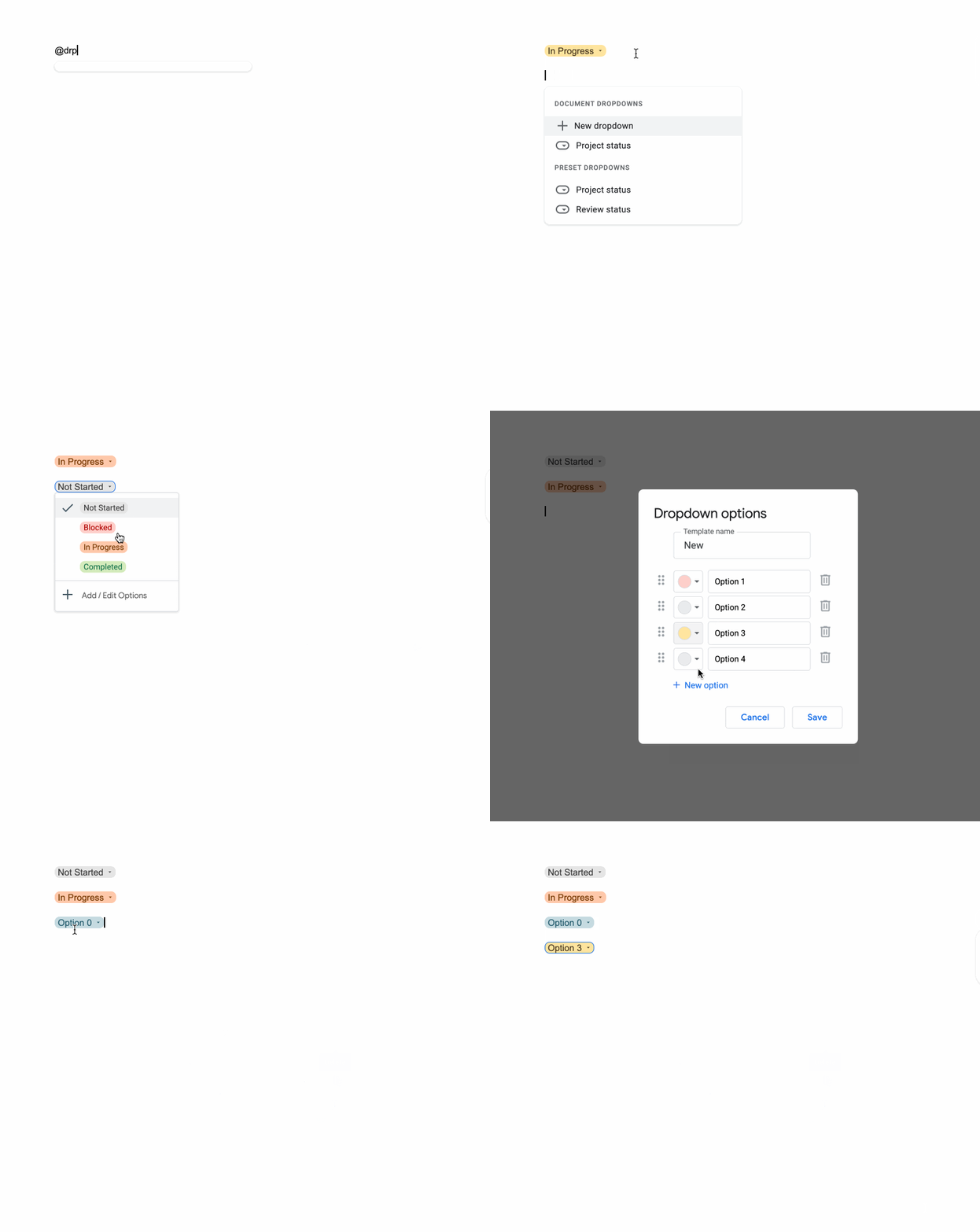
We’re introducing two new enhancements for our flexible, smart canvas for collaboration: dropdown chips and table templates in Google Docs. 


You can use dropdown chips to easily indicate the status of your document or various project milestones outlined in your document. There are two default dropdown options: 
  • Project Status, which includes selections for “Not Started”, “Blocked”, “In Progress” and “Complete” 
  • Review Status, which includes selections for “Not Started”, “In Progress”, “Under Review” and “Approved”. 


Additionally, you can create a dropdown chip with custom options and colors to best suit your needs.


We’re also adding table templates, which allow you to quickly insert building blocks for common workflows such as a:
  • Launch content tracker
  • Project asset
  • Review tracker
  • Product roadmap


The columns within the template include a sample row of content to help guide you on how they can be used and customized.


Who’s impacted

End users


Why you’d use them

We hope these features help you to create highly customized and organized documents in Google Docs, making it easier to collaborate and drive your project forward. 


Getting started 

  • Admins: There is no admin control for this feature.
  • End users: These features will be available by default. You can insert a dropdown chip by selecting Insert > Dropdown. To insert a table template, select Insert > Table > Table templates

Rollout pace 

Dropdown chips


Table templates

Availability 

  • Available to all Google Workspace customers, as well as legacy G Suite Basic and Business customers
  • Available to users with personal Google Accounts

Resources