This official feed from the Google Workspace team provides essential information about new features and improvements for Google Workspace customers.


What’s changing

We’re introducing named functions, a new feature that allows you to create high-performance custom functions that support built-in Sheets formula constructs. To maintain reusability across files, you can also import named functions from existing Sheets files, allowing you to use functions created in one Sheets file in a different Sheets file. 


named functions

Who’s impacted 

Admins and end users 


Why it matters 

Named functions provide greater formula flexibility, readability, and reusability within and across Sheets. Formulas that were previously complex and difficult to understand can now be simplified into more comprehensible and reusable named functions. 


This feature also builds upon our recent formula enhancements: intelligent corrections for formulas and suggestions for formulas and functions in Sheets. 


Additional details 

We’re also launching a bundle of new and powerful functions in Sheets: 
  • LAMBDA: Creates and returns a custom function, given a set of names and a formula_expression which uses them. The formula_expression can be calculated by calling the returned function with as many values as the names declared. 
  • Lambda Helper Functions - MAP, REDUCE, BYROW, BYCOL, SCAN, MAKEARRAY: Advanced array-operating functions which accept a reusable lambda as an argument along with an input array(s). 
  • XLOOKUP: Returns the values in the result range based on the position where a match was found in the lookup range. If no match is found, it returns the closest match. 
  • XMATCH: Returns the relative position of an item in an array or range that matches a specified value. XMATCH supports enhanced match and search functionality and allows wildcard matches with a question mark (?) or asterisk (*). 

Getting started 

  • Admins: There is no admin control for this feature. 
  • End users: 
    • In Sheets, navigate to Data > Named functions > Add new function > enter details > Next > Create. You can then enter your custom formula into a Sheets’ cell. 
    • Named functions created in a Sheets file are available only in that file. To use named functions in another Sheet, select that file via Data > Named functions > import function > pick the named functions you want to add. 
    • Visit the Help Center to learn more about Named functions

Rollout pace 

Availability 

  • Available to all Google Workspace customers, as well as legacy G Suite Basic and Business customers
  • Available to users with personal Google Accounts 

Resources 

What’s changing

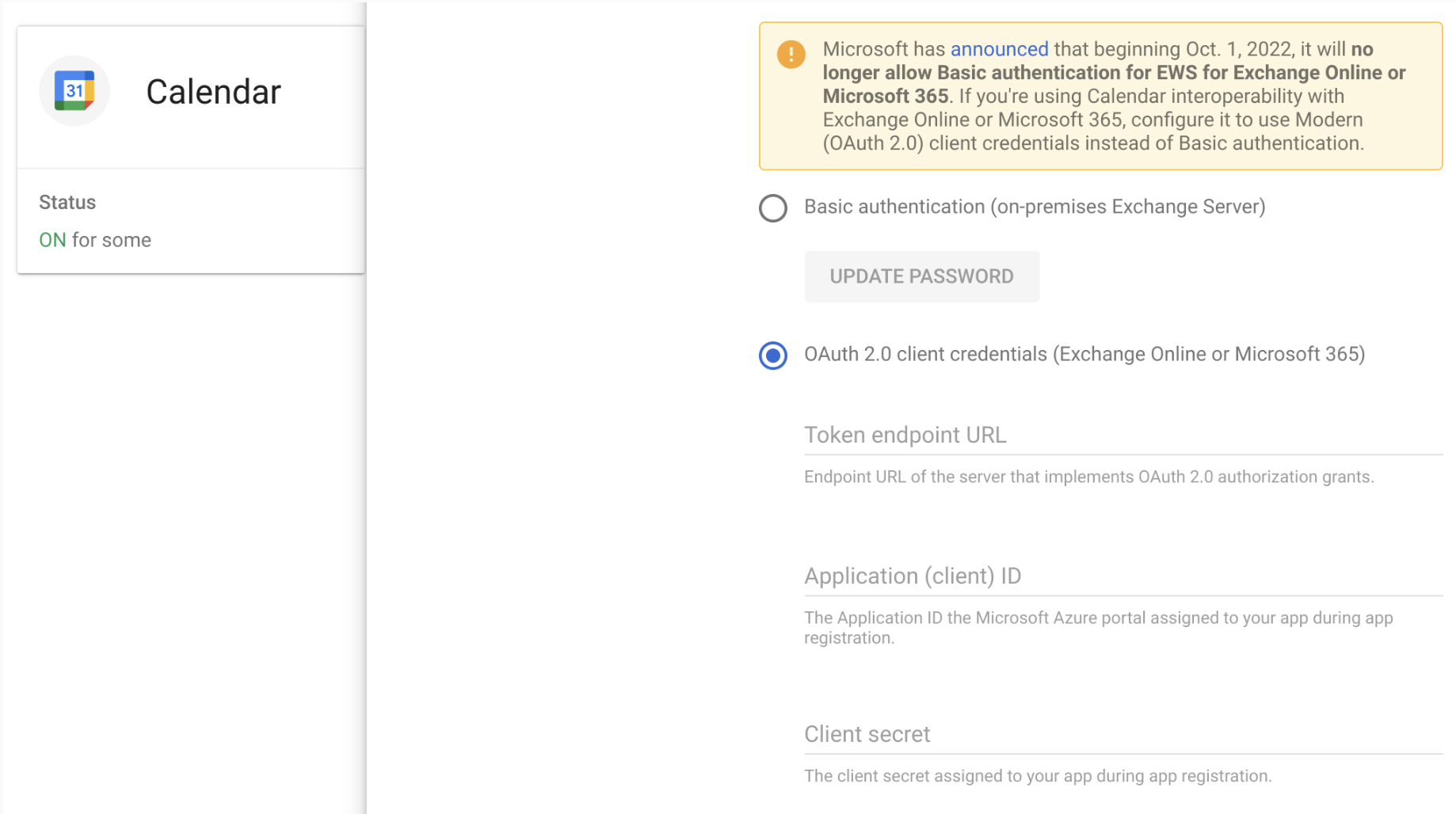
In 2020, we announced the support of OAuth2.0 to ensure Calendar Interop continues to be available after Microsoft’s disablement of basic authentication in Exchange Online. On October 1, 2022, Microsoft will begin to remove the ability to use Basic authentication in Exchange Online for Exchange Web Services. This will impact Workspace customers using Calendar Interop with Basic authentication on Microsoft Office 365 to allow Microsoft Exchange and Google Calendar to work together. 

To continue using Calendar Interop, upgrade to OAuth 2.0 authentication before October 1, 2022. 

MSFT authentication deprecation


Who’s impacted 

This only impacts Microsoft Exchange Online implementations (Microsoft 365). If you currently use an on-premise Exchange implementation, then no action is needed. 


Why you’d use it 

Calendar Interop enables Microsoft Exchange and Google Calendar users to view availability statuses and calendar resources (such as meeting rooms) across both systems. 


Additional details 


Getting started 

Availability 

Resources 

What’s changing 

We’re changing how the “Hey Google” voice control works for Google Meet hardware devices. With this update, the Google assistant will only be active when a device is not in a meeting and within 10 minutes of an upcoming meeting. Not having “Hey Google” active during meetings will help reduce accidental activation. 


We’re also expanding the devices that will be able to support the “Hey Google” voice control to include Logitech Rally Bar, Logitech Rally Bar Mini and the upcoming launch of the Series One Desk 27. 


Who’s impacted 

Admins and end users 


Why it’s important 

We know “Hey Google” voice control provides an easy and convenient way to join an upcoming meeting, or to help improve accessibility for users. However, we’ve heard from our customers that due to the increase in teams transitioning to hybrid meetings, the “Hey Google” control can unintentionally be triggered during meetings. We hope this improvement helps reduce any accidental disruptions during your calls. 


Additional details 

Because “Hey Google” will only be active when there is an upcoming meeting, the end user toggle has been removed to ensure the hardware device is in the expected default state for future use. 


Getting started 

  • Admins: Admins will still be able to enable or disable voice control in the admin console at a device level. 
  • End users: There is no end user action required. 

Rollout pace 


Availability 

  • Available to all Google Workspace customers, as well as G Suite Basic and Business customers 
  • Available for all supported Google Meet hardware devices that have not yet reached their auto-update expiration date 

Resources: 

New updates 


There are no new updates to share this week. Please see below for a recap of published announcements. 


Previous announcements


The announcements below were published on the Workspace Updates blog earlier this week. Please refer to the original blog posts for complete details.


Improved quality and performance for Google Meet effects on the web 
Background effects are now more accurate for Google Meet users on the web. This allows you to experience more accurate background blur, background replace, and immersive background and styles. | Available to Google Workspace Business Standard, Business Plus, Enterprise Standard, Enterprise Plus customers, and Workspace Individual users on eligible devices in eligible countries (Northern America, Europe, Northern Africa, Central Asia, Southeastern Asia). Visit the Help Center to learn more about availability. | Learn more

More control over accessibility preferences in Docs, Sheets, Slides, and Drawings 
You’re now able to set preferences for Docs, Sheets, Slides, and Drawings individually, rather than having the same accessibility settings apply across these products. | Learn more

Updated user interface for managing email quarantines 
In the coming weeks, you will see a new user interface when using the email quarantine tool. This brings the email quarantine experience inline with other tools in the Admin console, making it more intuitive to navigate and use. | Learn more

See how much noise is being removed during Google Meet video calls 
Google Meet can now remove background noises such as typing, construction sounds, or background chatter. | Available to Google Workspace Business Standard, Business Plus, Enterprise Essentials, Enterprise Standard, Enterprise Plus, Education Plus, and Workspace Individual customers only. | Learn more

Conveniently connect site visitors with social channels in new Sites 
Site editors can now insert stylized social media links into pages within their site, enabling you to more conveniently connect site visitors with additional information and content on your social channels. | Learn more

Enhancements to the “Frame people” feature on Google Meet hardware devices 
We’ve introduced two enhancements on Google Meet hardware devices for the “Frame people” feature: 
  • The “Frame people” feature is now more easily discoverable and can be accessed in a meeting from the touch panel in fewer steps. 
  • A solution to a recent bug impacting the auto framing capability for some Google Meet hardware devices. The auto framing functionality has been restored to impacted devices with improved reliability and performance. 
Available to all supported Google Meet hardware devices that have not yet reached their auto-update expiration date. | Learn more

New color categorization in Calendar to better understand how you’re spending your time 
You can now categorize your time by naming and assigning a corresponding color label to an event within Time Insights in Calendar. | Available to Business Standard, Business Plus, Enterprise Standard, Enterprise Plus, Education Plus and Nonprofits customers only. | Learn more

Easily assign Tasks from Google Docs 
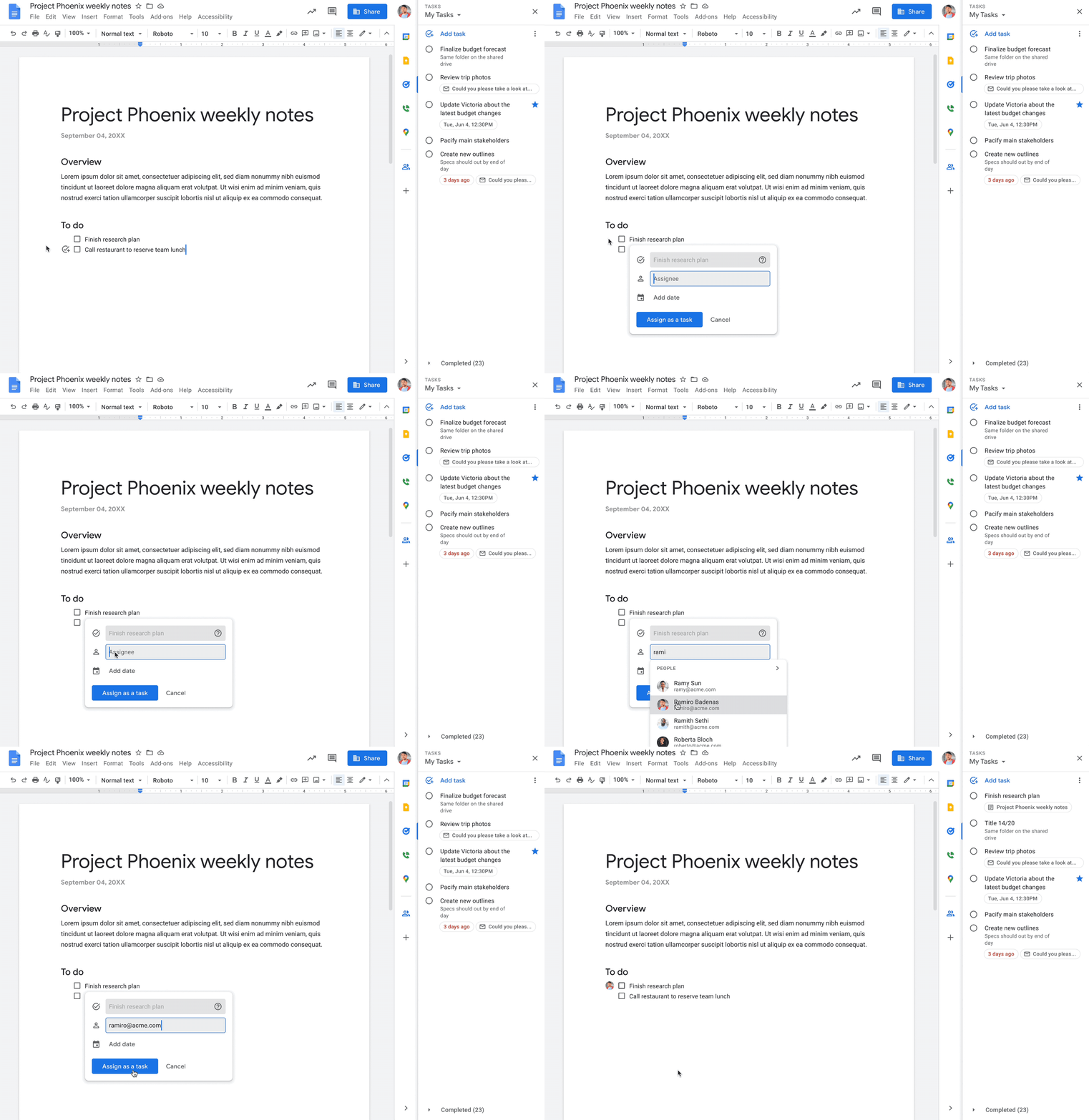
In Google Docs, you can now assign a checklist item to yourself or a colleague that will then show up in the assignee’s Tasks list. | Learn more


For a recap of announcements in the past six months, check out What’s new in Google Workspace (recent releases).

Quick summary

In Google Docs, you can now assign a checklist item to yourself or a colleague that will then show up in the assignee’s Tasks list. When edits are made to an assigned item in Tasks, such as a change to the title, due date or completion state, those updates will show in the Doc, and vice versa.


Getting started 

Rollout pace 

Availability 

  • Available to Google Workspace Business Starter, Business Standard, Business Plus, Essentials Starter, Enterprise Essentials, Enterprise Essentials Plus, Enterprise Standard, Enterprise Plus, Frontline Starter, Frontline Standard, Education Standard, Education Plus, Nonprofits, and legacy G Suite Basic and Business customers 
  • Not available to Education Fundamentals, the Teaching and Learning Upgrade, and users with personal Google Accounts 

Resources