This official feed from the Google Workspace team provides essential information about new features and improvements for Google Workspace customers.


New updates 


There are no new updates to share this week. Please see below for a recap of published announcements. 


Previous announcements


The announcements below were published on the Workspace Updates blog earlier this week. Please refer to the original blog posts for complete details.


In-room meeting participants can now join break out rooms 
When using Google Meet Hardware devices, meeting hosts can now assign conference rooms to breakout rooms. | Available to Google Workspace Essentials, Business Standard, Business Plus, Enterprise Starter, Enterprise Essentials, Enterprise Standard, Enterprise Plus, Education Plus, the Teaching and Learning Upgrade, Frontline, and Nonprofits customers only. | Learn more


Transcribe speech during Google Meet calls into a Google Doc 
You can now transcribe a Google Meet video meeting into a Google Doc. The transcribed file is saved in the hosts “Meet Recordings” folder in Google Drive, similar to meeting recordings. | Available to Google Workspace Business Standard, Business Plus, Enterprise Starter, Enterprise Standard, Enterprise Plus, Education Plus, and the Teaching and Learning Upgrade customers only. | Learn more


Use SIP Link to link phone numbers from local carriers to Google Voice 
For Google Voice Standard and Premier customers, admins can now connect a Session Initiation Protocol (SIP) trunk with Voice. This allows phone numbers (PSTN services) from local carriers to be used for Google Voice through a secure set of certified Session Border Controllers (SBCs), such as Audiocodes, Cisco, Oracle, and Ribbon. | Available with Voice Standard and Voice Premier licenses only. | Learn more


Preview and interact with files using smart chips in Google Sheets 
As an extension of smart canvas, you can now add Google Drive files directly into a Google Sheet as a smart chip. | Learn more


Expanding smart chips to include events in Google Sheets 
In addition to the recent announcement of adding files to Google Sheets using smart chips, we're also making it easier for you to quickly insert Calendar events into Sheets. | Learn more


Join or start a meeting directly from Jamboard on the web to kickstart collaboration 
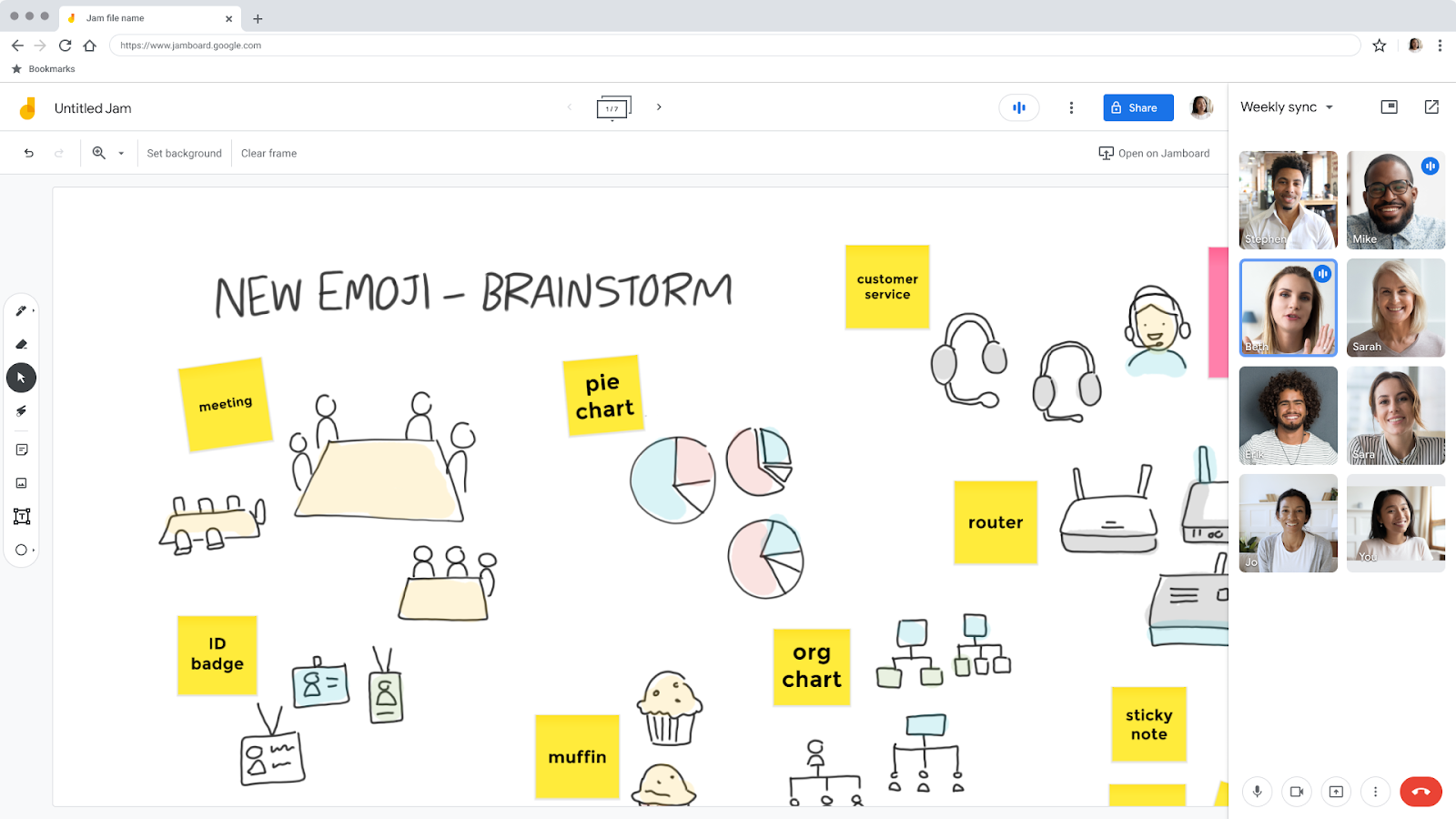
We’re expanding interoperability with Google Meet and Jamboard with the option to join or start a meeting directly from Jamboard on the web. This makes it easier for you to seamlessly present your jam and start collaborating. | Learn more


Data loss prevention for Google Chat now generally available 
Over the next several weeks, data loss prevention (DLP) rules for Google Chat will become generally available for select Google Workspace editions. Data protection rules for Chat help admins and security experts build a stronger framework around sensitive data to prevent personal or proprietary information from ending up in the wrong hands. | Learn more

Improve your visibility in Google Meet video calls
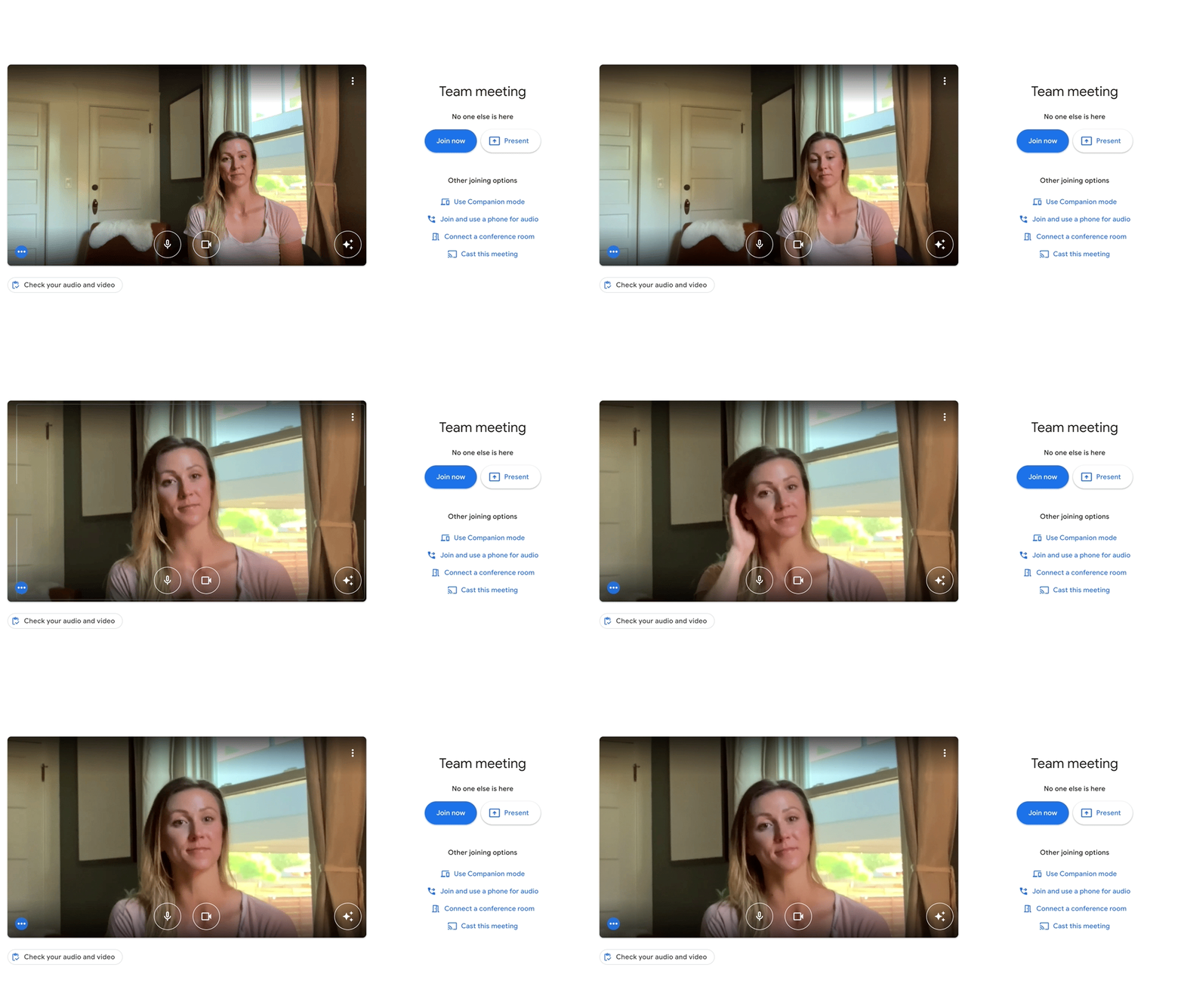
Google Meet can now automatically frame your video before joining a meeting to help ensure equal visibility for all participants. The automatic framing happens only once, so there are no motion distractions that can divert attention from the content of the meeting. | Available to Google Workspace Business Standard, Business Plus, Enterprise Essentials, Enterprise Starter, Enterprise Standard, Enterprise Plus, Education Plus, Education Teaching and Learning Upgrade, and Workspace Individual customers with eligible devices. Also available to Google One subscribers with 2TB or more storage space with eligible devices. | Learn more

For a recap of announcements in the past six months, check out What’s new in Google Workspace (recent releases).
This announcement was made at Google Cloud Next ‘22. Check out Next OnAir to tune into the livestream or watch session recordings following the event. Visit the Cloud Blog to learn more about the latest Google Workspace innovations for the ever-changing world of work. 


Quick summary 

Depending on their camera placement, some meeting participants might be less visible than others. Google Meet can now automatically frame your video before joining a meeting to help ensure equal visibility for all participants. The automatic framing happens only once, so there are no motion distractions that can divert attention from the content of the meeting. You can manually reframe the video at any time from the settings. 

Meet frames you in the center of the screen before joining a meeting to improve your visibility


Getting started 


Rollout pace 

  • Rapid Release domains: Extended rollout (potentially longer than 15 days for feature visibility) starting on October 14, 2022 
  • Scheduled Release domains: Gradual rollout (up to 15 days for feature visibility) starting on November 2, 2022 

Availability 

  • Available to Google Workspace Business Standard, Business Plus, Enterprise Essentials, Enterprise Starter, Enterprise Standard, Enterprise Plus, Education Plus, Education Teaching and Learning Upgrade, and Workspace Individual customers with eligible devices. 
  • Also available to Google One subscribers with 2TB or more storage space with eligible devices. Visit the Help Center to learn about device requirements for video framing
  • Not available to Google Workspace Essentials, Business Starter, Education Fundamentals, Frontline, and Nonprofits, as well as G Suite Basic and Business customers. 
  • Not available to users with personal Google Accounts. 

Resources 

This announcement was made at Google Cloud Next ‘22. Check out Next OnAir to tune into the livestream or watch session recordings following the event. Visit the Cloud Blog to learn more about the latest Google Workspace innovations for the ever-changing world of work. 


What’s changing

In July 2022, we announced data loss prevention (DLP) rules for Google Chat as an open beta. Over the next several weeks, this feature will become generally available for select Google Workspace editions. 


Data protection rules for Chat help admins and security experts build a stronger framework around sensitive data to prevent personal or proprietary information from ending up in the wrong hands. These leaks, whether accidental or malicious, are a top concern for our customers. 


Admins can selectively apply data protection rules to: 
  • Messages in group conversations, spaces, and/or direct messages 
  • Messages between internal and/or external participants 
  • Message text and/or attachments 

Once DLP rules are applied, messages and files in relevant conversations will automatically be scanned for sensitive information. Admins can configure the action to be taken in response to sensitive data being detected, such as: block from sending, warn before sending, and log for audit. 


In the Security Investigation Tool, we’ve added additional tabs which contain more information on incidents, such as Incident Details, containing information about the message, sender and a triggered rule, and Chat Transcript, showing preceding and following messages to the triggering one, providing a detailed context for investigation.

Additional information regarding Chat events

Getting started 

  • Admins: 
    • This feature will be OFF by default and can be enabled at the domain, OU, or group level. You can create DLP rules in the Admin console under Security > Data Protection
      • Note: You can modify existing DLP rules for Drive and Chrome to also apply to Chat. 
    • Visit the Help Center to learn more about turning data loss prevention in Chat on for your organization
    • If admins opt to log these events, they can be accessed in the Security Investigation Tool
  • End users: There is no action required. 

Rollout pace 


Availability 

  • Available to Google Workspace Enterprise Standard, Enterprise Plus, Education Standard, Education Plus. 
  • DLP for Chat is also available to Cloud Identity Premium users who are also licensed for Workspace editions that include Google Chat and Audit and investigation. Visit the Help Center for more information. 
  • Not available to Google Workspace Essentials, Business Starter, Business Standard, Business Plus, Enterprise Essentials, Frontline, and Nonprofits, as well as legacy G Suite Basic and Business customers 

Resources 

What’s changing 

We’re expanding interoperability with Google Meet and Jamboard with the option to join or start a meeting directly from Jamboard on the web. This makes it easier for you to seamlessly present your jam and start collaborating. This feature is available on the web. 


Who’s impacted 

End users 

Why you’d use it 

Effective team meetings are a critical component to unlocking innovation facilitated by human connection and collaboration. A key component of this is the ability to communicate seamlessly whether you’re joining in a meeting room or remotely. Bringing Google Meet into Jamboard allows everyone in the meeting to collaborate while having a conversation. 


This is particularly helpful for presenters, who can share their Jam to illustrate a new idea or concept, and receive their audience's reaction in one place. Collaboration is even easier, allowing everyone in the meeting to co-create on a whiteboard without switching between tabs or apps. 


As with other capabilities, such as Meet in Google Docs, Sheets, and Slides, we hope this update empowers teams working together in-real time, regardless of location. 

Getting started 


Rollout pace 


Availability 

  • Available to all Google Workspace customers, as well as legacy G Suite Basic and Business customers 

Resources 

This announcement was made at Google Cloud Next ‘22. Check out Next OnAir to tune into the livestream or watch session recordings following the event. Visit the Cloud Blog to learn more about the latest Google Workspace innovations for the ever-changing world of work. 


What’s changing

In addition to the recent announcement of adding files to Google Sheets using smart chips, we're also making it easier for you to quickly insert Calendar events into Sheets.

This additional smart canvas feature allows you to search for events from Calendar or copy Calendar links and place them directly into Sheets. You will then see the event name and an actionable hover card in the cell.

event chips v2

Who’s impacted


End users 


Why you’d use it 


When creating analysis, tracking progress, or updating data in Sheets, your Calendar is now at your fingertips. In addition, through the hovercard view, you can review attendees, times, and other meeting metadata. 


Getting started 

  • Admins: There is no admin control for this feature. 
  • End users: To add Calendar events into Sheets, type "@" in any cell and search for your Calendar events or navigate to Insert>Chips>Events. Visit the Help Center to learn more about inserting smart chips in Google Sheets.

Rollout pace 


Availability 

  • Available to all Google Workspace customers, as well as legacy G Suite Basic and Business customers 
  • Available to users with personal Google Accounts 


Resources