
This official feed from the Google Workspace team provides essential information about new features and improvements for Google Workspace customers.


We’ve made it easier to add images to Gmail signatures on the web by enabling the option to choose and display images from Google Drive.

Images can be added in Gmail Settings > General. In the ‘Signature’ section, click the ‘Insert image’ icon above the signature text box and add your image from Drive.

Note: In order for this feature to be visible in Gmail, admins will need to enable external sharing of Drive files in Admin console: Drive > Sharing settings > Sharing options.

Release track:
Rapid release, with Scheduled release coming in early Jan 2015

For more information:
Help Center

Note: all launches are applicable to all Google Apps editions unless otherwise noted

whatsnew.googleapps.com
Get these product update alerts by email
Subscribe to the RSS feed of these updates
Over the past few years, we’ve been updating our APIs with new versions across Drive and Calendar, as well as those used for managing Google Apps for Work domains. These new APIs offered developers several improvements over older versions of the API. With each of these introductions, we also announced the deprecation of a set of corresponding APIs.

As
communicated* back in September, the deprecation period for these APIs is coming to an end. As of April 20, 2015, we will discontinue these deprecated APIs. Calls to these APIs and any features in your application that depend on them will not work after April 20th.


When updating, we also recommend that you use the opportunity to switch to OAuth2 for authorization. Older protocols, such as ClientLogin, AuthSub, and OpenID 2.0, have also been deprecated and are scheduled to shut down.

In the coming weeks, we’ll be contacting domain administrators whose applications are still using these deprecated APIs with an email reminder and guidance on specific migration paths. 

* The Documents List API was not included in our communication in September, but its deprecation was
announced in September of 2012.


Note: all launches are applicable to all Google Apps editions unless otherwise noted

whatsnew.googleapps.com
Get these product update alerts by email
Subscribe to the RSS feed of these updates

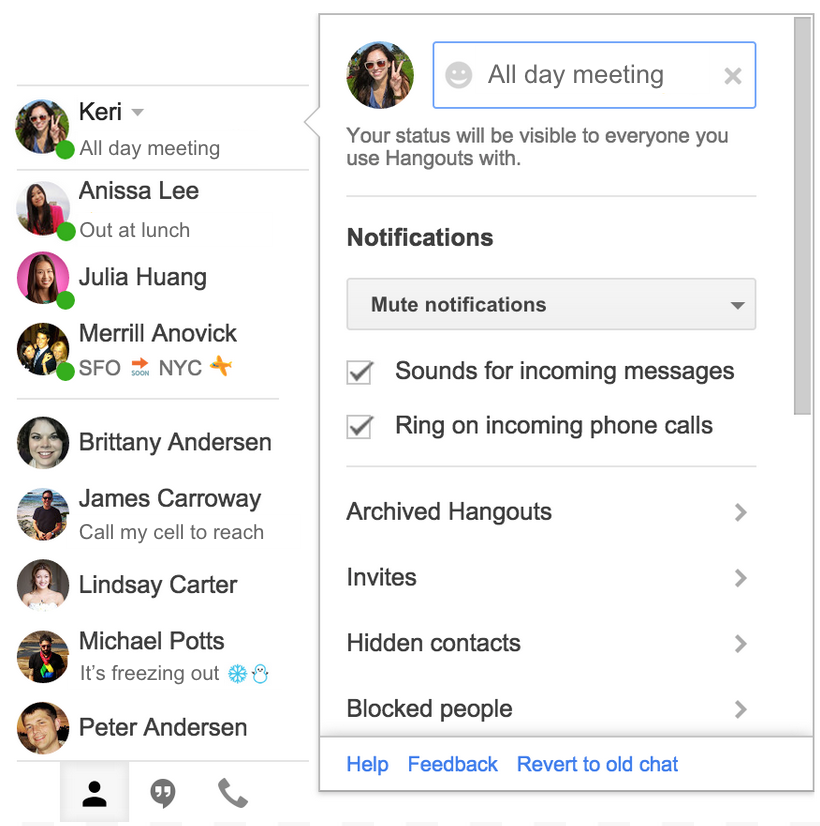
People using Google Hangouts on the web can now add custom status messages and see the status messages of others in the Contacts view. Status messages can be added via the settings menu: 
status_work2.png
By default, custom status messages will be displayed outside of the domain, though admins have the option to restrict them to be displayed within the domain only via Admin console at Apps > Google Apps > Talk/Hangouts > Sharing Settings.  

Note: Hangouts status messages are only visible to others using Hangouts. They are not shared to people using Google Talk. Similarly, status messages set in Google Talk will not be shared to Hangouts.

This feature is coming soon for the Hangouts Android and iOS apps.

Release track:
Rapid release and Scheduled release

For more information:
Help Center
Google for Work G+ post

Note: all launches are applicable to all Google Apps editions unless otherwise noted

whatsnew.googleapps.com
Get these product update alerts by email
Subscribe to the RSS feed of these updates

Today we announced that we’ve added Google Docs to the App Launcher for consumers, making it easier for people to get straight to Google Docs when signed into other Google products.

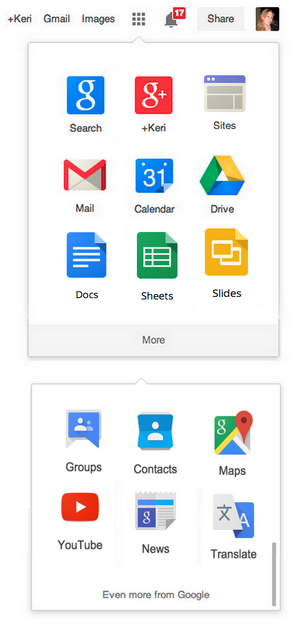
For Google Apps customers, we’ll be adding all three of the Docs editors―Docs, Sheets, and Slides―to the App Launcher in early January. The editors icons will be on the first screen along with your other Google Apps products:
Screen Shot 2014-12-12 at 5.00.43 PM.png
We’ll announce in early January when the Docs editors have been added. Groups and Contacts will be moved to the ‘More’ screen to make room. 

Note: all launches are applicable to all Google Apps editions unless otherwise noted

whatsnew.googleapps.com
Get these product update alerts by email
Subscribe to the RSS feed of these updates

We’ve added some helpful new features to the Google Drive apps for Android and iOS.

On Android, you can now search for files in Drive from the Google app. For example, you could say “OK, Google — search for team meeting notes on Drive” and find files in the Drive app without having to open the app and type in your search query. 

On iPhone and iPad, you can now get more of your content in Drive by uploading it from other iOS apps. 

The Android update will roll out over the next week or so and the iOS update is already available on the App Store.

Release track:
Rapid release and Scheduled release

For more information:
Get the Drive app for
Android and iOS

Note: all launches are applicable to all Google Apps editions unless otherwise noted

whatsnew.googleapps.com
Get these product update alerts by email
Subscribe to the RSS feed of these updates