
This official feed from the Google Workspace team provides essential information about new features and improvements for Google Workspace customers.


Today we’re launching Password Alert, an open-source Chrome extension that helps protect Google and Google Apps Accounts from phishing attacks and encourages people to use different passwords for different sites, a security best practice. 

When an employee with Password Alert installed enters their Google password into any site other than an authentic Google sign-in page (accounts.google.com), that employee will receive an email notifying them to change their password. 

In addition, Google Apps admins can choose to deploy an App Engine App that allows for, among other things, auditing and notifications to admins when employees enter their passwords into non-Google websites, and the ability to force those employees to change their passwords after doing so.

As an admin, you can install the Password Alert Chrome extension for all or some members of your domain. To get started with Password Alert, check out the Help Center and FAQ linked below. The Help Center includes a useful Deployment Guide, which outlines the options and requirements for enabling Password Alert for your domain.

Release track:
Rapid release and Scheduled release

For more information:
Help Center: Overview
Help Center: FAQ
Google for Work blog post


Note: all launches are applicable to all Google Apps editions unless otherwise noted

Launch release calendar
Get these product update alerts by email
Subscribe to the RSS feed of these updates
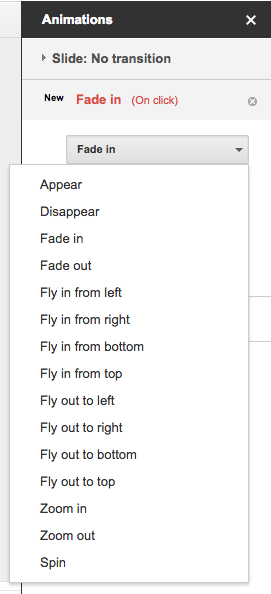
Animations are an easy way to make your presentations look more dynamic in Google Slides. Starting today, you can improve your Slides presentations with two new animations: Appear and Disappear. You can also now set the direction (to and from left, right, top, and bottom) of two previously existing animations: Fly in and Fly out.


Release track:
Rapid release and Scheduled release

More information:
Help Center


Note: all launches are applicable to all Google Apps editions unless otherwise noted

Launch release calendar
Get these product update alerts by email
Subscribe to the RSS feed of these updates

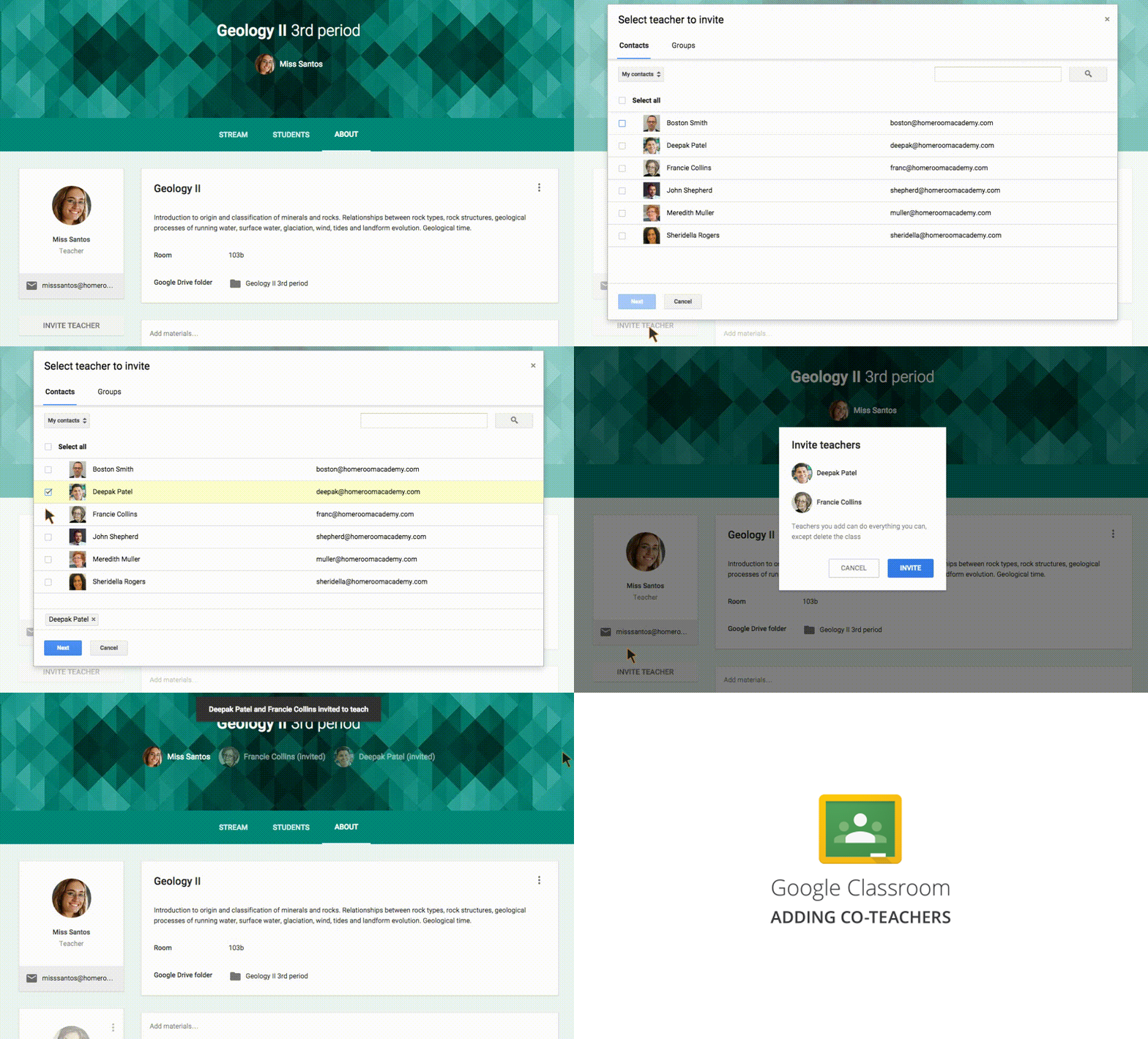
Google Classroom allows teachers to spend less time on paperwork and more time with their students. Starting today, multiple teachers can work and collaborate in a single Classroom class. With the exception of deleting the class altogether, additional teachers can perform all of the same functions as the primary teacher, including:

  • Creating assignments and announcements
  • Viewing and grading submissions
  • Participating in comments on the class’ “stream”
  • Inviting students to the class
  • Receiving email notifications related to the class
Screencast-of-Co-Teacher-2.gif
Teachers can also prep for their classes in advance, saving announcements and assignments as “drafts” and waiting to send them until they’re ready. Like in Gmail, once a new announcement or assignment is created, it will be automatically saved as a draft. Those drafts can then be accessed by multiple teachers, making it simple to collaborate on prep work.

Finally, in response to teacher feedback, we’ve made two additional changes that will make Classroom easier to use:
  • Autosaving grades - Grades will now be autosaved as they’re entered, meaning teachers can grade assignments over multiple sessions but still return those assignments to students all at one time.
  • Improved notifications - Teachers and students will now receive email notifications when private messages are left on assignments.

Release track:  
Rapid release and Scheduled release

More information:
Help Center: Invite teachers to a class
Help Center: Draft announcements
Help Center: Draft assignments
Google for Education blog post


Note: all launches are applicable to all Google Apps editions unless otherwise noted

Launch release calendar
Get these product update alerts by email
Subscribe to the RSS feed of these updates

A new version of the Google Drive Android app is coming to Google Play over the next week. New features include:
  • After uploading a file, the ability to add people to sharing settings and share a link directly from the upload notification:notification-share.png
  • Ability to access a contact’s extended information from the sharing section of the details pane of a file in Drive
  • Ability to remove a parent of a file from the details pane when a file is multi-parented
  • Support for 23 new languages (Afrikaans, Amharic, Armenian, Basque, Bengali, Chinese (Hong Kong), Estonian, French (Canada), Galician, Georgian, Icelandic, Kannada, Khmer, Lao, Malayalam, Marathi, Mongolian, Nepali, Sinhala, Swahili, Tamil, Telugu, Zulu)
  • PDF viewer improvements (better scrolling and handling of multi-layout PDFs)
  • Performance and UI improvements
We’ve also corrected an issue where Drive was not properly preventing uploads for accounts where Drive had been turned off by Apps admins.

Release track:
Rapid release and Scheduled release (gradual rollout)

For more information:
Help Center
Download the latest Google Drive app on Google Play


Note: all launches are applicable to all Google Apps editions unless otherwise noted

Launch release calendar
Get these product update alerts by email
Subscribe to the RSS feed of these updates

New versions of the Google Docs, Sheets, and Slides apps for Android are now available on Google Play and a new version of the Docs app for iOS is available in the App Store. New features include:
  • Docs
    • Accept, reject, or comment on suggestions (Android and iOS)
    • Tracked changes and comments in Word files (Android and iOS)
    • Edit tables (iOS only, already available on Android)
    • Slides
      • Reorder objects to the front or back
      • Quicker loading and scrolling of PowerPoint presentations from the app
    Release track:
    Rapid release and Scheduled release

    For more information:
    Get the latest Docs, Sheets, and Slides apps on Google Play
    Get the latest Docs app in the App Store
    Google Docs G+ post


    Note: all launches are applicable to all Google Apps editions unless otherwise noted

    Launch release calendar
    Get these product update alerts by email
    Subscribe to the RSS feed of these updates