
This official feed from the Google Workspace team provides essential information about new features and improvements for Google Workspace customers.


When auto-provisioning is enabled for a supported third-party application, any users created, modified, or deleted in G Suite are automatically added, edited, or deleted in the third-party application as well. This feature is highly popular with admins, as it removes the overhead of managing users across multiple third-party SaaS applications.

We’ve heard continued positive feedback from admins, so we’re adding auto-provisioning support for eight new applications: Amazon Web Services, DocuSign, Evernote, GoToMeeting, Office 365, SAP Cloud Platform Identity Authentication, Sugar, and Zendesk.

Customers subscribed to G Suite Education, G Suite Business, and G Suite Enterprise editions can enable user auto-provisioning in all supported applications. Customers on G Suite Basic, G Suite Government, and G Suite Nonprofit can configure auto-provisioning for up to three applications from the supported list. For more information on how to set up auto-provisioning, check out the Help Center.

Launch Details
Release track:
Launching to both Rapid Release and Scheduled Release

Editions:

  • G Suite Basic, Government, and Nonprofit customers can enable auto-provisioning for up to three applications
  • G Suite Education, Business, and Enterprise customers can enable auto-provisioning for all supported applications 
Rollout pace:
Gradual rollout (up to 15 days for feature visibility)

Impact:
Admins only

Action:
Admin action suggested/FYI

More Information
Help Center: Automated user provisioning
Help Center: Using SAML to set up federated SSO

Launch release calendar
Launch detail categories
Get these product update alerts by email
Subscribe to the RSS feed of these updates

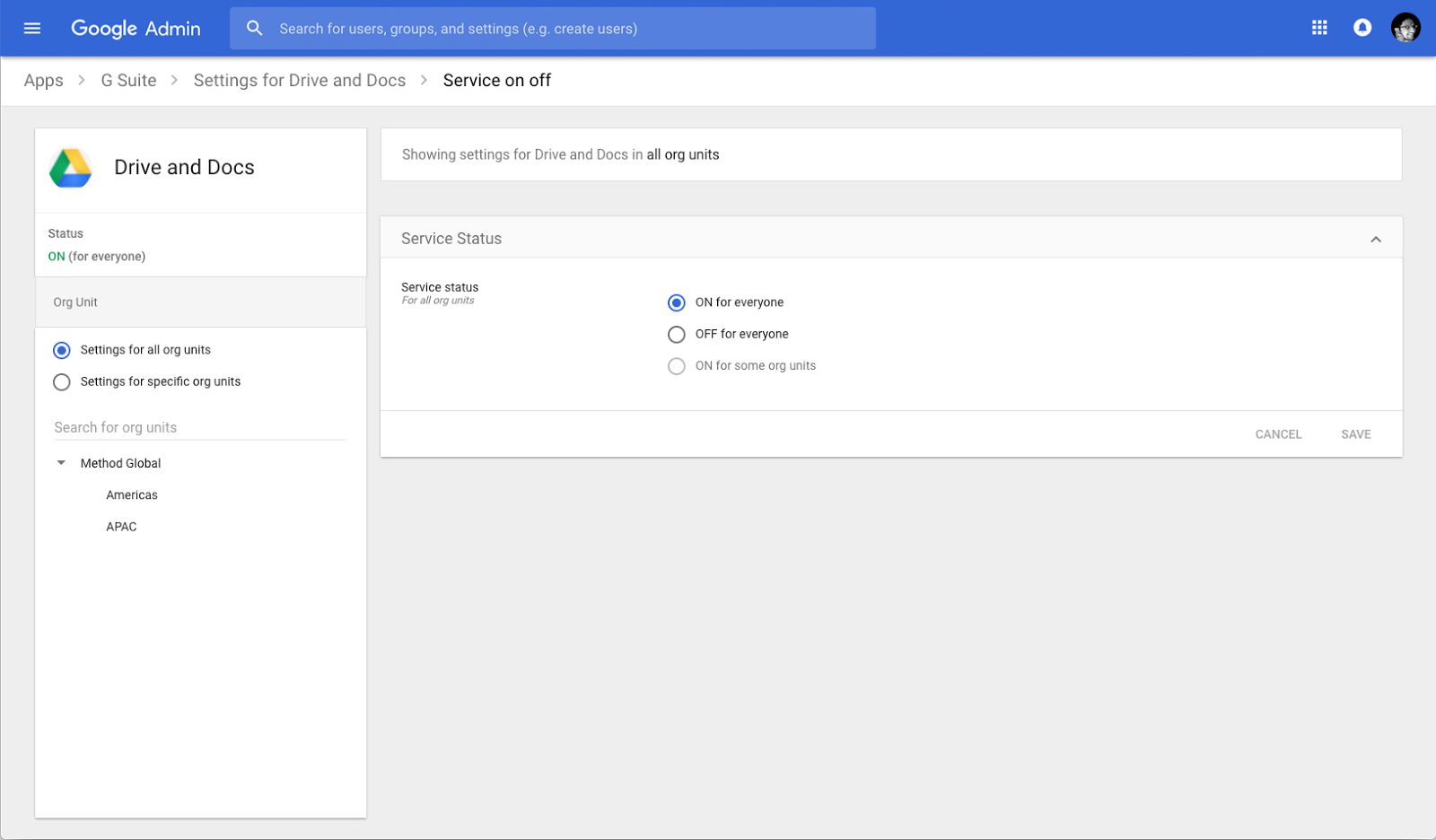
Controlling the settings for your domain, and the organizational units (OUs) within it, is a critical part of being a G Suite admin. We’re now making that easier with changes to the apps settings list page in the Admin console.

Navigating to Apps > G Suite will now list out your domain’s available G Suite core apps with a cleaner look and feel. Also on this page you’ll see a new panel on the left-hand side where you can toggle between app management at the domain or OU level.


If you select an OU in the left panel and then hover over an app, you'll see two options:

  • Off (override): This option turns off the app for the OU, overriding the ON/OFF setting made at the parent organization level.
  • Inherit: This option uses the ON/OFF setting designated at the OU’s parent organization level.
Alternatively, if you click into the details page of a specific app and go to adjust the ON/OFF setting to “On for some organizations,” you’ll see a new page layout that shows the service status with the option to change the setting. From there, you can easily click in the top left of the screen to navigate back to any of the previous pages in the Admin console.


Launch Details
Release track:
Launching to both Rapid Release and Scheduled Release

Editions:
Available to all G Suite editions

Rollout pace:
Extended rollout (potentially longer than 15 days for feature visibility)

Impact:
Admins only

Action:
Admin action suggested/FYI
Launch release calendar
Launch detail categories
Get these product update alerts by email
Subscribe to the RSS feed of these updates

We recently introduced the new Google Calendar experience on the web, including the ability to add more structured data about your buildings and resources. We’re now making it easier to add and edit that information with updates to the existing Calendar Resources API, as well as adding two new APIs: Buildings and Features.

G Suite admins can also use these APIs to keep resource and building information in Google Calendar up to date and in sync with other systems used for facility management.

For more information on the Calendar Resources APIs, check out the API documentation and Help Center links below.

Launch Details
Release track:
Launching to both Rapid Release and Scheduled Release

Editions:
Available to all G Suite editions

Rollout pace:
Full rollout (1–3 days for feature visibility)

Impact:
Admins only

Action:
Admin action suggested/FYI

More Information
Help Center: Create buildings, features, and resources
The Keyword: Time for a refresh: meet the new Google Calendar for web
G Suite Updates: Introducing the new Calendar Resource API
G Suite Admin SDK > Directory API: Resources.calendars
G Suite Admin SDK > Directory API: Resources.features
G Suite Admin SDK > Directory API: Resources.buildings

Launch release calendar
Launch detail categories
Get these product update alerts by email
Subscribe to the RSS feed of these updates

With Single-Sign-On (SSO), users can access all of their enterprise cloud applications—including the Admin console for admins—after signing in just one time. Google supports the two most popular enterprise SSO standards, OpenID Connect and SAML, and there are more than 800 applications with pre-integrated SSO support in our third-party apps catalog already.

We’re now adding SAML integration for 11 additional applications: &frankly, Bonusly, HelloSign, Salsify, Sequr, Small Improvements, SpaceIQ, StatusHub, Symantec Web Security Service (WSS), ThousandEyes, and PurelyHR.

You can find our full list of pre-integrated applications, as well as instructions for installing them, in the Help Center.

Note that apart from the pre-integrated SAML applications, G Suite also supports installing “Custom SAML Applications,” which means that admins can install any third-party application that supports SAML. The advantage of a pre-integrated app is that the installation is much easier. You can learn more about installing Custom SAML Applications in this Help Center article.

Launch Details
Release track:
Launching to both Rapid release and Scheduled release

Editions:
Available to all G Suite editions

Rollout pace:
Gradual rollout (potentially longer than 3 days for feature visibility)

Impact:
Admins only

Action:
Admin action suggested/FYI

More Information
Help Center: Using SAML to set up federated SSO

Launch release calendar
Launch detail categories
Get these product update alerts by email
Subscribe to the RSS feed of these updates

Update (January 25, 2018): In response to your feedback, we’re rolling this feature back and will re-launch once we’ve made some improvements. Please stay tuned to the G Suite Updates blog to learn when the feature is once again available.


The Google Apps Device Policy app enforces your organization’s security policies on employees’ managed Android devices, protecting them and making them safer. If a security policy is violated, it’s especially important to ensure that corporate data isn’t accessible on that device until it’s once again compliant.


With that in mind, the Device Policy app will now disable access to non-critical apps* on any work profile or company-owned Android device that it determines is non-compliant. Users will see a notification informing them that their device violated a security policy and some apps may be disabled. Those apps will be re-enabled when their device complies with all of the organization’s security policies.

*Non-critical apps are any apps that aren’t required for a device to function. For example, Dialer is a critical app, but Gmail is a non-critical app.

Launch Details
Release track:
Launching to both Rapid Release and Scheduled Release

Editions:
Available to all G Suite editions

Rollout pace:
Gradual rollout (up to 15 days for feature visibility)

Impact:
All end users

Action:
Change management suggested/FYI

More Information
Help Center: Protect corporate data on mobile devices
Help Center: Mobile audit log
Help Center: Automate mobile management tasks with rules
Help Center: Use the Google Apps Device Policy app on an Android device
Help Center: Assist users of managed Android devices


Launch release calendar
Launch detail categories
Get these product update alerts by email
Subscribe to the RSS feed of these updates