This official feed from the Google Workspace team provides essential information about new features and improvements for Google Workspace customers.


New updates

Unless otherwise indicated, the features below are fully launched or in the process of rolling out (rollouts should take no more than 15 business days to complete), launching to both Rapid and Scheduled Release at the same time (if not, each stage of rollout should take no more than 15 business days to complete), and available to all Google Workspace and G Suite customers.


Delegate Information is now available in Gmail Log Search
Email log search now indicates when an email was sent on behalf of the user by a delegate. In cases where a delegate sent the email, the delegate will be listed, along with the sender, in message details in email log search. Delegate information will only be available on emails sent after this change rolls out. | Available to all Google Workspace with Gmail enabled. | Learn more.


New font in Workspace improves accessibility for vision impaired
Now there's a new font in Workspace optimized for vision impaired users.  When you create or want to read a document, set the font to Atkinson Hyperlegible for improved legibility.


Previous announcements 

The announcements below were published on the Workspace Updates blog earlier this week. Please refer to the original blog posts for complete details.


Improvements for braille mode in Google Docs provide a richer, more interactive experience
We've improved how suggestions are announced in braille mode in Google Docs. You’ll now hear detailed suggestion information inline with the rest of the text — this includes whether the suggestion is an insertion or deletion, and the author of the suggestion. | Learn more.


Disabling File Transfer in Google Chat
Admins can now disable or limit file sharing for their users in Chat. Specifically, admins
will be able to specify controls within and outside their organization, and will be able to choose between restricting all files, allowing images only, or allowing all files. | Available to Google Workspace Business Plus, Enterprise Standard, Enterprise Plus, Education Plus, Enterprise Essentials | Learn more.


Alert Center enrichment with VirusTotal threat context now generally available
Earlier this year, we pre-announced an integration between the Alert Center and VirusTotal. Currently, the Google Workspace Alert Center provides admins with actionable, real-time alerts and insights regarding security-related activity in their domain. With the VirusTotal (now part of Google Cloud) integration, admins have the ability to dig into their alerts at a deeper level. | Available to Google Workspace Business Plus, Enterprise Standard, Enterprise Plus, Education Fundamentals and Education Plus customers. | Learn More.


Use dynamic security groups for group based policies
Google Workspace admins can now use dynamic groups to manage policies for their users in the Admin console. Previously, it was only possible to apply these policies to static groups and OUs. | Available to Google Workspace Enterprise Plus, Education Plus, and Cloud Identity Premium customers. | Learn more.


Workspace for Education Plus now syncs Google Classroom courses and rosters with Student Information Systems
U.S. school districts with Google Workspace for Education Plus will be able to automatically set up Google Classroom courses and keep rosters in sync with their Student Information System (SIS). IT admins will do the setup via Clever, meaning teachers will no longer need to manually create classes and invite students to join them. | Learn More.


Enhancements to Google Voice
We’ve made several enhancements to Google Voice, including information and troubleshooting tips for missed calls, the ability to easily redial dropped calls, the ability to delete SMS messages in bulk, and an option to show your Google Voice number as the caller ID when forwarding calls. | Learn more.


Search within a folder in Google Drive on iOS
You can now search for content inside a specific folder in Google Drive on iOS. Simply navigate to the folder you want to search within and select the search bar — you’ll see a list of suggested folders, documents, and users to refine your search results. Select the folder chip before typing your search query. | Learn more.


Assign SSO profile to organizational units or groups with the new SAML Partial SSO beta
Currently, you can configure to authenticate your users using a third-party identity provider — this configuration applies to all users within your domain. Now, you have the option to specify groups or organizational units (OUs) to authenticate a subset of your users using Google. This feature is available as an open beta. | Learn more.


New enrollment privilege and naming updates for Google Meet hardware in the Admin console
We are making two improvements to the admin controls for Google Meet hardware: a new enrollment privilege admins and updates for hardware management in the Admin console. | Learn more.


Use the new Google Meet web app for better meetings on desktop devices
We’ve launched a new Google Meet standalone web app. This Progressive Web Application (PWA) has all the same features as Google Meet on the web, but as a standalone app it’s easier to find and use, and it streamlines your workflow by eliminating the need to switch between tabs. | Learn more.


For a recap of announcements in the past six months, check out What’s new in Google Workspace (recent releases).

Quick summary

We’ve launched a new Google Meet standalone web app. This Progressive Web Application (PWA) has all the same features as Google Meet on the web, but as a standalone app it’s easier to find and use, and it streamlines your workflow by eliminating the need to switch between tabs.

The PWA runs on any device with Google Chrome browser version 73 and up (version 73 was released in March 2019). This means it works on Windows, MacOS, Chrome OS, and Linux devices.


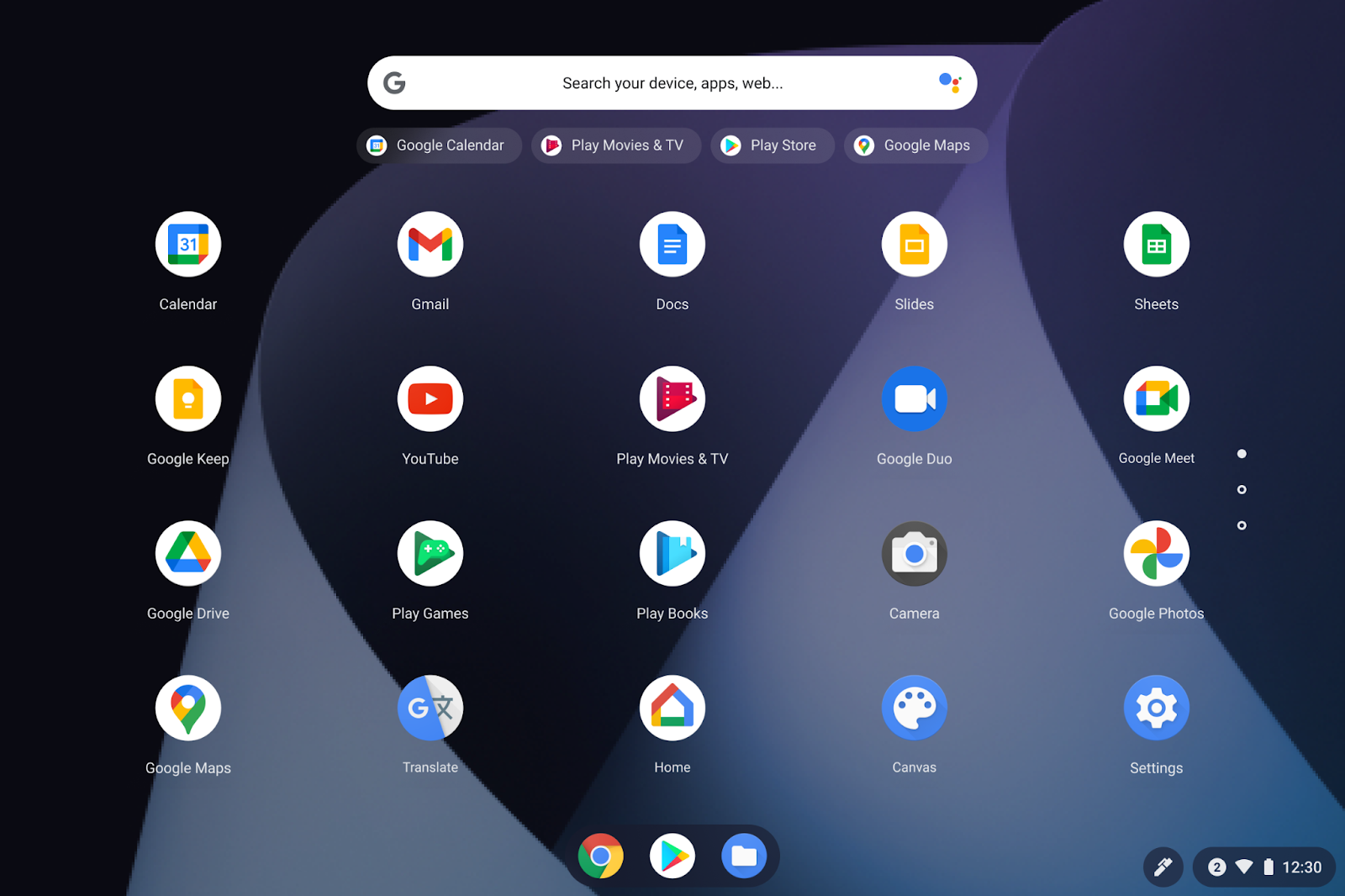
Image showing Google Meet PWA in the app launcher screen

Google Meet PWA app (far right column, second down) in app launcher screen


Image showing Meet PWA app opened for a meeting

Meet PWA app opened for a meeting


Getting started

Image of offer to try the Google Meet web app that appears in the main Google Meet opening page

There will also be an offer to try the Google Meet web app in the upper right-hand corner of the main Google Meet opening page

Rollout pace


Availability

  • Available to all Google Workspace customers, as well as G Suite Basic and Business customers and users with personal Google Accounts.

Resources

What’s changing 

We are making two improvements to the admin controls for Google Meet hardware: 
  • A new enrollment privilege: You can use the new "Enroll Google Meet hardware" admin privilege to limit the enrollment of new devices to authorized users. 
  • Updates for hardware management in the Admin Console: Legacy references to “Chromebox for meetings” will be renamed “Google Meet hardware,” and there will be a minor settings reorganization. 

Read below for more details. 


Who’s impacted

Admins only 


Why it’s important 

This new admin privilege provides enhanced security functionality by enabling you to restrict who in your organization is able to enroll new Google Meet hardware devices and consume licenses. The naming updates will help increase the consistency and clarity of managing hardware devices in the Admin console. 


Additional details 

A new enrollment privilege 
As part of this launch, we are creating: 
  • A new “Enroll Google Meet hardware” privilege that can be granted to Google Meet hardware administrators. 
  • A new “Require enrollment privilege” policy in the new Service settings group in the Google Meet hardware settings. 
Enabling the Require enrollment privilege policy for your organization will require any user attempting to provision a new device to have the Enroll Google Meet hardware admin privilege. If they do not, enrollment will be blocked during setup and no license will be consumed. 


Updates for hardware management in the Admin Console 

For consistency and clarity, we will begin updating a handful of remaining legacy references to Chromebox for meetings with the correct product name, Google Meet hardware. You may notice this change in the Admin console Policies page, Admin roles and privileges page, and the Subscriptions page. 

Additionally, the Google Meet hardware settings page will now have a single combined tab for Device settings. These were previously separated out across Meet settings and System settings. See image below.


Getting started 

  • Admins: The new enrollment privilege and related enforcement only be applied to your whole organization, not to specific groups or OUs. Changes to this enrollment will only affect future devices; it will not affect devices that have already been successfully provisioned and enrolled into your organization. Visit the Help Center to learn more about enrolling Google Meet hardware devices into your organization. 
  • End users: No end user impact. 

Alt text - Admin console screen showing new admin privilege
The new “Enroll Google Meet hardware” admin privilege in the Admin console

Alt text - Admin console screen showing new enforcement option
The setting to enforce the new Admin privilege for enrollment of new Google Meet Hardware devices

Alt text - Admin console screen showing new device settings section
The new ‘Device settings’ section in the Admin console

Rollout pace 

  • This feature is available now for all users. 

Availability 

  • Available to all Google Workspace customers with Google Meet hardware licenses 

Resources 

What’s changing 

Currently, you can configure to authenticate your users using a third-party identity provider — this configuration applies to all users within your domain. Now, you have the option to specify groups or organizational units (OUs) to authenticate a subset of your users using Google. This feature is available beginning today as an open beta, which means you can use it without enrolling in a specific beta program. 


Who’s impacted 

Admins 


Why you’d use it 

Currently, when you configure SSO with a third-party identity provider, the setting applies to your entire domain. However, there are some instances where you may want a subset of your users, such as vendors or contractors, to authenticate with Google instead. The Partial SSO beta gives you the flexibility to specify the authentication method for various users in your organization as needed.


Getting started

Image description: Within the Admin console, navigate to Security > Settings > Set up single sign-on (SSO) with a third party iDP > Manage SSO Profile assignments to specify a specific OU or Group who should identify using Google.

Rollout pace


Availability

  • Available to all Google Workspace and Cloud Identity customers


Resources


What’s changing 

You can now search for content inside a specific folder in Google Drive on iOS. Simply navigate to the folder you want to search within and select the search bar — you’ll see a list of suggested folders, documents, and users to refine your search results. Select the folder chip before typing your search query.


Searching for content in a folder in Drive


Who’s impacted 

End users 

Why you’d use it 

We’ve heard from our users that they often navigate to specific folders to streamline their search experience. We hope this change makes it easier for you to quickly find your important files. 


Getting started 
  • Admins: There is no admin control for this feature. 
  • End users: 

Rollout pace 


Availability 

  • Available to all Google Workspace customers, as well as G Suite Basic and Business customers 
 Resources