
This official feed from the Google Workspace team provides essential information about new features and improvements for Google Workspace customers.


What’s changing 

You can now use the Admin console to detect and monitor additional Meet hardware issues, including: 
  • Missing display 
  • Missing controller 
  • Missing default camera 
  • Missing default microphone 
  • Missing default speaker 
  • Missing default whiteboard camera

In addition to these new issues appearing in the peripheral status on the Device list page and on the issue timeline, email and SMS alerts will be supported for them as well. 

The updated issue timeline in the Meet hardware Admin console with new rows for Display and Controller


Also included in this update, admins can now clear previously set default peripherals from the peripheral tree on the device detail page. Previously this was only possible by setting a different peripheral as the new default. 


Why it’s important 

Before this update, the Google Meet hardware section of the Admin console provided insight into issues related to devices going offline or missing cameras, microphones, and speakers. With this update, admins can now also get information on other crucial peripheral types that admins need to know to monitor the health of their rooms. 


Getting started 

  • Admins: 
    • To view these new issues, you can monitor the status of your peripherals in the Google Meet hardware Admin console 
    • If you have turned on alerts for any organizational units using the Peripheral alerts setting, you will automatically start receiving alerts for these new issue types. 
    • Note that for most displays with CEC support, a missing display issue should only be opened when the display is actually disconnected from the device (and not just put into standby mode). However, actual behavior could vary from display to display depending on how manufacturers implement CEC. We suggest testing your displays to ensure they work as expected. Missing controller issues will be opened only when a device has no eligible controllers connected to it (including touch controllers or remote controls)

Rollout 

  • Rapid Release and Scheduled Release domains: Gradual rollout (up to 21 days for feature visibility) beginning on June 21, 2023 for all listed features except display issues,
    • Display issue support will be rolled out along with the promotion of Chrome M108 to the stable release track. This is expected in the next 6-8 weeks, but check What’s new in Google Meet hardware? for the latest and most accurate timeline. 
    • Note that during rollout to your organization, there may be a short period of time when issue data may appear inaccurate or delayed. This should resolve on its own when feature rollout is complete. 
    • Alert notification support may not be available for up to a week after you first see new issues appear in your organization’s Admin console – this is expected and due to the serialized nature of the feature rollout procedures. 

Availability

  • Available to all Google Workspace customers with Meet Hardware devices 
Resources 

What’s changing

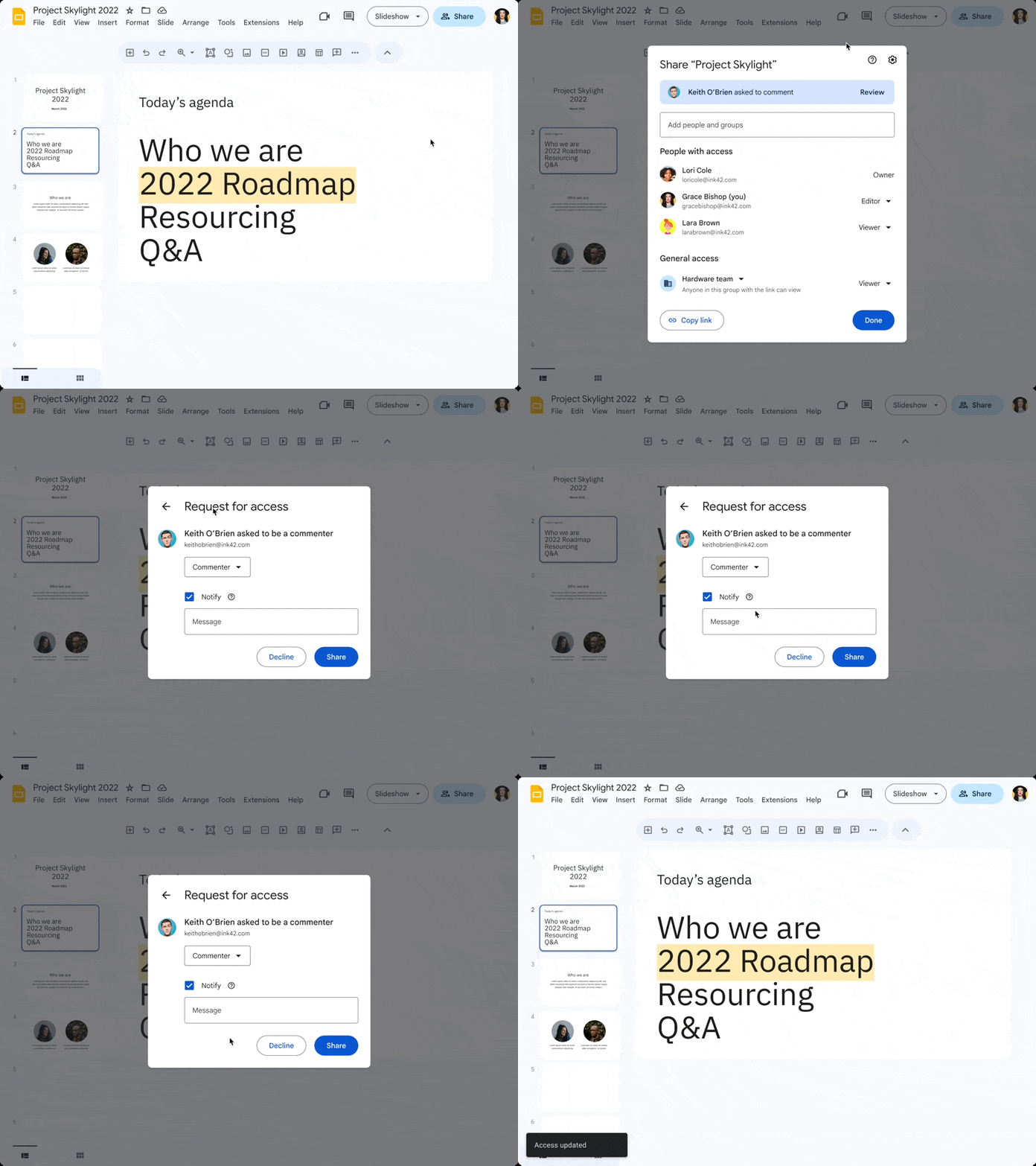
We’re introducing a new file access experience to make it easier for file approvers to respond to pending access requests across Google Workspace. 

Currently, when users request access to a file, the approvers receive an email with the option to share the file or decline the request. With this update, users can review and respond to requests from within the file. Approvers will see a notification dot on the “Share” button if they have a pending access request and a new banner at the top of the sharing dialog. 

Approvers can continue to respond to access requests through the existing emails that are sent when users request access to files. If the “Notify” checkbox is selected when an approver responds to a request, the user who requested access will receive an email with the status of the request. 
Respond to access requests for Google Workspace files more efficiently

Getting started 

  • Admins: There is no admin control for this feature. 
  • End users: Within a file (Docs, Sheets, Slides, PDFs, etc.), open the file and click the Share button > select the Review button in the new banner to view the access request(s) > respond to the request(s). Visit the Help Center to learn more about sharing files from Google Drive. 

Rollout pace 

Availability 

  • Available to all Google Workspace customers and users with personal Google Accounts 

Resources 

What’s changing

Google Drive labels are metadata your organization defines to help organize, find, and apply policies to files in Drive. As an administrator, you can create labels to apply to files stored in Drive. Starting today, Google Vault now supports custom retention rules based on Drive labels. 

With this update, Vault users can set fine-grained file-level retention policies with configurable label conditions (e.g. "label is," "label is not," "label date is before"). Additionally, you can have a label with multiple options (sub labels) and have nested and conditional application of overlapping and distinct rules. 


Who’s impacted 

Admins 


Why you’d use it 

Record retention management is a critical activity for organizations looking to maintain various compliance requirements. With file-level policy administration, label-based retention enables organizations to now be much more targeted in their retention management.


Getting started 

Rollout pace 

Availability 

  • Available to Google Workspace Business Plus, Enterprise Essentials, Enterprise Essentials Plus, Enterprise Standard, Enterprise Plus, Education Standard, and Education Plus customers 

Resources 

What’s changing 

Available now in beta through our Developer Preview Program, you can write a user’s working location using the Calendar API. 


Using the API to write a Calendar user’s working location values can help you synchronize users' working location with third-party tools. You can easily update users’ working location based on: 
  • When they book a hot desk via a hot desk booking tool 
  • Schedule a trip via a travel booking tool 


Reading of working locations is already available through the Developer Preview Program. 

Getting started 


Rollout pace 

  • This feature is available now for all eligible Google Workspace editions. 

Availability 

All developers can use the API, however the working location feature is only available for eligible Workspace editions: 
  • Available to Google Workspace Business Standard, Business Plus, Enterprise Standard, Enterprise Plus, Education Fundamentals, Education Plus, Education Standard, the Teaching and Learning Upgrade and Nonprofits customers

Resources 

4 New updates

Unless otherwise indicated, the features below are fully launched or in the process of rolling out (rollouts should take no more than 15 business days to complete), launching to both Rapid and Scheduled Release at the same time (if not, each stage of rollout should take no more than 15 business days to complete), and available to all Google Workspace customers.


Get more granular views of Google Slides with new zoom settings 
You can now customize your views in Google Slides with new custom zoom settings that give you the ability to input your desired zoom percent or use the preset zoom percentages in the drop-down menu at the top of your presentation. | Learn more about zooming or changing your document view. 
Get more granular views of Google Slides with new zoom settings

Expanding Google Drive log events to additional Google Workspace editions 
Drive log events, a feature that enables admins to access an audit and investigation page to run searches related to Drive log events, is now available for Google Workspace Business Starter and Essentials Starter editions. | Learn more about Drive log events. 

Expanding originality reports in Google Classroom to Microsoft Word files 
Educators can now run Google Classroom originality reports on Microsoft Word files (.docx) to check their students' work for authenticity. The tool will identify uncited content and plagiarism by comparing a file against webpages and books on the internet. | Learn more about turning on originality reports.

Adding rich text formatting to comments in Google Classroom 
Rich text formatting is now available for class and private comments in Google Classroom, enabling teachers and students to customize and add emphasis to their content. This highly requested feature includes bolding, underlining, italicizing, and bulleted lists. | Learn more about bold, italicize, and underline text. 
Adding rich text formatting to comments in Google Classroom


Previous announcements

The announcements below were published on the Workspace Updates blog earlier this week. Please refer to the original blog posts for complete details.


Experience better collaboration in conference rooms with new support for whiteboard cameras on Google Meet Hardware 
To improve upon the whiteboarding experience, provide better meeting inclusion, and foster greater collaboration, we’re excited to announce support for whiteboard cameras on Google Meet Hardware, with Logitech Scribe as the first supported camera. | Learn more about support for whiteboard cameras on Google Meet Hardware. 

Use Directory Sync to replace the domain name for synced users 
Using Directory Sync, admins can automatically replace the domain name for synced users and groups in their Google Cloud directory. This means synced Google users and groups can have a different domain name than the domain used in the external directory following a sync. | Learn more about replacing the domain name for synced users. 

Add or remove client-side encryption from a Google Sheets and Google Slides files 
You can now simply add or remove client-side encryption to existing spreadsheets in Google Sheets or presentations in Google Slides. This update gives you the flexibility to control encryption as your documents and projects evolve and progress. This feature is already available for Google Docs. | Available to Google Workspace Enterprise Plus, Education Standard and Education Plus customers only. | Learn more about client-side encryption in Sheets and Slides. 

Improving table placements in Google Docs 
We improved table positioning options for documents set in pages format. These features add more flexibility and control over the layout of text with tables in Docs. Learn more about table placements in Google Docs. 

View more insights and take quick action via the Chrome Browser Cloud Management home card in the Admin console 
In addition to the existing cards in the Admin console landing page such as “Users” or “Billing”, we’ve added a card for Chrome Browser Cloud Management. Here you can see quick stats, such as the number of enrolled browsers, and directly perform actions such as enrolling new browsers or managing Chrome extensions. | Learn more about the Chrome Browser Cloud Management home card. 

Pull rich data from apps directly into Google Docs with third-party smart chips 
We’re excited to share that third-party smart chips in Docs are now generally available for all users. Since introducing third-party smart chips, developers have been able to build app integrations. Several partners have already created smart chips so users can start embedding content from those apps directly into Docs. | Learn more about third-party smart chips in Google Docs.


Completed rollouts

The features below completed their rollouts to Rapid Release domains, Scheduled Release domains, or both. Please refer to the original blog post for additional details.


Rapid Release Domains: