This official feed from the Google Workspace team provides essential information about new features and improvements for Google Workspace customers.


What’s changing

In June, we introduced read receipts in group direct messages so that users could quickly identify if other members of a group have read their latest message within a Google Chat stream. Today, we’re excited to announce a similar feature in spaces that will allow space members to see view counts for messages in all spaces. 

A more detailed view of how many members are engaging with content in spaces can be seen by hovering over the message, selecting the three-dot menu, and clicking “See message views”. 
See view counts in Google Chat spaces


Additional details 

The view counts in spaces will be available for messages sent on August 1, 2023 and beyond. Additionally, view counts are not available for in-line replies. 


Getting started 

Rollout pace 

Web: 

Mobile (Android & iOS): 

Availability 

  • Available to all Google Workspace customers and users with personal Google Accounts 

Resources 

What’s changing 

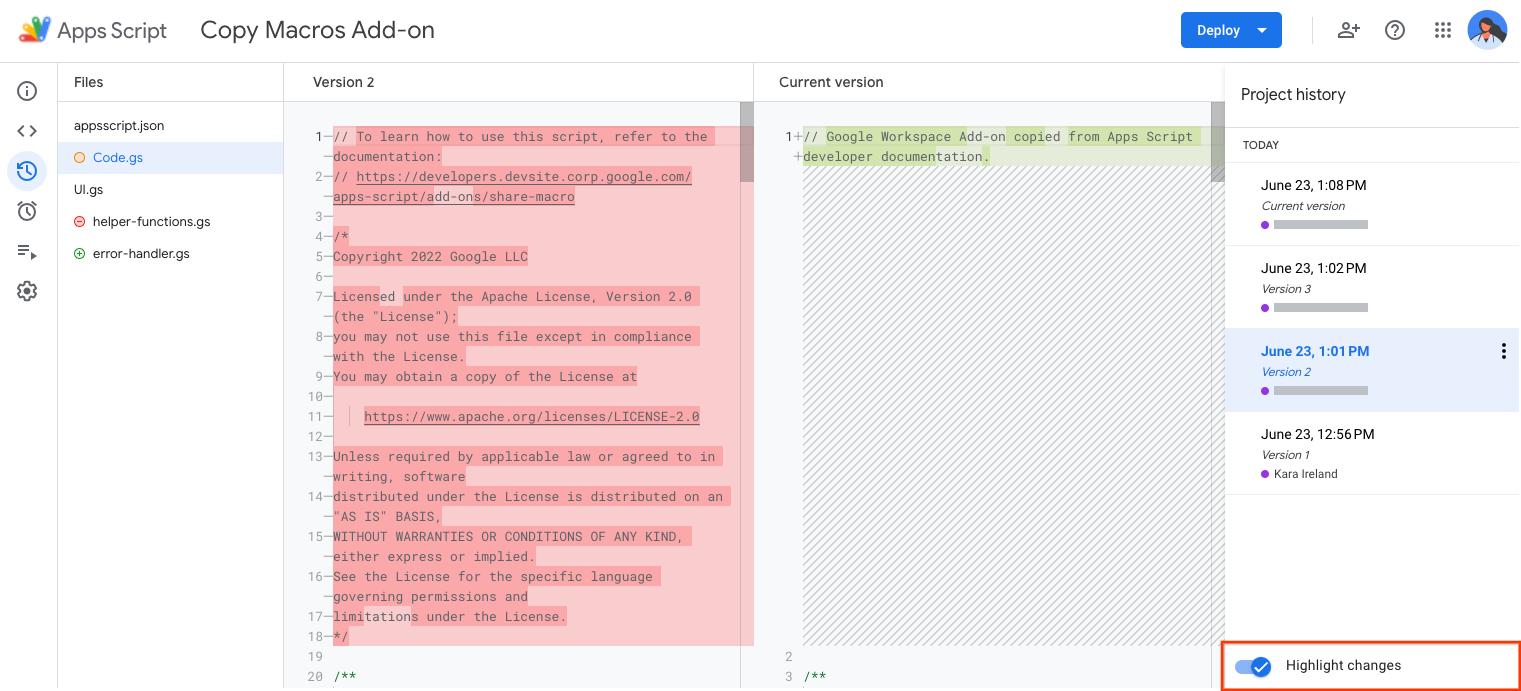
As we continue to improve the experience for Apps Script developers, today we're announcing project history, a new interface for developers to view previously deployed script versions and compare versions to the current script version. 


Developers can use project history to view the code of previously deployed script versions. The highlight changes can be used to quickly compare differences between their selected version and the current, or head, version, taking the guesswork out of determining what's changed. Anyone who has edit permission on an Apps Script project can access project history. To navigate to the project history page, open an Apps Script project and click Project History.

The project history page displays up to 200 previously deployed versions and the head version of the script.


To compare a version to the head version, turn on Highlight changes.


Additional improvements for script versions will be made in the coming weeks.


Who’s impacted

Developers

Why it’s important

Apps Script is a low-code development platform that makes it quick and easy to build business solutions that integrate, automate, and extend Google Workspace. With Apps Script, Google Workspace users can customize workflows, create automations, and build integrations that connect the applications they use every day.

Getting Started

  • Developers: Use our developer documentation to learn more about working with Apps Script and watch the video below to see project history in action:

  • Anyone who has edit permission on an Apps Script project can access project history. To navigate to the project history page, open an Apps Script project and click Project History.


Rollout


Availability

  • Available to all Google Workspace customers and users with personal Google accounts

Resources


Update

[September 28, 2023] Rollout has resumed. 
[September 8, 2023] We have paused rollout for this feature while we evaluate performance and quality. We will provide an update once rollout resumes.


What’s changing

Last year, we introduced stronger safeguards around sensitive actions taken in your Google Workspace accounts. We’re extending these protections to sensitive actions taken in Gmail, specifically actions related to: 
  • Filters: creating a new filter, editing an existing filter, or importing filters. 
  • Forwarding: Adding a new forwarding address from the Forwarding and POP/IMAP settings. 
  • IMAP access: Enabling the IMAP access status from the settings. (Workspace admins control whether this setting is visible to end users or not) 

When these actions are taken, Google will evaluate the session attempting the action, and if it’s deemed risky, it will be challenged with a “Verify it’s you” prompt. Through a second and trusted factor, such as a 2-step verification code, users can confirm the validity of the action. If a verification challenge is failed or not completed, users are sent a “Critical security alert” notification on trusted devices.

If a risky action is taken, you'll be prompted with a "Verify it's you" challenge.


Additional details

Note that this feature only supports users that use Google as their identity provider and actions taken within Google products. SAML users are not supported at this time. See below for more information.

Getting started

Rollout pace


Availability

  • Available to all Google Workspace customers and users with personal Google Accounts 

Resources

What’s changing

Earlier this year, we added a new feature that allows multiple people to present a Google Slides presentation together in Meet. Starting today, co-presenters are now also able to view speaker notes. 
View speaker notes while co-presenting Google Slides in Google Meet

Who’s impacted 

End users 


Why it’s important 

Primary and co-presenters can now read from the same speaker notes while engaging with their audience during a presentation. This allows everyone to present with greater confidence and reduces context switching between Meet and Slides. 


Additional details 

This feature requires a computer with a Google Chrome or Edge browser. 


Getting started 

  • Admins: There is no admin control for this feature. 
  • End users: 
    • As the main presenter: 
      • To start a presentation, select “present a tab” in Meet > “start slideshow”. 
      • To add a co-presenter, select "Add co-presenter" in the people panel drop down menus. 
      • To view speaker notes, click the speaker notes button in the controls at the bottom corner of the presentation. 
    • As a co-presenter: 
      • You’ll be notified that the primary presenter assigned you as a co-presenter. 
      • You’ll get control over the Slides presentation, allowing you to navigate the deck for everyone in the meeting. 
      • To view speaker notes, click the speaker notes button in the controls at the bottom corner of the presentation. 
        • Note: co-presenters must have edit access to the Slides presentation in order to view speaker notes 
    • Visit the Help Center to learn more about co-presenting Slides in Google Meet. 

Rollout pace 

Availability 

  • Available to Google Workspace Business Standard, Business Plus, Enterprise Starter, Enterprise Essentials, Enterprise Standard, Enterprise Plus, Education Plus, and the Teaching & Learning Upgrade

Resources 

2 New updates 

Unless otherwise indicated, the features below are available to all Google Workspace customers, and are fully launched or in the process of rolling out. Rollouts should take no more than 15 business days to complete if launching to both Rapid and Scheduled Release at the same time. If not, each stage of rollout should take no more than 15 business days to complete.


Get started with smart canvas in Google Sheets 
When opening a new spreadsheet or tab in Google Sheets, you will now see “Type @ to insert” to help you start using the smart canvas features available in Sheets. 
Get started with smart canvas in Google Sheets

A new look for Google Docs, Sheets, and Slides apps on Android devices 
We’re introducing a modernized visual design for the Google Docs, Sheets, and Slides apps on Android devices. In the coming weeks, Android users will notice a refreshed look for things like the editing toolbar, icons, background colors, and more. 
A new look for Google Docs, Sheets, and Slides apps on Android devices


Previous announcements

The announcements below were published on the Workspace Updates blog earlier this week. Please refer to the original blog posts for complete details.


Programmatically read and write working locations with the Calendar API, now generally available 
Previously available in beta through our Developer Preview Program, the ability to read and write a user’s working location using the Calendar API is now generally available. | Available to Google Workspace Business Standard, Business Plus, Enterprise Standard, Enterprise Plus, Education Fundamentals, Education Plus, Education Standard, the Teaching and Learning Upgrade and Nonprofits customers, as well as legacy G Suite Business customers only. | Learn more about Calendar API. 

Google Voice users can manage incoming calls across individuals and groups 
Admins can now designate specific Voice users as managers of a ring group, allowing them to make changes from voice.google.com instead of the Admin console. | Available to Google Voice Starter, Standard and Premier customers only. | Learn more about managing incoming calls. 

Resolve conflict accounts faster with the new Conflict Accounts Management tool 
We’re introducing an automated workflow to help reduce the manual effort needed to turn unmanaged accounts into managed accounts. Unmanaged accounts are users who independently created a Google account using one of your organization's domains. | Learn more about the new Conflict Accounts Management tool. 


Completed rollouts

The features below completed their rollouts to Rapid Release domains, Scheduled Release domains, or both. Please refer to the original blog posts for additional details.


Rapid Release Domains: