This official feed from the Google Workspace team provides essential information about new features and improvements for Google Workspace customers.


There are no new updates or previous announcements this week. Please see below for rollout progress for previously announced features. 


Completed rollouts 

The features below completed their rollouts to Rapid Release domains, Scheduled Release domains, or both. Please refer to the original blog posts for additional details. 


Rapid Release Domains: 

Scheduled Release Domains: 

Rapid and Scheduled Release Domains: 


For a recap of announcements in the past six months, check out What’s new in Google Workspace (recent releases).

New updates 

There are no new updates to share this week. Please see below for a recap of published announcements. 


Previous announcements

The announcements below were published on the Workspace Updates blog earlier this week. Please refer to the original blog posts for complete details.

Get enhanced spam protection through automatic labeling of suspected spam calls in Google Voice
To help protect you from unwanted calls and potentially harmful scams, Google Voice will now show a “suspected spam caller” label on all calls that Google believes to be spam. | Available to all Google Voice customers | Learn more. 

Completed rollouts


The features below completed their rollouts to Rapid Release domains, Scheduled Release domains, or both. Please refer to the original blog post for additional details.


Scheduled Release Domains:

Rapid and Scheduled Release Domains:

For a recap of announcements in the past six months, check out What’s new in Google Workspace (recent releases).


What’s changing 

To help protect you from unwanted calls and potentially harmful scams, Google Voice shows a “suspected spam caller” label on all calls that Google believes to be spam. Google makes this determination using the same advanced artificial intelligence that identifies billions of spam calls each month across Google’s calling ecosystem. 


The new labels appear on the incoming call screen and in the user’s call history. Users can either: 
  • Confirm a suspected spam call, which causes future calls from that number to go directly to voicemail and call history entries to be put in the spam folder 
  • Mark a labeled call as not spam, after which the suspected spam label is never displayed for that number again 
Get an alert that an incoming call is suspected spam


Getting started 

  • Admins: There is no admin control for this feature. 
  • End users: Suspected spam labeling appears automatically when the Voice spam filter setting (Settings > Security > Filter spam) is OFF. When spam filtering is ON, all calls that Google identifies as spam are automatically sent to voicemail, and the call entry is put into the spam folder. Visit the Help Center to learn more about blocking calls and messages or marking them as spam. 

Rollout pace 


Availability 

  • Available to all Google Voice customers

Resources 

New updates 


There are no new updates to share this week. Please see below for a recap of published announcements. 


Previous announcements


The announcements below were published on the Workspace Updates blog earlier this week. Please refer to the original blog posts for complete details.


Updated experience for exporting your organization’s data
We’re introducing new capabilities for exporting your organization’s data, giving our customers greater flexibility over managing their organization’s data export needs. | Available to Google Workspace Enterprise Plus, Education Standard, and Education Plus customers only. | Learn more. 


Google Voice Standard customers can assign phone numbers in other Voice countries in their region 
Google Voice customers on the Standard subscription in Canada, Europe and the US can assign phone numbers to any supported country in their region:
  • Customers in Europe can assign phone numbers in supported European countries
  • Customers in Canada and the US can assign phone numbers in both countries
This change gives our customers on the Standard SKU the flexibility to deploy Voice across the different countries they operate in within the same region. | Available for Google Voice Standard customers only. | Learn more.


More filter effects available for Google Meet
Google Workspace users can now access a variety of new filter effects on Google Meet on the web and mobile. These filters, such as loghead, strawberry, and working bunny, can help bring an element of fun to meetings. | Learn more. 


Quickly refine search results in Google Chat with search chips
We’re expanding an existing mobile feature to the web that helps you find exactly what you’re looking for much faster using search chips that filter your search results. | Learn more. 


Completed rollouts


The features below completed their rollouts to Rapid Release domains, Scheduled Release domains, or both. Please refer to the original blog post for additional details.


Rapid Release Domains:


Rapid and Scheduled Release Domains:


For a recap of announcements in the past six months, check out What’s new in Google Workspace (recent releases).


What’s changing

Previously Google Voice customers on the Standard subscription could only assign phone numbers in the country of their subscription. Beginning today, Google Voice customers on the Standard subscription in Canada, Europe and the US can assign phone numbers to any supported country in their region:

  • Customers in Europe can assign phone numbers in supported European countries
  • Customers in Canada and the US can assign phone numbers in both countries

This change gives our customers on the Standard SKU the flexibility to deploy Voice across the different countries they operate in within the same region.  Please note, to assign numbers across regions, for example a customer in Europe requiring US phone numbers, you will need to upgrade to Google Voice Premier.

Getting started

  • Admins: Visit the Help Center to learn more about how Voice billing works.
  • End users: There is no end user action required.


Rollout pace

Availability

  • Available for Google Voice Standard customers

Resources

New updates

Unless otherwise indicated, the features below are fully launched or in the process of rolling out (rollouts should take no more than 15 business days to complete), launching to both Rapid and Scheduled Release at the same time (if not, each stage of rollout should take no more than 15 business days to complete), and available to all Google Workspace and G Suite customers.


Drive approvals available on Android and iOS apps

Google Drive users have had the ability to send an item for approval on the web since 2021. These approvers can comment, approve, or reject a request on a file. Starting this week, Drive approvals are now available on the Drive Android and iOS apps. | Available to Google Workspace Essentials, Business Standard, Business Plus, Enterprise Essentials, Enterprise Standard, Enterprise Plus, Education Plus, and legacy G Suite Business customers only. | Learn more.


New keyboard shortcuts for Google Sheets on Android

In continuing our mission to provide a top-class user experience on large screen devices, we’re releasing new and updated keyboard shortcut options on Android that better align with the Google Sheets web experience. | View the full list of shortcuts and learn more here. 


Additional functionality for storage management

Adding shared drive storage limits and shared drives IDs are now available as part of the new set of tools for managing storage. Please refer to our original announcement for more information. | Learn more.


Previous announcements

The announcements below were published on the Workspace Updates blog earlier this week. Please refer to the original blog posts for complete details.


Facet Enhancements for Cloud Search

It’s now easier to configure and use Cloud Search search filters and facets with multiple enhancements to our existing functionalities. With this launch, you can use the Cloud Search Query API to configure new additional capabilities. | Available to Google Cloud Search Customers. | Learn more. 


Easily format and display code in Google Docs

We’ve added a new smart canvas feature that makes this process much easier by enabling you to format and display code in Docs with code blocks. | Available to Google Workspace Business Standard, Business Plus, Enterprise Standard, Enterprise Plus, Education Standard, Education Plus customers and Nonprofits only. | Learn more. 


Email notifications from Google now available in the Alert Center

Admins routinely receive notifications from Google to inform them about important Google Workspace updates. Now when admins receive these notifications, they’ll also be captured in the Alert Center in the admin console. This will help make it easier for admins to stay on top of important communications from Google. | Learn more. 


Enjoy improved call performance with intelligent network switching in Google Voice

To ensure the best call experience, Google Voice now automatically switches ongoing calls between cellular data service and Wi-Fi when it determines that one network type will lead to better call quality. | Learn more.


Expanded language support for captions and translated captions in Google Meet

We’ve expanded language support for standard captions and translated captions in Google Meet. | Standard captions are available for all users. Translated captions are available for meetings organized by Google Workspace Business Standard, Business Plus, Enterprise Starter, Enterprise Standard, Enterprise Plus, Education Plus, and the Teaching and Learning Upgrade customers.| Learn More.


Client-side encryption for Gmail available in beta

We’re expanding customer access to client-side encryption in Gmail on the web. Google Workspace Enterprise Plus, Education Plus, and Education Standard customers are eligible to apply for the beta until January 20th, 2022. | Learn more.


Completed feature rollouts

The features below have finished rolling out to Rapid Release domains, Scheduled Release domains, or both. Please refer to the original blog posts for additional details.


Rapid Release Domains:


Rapid and Scheduled Release Domains:


For a recap of announcements in the past six months, check out What’s new in Google Workspace (recent releases).


What’s changing 

To ensure the best call experience, Google Voice now automatically switches ongoing calls between cellular data service and Wi-Fi when it determines that one network type will lead to better call quality. Previously, Voice identified the ideal network only at the time the call was placed and did not make any corrections for changes in network performance that might occur during the call. 


Getting started 

  • Admins: There is no admin control for this feature. 
  • End users: There is no end user setting for this feature. 

Rollout pace 

  • This feature is available now for all users. 

Availability 

  • Available to all Google Voice customers

New updates 


There are no new updates to share this week. Please see below for a recap of published announcements. 


Previous announcements


The announcements below were published on the Workspace Updates blog earlier this week. Please refer to the original blog posts for complete details.


In-room meeting participants can now join break out rooms 
When using Google Meet Hardware devices, meeting hosts can now assign conference rooms to breakout rooms. | Available to Google Workspace Essentials, Business Standard, Business Plus, Enterprise Starter, Enterprise Essentials, Enterprise Standard, Enterprise Plus, Education Plus, the Teaching and Learning Upgrade, Frontline, and Nonprofits customers only. | Learn more. 


Transcribe speech during Google Meet calls into a Google Doc 
You can now transcribe a Google Meet video meeting into a Google Doc. The transcribed file is saved in the hosts “Meet Recordings” folder in Google Drive, similar to meeting recordings. | Available to Google Workspace Business Standard, Business Plus, Enterprise Starter, Enterprise Standard, Enterprise Plus, Education Plus, and the Teaching and Learning Upgrade customers only. | Learn more. 


Use SIP Link to link phone numbers from local carriers to Google Voice 
For Google Voice Standard and Premier customers, admins can now connect a Session Initiation Protocol (SIP) trunk with Voice. This allows phone numbers (PSTN services) from local carriers to be used for Google Voice through a secure set of certified Session Border Controllers (SBCs), such as Audiocodes, Cisco, Oracle, and Ribbon. | Available with Voice Standard and Voice Premier licenses only. | Learn more. 


Preview and interact with files using smart chips in Google Sheets 
As an extension of smart canvas, you can now add Google Drive files directly into a Google Sheet as a smart chip. | Learn more. 


Expanding smart chips to include events in Google Sheets 
In addition to the recent announcement of adding files to Google Sheets using smart chips, we're also making it easier for you to quickly insert Calendar events into Sheets. | Learn more. 


Join or start a meeting directly from Jamboard on the web to kickstart collaboration 
We’re expanding interoperability with Google Meet and Jamboard with the option to join or start a meeting directly from Jamboard on the web. This makes it easier for you to seamlessly present your jam and start collaborating. | Learn more. 


Data loss prevention for Google Chat now generally available 
Over the next several weeks, data loss prevention (DLP) rules for Google Chat will become generally available for select Google Workspace editions. Data protection rules for Chat help admins and security experts build a stronger framework around sensitive data to prevent personal or proprietary information from ending up in the wrong hands. | Learn more. 

Improve your visibility in Google Meet video calls
Google Meet can now automatically frame your video before joining a meeting to help ensure equal visibility for all participants. The automatic framing happens only once, so there are no motion distractions that can divert attention from the content of the meeting. | Available to Google Workspace Business Standard, Business Plus, Enterprise Essentials, Enterprise Starter, Enterprise Standard, Enterprise Plus, Education Plus, Education Teaching and Learning Upgrade, and Workspace Individual customers with eligible devices. Also available to Google One subscribers with 2TB or more storage space with eligible devices. | Learn more. 

For a recap of announcements in the past six months, check out What’s new in Google Workspace (recent releases).

This announcement was made at Google Cloud Next ‘22. Check out Next OnAir to tune into the livestream or watch session recordings following the event. Visit the Cloud Blog to learn more about the latest Google Workspace innovations for the ever-changing world of work. 


What’s changing 

For Google Voice Standard and Premier customers, admins can now connect a Session Initiation Protocol (SIP) trunk with Voice. This allows phone numbers (PSTN services) from local carriers to be used for Google Voice through a secure set of certified Session Border Controllers (SBCs), such as Audiocodes, Cisco, Oracle, and Ribbon. SIP Link makes it easier for our customers to leverage the power of Voice. 


In the coming weeks, this feature will be available for new and existing Voice customers in supported countries. Support for more countries will be added over the coming months — we will share more information here on the Workspace Updates Blog at that time. 

Who’s impacted

Admins and end users 


Why it’s important 

SIP Link provides flexible options depending on the needs of your organization — in addition to using any SIP trunk with Voice, you can: 
  • Configure multiple deployment options, including managing on-premise management of SBC infrastructure or outsourcing to the carrier or a third-party provider 
  • Configure SBC for interoperability between Voice and any customer-owned call control infrastructure 


Getting started 


Rollout pace 


Availability 

  • Available with Voice Standard and Voice Premier licenses. 


Resources 

New updates

Unless otherwise indicated, the features below are fully launched or in the process of rolling out (rollouts should take no more than 15 business days to complete), launching to both Rapid and Scheduled Release at the same time (if not, each stage of rollout should take no more than 15 business days to complete), and available to all Google Workspace and G Suite customers. 


Support for two simultaneous calls now available on Google Voice 
As part of our efforts to further improve our core calling features, Google Voice now offers the ability to place or receive a second call when you are on an ongoing call. You can quickly decide if you would like to take the second incoming call by placing the current call on hold or by hanging up the current call. You can also reject the second incoming call if you would rather not be interrupted right now.The feature is currently rolling out on Web and will roll out on Android and iOS in the coming weeks. | Available to Voice Starter, Standard, and Premier customers and all Voice users. | Learn more. 

call waiting


The new integrated view is now the standard experience for Gmail 
At the beginning of 2022, we announced a new integrated view for Gmail, bringing critical applications like Gmail, Chat, and Meet in one unified location. By August 5th, users who have not opted-in will begin seeing the new experience by default, but can revert to classic Gmail via settings. Within the next two months, this will become the default experience with no option to revert back. We will share an update on the Workspace Updates Blog at that time. | Available to Google Workspace Business Starter, Business Standard, Business Plus, Enterprise Essentials, Enterprise Standard, Enterprise Plus, Education Fundamentals, Education Plus, Frontline, and Nonprofits, as well as legacy G Suite Basic and Business customers only. | Visit the Help Center and The Keyword to learn more. 


Previous announcements 

The announcements below were published on the Workspace Updates blog earlier this week. Please refer to the original blog posts for complete details.


Improving the Google Workspace experience on large screen Android devices 
We’ve added several new features and functionality to products like Google Drive, Docs, Sheets, Slides, and Keep on Android devices as part of our mission to provide a top-class user experience on large screen devices. | Learn more. 

Migrate unmanaged accounts to your domain using new “UserInvitation” API functionality 
We’ve introduced new API functionality that allows you to automate the process of finding conflicting accounts and inviting them to join your organization. | Available to Google Workspace Business Starter, Business Standard, Business Plus, Enterprise Standard, Enterprise, Cloud Identity Premium and Cloud Identity Free customers only. | Learn more. 

Working Location enabled by default 
You are now able to set your working location without having to first enable this feature in your Calendar settings. | Available to Google Workspace Business Standard, Business Plus, Enterprise Standard, Enterprise Plus, Education Fundamentals, Education Standard, Education Plus, the Teaching and Learning Upgrade, and Nonprofits, as well as legacy G Suite Business customers only. | Learn more. 

Use the Cloud Search Query API to set Suggest Filters to enhance Cloud Search results 
We’ve introduced Suggest Filters for Cloud Search. Using the Cloud Search Query API, admins can specify a filter condition that will be pre-applied to keyword suggestions as user types a query. This will surface more relevant suggestions, helping reduce the time users spend searching. | Available to Google Cloud Search customers only. | Learn more. 

Assignments audit data now available in the Admin console 
Google Workspace for Education admins can now view Assignments data in their audit logs. Using this data, admins can find and act on Assignments related events such as who removed a student from a video call, when assignment files were created or submitted, and more. | Available to Google Workspace Education Fundamentals, Education Plus, Education Standard, and the Teaching and Learning upgrade customers only. | Learn more. 

Better search and suggestion options in Gmail 
Gmail has more accurate and circumstantial search suggestions with better customization as a result of our new machine learning models. | Available to Google Workspace Business Starter, Business Standard, Business Plus, Enterprise Standard, Enterprise Plus, Education Fundamentals, Education Plus, Frontline, and Nonprofits customers only. | Learn more. 

New integrated email marketing tools for Gmail 
We’ve added two new features in Gmail that you can use to easily send professional-looking emails to large audiences: layouts and multi-send. | Available to Google Workspace Business Standard, Business Plus, Enterprise Starter, Enterprise Standard, Enterprise Plus, Education Standard, Education Plus, Nonprofits, Workspace Individual, and legacy G Suite Basic customers only. | Learn more. 

For a recap of announcements in the past six months, check out What’s new in Google Workspace (recent releases).

New updates

There are no new updates to share this week. Please see below for a recap of published announcements. 

Previous announcements 

The announcements below were published on the Workspace Updates blog earlier this week. Please refer to the original blog posts for complete details.

Improved email notifications for Google Calendar invites 
We’ve refreshed the layout of emails sent by Google Calendar to make key event details more accessible and useful. | Learn more. 

De-reverberation available for Google Meet 
Google Meet will now remove reverberations from sound recorded by your microphone. This automatically filters out echos created by spaces with hard surfaces, such as a basement or a kitchen, helping to ensure optimal audio quality. | Available to Google Workspace Business Standard, Business Plus, Enterprise Essentials, Enterprise Standard, Enterprise Plus, Education Plus, the Teaching and Learning upgrade, and Frontline customers only. | Learn more. 

VirusTotal integration with the security investigation tool provides deeper insight into Chrome events 
You can now use VirusTotal to view deeper insights on Chrome log events in the Security Investigation Tool. | Available to Google Workspace Enterprise Plus, Education Standard, and Education Plus customers only. | Learn more. 

Manage Google Voice call recording options for your organization 
Admins can set Google Voice call recording options (automatic or manual) for any organizational unit or group in their organization. | Automatic voice recording is available to all Google Voice Premier customers. On-demand voice recording is available to all Google Voice Premier and Standard customers. | Learn more. 

Improved experience for removing participants from Google Meet calls 
We’ve updated the user experience for removing participants from a meeting in Google Meet. When a host or co-host removes a participant from a call, they are prompted with additional actions: remove the user from the call, fill out an additional abuse report, and/or block the user from rejoining. | Learn more. 

Export search results to .CSV files from the security investigation tool 
Admins can now download log event data from the security investigation tool as a .CSV file. This will allow admins to further analyze data outside of the tool. | Learn more. 

Picture-in-Picture and multi-pinning available for Google Meet in Chrome 
We’re bringing picture-in-picture to Google Meet to Chrome browsers on the web. You’ll be able to see up to four video tiles of meeting attendees in a floating window on top of other applications. | Learn more.  


For a recap of announcements in the past six months, check out What’s new in Google Workspace (recent releases).

What’s changing 

Admins can set Google Voice call recording options for any organizational unit or group in their organization. You can choose to automatically record calls–incoming, outgoing, or both–or allow users to manually record their calls. If you turn on automatic call recording, users receive a notification that the feature is on. 


For both options, you can set up an audio notification to be played when recording has started. For on-demand manual recording, you can also set up a notification for when recording has stopped. 


Admins can access any call recordings from Google Vault. Users can access their own recordings from their Voice call logs. 


Who’s impacted 

Admins and end users 


Why it’s important 

For admins, recording calls is a key component of policy management and compliance. Recording calls with customers ensures that a proper track record exists for each customer interaction. For business processes that require a customer record before processing customer requests, creating and confirming a call recording allows the request to take place. 


For users, recording calls for later reference provides an alternative to note-taking and allows for sharing within the organization. 

Getting started 


  • Admins: The option to automatically record calls will be OFF by default. The option to allow users to record their calls will be ON by default, with a notification at the start and end of call recording. Both options can be changed at the organizational unit or group level. Visit the Help Center to learn more about controlling recorded calls in Voice. 


Customize call recording options in the Google Voice settings

  • End users: There is no end user setting to turn call recording on or off. If automatic recording is enabled by your administrator, an Auto Rec notification appears on your Voice call screen.


Users see “Auto Rec” if automatic recording is turned on


If on-demand recording is enabled by your administrator, a Record button appears and is active on your Voice call screen. 

If on-demand recording is turned on, users can record their calls using the Record button


Rollout pace 

  • Rapid Release and Scheduled Release domains: 
    • For the Admin console setting: Extended rollout (potentially longer than 15 days for feature visibility) starting on June 14, 2022. 
    • If enabled, recording of calls, both automatic and on-demand, will begin on or around July 11, 2022. 

Availability 

  • Automatic voice recording is available to all Google Voice Premier customers 
  • On-demand voice recording is available to all Google Voice Premier and Standard customers 

Resources 

New updates 

Unless otherwise indicated, the features below are fully launched or in the process of rolling out (rollouts should take no more than 15 business days to complete), launching to both Rapid and Scheduled Release at the same time (if not, each stage of rollout should take no more than 15 business days to complete), and available to all Google Workspace and legacy G Suite customers. 


Japanese grammar suggestions for Google Docs 
You'll now see grammar suggestions as you type in Japanese in Docs. Grammar suggestions can help you write faster and more accurately. | Learn more.


Previous announcements 

The announcements below were published on the Workspace Updates blog earlier this week. Please refer to the original blog posts for complete details. 


Manage overdue tasks in Google Calendar You can now easily see and manage your overdue tasks in Google Calendar. 
If you have uncompleted tasks that were due in the past 30 days, you will have an all day entry that will tell you how many tasks are pending from that timeframe. | Learn more. 


Participate in Google Meet polls and Q&As on Chromebase for meetings 
You can now participate in Google Meet polls and Q&As when joining from a Chromebase for meetings all-in-one touchscreen device. | Learn more.


The future of Currents and the next generation of collaboration in Spaces 
With Spaces now available, starting in 2023 we are planning to wind down Google Currents and bring remaining content and communities over to the new Spaces experience. | Learn more here and here. 


Google Voice calls between many European numbers are now included in Google Voice licenses
Beginning February 8, 2022, calls from European Google Voice numbers to mobile and landline numbers in many European countries will be included with the cost of the Google Voice license. | Learn more. 


For a recap of announcements in the past six months, check out What’s new in Google Workspace (recent releases).

Quick summary

Beginning February 8, 2022, calls from European Google Voice numbers to mobile and landline numbers in many European countries will be included with the cost of the Google Voice license. 

Previously, these calls were subject to domestic and international rates. This change will reduce the cost of staying connected with your colleagues, partners, and customers distributed in Europe.


Getting started


Rollout pace

  • This feature is available now for all users with European phone numbers.


Availability

  • Available to all Google Voice Starter, Standard, and Premier customers


Resources


Quick launch summary 

We’re expanding Google Voice support for several cloud-connected deskphone, pro-grade performance solutions from Poly: 
  • Poly Edge B-Series IP desk phones 
  • Obi 300/302 Analog Adapters for older, analog equipment such as analogue phones and fax machines 
  • Poly Trio 8300 conference phones 

This expanded support allows Admins to integrate Google Voice with a wider variety of Poly equipment in their fleet. For more detailed information about Poly devices that support Google Voice, see this announcement.

Getting started


Rollout pace

Support for Edge-B Desk Phones and Obi 300/302 Devices

Note: Support for Trio 8300 devices will be available in the coming weeks. We will share more information on the Workspace Updates Blog at that time.

Availability


Resources

Quick Summary 

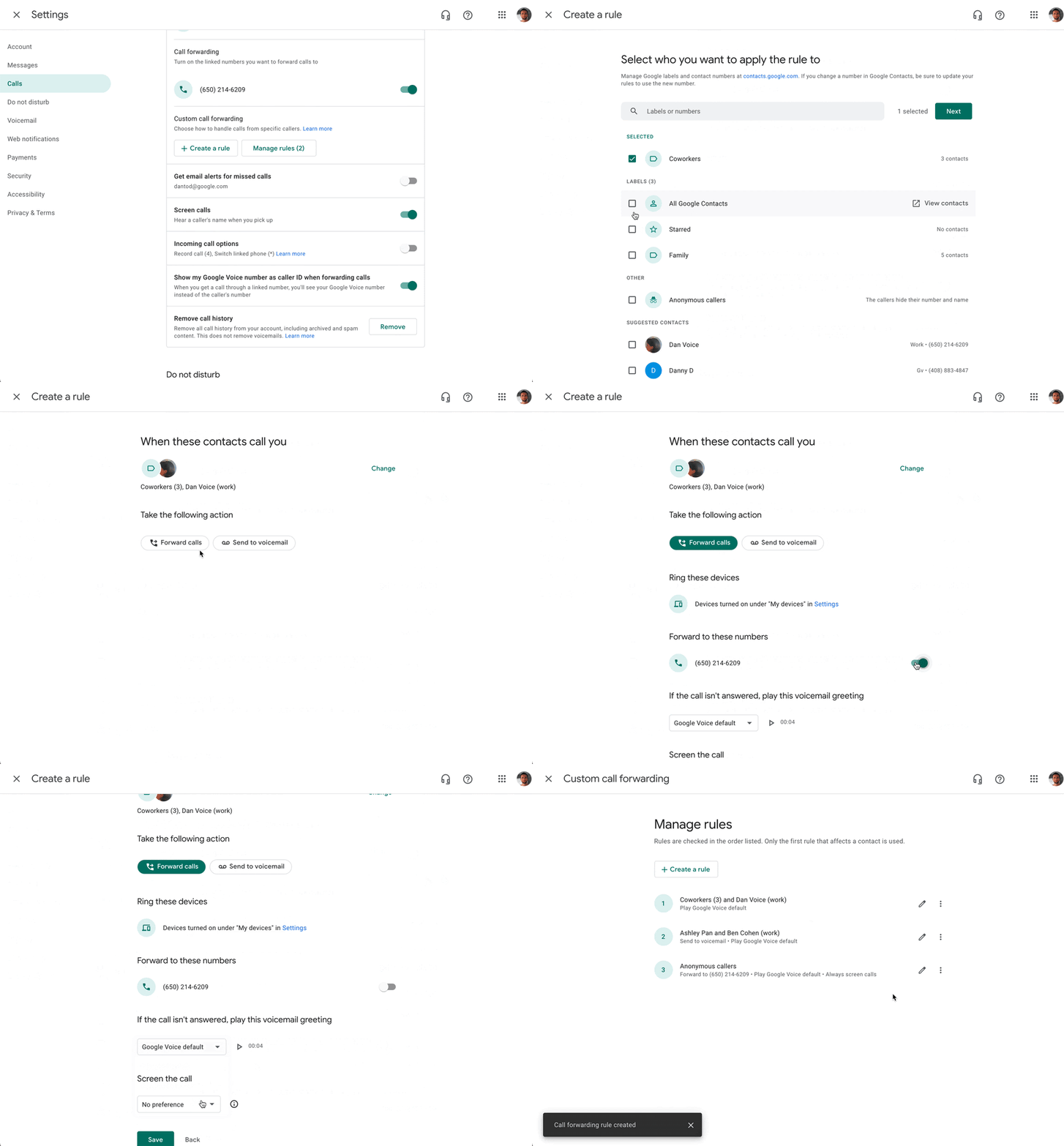
Within the Google Voice settings, you can easily create rules for how incoming calls should be handled. These options allow you to route incoming calls in ways that are most efficient to your workflows and productivity, including granular settings for specific contacts. 


Specifically, you can now: 
  • Forward calls from specific contacts to your linked phone numbers or directly to voicemail, 
  • Opt to screen calls from specific contacts, 
  • Set custom voicemail greetings for specific contacts, 
  • Apply rules for all your contacts or specific groups within your contacts 


Getting started 


Rollout pace 

Availability 

  • Available to all Google Voice users.

Resources 

New updates 

Unless otherwise indicated, the features below are fully launched or in the process of rolling out (rollouts should take no more than 15 business days to complete), launching to both Rapid and Scheduled Release at the same time (if not, each stage of rollout should take no more than 15 business days to complete), and available to all Google Workspace and G Suite customers. 


New look and feel for Workspace Updates email subscriptions 
We’ve improved the look and feel of the emails you receive when you subscribe to Workspace Updates. 
  • The emails themselves will be sent from noreply@workspaceupdates.withgoogle.com, so be sure to update any inbox filters or labels you may have and check your spam folders if you don't immediately see them. 
  • Emails for the Workspace Updates Blog in non-English markets will update to this new format in the coming weeks. 
  • If you have any feedback about these emails after September 29th, please feel back to let us know in the linked form. 
Available now | Available to all Google Workspace customers and users with personal Google Accounts. | Workspace Updates Blog Email Subscription Feedback 


Porting in Google Voice now available in Canada 
If your organization has existing phone numbers with another service provider, you can port (or move) those numbers to Google Voice in Canada. | Learn more.


Previous announcements 

The announcements below were published on the Workspace Updates blog earlier this week. Please refer to the original blog posts for complete details. 


Live translated captions in Google Meet available in beta 
Launching in beta, live translated captions help video call participants communicate better by translating a spoken language to captions in another language. | Learn more here and here. | Available to meetings organized by Google Workspace Business Plus, Enterprise Standard, Enterprise Plus, Education Plus, and Teaching & Learning Upgrade customers. | Apply to beta 


Add image watermarks in Google Docs 
You can now add image watermarks directly into Google Docs. This watermark image will repeat behind the text on every page of your document. | Learn more. 


Renaming “whitelisted domains” to “allowlisted domains” in the Admin console 
We’re updating instances of “whitelisted” in the Admin console to “allowlisted”. This change more accurately describes this action, as well as eliminates a non-inclusive term from our products. | Learn more.


Comment size increasing in Google Docs 
Comment width will intelligently scale based on your browser window to maximize the use of available screen space. | Learn more.


Replace your background with a video in Google Meet on Android 
In addition to replacing your Google Meet background with a static image on web and mobile, you can now replace your background with a video on Android. | Learn more. 


Quickly access Google Drive files in Chrome browser 
We’re adding a card onto the New Tab Page in your Chrome browser that will surface relevant files from your Google Drive, making it easier and more efficient to find the files you need. | Learn more.


View Alert Center notifications directly from the Admin console toolbar 
You can now quickly access Alert Center alerts from anywhere in the Admin console from the toolbar at top of the page. Selecting the new bell icon will surface the ten latest alerts, along with a brief description. | Learn more.


Use the “Slideshow” button in Google Slides 
We’re replacing what was previously the “Present” button in Slides to now say “Slideshow.” We hope this makes it clearer when you are beginning a slide show, and when you are sharing your screen in Meet. | Learn more. 


Review smart home devices used for work in your Admin console
Admins can now view and manage the smart displays and speakers that access work data in the Admin console, alongside other devices managed with Google endpoint management. | Learn more. 


For a recap of announcements in the past six months, check out What’s new in Google Workspace (recent releases).

New updates 

Unless otherwise indicated, the features below are fully launched or in the process of rolling out (rollouts should take no more than 15 business days to complete), launching to both Rapid and Scheduled Release at the same time (if not, each stage of rollout should take no more than 15 business days to complete), and available to all Google Workspace and G Suite customers.


Block shares option added to Google Drive sharing emails
Last month, we announced that you could now block shares from another user in Google Drive. es from another user in Google Drive. Now, we're also adding the option to block a user from the sharing notification emails sent from Google Drive. With this addition, you'll be able to start the workflow directly from the email. | Learn more. 


Previous announcements 

The announcements below were published on the Workspace Updates blog earlier this week. Please refer to the original blog posts for complete details.

View more insights and take quick action on the Users, Domain, and Billing home cards in the Admin console
You’ll notice important notifications and improved guidance within the cards to help you easily take action on user, billing, and domain management activities on the Admin console homepage. | Learn more. 


Upload customized audio prompts and greetings to Google Voice automated attendant
You can now upload your own pre-recorded prompts and greetings when setting up an automated attendant at Google Voice, in addition to the standard text-to-speech voice ability you currently have. | Available to all Google Workspace and G Suite customers with Google Voice standard and premier licenses. | Learn more.


Easily customize theme colors in Sheets and Slides
Now it’s easier to find and select theme colors in Sheets and Slides. | Learn more.


Share where you’re working from in Google Calendar
Starting August 30, 2021, you’ll be able to indicate where you’re working from directly on your calendar. You can add a weekly working location routine and update your location as plans change. Starting August 18, admins will be able to control how the feature is used in their organization. | Learn more.


Limit external messaging to trusted domains in Google Chat
Now, you may choose to limit external chat to people in trusted domains for your entire organization, or set different policies for different OUs. | Learn more.


Dark mode for Google Chat on web
You can now enable dark mode for Google Chat on the web (chat.google.com) and the Google Chat Progressive Web App (PWA). | Learn more.


For a recap of announcements in the past six months, check out What’s new in Google Workspace (recent releases).

What’s changing

You can now upload your own pre-recorded prompts and greetings when setting up an automated attendant at Google Voice, in addition to the standard text-to-speech voice ability you currently have.


Who’s impacted

Admins


Why you’d use it

We’ve heard from you that you’d like to use your own pre-recorded prompts and greetings instead of using the existing text-to-speech option when setting up Google Voice automated attendant. Now, you can upload custom prompts and greetings for a greater degree of customization. Once you upload recordings, we offer immediate playback and automatic transcriptions to help you more easily keep track of and manage uploads.


Gif showing an example of how to upload a recorded sales greeting audio file to Voice auto attendant
Example of how to upload a recorded sales greeting audio file to Auto Attendant


Getting started

  • End users: There is no impact to end users.

Rollout pace


Availability


Resources

New updates

Unless otherwise indicated, the features below are fully launched or in the process of rolling out (rollouts should take no more than 15 business days to complete), launching to both Rapid and Scheduled Release at the same time (if not, each stage of rollout should take no more than 15 business days to complete), and available to all Google Workspace and G Suite customers.


Delegate Information is now available in Gmail Log Search
Email log search now indicates when an email was sent on behalf of the user by a delegate. In cases where a delegate sent the email, the delegate will be listed, along with the sender, in message details in email log search. Delegate information will only be available on emails sent after this change rolls out. | Available to all Google Workspace with Gmail enabled. | Learn more.


New font in Workspace improves accessibility for vision impaired
Now there's a new font in Workspace optimized for vision impaired users.  When you create or want to read a document, set the font to Atkinson Hyperlegible for improved legibility.


Previous announcements 

The announcements below were published on the Workspace Updates blog earlier this week. Please refer to the original blog posts for complete details.


Improvements for braille mode in Google Docs provide a richer, more interactive experience
We've improved how suggestions are announced in braille mode in Google Docs. You’ll now hear detailed suggestion information inline with the rest of the text — this includes whether the suggestion is an insertion or deletion, and the author of the suggestion. | Learn more.


Disabling File Transfer in Google Chat
Admins can now disable or limit file sharing for their users in Chat. Specifically, admins
will be able to specify controls within and outside their organization, and will be able to choose between restricting all files, allowing images only, or allowing all files. | Available to Google Workspace Business Plus, Enterprise Standard, Enterprise Plus, Education Plus, Enterprise Essentials | Learn more.


Alert Center enrichment with VirusTotal threat context now generally available
Earlier this year, we pre-announced an integration between the Alert Center and VirusTotal. Currently, the Google Workspace Alert Center provides admins with actionable, real-time alerts and insights regarding security-related activity in their domain. With the VirusTotal (now part of Google Cloud) integration, admins have the ability to dig into their alerts at a deeper level. | Available to Google Workspace Business Plus, Enterprise Standard, Enterprise Plus, Education Fundamentals and Education Plus customers. | Learn More.


Use dynamic security groups for group based policies
Google Workspace admins can now use dynamic groups to manage policies for their users in the Admin console. Previously, it was only possible to apply these policies to static groups and OUs. | Available to Google Workspace Enterprise Plus, Education Plus, and Cloud Identity Premium customers. | Learn more.


Workspace for Education Plus now syncs Google Classroom courses and rosters with Student Information Systems
U.S. school districts with Google Workspace for Education Plus will be able to automatically set up Google Classroom courses and keep rosters in sync with their Student Information System (SIS). IT admins will do the setup via Clever, meaning teachers will no longer need to manually create classes and invite students to join them. | Learn More.


Enhancements to Google Voice
We’ve made several enhancements to Google Voice, including information and troubleshooting tips for missed calls, the ability to easily redial dropped calls, the ability to delete SMS messages in bulk, and an option to show your Google Voice number as the caller ID when forwarding calls. | Learn more.


Search within a folder in Google Drive on iOS
You can now search for content inside a specific folder in Google Drive on iOS. Simply navigate to the folder you want to search within and select the search bar — you’ll see a list of suggested folders, documents, and users to refine your search results. Select the folder chip before typing your search query. | Learn more.


Assign SSO profile to organizational units or groups with the new SAML Partial SSO beta
Currently, you can configure to authenticate your users using a third-party identity provider — this configuration applies to all users within your domain. Now, you have the option to specify groups or organizational units (OUs) to authenticate a subset of your users using Google. This feature is available as an open beta. | Learn more.


New enrollment privilege and naming updates for Google Meet hardware in the Admin console
We are making two improvements to the admin controls for Google Meet hardware: a new enrollment privilege admins and updates for hardware management in the Admin console. | Learn more.


Use the new Google Meet web app for better meetings on desktop devices
We’ve launched a new Google Meet standalone web app. This Progressive Web Application (PWA) has all the same features as Google Meet on the web, but as a standalone app it’s easier to find and use, and it streamlines your workflow by eliminating the need to switch between tabs. | Learn more.


For a recap of announcements in the past six months, check out What’s new in Google Workspace (recent releases).