This official feed from the Google Workspace team provides essential information about new features and improvements for Google Workspace customers.


What’s changing

Google Chat apps integrate with productivity tools, enable you to collaborate with others, and can also help automate your work. Previously, to start using an app in Chat, users had to individually install apps as described here. 

Starting this week, admins can install Chat apps for direct messages on behalf of users within their domain from the Workspace Marketplace. Users will automatically see when an app has been enabled, eliminating the need to manually install the app themselves. 

Admins can deploy Chat apps as they see fit: to an entire domain, OU, or group of users using the Workspace Marketplace apps management controls. 

Who’s impacted 

Admins 

Why you’d use it 

This feature enables admins to provide their users with instant access to the Chat integrations they need for their workflow within an organization. 

Getting started 

Rollout pace 


Availability 

  • Available to Google Workspace Essentials, Business Starter, Business Standard, Business Plus, Enterprise Essentials, Enterprise Standard, Enterprise Plus, Education Fundamentals, Education Plus, Education Standard, the Teaching and Learning Upgrade, Frontline, and legacy G Suite Basic and Business customers 
  • Not available to Nonprofits 
  • Not available to users with personal Google Accounts 

Resources 

What’s changing

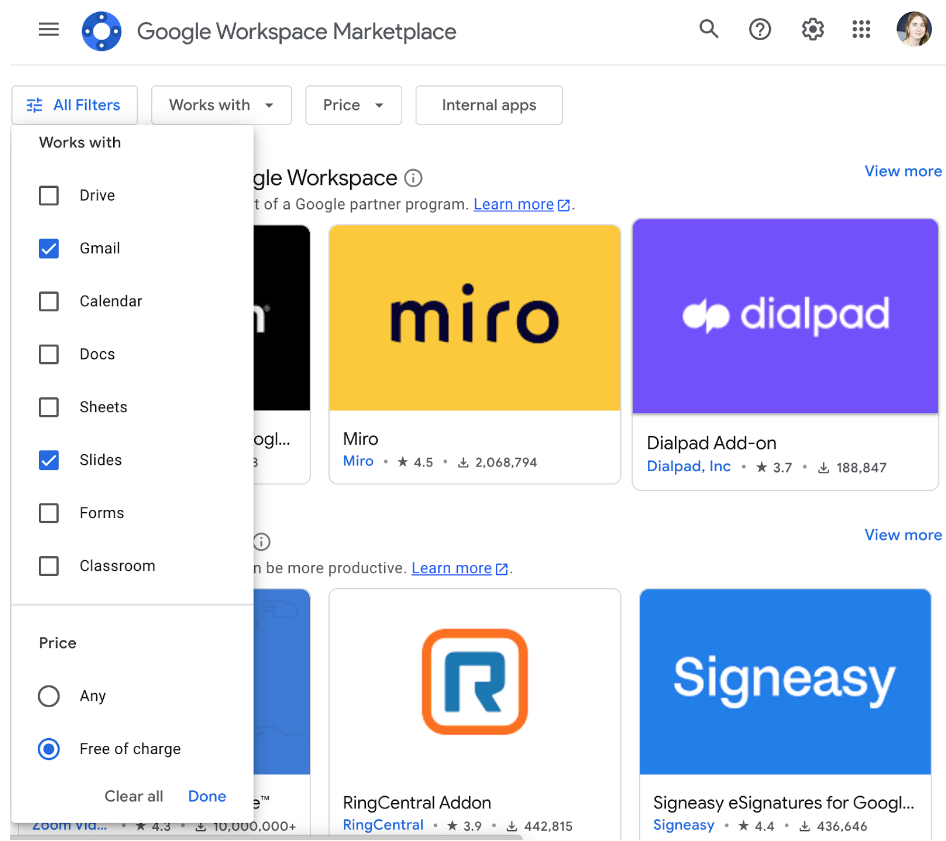
We’re introducing enhanced search filters in the Google Workspace Marketplace to help you quickly find relevant apps. These new filters allow you to search by category, price, rating whether it’s a private app for the organization, if it works with other apps, and more. 

Getting started 

Rollout pace 

Availability 

  • Available to Google Workspace Business Starter, Business Standard, Business Plus, Enterprise Standard, Enterprise Plus, Education Fundamentals, Education Plus, and Nonprofits, as well as legacy G Suite Basic and Business customers
  • Not available to Google Workspace Essentials, Enterprise Essentials, and Frontline customers 
  • Available to users with personal Google Accounts 

Resources 

New updates

Unless otherwise indicated, the features below are fully launched or in the process of rolling out (rollouts should take no more than 15 business days to complete), launching to both Rapid and Scheduled Release at the same time (if not, each stage of rollout should take no more than 15 business days to complete), and available to all Google Workspace and G Suite customers. 


Delegate access to a shared inbox using a group address 
You can now give an entire Google Group access to your Gmail account through mail delegation. With this feature, delegated users can read, send, and delete messages on the account owner's behalf. We hope this will enable teams to more effectively process incoming requests and tasks via a single shared email address. | Available to Business Starter, Business Standard, Business Plus, Enterprise Standard, Enterprise Plus, Education Fundamentals, Education Plus, Frontline, Nonprofits, and legacy G Suite Basic and Business customers only. | Learn more. 


Granular controls for app allowlisting in the Google Workspace Marketplace 
Admins can now choose which Google Workspace Marketplace apps are available to be installed by users in a particular department (OU) or group by managing Marketplace apps on their allowlist. Previously, admins could only manage the allowlist for an entire domain. Additionally, the Marketplace apps access settings, Allow all apps, Allow selected apps, and Block all apps, can now be set for your entire organization or for an OU or group. This new functionality provides a solution when only a subset of domain users need permissions to install certain Marketplace apps. Examples include Chat apps required for your Engineering organization and IT security group or Classroom add-ons required for high-school teachers. | Available to Business Starter, Business Standard, Business Plus, Enterprise Essentials, Enterprise Standard, Enterprise Plus, Education Fundamentals, Education Plus, Frontline, Nonprofits, and legacy G Suite Basic and Business customers only. | Learn more. 


Seamlessly delete subsets of Sites 
Site editors can now delete a page with subpages and delete pages that were copied into another site during a partial site copy. | Roll out to Rapid Release began August 8, 2022; launch to Scheduled Release planned for August 29, 2022. | Learn more. 


Previous announcements 

The announcements below were published on the Workspace Updates blog earlier this week. Please refer to the original blog posts for complete details.


Office Building support for Working Locations 
We’ve added the ability to select a specific office building as your working location. | Available to Google Workspace Business Standard, Business Plus, Enterprise Standard, Enterprise Plus, Education Fundamentals, Education Plus, Nonprofits, and legacy G Suite Business customers only. | Learn more. 


Improving data privacy with Client-side encryption for Google Meet 
We’ve added Workspace Client-side encryption to Google Meet, giving customers increased control over their data. | Available to Google Workspace Enterprise Plus, Education Standard, and Education Plus customers hosting client-side encrypted calls only. | Learn more. 


Stronger protection for sensitive Google Workspace account actions 
There are now stronger safeguards for sensitive actions taken in your Google Workspace account. These apply to actions that, when done by hijackers, can have far reaching consequences for the account owner or the organization it belongs to. | Learn more. 


The Google Meet and Google Duo app icons are changing, additional information for Google Workspace users 
As part of the announcement that we are upgrading the Duo experience to include all Google Meet features, users will now begin to see their app name and icon update to Google Meet. | Learn more. 


Better location context for events and RSVPs in Calendar 
We’ve made it even easier to use RSVPs in Google Calendar and let others know how you’re planning to join a meeting. | Available to Google Workspace Business Standard, Business Plus, Enterprise Standard, Enterprise Plus, Education Fundamentals, Education Plus, Education Standard, Teaching & Learning Upgrade, Nonprofits, and legacy G Suite Business customers only. | Learn more. 


Improved notifications when editing Microsoft Office files in Docs, Sheets, and Slides 
We’ve rolled out a series of improvements to the notifications you see when editing a Microsoft Office-formatted file with Office editing mode. | Learn more. 


Unified experience for Gmail logs in BigQuery, configure your existing Gmail logs to route to Workspace logs 
In the coming months, we will move the location of the existing Gmail logs in BigQuery to Google Workspace logs and reports in BigQuery. | Available to Google Workspace Enterprise Essentials, Enterprise Standard, Enterprise Plus, Education Plus, Education Standard customers only. | Learn more. 


Google Meet call control for USB peripheral devices
We've introduced additional call control for Google Meet which will allow you to toggle between mute and unmute using headsets, speaker microphones, and other USB peripheral devices. | Learn more. 


Control visibility of admin alerts with admin role privileges
There is a new control that allows super admins to create a custom rule which ensures only admins with the DLP privilege can see DLP alerts. | Learn more.


For a recap of announcements in the past six months, check out What’s new in Google Workspace (recent releases).

What’s changing

We’re introducing and updating a variety of additional DevOps integrations, which will allow you to take action on common workflows directly in Google Chat: 

  • Apps such as Google Cloud Build, Asana, GitHub, Jenkins and more, have been updated with new functionality: 
    • Using Slash commands for quick actions such as creating a new Asana task or triggering a build in Jenkins or Google Cloud Build. 
    • Ability to use Dialogs for important flows such as setting up the app, or entering detailed info such as creating a GitHub issue. 
  • Operations and incident response professionals can use the new PagerDuty integration to take action on PagerDuty incidents from Chat. From Chat, you’ll be able to: 
  • Receive notifications of PagerDuty incidents right from Google Chat. 
  • Take action, including acknowledging and resolving incidents without leaving the conversation. 


You can find these integrations and a complete list of other Google-developed Chat apps here. 


Who’s impacted 

Admins and end users 


Why you’d use them 

We hope these additional third-party integrations within Chat help you collaborate and get work done faster by eliminating the need to switch between various apps and browser tabs. 


Additional details 

We plan to introduce the ability to create dedicated spaces to collaborate with teammates on important incidents to resolve them quickly, with the right people. We will provide an update on the Workspace Updates blog when that functionality becomes available. 


Getting started 


Rollout pace 


Availability 

  • Available to Google Workspace customers, as well as legacy G Suite Basic and Business customers 

Resources 

Quick summary 

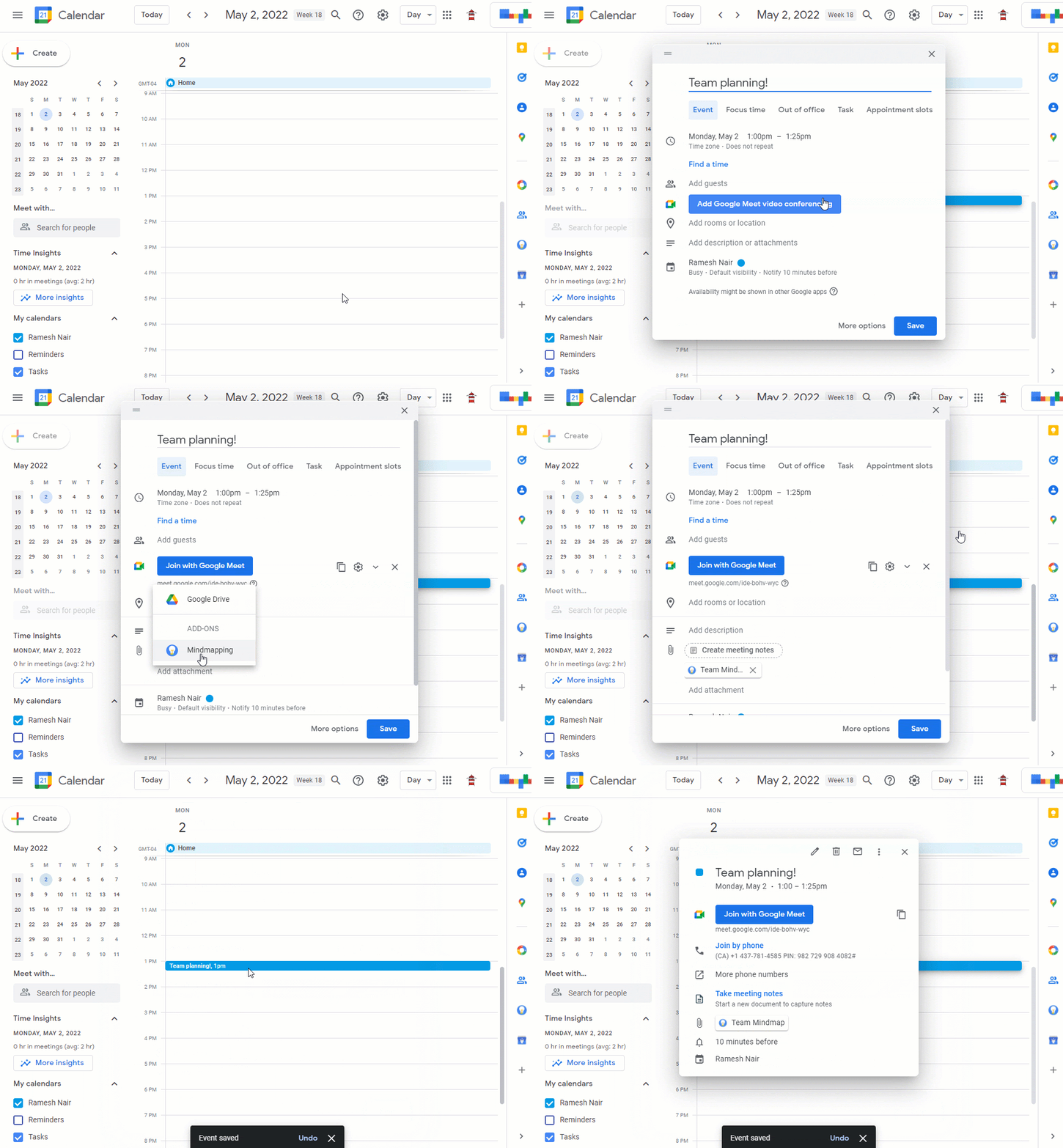
Google Workspace developers can now create Google Workspace add-ons that attach files to a Google Calendar event from any third-party service. This feature enables developers to create add-ons that support attachments from a wide range of sources beyond Google Drive, such as digital whiteboard, content creation, or file management tools. 


Users who have the relevant add-ons installed will be able to attach files from these sources to a Calendar event, and attendees can view the event with the attachment on the web or on mobile.


Attach files from a third-party service to a Calendar event


After attaching files in Calendar on the web, users can view the event with the attachment on the web or on mobile. 


Getting started 


Rollout pace 

  • This feature is available now for all developers and users. 

Availability 

  • Available to all Google Workspace customers, as well as legacy G Suite Basic and Business customers 

Resources 

Quick launch summary

Admins can now install Google Workspace Marketplace applications for specific groups in their organization using the new “admin-install” functionality (formerly known as “domain-install”). Previously, admin-installing applications from the Google Workspace Marketplace was only possible for organizational units or an entire domain.


This is useful in situations where only a subset of your users need to have the app installed, for example CRM applications required for your sales and marketing groups or e-signature applications required for your legal teams. 

Getting started


Rollout pace


Availability

  • Available to Google Workspace Business Starter, Business Standard, Business Plus, Enterprise Essentials, Enterprise Standard, Enterprise Plus, Education Fundamentals, Education Plus, Frontline, and Nonprofits, as well as G Suite Basic and Business customers
  • Not available to Google Workspace Essentials customers

Resources


New updates 

Unless otherwise indicated, the features below are fully launched or in the process of rolling out (rollouts should take no more than 15 business days to complete), launching to both Rapid and Scheduled Release at the same time (if not, each stage of rollout should take no more than 15 business days to complete), and available to all Google Workspace and G Suite customers.


New Categories in Google Workspace Marketplace
Three manually curated categories have been added to the Google Workspace Marketplace: Business essentials, Work from everywhere, and Apps to discover. A left navigation menu will be included to show new categories. 

You'll notice new categories in the Google Workspace Marketplace, which allows users to sort through specific categories to find relevant add-ons.

Previous announcements 


The announcements below were published on the Workspace Updates blog earlier this week. Please refer to the original blog posts for complete details.

Reminder: Google Meet support for IE11 ending August 17, 2021
Beginning August 17, 2021, you will no longer be able to use Google Meet on IE11. To avoid disruption, please switch to a supported browser before that date. | Learn more. 


Easily switch between lists in Google Tasks on mobile
We have now updated the current Tasks Mobile user interface to display multiple lists at the same time in a tabbed UI. | Learn more.


Add up to 25 co-hosts per meeting and expanded safety features for Google Meet
We’re expanding meeting moderation controls in Google Meet with several highly requested features, including assigning co-hosts, new safety features, and more. | See the original announcement for more details and full availability. | Learn more.


For a recap of announcements in the past six months, check out What’s new in Google Workspace (recent releases).

New updates 

Spelling autocorrect is now available when you write comments in Sheets, Slides, and Drawings 
Autocorrect helps you compose documents quickly and with confidence. Misspelled words will automatically be corrected while typing and denoted with a grey dashed underline. This feature is already available in Docs.


Previous announcements 
The announcements below were published on the Workspace Updates blog earlier this week. Please refer to the original blog posts for complete details. 


Google Chat will automatically suggest group chats based on your Google Calendar 
We previously announced that Google Chat will automatically suggest 1:1 chats based on your meetings in Google Calendar. Now, you’ll also get suggestions for group chats when you’re meeting with multiple people. | Learn more. 


Expanding Google Meet visual refresh to Meet hardware portfolio 
We’re expanding the rollout of the refreshed Google Meet web experience to Meet hardware devices. Users joining Meet calls with a Chromebase for meetings all-in-one touchscreen device will notice improvements for video feeds, the viewing and presenting experience, and the bottom bar. | Learn more. 


Admins can view more information about apps in the Google Workspace Marketplace before deploying to their users 
In the Google Workspace Marketplace, you’ll now see more information about apps available in the Marketplace. Specifically, you’ll see the following information regarding the app developer, their privacy policy, terms of service, app permissions, and more. | Available to Google Workspace Business Starter, Business Standard, Business Plus, Enterprise Standard, Enterprise Plus, Education Fundamentals, Education Plus, and Nonprofits, as well as G Suite Basic and Business customers only. | Learn more. 


Enhancing live streams in Google Meet with captions and cross-domain live streams 
We’re improving live streams for Google Meet with two new features: cross-domain livestreams and captions in live streams.| Available to Google Enterprise Standard, Enterprise Plus, Teaching and Learning Upgrade, and Education Plus customers only. | Learn more.


For a recap of announcements in the past six months, check out What’s new in Google Workspace (recent releases).

What’s changing

In the Google Workspace Marketplace, you’ll now see more information about apps available in the Marketplace. Specifically, you’ll see the following information:

  • Overview: Information about the app developer, including quick links to their site, privacy policy, and terms of service.
  • Permissions: App permissions to review to assess whether the app data access complies with your organization’s policies.
  • Reviews: Reviews and replies provided by other users who have installed the app.


Who’s impacted

Admins and end users


Why it’s important

Before installing Google Workspace Marketplace app to users in their domain, admins can review important information about the application, such as developer information, permissions the applications require, and more. This additional information will help you make a more informed decision when deploying apps to your users.


Getting started


Rollout pace


Availability

  • Available to Google Workspace Business Starter, Business Standard, Business Plus, Enterprise Standard, Enterprise Plus, Education Fundamentals, Education Plus, and Nonprofits, as well as G Suite Basic and Business customers
  • Not available to Google Workspace Essentials and Frontline customers

Resources

New updates 

Google Voice is now available in Belgium 
Google Workspace customers based in Belgium can now sign up for Google Voice, and customers who have purchased Google Voice Premier can get phone numbers for their users in Belgium. With this launch, Voice is now available in these countries. | Learn more. 


Easily view the number of Google Meet hardware devices in your organization in the Admin console 
In the Admin console under Devices > Google Meet Hardware, admins will now see a simple count on the device list page of the number of devices that meet the criteria of the currently selected filters. | Learn more. 


Previous announcements 

The announcements below were published on the Workspace Updates blog earlier this week. Please refer to the original blog posts for complete details. 


Replace your background with a video in Google Meet 
In addition to replacing your Google Meet background with a static image, you can now replace your background with a video. | Learn more. 


Option to replace your background in Google Meet is now available on Android 
You can now blur or replace your background with an image in Google Meet on Android. This feature is already available on the web. | Learn more.


Find admin approved applications in the “Approved for you” section in the Google Workspace Marketplace 


For a recap of announcements in the past six months, check out What’s new in Google Workspace (recent releases).

What’s changing 

The new “Approved for You” section in the Google Workspace Marketplace allows users to quickly see and install applications that have been approved and allowlisted by their admins. 


Who’s impacted 

Admins and end users 


Why it’s important 

Admins can specify which third-party apps their users can install from the Google Workspace Marketplace. With the addition of the “Approved for you” section in the Marketplace, users can quickly find and install pre-approved apps for Gmail, Drive, Editors, Calendar, and more. 


Getting started 


Rollout pace 


Availability 

  • Available to Google Workspace Business Starter, Business Standard, Business Plus, Enterprise Standard, Enterprise Plus, Education Fundamentals, Education Plus, and Nonprofits, as well as G Suite Basic and Business customers 
  • Not available to Google Workspace Essentials and Frontline customers 

Resources 

Quick Summary 

Google Workspace Add-ons are now available for Google Docs, Sheets, and Slides. Google Workspace Add-ons are already available for Calendar, Gmail, and Google Drive.


Google Workspace Add-ons allow you to use third-party applications within Google Workspace, helping you get work done faster without switching from one app to another. 

Organizations can also create add-ons using Apps Script or alternative runtimes — use the Google Workspace Developer guide for add-ons to learn more about building add-ons. 

Getting started 

Rollout pace 

Availability 

  • Available to Essentials, Business Starter, Business Standard, Business Plus, Enterprise Essentials, Enterprise Standard, Enterprise Plus, G Suite Business, Basic, Education, Enterprise for Education, and Nonprofits customers and users with personal accounts.  

Resources 

Quick launch summary 

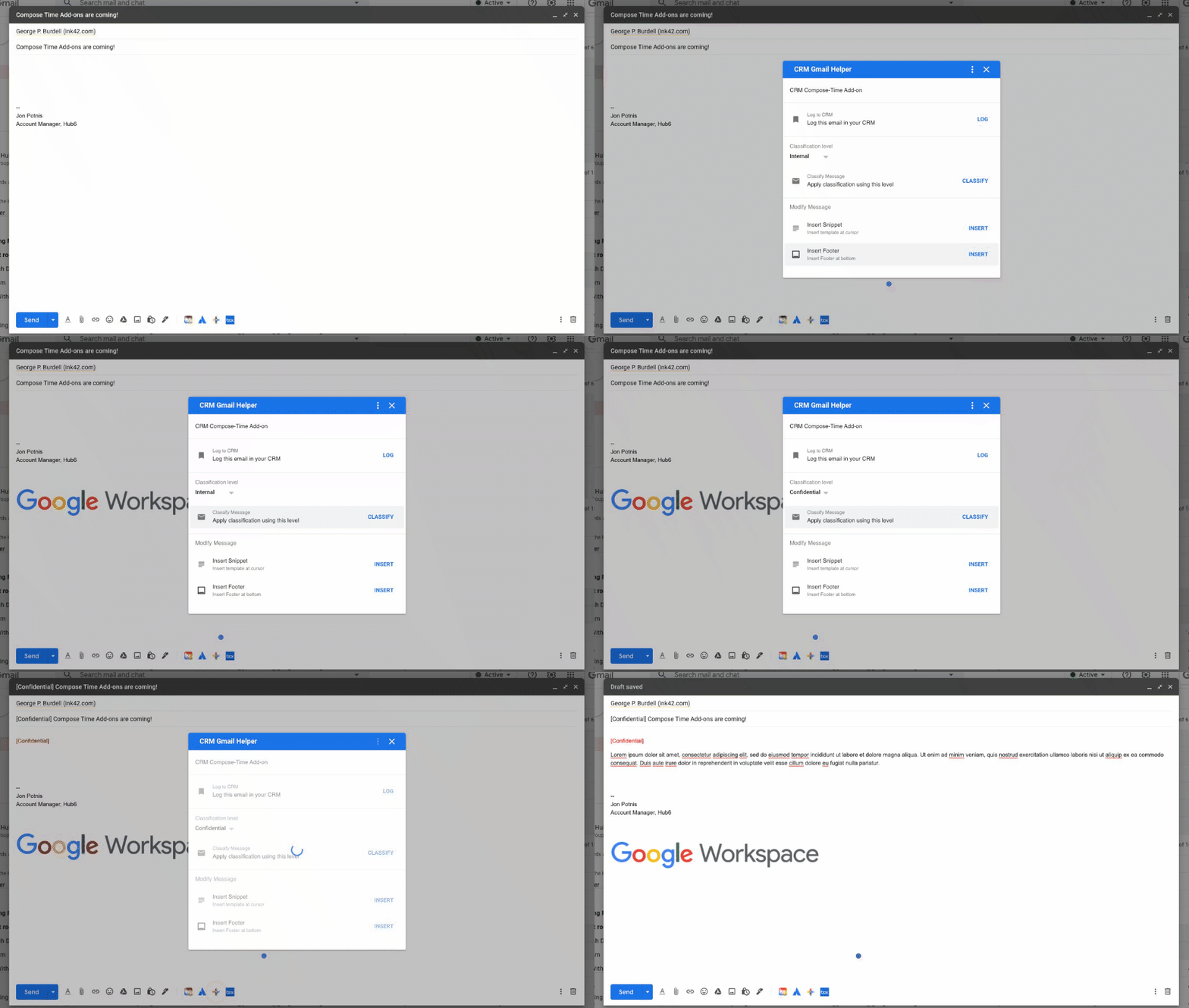
We’re enhancing the way you work with Google Workspace Add-ons in Gmail with the addition of Compose-time functions. Compose-time functions can help modify and format your messages in Gmail faster by: 
  • Adding recipients in the “To”, “CC”, and “BCC” fields. 
  • Inserting content into the subject line and body of the email. 
  • Inserting message templates for a consistent look and feel for your communications, and more. 


Organizations can also create their own compose-time add-ons using Apps Script or alternative runtimes. Use the Google Workspace Developer Guide to learn more about building compose actions. 

Getting started 

Rollout pace 

  • Compose time add-ons are available now in the Google Workspace Marketplace. 

Availability 

  • Available to Essentials, Business Starter, Business Standard, Business Plus, Enterprise Essentials, Enterprise Standard, Enterprise Plus, G Suite Basic, Business, Education, Enterprise for Education, and Nonprofits customers (when enabled by admins) and users with personal accounts.  

Resources 

What’s changing 

Last year, we launched app access control to help all G Suite and Cloud Identity customers control access to G Suite data via OAuth 2.0 by third-party and domain-owned apps. Now, we're improving it by allowing admins to block apps from accessing any OAuth 2.0 scopes. This makes it easy for customers to quickly restrict apps that are deemed to be high-risk or compromised. 

If an app is blocked, it will not be able to access any data from Google services. It will be blocked whether the app is on iOS, Android, or the web. If users try to authorize the app, they’ll see an authorization error message. Admins can customize this error message if they choose. 


Who’s impacted 

Admins 


Why you’d use it 


G Suite has a robust developer ecosystem, with thousands of apps available via the G Suite Marketplace and directly to customers, and a rich API framework enabling customers to develop custom apps. Not all apps, however, conform to every enterprise customer’s security policy, so our customers and partners value controls to manage third-party apps accessing G Suite data. 

Previously, admins could trust or limit access by specific apps. Now, we’re streamlining this to make it easier to manage potentially thousands of apps, and to help you to more quickly block apps when needed. By adding an option to block an app, you can quickly and efficiently protect data when an app is compromised or high-risk.
You can now block app access to OAuth 2.0 scopes via the Admin console. 

Apps can now be trusted, limited, or blocked. 


Getting started 

Rollout pace 

Availability 

  • Available to G Suite Basic, G Suite Business, G Suite Enterprise, G Suite for Education, G Suite Enterprise for Education, and G Suite for Nonprofits customers
  • Not available to G Suite Essentials and G Suite Enterprise Essentials customers

Resources 

We’ve made several updates to the Admin console interface. Specifically, we’ve:
  • Streamlined the API client access page 
  • Improved and expanded the G Suite Marketplace apps (GSM) settings 
  • Made it easier to manage admin role assignments 
  • Created a new interface for domain management 
  • Updated the unmanaged users and consumer account invite section 

See below for more details on each of these changes.


Streamlined the API client access page 

The API client access page helps you grant API access to internal or 3rd-party apps, especially those using service accounts, on behalf of your users. We’ve created a simpler view of all apps that are authorized for domain-wide delegation and all authorized scopes, with service account and app name details. Updates to this view include:

  • A new location for the page. It’s now found at Security > API Controls > Domain-wide Delegation. It was previously at Security > Advanced settings. 
  • Improved interface, with more information and clearer UI, which makes it easier to see, understand, and manage apps and scopes. 
  • Removed applications domain-installed from G Suite Marketplace (GSM) from this view (they’re now in the GSM settings section, detailed below.) 

Visit the Help Center to learn more about controlling G Suite API access with domain-wide delegation. 
The new interface for domain-wide delegation in the Admin console 


Improved and expanded G Suite Marketplace apps (GSM) settings section 

The GSM section helps you control which GSM apps your organization can use. Updates in this section include:

  • General interface updates to several pages, including Admin console > Apps > G Suite Marketplace whitelist, Admin console > Apps > Settings for G Suite Marketplace apps, and Admin console > Apps > Domain install G Suite Marketplace apps. 
  • Functionality updates when you click into a specific app on the Domain install G Suite Marketplace apps page, including: 
    • A new “partially approved” status, in addition to "approved" and "not approved" to provide more visibility into data permissions for apps. 
    • New grouping for data access scopes by API buckets (e.g. "Gmail," "Calendar," etc) to make it easier to understand app data access. 
    • The OAuth client ID for the app. 

Visit the Help Center to learn more about how to manage Marketplace apps for your organization.
An example of the improved GSM app information page 


Easier to manage admin role assignments 

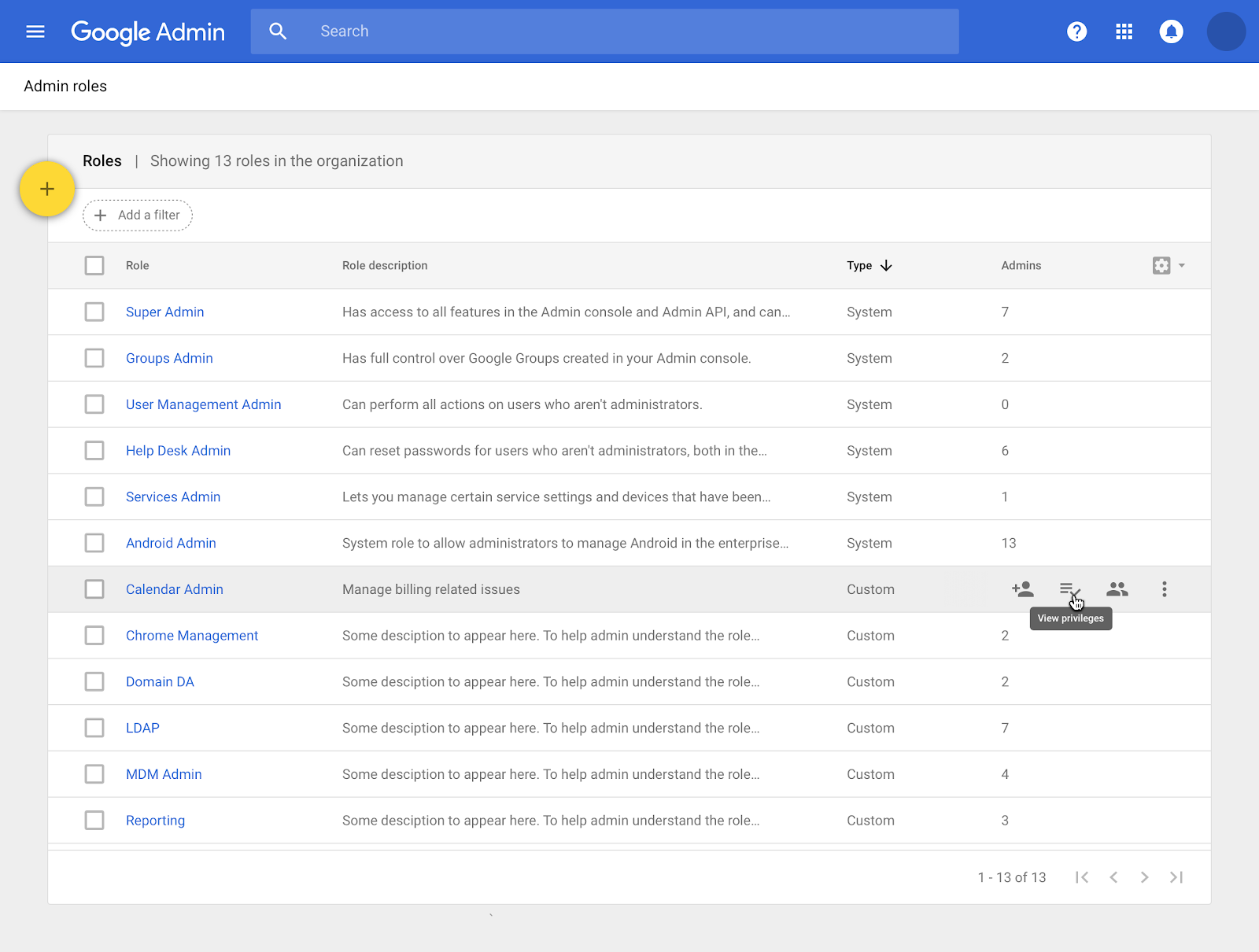
We’ve made updates to the area where you can view, create and assign admin roles within your organization. Improvements include:

  • A new roles home page, where you can quickly see all the system and custom roles and the admins assigned those roles. 
  • New quick-action buttons to more easily understand role privileges, then add and manage users in those roles. 
  • Easier ways to create and assign custom roles, including ability to copy an existing role. 

Use our Help Center to learn more about administrator roles in G Suite.
The new interface to manage admin roles 


New interface for domain management in the Admin console 

We’ve updated the interface you use to manage your primary domain, secondary domains, and domain aliases. When you go to Admin console > Domains > Manage domains, you may notice:

  • An updated interface with more complete information and descriptions of items and domain state. 
  • New grouped action buttons which make it easier to see and select the action you want to take, such as verifying domains, changing your primary domain, setting up MX records, and more. 
  • A new side panel which shows information about domains registered through Google, enabling you to quickly see and manage renewals and advanced DNS settings. 

Use our Help Center to learn more about how to add and manage domains in G Suite.
The new domain management interface in the Admin console 

Updated the unmanaged users and consumer account invite section 

We’re making improvements to the interface you use to find and manage users who have personal Google Accounts that use your organization's domain. Through this interface you can invite them to join your domain so you can better manage their accounts and any company data within it.

Specifically, when you go to Admin console > Tools > Transfer tool for unmanaged users, you’ll find an updated interface that makes it easier to:

  • Switch between managed and unmanaged account views. 
  • See and filter users with personal accounts. 
  • Invite them to migrate that account to your G Suite organization. 

Visit the Help Center to learn more about managing existing personal accounts for your organization.
Unmanaged user section in the Admin console

Getting started 

  • Admins: These updates will happen automatically. Use the Help Center links in each section above to learn more about the enhancements and available controls. 
  • End users: No end user impact. 

Rollout pace 

  • These updates are available now for all users. 

Availability 

  • Available to all G Suite customers 

Roadmap 

  • Updates to the G Suite Marketplace apps section in Admin console was listed as an upcoming G Suite release.

What’s changing 

Last year we announced the beta of G Suite Add-ons, a new cross-suite platform that connects G Suite to your favorite workplace apps. Beginning today, G Suite Add-ons will begin rolling out to all users.

With G Suite Add-ons, workflows that require third-party applications can be executed inside G Suite, allowing users and teams to use the applications they want without leaving G Suite. For example, you can install the Workfront add-on for quick access across Calendar, Gmail, and Google Drive.

Installing the Workfront add-on directly from Calendar


Access G Suite Add-ons from the side panel of Calendar, Google Drive, and Gmail

Take action without leaving G Suite


Who’s impacted

Admins and end users

Why it’s important

G Suite Add-ons connect G Suite with third-party applications so you can work directly from the G Suite app you’re using, rather than toggling from one app to another. They also surface relevant information and suggest actions based on what you’re working on. 

Add-ons from SignEasy, WebEx, Workfront, Lucidchart and more will be available once this feature has fully rolled out and can be installed from the G Suite Marketplace. 

Organizations can also build their own add-ons using Apps Script. Note that the developer feature will be fully available in early February — we’ll provide an update here once it’s fully rolled out.


Additional Details

G Suite Add-ons will work across G Suite products, allowing developers to create a single add-on that works across G Suite, rather than building a separate add-on for each application within G Suite. 

G Suite Add-ons are currently accessible in Calendar, Gmail, and Google Drive, with support for other G Suite products coming later this year.

Getting started

  • Admins: This feature will be available by default. If you allow users to install only whitelisted applications from the G Suite Marketplace, you can specify those apps within the Admin console. Or, you can install chosen G Suite Add-ons for your entire domain via the listing in the G Suite Marketplace.
  • End users: This feature will be available by default. You’ll be able to install G Suite Add-ons using the “+” button in the G Suite quick access side panel. The add-ons you install will appear in the side panel across G Suite apps.

Rollout pace

Resources

Roadmap

What’s changing 

We're making it easy for admins to enable single sign-on for thousands of additional apps that don’t support modern authentication standards like SAML and OIDC. The combination of standards based and password-vaulted app support will deliver one of the largest SSO app catalogs in the industry. 

Who’s impacted 

Admins and end users

Why you’d use it 

Google supports single sign-on for apps in the G Suite Marketplace, apps that support SAML or OIDC as an authentication mechanism, and apps that leverage LDAP for sign-on. While this existing solution works for many apps, some of our customers rely on apps that don’t support these standards. others don’t support federated single sign-on. This release provides seamless one-click access for users and a single point of management, visibility, and control for admins.

With password vaulting, admins can:

  • Manage credentials in a single space,
  • Securely enable access to shared credentials,
  • Manage access to app credentials based on group membership, and
  • Log and access reports on usage of the credentials within their organization.

End users can view and login to their apps with a single click within a new user dashboard.

How to get started


Availability

Rollout details
G Suite editions
  • Available to G Suite Enterprise, G Suite Enterprise for Education, and Cloud Identity Premium
  • Not available to G Suite Basic, G Suite Business, G Suite for Education, or G Suite for Nonprofits

On/off by default?
  • This feature will be available by default.  

  Stay up to date with G Suite launches

Update (October 14, 2019): We previously stated that the Goal Seek add-on would impact the API request quota for your domain — this was incorrect. There will be no impact on API request quotas from using the Goal Seek add-on and we've updated the blog to reflect this correction.

What’s changing

The Goal Seek add-on for Google Sheets can now be downloaded and installed from the G Suite Marketplace.


Populating and triggering the solve functionality for the Goal Seek add-on.

The Goal Seek add-on running and successfully finding a solution.


Who’s impacted

Admins and end users

Why you’d use it

You can use the Goal Seek add-on to calculate the required value of a cell to achieve a desired value in another cell. This is particularly useful when conducting break-even analysis or sensitivity calculations, like determining how changing one value affects other correlated values in your sheet.

How to get started

Helpful links

Availability

Rollout details

G Suite editions
  • Available to all G Suite editions

On/off by default?

Stay up to date with G Suite launches

Quick launch summary 

The Form Notifications add-on is now available on the G Suite Marketplace. You can use the add-on to receive an email notification once your Google Form has received a set number of responses, or you can use it to send an automated follow-up email to any user who completes your form. To learn more, see this article in our Help Center.


Availability 

Rollout details 
  • This add-on is available now in the G Suite Marketplace. 

G Suite editions 
  • Available to all G Suite editions

Stay up to date with G Suite launches

What’s changing

In the coming weeks, we’ll move all Google Docs, Sheets, Slides, and Forms add-ons and Google Drive apps from the Chrome Web Store to the G Suite Marketplace. See our Cloud Blog for more details on this change. If an add-on’s developer hasn’t taken action to migrate their listing, new users won’t be able to install it. We’re calling these add-ons “unmigrated add-ons.”


Who’s impacted

Admins and end users

Why it matters

Existing users of unmigrated add-ons will continue to be able to use them. However, if they uninstall Editors add-ons or Drive apps, they won’t be able to reinstall them. Moreover, if an existing user creates a template with one of these add-ons, any users who don’t already have the add-on installed won’t be able to use the add-on within the template.

How to get started


  • Admins and end users: No action is required. To check whether an add-on has been migrated, search for it in the G Suite Marketplace. 
  • Developers: Drive apps and Editor Add-ons must have a G Suite Marketplace listing prior to September 9, 2019. For more information on how to migrate your add-ons, see here for Drive developers and here for Editors developers.

Helpful links


Availability

Rollout details

  • Rapid Release domains: Extended rollout (potentially longer than 15 days for feature visibility) starting on August 28, 2019
  • Scheduled Release domains: Extended rollout (potentially longer than 15 days for feature visibility) starting on August 28, 2019

G Suite editions

  • All G Suite editions


Stay up to date with G Suite launches