
Agosto 24, 2015
Hover over Google Docs, Sheets, and Slides Share button to see warning if sharing settings are invalid


In July, we launched notifications in the Google Drive, Docs, Sheets, and Slides sharing dialogues that warn users when they attempt to share files with others but cannot do so due to their own or the recipient’s domain-wide sharing settings. Starting today, a similar warning will appear when a user hovers over the Share button in a Google Docs, Sheets, or Slides file if that user is allowed to edit that file’s permissions.
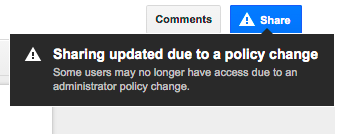
As with the sharing dialogue, this warning will appear when:
Launch Details
Release track:
Launching to both Rapid release and Scheduled release
Rollout pace:
Full rollout (1–3 days for feature visibility)
As with the sharing dialogue, this warning will appear when:
- a file is shared with a person outside of the sharing employee’s domain, but sharing outside of that employee’s domain is disabled,
- a file is shared with a person outside of the sharing employee’s domain, but sharing into the receiving person’s domain is disabled, and/or
- a file is shared using one of the “anyone” options, but sharing or publishing outside of the sharing employee’s domain is disabled.
Launch Details
Release track:
Launching to both Rapid release and Scheduled release
Rollout pace:
Full rollout (1–3 days for feature visibility)
Impact:
All end users
Action:
Change management suggested/FYI
More Information
Help Center
Note: all launches are applicable to all Google Apps editions unless otherwise noted
Launch release calendar
Launch detail categories
Get these product update alerts by email
Subscribe to the RSS feed of these updates
All end users
Action:
Change management suggested/FYI
More Information
Help Center
Note: all launches are applicable to all Google Apps editions unless otherwise noted
Launch release calendar
Launch detail categories
Get these product update alerts by email
Subscribe to the RSS feed of these updates