This official feed from the Google Workspace team provides essential information about new features and improvements for Google Workspace customers.


What’s changing

You are now able to set expiring access when sharing files in My Drive. This update improves the existing expiring access capabilities by allowing you to add an expiration when sharing, as opposed to after a person already has access to the file. Additionally, you can now add expiring access for editors, as opposed to just for viewers and commenters. 
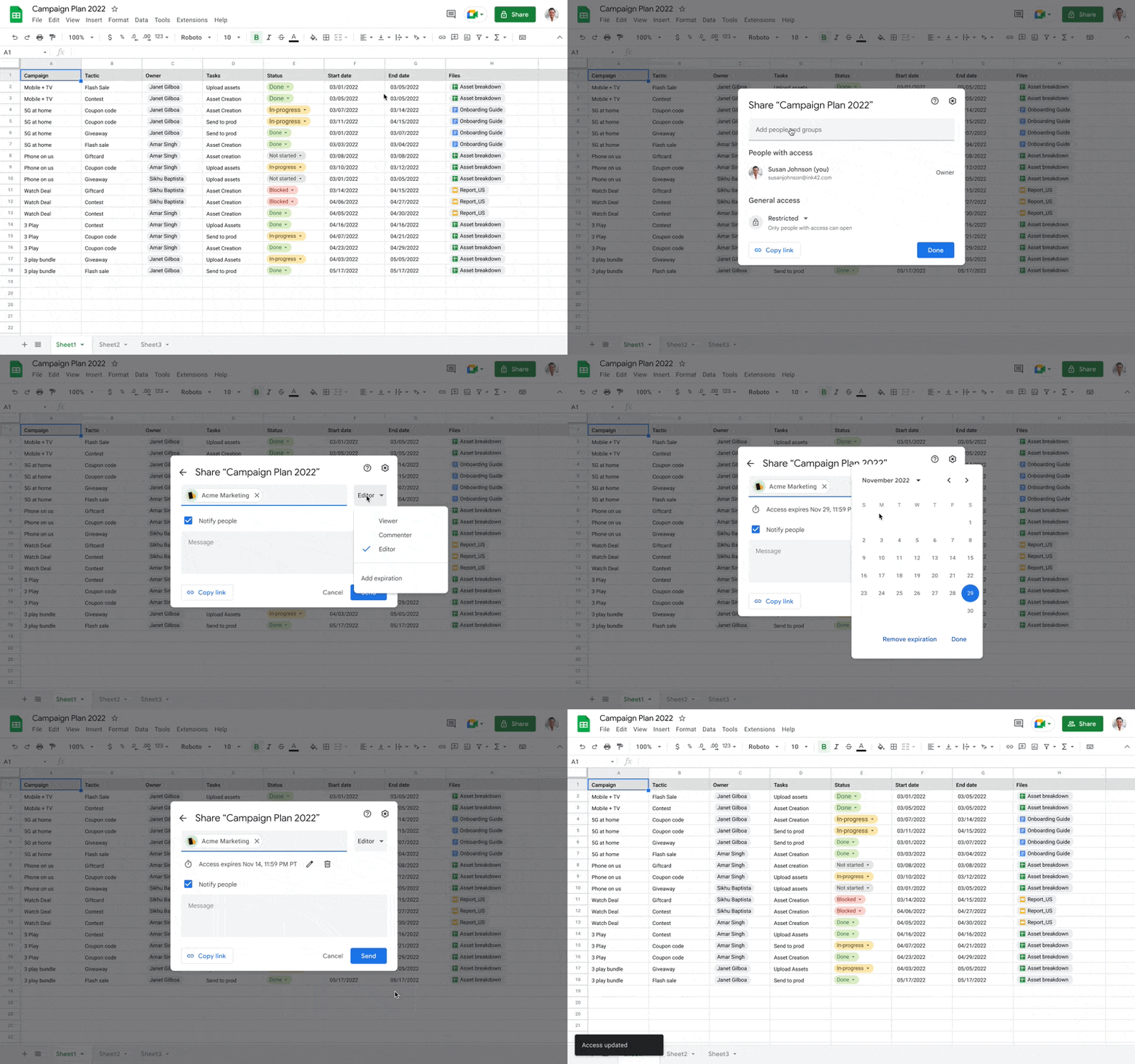
xpiring Access in My Drive

Who’s impacted

End users 


Why it matters 

This update makes sharing across Google Workspace more secure by making it easier to specify when a given collaborator should lose access to a specific file. This is especially useful in cases where a file creator or editor knows their collaboration with another person is time-bound. With this security feature, you don’t have to clean up a file’s access control list after collaboration has ended. 


Additional details 

You will also be able to set expiring access to files when sharing files in My Drive on Android by the end of November. 


Getting started 

  • Admins: There is no admin control for this feature. 
  • End users: This feature will be ON by default and cannot be turned off. Visit the Help Center to learn more about setting an expiration date for file access

Rollout pace 

Availability 

  • Available to Google Workspace Business Standard, Business Plus, Enterprise Essentials, Enterprise Standard, Enterprise Plus, Education Plus, Education Standard, and Nonprofits customers 
  • Not available to Google Workspace Essentials, Business Starter, Education Fundamentals, the Teaching and Learning Upgrade, Frontline, as well as legacy G Suite Basic and Business customers 
  • Not available to users with personal Google Accounts 

Resources 

Roadmap 

New updates 

Unless otherwise indicated, the features below are fully launched or in the process of rolling out (rollouts should take no more than 15 business days to complete), launching to both Rapid and Scheduled Release at the same time (if not, each stage of rollout should take no more than 15 business days to complete), and available to all Google Workspace and G Suite customers. 


New keyboard shortcuts for Keep
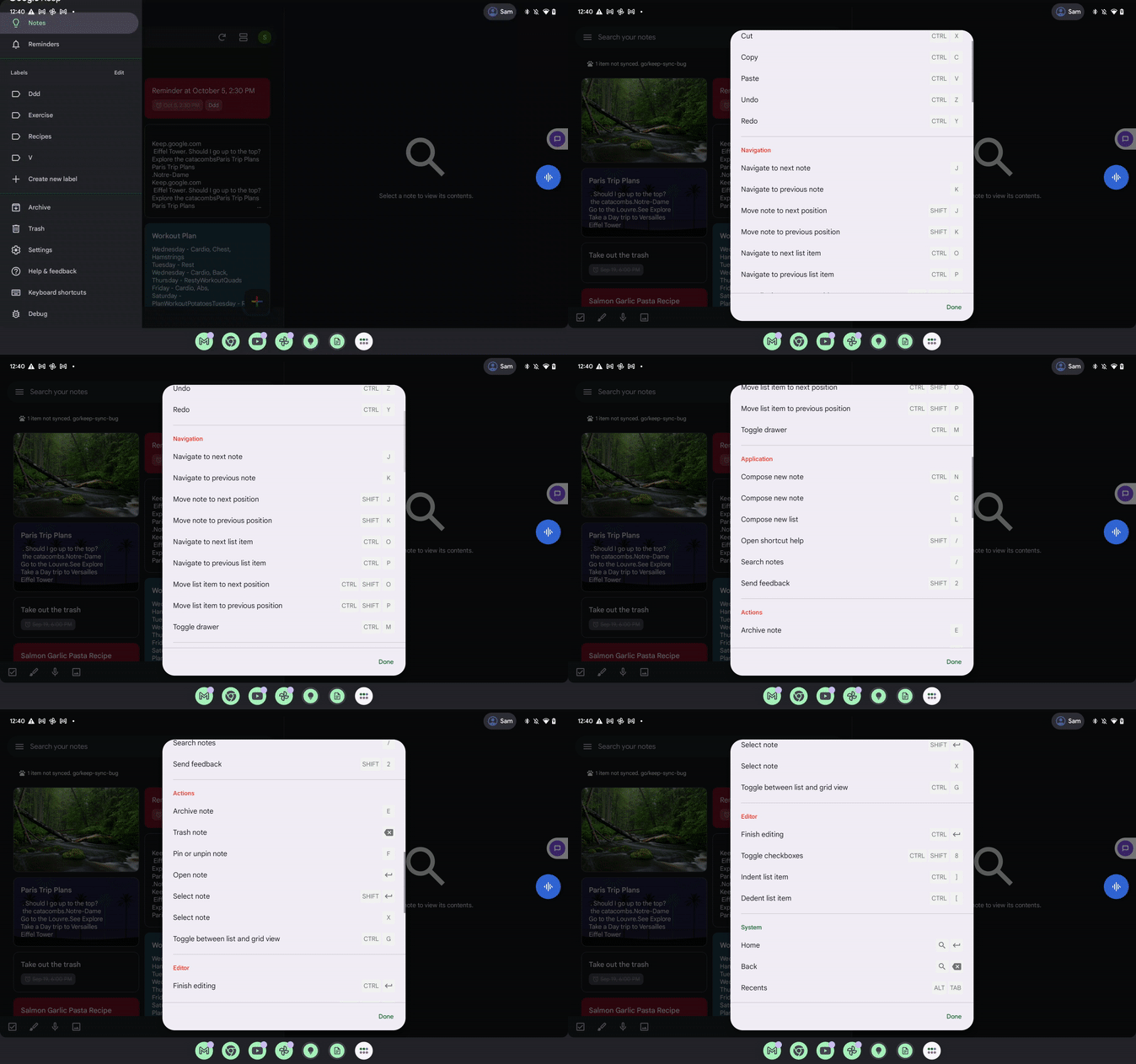
In continuing our efforts to provide a top-class user experience on large screen devices, we’re releasing updated keyboard shortcuts for Keep on Android that better align with the web experience. | View the full list of shortcuts and learn more here

Enhancing spell check in Google Docs
Words whose spelling is not recognized will now be underlined in red, even if there is no suggestion. When you click on such a word, you'll see it labeled as an "unknown word" -- from here you can choose to add the word to your personal dictionary or ignore the suggestion. This improvement will highlight more potential spelling errors - helping you write correctly and with confidence. Note that this feature is only available in English at this time. | Learn more. 
Improved hearing aid support for Google Meet on Android
We’ve expanded Google Meet hearing aid support on Android devices to recognize a wider variety of hearing aid devices. Meet will automatically default to using hearing aid support when they’re connected. You can also select hearing aids during a meeting from the audio settings menu. If the hearing aid has a built-in microphone, this microphone will be used. If it doesn’t the mobile phone or tablet microphone will be used.

Previous announcements


The announcements below were published on the Workspace Updates blog earlier this week. Please refer to the original blog posts for complete details.


Use built-in mail merge tags like @firstname to personalize multi-send emails
We’ve launched the ability to personalize multi-send emails with mail merge tags like @firstname and @lastname. | Available to Google Workspace Business Standard, Business Plus, Enterprise Starter, Enterprise Standard, Enterprise Plus, Education Plus, and Workspace Individual customers only. | Learn more.


Stronger Admin console protection with risk-based re-authentication challenges
In August 2022, we announced strengthened safeguards for sensitive actions taken in your Google Workspace end users accounts. Specifically, this update protected users from bad actors taking over accounts via cookie theft. Beginning this week, we’re extending this protection to the Admin console. | Learn more.


Custom emojis coming to Chat
We’re making emojis even more expressive and personalized by allowing people to create custom emojis. Everyone in an organization can view and use custom emojis uploaded by their colleagues in Chat messages and reactions. | Learn more


Save time by adding in grading category information before exporting Google Assignments in Google Classroom
Starting this week, teachers can include grading category information when exporting Google Classroom assignments to the SIS. | Available to Education Fundamentals, Education Plus, Education Standard, the Teaching and Learning Upgrade, and Aspen and Skyward 2.0 (SaaS Customers Only) SIS customers only. | Learn more.


Create and manage AppSheet databases, available in public preview
AppSheet is Google’s platform for building and deploying end-to-end apps and automation without writing code. As we continue to enhance and streamline app creation, we’re introducing a built-in structured database in public preview. | Available to Google Workspace Enterprise Plus customers, as well as those with an AppSheet license. | Learn more


Configure App Access Control for third-party applications in bulk
You can now use that CSV file to specify the status of each app—trusted, blocked, or limited—and upload the file back into the Admin console for updates. | Available to Google Workspace Business Starter, Business Standard, Business Plus, Enterprise Essentials, Enterprise Standard, Enterprise Plus, Education Fundamentals, Education Plus, Education Standard, the Teaching and Learning Upgrade, Frontline, and Nonprofits, legacy G Suite Basic and Business, and Cloud Identity Pro customers only. | Learn more. 


For a recap of announcements in the past six months, check out What’s new in Google Workspace (recent releases).

What’s changing 

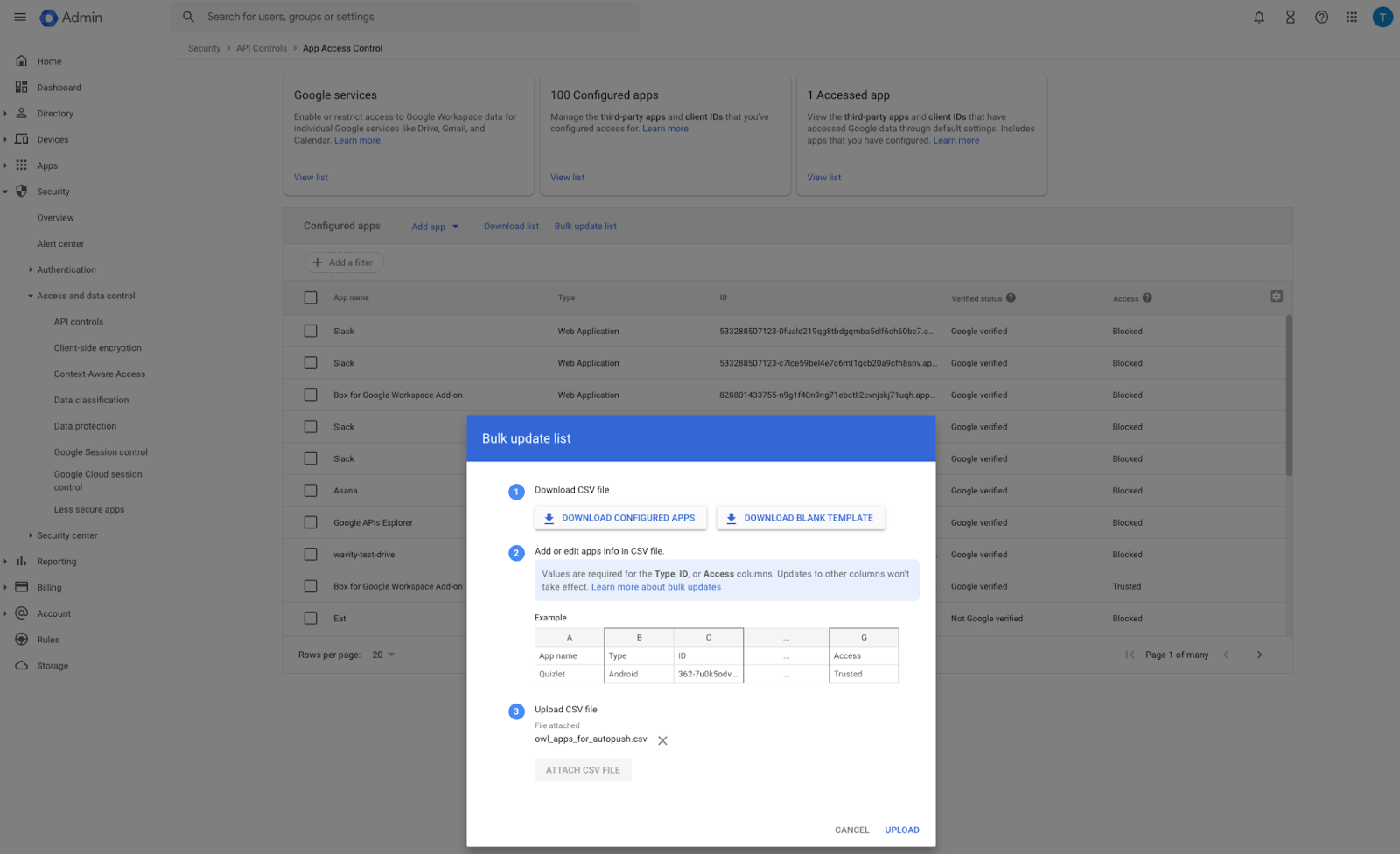
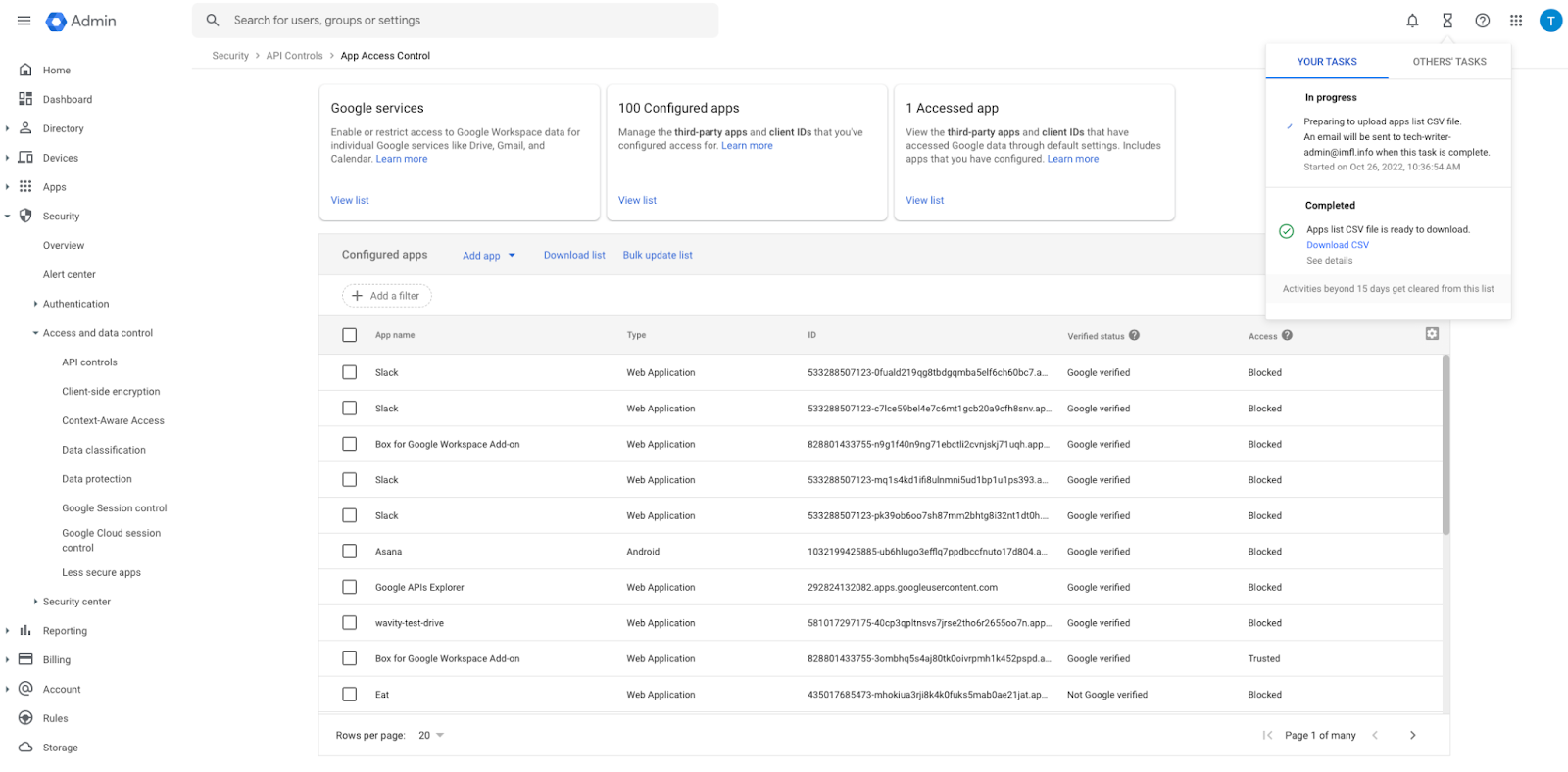
Currently, you can download and view a CSV file with information on accessed and configured apps. Now, you can use that CSV file to specify the status of each app—trusted, blocked, or limited—and upload the file back into the Admin console for updates. 


In the Admin console, under Security > API Controls > App Access Controls, you’ll see the option to “Bulk update list”. 


Controlling how apps across your organization access Google Workspace data is critical to the security of your end users and sensitive data. This change makes it easier for Admins to set these policies in bulk, versus taking these actions individually, which can be time consuming. 


Getting started 


Rollout pace


Availability 

  • Available to Google Workspace Business Starter, Business Standard, Business Plus, Enterprise Essentials, Enterprise Standard, Enterprise Plus, Education Fundamentals, Education Plus, Education Standard, the Teaching and Learning Upgrade, Frontline, and Nonprofits, as well as legacy G Suite Basic and Business customers 
  • Available to Cloud Identity Pro customers 
  • Not available to Google Workspace Essentials customers 

Resources 

What’s changing 

AppSheet is Google’s platform for building and deploying end-to-end apps and automation without writing code. As we continue to enhance and streamline app creation, we’re introducing a built-in structured database in public preview. 


Within the database editor, you can set the same column types as in the AppSheet editor for your data. 


Easily create and customize databases starting from AppSheet's My Apps page. 


Who’s impacted 

Admins, developers and end users 


Why it’s important 

AppSheet databases make it easy for you to organize and manage the data that power your apps directly inside AppSheet. See our Developer Blog for more information. 


Additional Details 

Note that during preview: 
  • Access to AppSheet databases will be enabled by default for everyone. There will be no impact on existing apps. Users can connect a database to both new and existing AppSheet apps. 
  • Databases will be limited to 10k rows per table, 20 tables per database and 20 databases per user. These limits may change when this feature becomes generally available. 


Getting started 

  • Admins and Developers: You can create a blank database from the My Apps page. 


Rollout pace 

  • This feature is available now for all users. 

Availability 

  • Available to Google Workspace Enterprise Plus customers, as well as those with an AppSheet license. 

Resources 

What’s changing

For teachers who export grades from Google Classroom to their student information system (SIS), it's important to make sure that all data is transferred seamlessly. Starting today, teachers can include grading category information when exporting Google Classroom assignments to the SIS. 


Who’s impacted 

End users 


Why it matters 

This highly requested grade export feature eliminates the previous experience of teachers having to manually change the grading category directly in their SIS, which was both tedious and prone to error. 


Getting started 

  • Admins: There is no admin control for this feature. 
  • End users: 
    • To set up your gradebook with grading categories, go to classroom.google.com, click the class > select Class Settings > and set up your grading categories. 
      • Note: The grading category titles should match the exact text in your SIS gradebook. 
    • After setting up grading categories, assign a grading category when creating an assignment. To export grades with grading categories, click SIS export > select the assignment > click export. 
    • Visit the Help Center to learn more about exporting grades to your SIS.

Rollout pace 

Availability 

  • Available to Education Fundamentals, Education Plus, Education Standard, the Teaching and Learning Upgrade customers 
  • Available to Aspen and Skyward 2.0 (SaaS Customers Only) SIS Customers (not available with Infinite Campus). Visit the Help Center to learn more about connecting Classroom to your SIS. 
  • Not available to Google Workspace Essentials, Business Starter, Business Standard, Business Plus, Enterprise Essentials, Enterprise Plus, Frontline, and Nonprofits, as well as legacy G Suite Basic and Business customers 
  • Not available to users with personal Google Accounts 

Resources 

Roadmap