
This official feed from the Google Workspace team provides essential information about new features and improvements for Google Workspace customers.


Quick launch summary 

We’ve designed a new interface for Google Vault. The new interface makes it easier to navigate, and includes new productivity features for faster task completion. To use the new interface, visit vault.google.com and sign in with your Google Workspace admin account. 

The new interface includes all the core functionality from the classic interface, and there’s no impact on your existing Google Vault setup. The main interface improvements include the following: 
  • When you first sign in, you’re directed to a home page with up to three options (depending on your permissions): Retention, Matters, and Reporting. 
  • When you set up retention rules and holds, step-by-step flows with more tooltips guide you through the process. 
  • Custom retention rules, holds, and search results are listed in sortable, filterable tables. This helps you more easily understand the scope of your information governance policies and search results. 
  • When you explore search results and hold reports, you keep your context. Clicking an item opens a side panel instead of taking you to a new page. 

The classic interface is still available at ediscovery.google.com. Matters, retention rules, and audit log data will sync between the interfaces and be available in both places until ediscovery.google.com is shut down. We’ll provide more details regarding this turndown on the Workspace Updates blog at least three months in advance. 


Getting started 

  • Admins: The new interface is available at vault.google.com. Visit the Help Center to learn more about managing Google Vault for your organization. Note that users in the classic interface may see a banner inviting them to try the new interface starting on December 3, 2020. 
  • End users: No end user impact. 
When you first sign in, you’ll now see a home page with up to three options: Retention, Matters, and Reporting. 
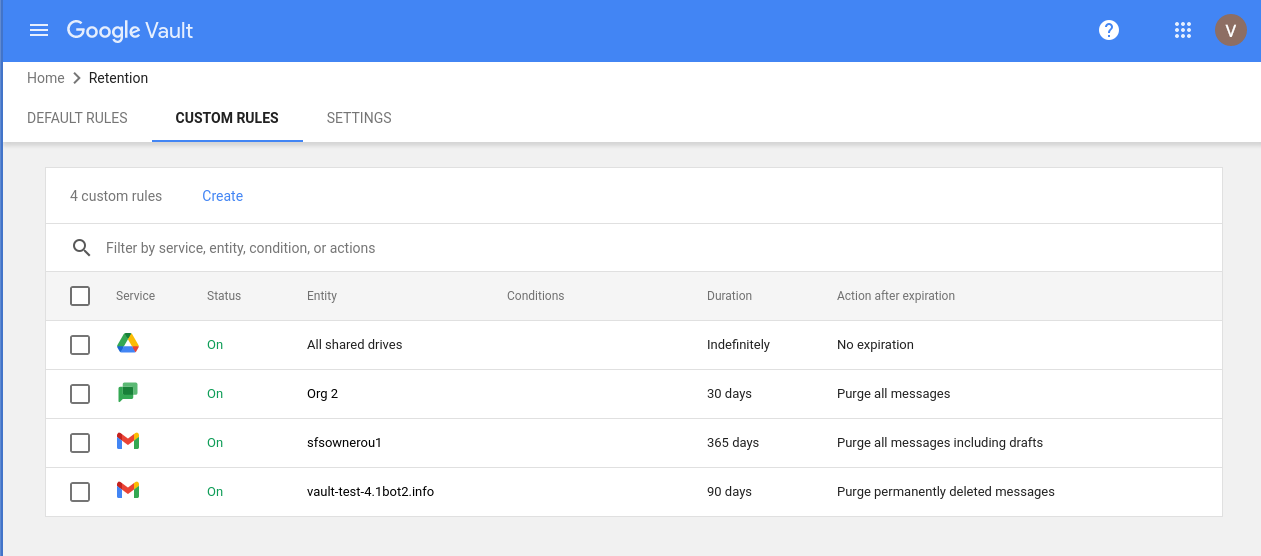
Custom rules are now listed in a sortable, filterable table. 

You’ll see a new interface for creating and managing rules. 

Rollout pace 

  • This feature is available now for all users. 

Availability

  • Available to Google Workspace Business Plus, Enterprise Standard, and Enterprise Plus customers, G Suite Business, Education, Enterprise for Education, and Nonprofit customers, and customers with the Vault add-on license 
  • Not available to Google Workspace Essentials, Business Starter, and Business Standard customers, as well as G Suite Basic customers. 

Resources 

Update

February 25, 2021: This rollout for this feature is complete.

January 26, 2021: This feature will resume a gradual rollout (up to 15 days for feature visibility) beginning on February 8, 2021.

January 12, 2021: We've paused the rollout of this feature while we work to improve performance. We apologize for the delay — we'll provide an update here once rollout has resumed.

December 7, 2020: Primary domain administrators will receive an email no later than January 5, 2021, outlining the specific impact to their organization and who to contact for more info. Please note that you will not receive an email if:
See the Additional Details section below for more information.


What’s changing 

On December 14, 2020, Google Workspace admins will begin seeing a new control for AppSheet in the Additional Google services section of the Admin console. 

AppSheet is available to all Google Workspace customers; this new setting simply gives admins the ability to enable or disable user access to AppSheet at the domain, organizational unit (OU), or group level.


Who’s impacted 

Admins 


Why you’d use it 

AppSheet allows users to maximize the power of Google Workspace by building custom applications on top of Workspace applications and other services and applications in their environment, all without writing any code. 


Additional Details 

Setting defaults

The default for the new control will be based on your setting for managing access to services that aren’t controlled individually, combined with additional factors.

  • If your setting for managing access to services that aren’t controlled individually is ON for everyone, the new AppSheet control will also be ON for everyone.
  • If you currently pay for an AppSheet subscription and your setting for managing access to services that aren’t controlled individually is OFF for everyone, or ON for some OUs and OFF for others, the AppSheet control will be ON for everyone. This is to ensure that your AppSheet services continue to run without disruption. 
  • If you do not currently pay for an AppSheet subscription and your setting for managing access to services that aren’t controlled individually is ON for some OUs and OFF for others, the AppSheet control will automatically align to those settings at an OU level
  • If you do not currently pay for an AppSheet subscription and your setting for managing access to services that aren’t controlled individually is OFF for everyone, the AppSheet control will be OFF for everyone.
Most admins will receive an email no later than January 5, 2021, detailing the specific impact to their organization in these cases. Please note that you will not receive an email if your setting is OFF for everyone and you don’t currently have an AppSheet subscription.

Unless you want to make changes to the configurations described above, no additional action is required. 

Disabling AppSheet 

If your users are already using AppSheet, turning the additional service off will disable access for all app creators and users, and will stop applications from running. 

To find out who in your organization is using AppSheet, use the Token Audit Log in the Admin console at Reports > Audit Log > Token. Select “+ Add a filter” and choose “Application name,” then enter “AppSheet”. You’ll then see a list of users in your organization who have used AppSheet. 


Getting started 

  • Admins: In the Admin console, go to Apps > Additional Google services > Settings for AppSheet. There, you can enable or disable AppSheet for your entire organization or specific OUs, groups, or users. Visit the Help Center to learn more about turning AppSheet on or off for your organization


Rollout pace 


Availability 

  • Available to Google Workspace Essentials, Business Starter, Business Standard, Business Plus, Enterprise Essentials, Enterprise Standard, and Enterprise Plus, as well as G Suite Basic, Business, Education, Enterprise for Education, and Nonprofits customers 

Resources 


Quick launch summary 

Originality reports in Google Classroom and Assignments are now better at detecting potential plagiarism by alerting you when a document contains symbols from different alphabets or other writing systems. 

Students sometimes swap out specific characters with similar looking symbols in order to trick plagiarism detection technology. For example, if the letter “a'' is replaced with the Greek symbol “⍺” or Cyrillic symbol “α,” a plagiarized assignment may not be detected as such. 

Originality reports will now alert you when a document contains symbols from another alphabet or writing system. Educators can then review it and determine whether the student had a legitimate reason for using those different symbols. Note that students who use originality reports will not see this feature. 

Getting started 

  • Admins: There is no admin control for this feature. 
  • End users: This feature will be automatically available to educators when originality reports are turned on for an assignment. Visit the Help Center to learn more about using originality reports

Rollout pace 

Availability 

  • Available to G Suite for Education and Enterprise for Education customers, as well as standalone Classroom and Assignments users 
  • Not available to Google Workspace Essentials, Business Starter, Business Standard, Business Plus, Enterprise Essentials, Enterprise Standard, and Enterprise Plus, as well as G Suite Basic, Business and Nonprofits customers 

Resources 

Quick launch summary 

You can now adjust text size, color, font, spacing, and more while typing in a text box in Google Sites. This significantly expands control over how individual words, paragraphs, pages, and sections look. We hope this will help you make your site look and feel just the way you want it to. 

In 2021, we will add the ability to create themes, which will allow you to easily set fonts, colors, and styles across your whole site. We'll announce on the Google Workspace Updates blog when that's available. 


Getting started 

  • Admins: There is no admin control for this feature. 
  • End users: This feature will become available automatically. Visit the Help Center to learn more about how to change how your site looks


Rollout pace 

Availability 

  • Available to Google Workspace Essentials, Business Starter, Business Standard, Business Plus, Enterprise Essentials, Enterprise Standard, and Enterprise Plus, as well as G Suite Basic, Business, Education, Enterprise for Education, and Nonprofits customers 

Resources 

Quick Summary 

We’re updating the user interface for comments and action items in the Google Drive, Docs, Sheets, and Slides apps for iOS. These improvements include: 
  • Larger, clearer interface to make it easier to see comments and their context in a document. 
  • Shortcuts and gestures to help you quickly scroll through and respond to multiple comments. 
  • Quick access button to reply, “@” mention someone, and assign action items. 


These updates were previously made available on the Docs, Sheets, and Slides Android apps; they’re now rolling out to the Drive Android app and the Docs, Sheets, and Slides iOS apps. 

They’ll be made available on the Drive iOS app in the future. See below for more details on the rollout.

Getting started 

  • Admins: There is no admin control for this feature. 
  • End users: This feature will be automatically available. To get started, tap on a comment when using the Docs, Sheets, or Slides app on an iOS device. Visit the Help Center to learn more about using comments and action items on iOS devices


Rollout pace 

Docs, Sheets, and Slides on iOS 

Drive Android app

Drive iOS app
  • Stay tuned to the Workspace Updates blog for information on when this will launch to iOS devices. 

Availability 

  • Available to Google Workspace Essentials, Business Starter, Business Standard, Business Plus, Enterprise Essentials, Enterprise Standard, and Enterprise Plus, as well as G Suite Basic, Business, Education, Enterprise for Education, and Nonprofits customers 

Resources