
This official feed from the Google Workspace team provides essential information about new features and improvements for Google Workspace customers.


What’s changing 

The Secure LDAP service provides a simple and secure way to connect your LDAP-based applications and services to Cloud Identity or Google Workspace. Admins can now specify which attributes they’d like to make available for the LDAP Client:
  • System attributes: Default user attributes that are available for all user accounts—for example, Email, Phone, and Address. Note that you can't disable this option.
  • Public custom attributes: Custom user attributes that are marked as visible to the organization.
  • Private custom attributes: Custom user attributes that are marked as visible only to the user and administrators. Use caution when using private custom attributes, as you're exposing private information to the LDAP client.


Who’s impacted


Admins and end users


Why it’s important


LDAP clients are in the secure LDAP service, which enables users to access traditional LDAP-based apps and IT infrastructure using their Google Workspace credentials. This new feature gives admins more control over the connections your LDAP-based applications and services use to interact with Google Workspace and Cloud Identity services. 


Additional details

Custom attribute naming requirements and guidelines:
  • Names for custom attributes can contain only alphanumeric text and hyphens.
  • There should be no duplicate attribute names across all custom schemas.
  • If the custom attribute name matches with an existing system attribute, we will return the system attribute value.
Important: If attribute names don't adhere to the above guidelines, the attribute values in question are excluded from the LDAP response.


Getting started


Rollout pace


Availability

  • Available to Google Workspace Enterprise Standard, Enterprise Plus, Education Fundamentals, and Education Plus, G Suite Enterprise, and Cloud Identity Premium customers
  • Not available to Google Workspace Essentials, Business Starter, Business Standard, Business Plus, Enterprise Essentials, Frontline, and Nonprofits, as well as G Suite Basic and Business customers


Resources


What’s changing

We’ve added new ways for admins to manage their Google Voice ring groups. Specifically, admins can now:
  • Configure a “Fixed order” pattern where incoming ring group calls will ring members in a predetermined order.
  • Change the maximum duration that a call should ring before proceeding to the "unanswered call" behavior — previously this was fixed at 30 seconds.

Set your Call Routing Pattern, Ring Duration, and Order of Call Ringing


Setting the Call Routing Pattern to Simultaneous


Who’s impacted

Admins


Why you’d use it

We've heard from you that you'd like more options to customize the ringing behavior for your ring groups. With the new “Fixed order” pattern, you can define exactly what order to ring your members when the ring group receives a call, skipping members who are already in a call or have “Do not disturb” enabled. You can also customize the maximum ringing duration for fixed and round robin patterns that allows you to limit how long an incoming call should ring, which may be particularly useful for large ring groups.


Getting started


Rollout pace


Availability

  • Available to all Google Workspace and G Suite customers with Google Voice standard and premier licenses.
  • Not available to Google Workspace and G Suite customers with Google Voice starter licenses.

Resources

What’s changing 

We’re adding the ability to boost Google Cloud Search results using the Cloud Search Query API for third party data sources. Contextual boost is achieved by defining document specific context at the time of indexing and using the right contextual values at the time of query. Contextual boost is one of the key ways used to enable search personalization. 

Some examples of the contextual attributes you can define are: 
  • Location: Certain results can be more relevant to users from a specific location. For example, an employee in Japan might search for "benefits," and want to receive benefits information specific to their office in Japan 
  • Department: Certain results can be more relevant to a user's department. For example, a member of the Sales team might search for "pitch decks," and want to discover pitch decks specific to their team 
  • Tenure: Certain results can be more relevant to the user's tenure. For example, a new employee might search for "onboarding documents," and want to discover documents specific to employee onboarding 


Who’s impacted 

Admins and end users 


Why you’d use it 

Context is a critical element in providing highly relevant search results. By providing a wide range of contextual attributes, users will see more tailored results based on inputs such as location, department, and job role. This helps reduce the time spent searching by surfacing more relevant content faster. 

With this launch, we provide support for a wide range of contextual attributes that can be used to personalize the results for the end users. This launch also supports combining contextual attributes for deeper context. Combining attributes helps to further triangulate the right results tailored for a specific end user.


Getting started


Availability

  • Available to Google Cloud Search customers

Rollout pace


Quick launch summary 

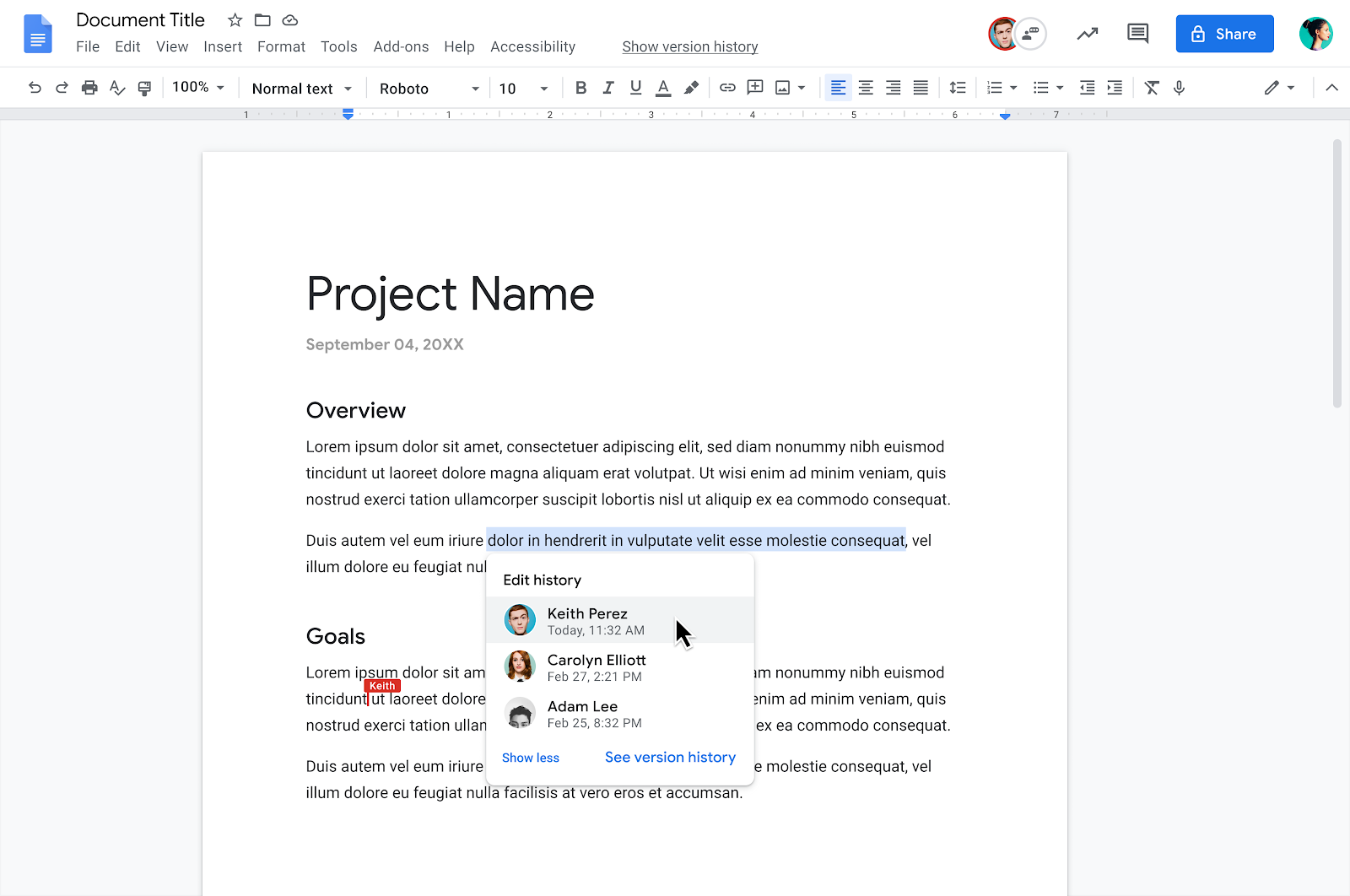
You can now view richer information on the edit history of a particular range of content in Google Docs. Simply highlight and right-click on a range of text and select “Show Editors” from the dropdown menu. Here, you can view a list of editors and their latest edit along with time stamps. You’ll also have the option to open the Version History of the document. 


This makes it easier to track edits made by multiple collaborators, giving greater insight into who the recent editors were, what changes were made and when. 

Getting started 

Rollout pace 

Availability 

  • Available to Google Workspace Business Standard, Business Plus, Enterprise Standard, Enterprise Plus, and Education Plus customers
  • Not available to Google Workspace Essentials, Business Starter, Enterprise Essentials, Education Fundamentals, Frontline, and Nonprofits, as well as G Suite Basic and Business customers

What’s changing 

Google for Education transformation reports are available for K-12 Google Workspace for Education customers worldwide, at no additional cost. Note: transformation reports are only available in English only at this time. 


The next reporting window is open as of May 3, 2021. See below for more information on generating your transformation report.


Who’s impacted 

Admins 


Why you’d use it 

The transformation report is a free tool designed to help quantify your organization’s Google for Education implementation across our products and programs. Semester-based reports track usage trends over time and make it easy to understand how your organization is using Google Workspace for Education, Chromebooks, and progressing through Certification programs. 


Based on usage information and survey responses, you’ll receive tailored recommendations and resources from Google for Education to help you drive more impact across your organization. 


See here for more information about Google for Education transformation reports, as well as a list of frequently asked questions.


Getting started 

  • Admins: Google Workspace for Education super admins must log in to the transformation report tool between May 3rd and May 21st to ensure a report will be available on June 2, 2021. Within the tool, we strongly recommend Admins:

    • Update their settings, specifically their student enrollment and faculty count. 
    • Customize the product reporting windows — we recommend selecting two 12-week periods of time, current and previous, to display product data.
    • Take and share Transformation Survey:
      • If you log in within that time frame, but don’t take or share the survey, you’ll still receive a report—it will simply lack a valuable section of survey data, recommended next steps, and resources. 
      • See our FAQs for recommendations on who to share the survey with and this email template when sharing with your leadership team.

  • End users: No action required. 

Rollout pace 


Availability 

  • Available to K-12 Google Workspace Education Fundamentals and Education Plus customers
  • Not available to Google Workspace Essentials, Business Starter, Business Standard, Business Plus, Enterprise Essentials, Enterprise Standard, Enterprise Plus, Frontline, and Nonprofits, as well as G Suite Basic and Business customers

Resources