
This official feed from the Google Workspace team provides essential information about new features and improvements for Google Workspace customers.


What’s changing

We’re making two enhancements for Google Classroom, which will help Google Workspace for Education admins surface information about how Classroom is being used in their organization. Specifically, we’re introducing:

  • Classroom audit logs in the Admin console
  • Classroom activity logs in BigQuery, and Data Studio dashboards.

See below for more information and availability.


Who’s impacted

Admins


Why it’s important

By surfacing Classroom audit logs, Admins can quickly pinpoint who did what in their domain, such as: who removed a student from a class, who archived a class on a certain date, and more. 

For Education Standard and Plus customers, admins can export the Classroom audit log data from the Admin console to BigQuery, which allows them to query the data as needed. As a starting point, we’ve provided a Data Studio report template, which surfaces your data in an easily digestible format. Admins can copy this template and further customize it using Data Studio.

We hope this makes it easier for admins to quickly look up common activities in their organization and quickly act on scenarios where support may be needed.


Getting started


Rollout pace


Availability

Classroom audit logs
  • Available to Google Workspace Education Fundamentals, Education Plus, Teaching and Learning Upgrade, Essentials, Business Starter, Business Standard, Business Plus, Enterprise Essentials, Enterprise Standard, and Enterprise Plus Frontline, and Nonprofits, as well as G Suite Basic and Business customers

BigQuery Logs + Data Studio Templates
  • Available to Google Workspace Education Standard and Education Plus customers
  • Not available to Google Google Workspace Essentials, Business Starter, Business Standard, Business Plus, Enterprise Essentials, Enterprise Standard, Enterprise Plus, Frontline, Education Fundamentals, the Teaching and Learning Upgrade, and Nonprofits, as well as G Suite Basic and Business customers

Quick launch summary 

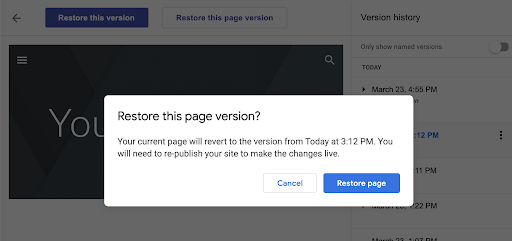
In new Google Sites, you can now restore a specific page from version history. Previously, you could only restore an entire site. This additional functionality makes it easier to restore, edit, and re-publish specific pages that may have changed by mistake or been deleted. 


Getting started 


Rollout pace 


Availability 

  • Available to all Google Workspace customers, as well as G Suite Basic and Business customers and users with personal Google accounts 

Resources 


Quick launch summary 
Now you can easily customize your form or quiz settings with a more visible settings tab and an improved settings layout. 


You’ll see an improved settings menu in the settings tab.

You’ll see an improved settings menu in the settings tab.


Getting started 
  • Admins: There is no admin control for this feature. 
  • End users: There is no end user control for this feature.

Rollout pace 
Availability 
  • Available to all Google Workspace customers, as well as G Suite Basic and Business customers. Available to users with personal Google Accounts 
 Roadmap 

What’s changing

We just announced some new and exciting additions to the Google Meet hardware portfolio for the office or home office.


First, we’re announcing two new all-in-one video conferencing devices to complement our Series One Rooms Kits:
  • New Series One Desk 27 is a premium all-in-one touchscreen Google Meet collaboration device.

Series One Desk 27


  • New Series One Board 65 is an all-in-one 65” 4K video conferencing device that can be paired with an optional stand for ultimate configuration flexibility—turning any room or space into a video collaboration hub in minutes. It also features the Jamboard app built in for easy collaboration with colleagues in the room or remotely.

Series One Board 65


We’re also proud to announce new third-party devices coming to the Google Meet hardware ecosystem. Google has certified the Logitech Rally Bar Mini and Rally Bar for Google Meet, which provide complete room solutions for small and mid-sized rooms. Both products will be available in October.

Additionally, Appcessori is launching a new mobile device speaker dock, Rayz Rally Pro, that will automatically launch Google Meet for video meetings and provide an enhanced audio experience from mobile devices. Rayz Rally Pro is also the first product in our “Designed for Google Meet” program, which identifies peripherals designed by partners specifically for and to work with Google Meet. Rayz Rally Pro supports both Android and iOS and is now available.


New third-party devices certified for Google Meet


Who’s impacted

Admins and end users

Why you’d use them
Hybrid working requires more immersive, interactive video-enabled devices to make meetings more inclusive for both in-office and remote workers.

The Series One Desk 27 is perfect for small, shared spaces or your desktop, either in the office or at home. Desk 27 is your personal video conferencing and team collaboration device.

The Series One Board 65 is a meeting solution that gives everyone an equal seat at the table. Now everyone can see, hear, collaborate and participate as if they were in the room. Ideal for team collaboration in small and medium rooms, Board 65 can be wall-mounted or configured with an optional stand for greater mobility.

Additional details

Series One devices:
Both Series One Desk 27 and Board 65 feature collaboration capabilities to help you capture ideas with the Jamboard app built right in.

Optimized for Google Meet, Desk 27 and Board 65 can also be used with any conferencing service through a single USB-C cable from your laptop. Use the conferencing app of your choice on your laptop and enjoy the high fidelity audio and high definition video of the Desk 27 and Board 65. Desk 27 will be available towards the end of the year, and Board 65 will be available at the end of Q1 2022.

New third-party devices certified for Google Meet:
The Logitech Rally Bar Mini and Rally Bar for Google Meet provide complete room solutions for small and mid-sized rooms. Certified Google Meet hardware ensures high-quality video and audio in meetings and are easy to deploy and manage. You can learn more about Google Meet-certified products in Logitech’s September 21 webinar. You can also view our full Google Meet device portfolio and purchase directly from approved resellers by visiting the Google Meet Hardware website.

Getting started

  • Admins: Contact Avocor for more information on pre-ordering the Series One devices. Contact Logitech for more information on their Google Meet-certified devices.

Availability

  • Available to Google Workspace, Business Starter, Business Standard, Business Plus, Enterprise Standard, Enterprise Plus, Education Fundamentals, Nonprofits, and Education Plus customers.
  • Not available to Google Workspace Essentials, Enterprise Essentials, and Frontline, as well as G Suite Basic and Business customers.

Resources


Quick launch summary 

In June 2021, we announced that ‘Rooms’ in Google Chat would evolve to become ‘Spaces’. As part of that evolution, starting on September 8, 2021, any user who has enabled Chat in their Gmail settings will start to see the term ‘Rooms’ automatically updated to ‘Spaces’. 

Over the coming months, spaces will be enhanced with a number of new features such as in-line topic threading, discoverable spaces, and enhanced user roles and moderation. Read more about the upcoming spaces experience


Getting started 


Rollout pace 

Availability 

  • Available to all Google Workspace customers, as well as G Suite Basic and Business customers 

Resources 

Roadmap